


Help Scout Overview
Help Scout provides a shared inbox, help center, and live chat software, equipping teams to efficiently handle customer interactions. This platform enhances customer service by integrating communication tools that allow for seamless and human-centric support. Businesses benefit from Help Scout's ability to manage conversations with ease, ensuring that customer inquiries are addressed promptly and effectively. The software supports over 12,000 companies, emphasizing its reliability and trust within the industry. A notable feature is the platform's capacity to deliver a personalized touch at high speed, which is crucial for maintaining customer satisfaction. Help Scout's solution is ideal for businesses seeking to optimize customer service operations and improve communication workflows.
Use Cases
Customers recommend Helpdesk Management, Workflow Management, Engagement Management, as the business use cases that they have been most satisfied with while using Help Scout.
Business Priorities
Acquire Customers and Enhance Customer Relationships are the most popular business priorities that customers and associates have achieved using Help Scout.
Help Scout Use-Cases and Business Priorities: Customer Satisfaction Data
Help Scout works with different mediums / channels such as E-Mail. Chat. Website etc.
Help Scout's features include Ticketing, Personalization, Alerts: Popups & Notifications, etc. and Help Scout support capabilities include Phone Support, Email Support, 24/7 Support, etc. also Help Scout analytics capabilities include Custom Reports, and Analytics.
Reviews
"Help Scout has replaced a bunch of different tools for us. For example, we used to have a Google Doc with answers to common questions so agents could respond quickly. Saved replies let us get rid of that," - Ramin Sabour
Peer review evidence (same sources as the product rating summary)
"...Set-up was easy and when we did need support, the Help Scout team was responsive and effective...." Peer review by Alyssa Ciorciari, User Support Manager, WayUp
"...Automated workflows based on custom parameters are incredibly useful, too!. ...." Peer review by April G., Operations Manager, Professional Training & Coaching
"...Connecting with members to find solutions asap for various questions, and being able to get the info needed from different teams (billing, leadership, events, etc) to follow up...." Peer review by Marie C., Non-Profit Organization Management
Help Scout, Cayzu Help Desk, Agiloft Contract Management Suite, Vision Helpdesk, LiveAgent, etc., all belong to a category of solutions that help Help Desk. Each of them excels in different abilities. Therefore, determining the best platform for your business will depend on your specific needs and requirements.
Help Scout's shared inbox, help center, and live chat software streamline customer communication management. Teams are equipped with essential tools for efficient service.
Popular Business Setting
for Help Scout
Top Industries
- Computer Software
- Health, Wellness and Fitness
- Media Production
Popular in
- Small Business
- Mid Market
- Enterprise
Help Scout is popular in Computer Software, Health, Wellness And Fitness, and Media Production and is widely used by Small Business, Mid Market, and Enterprise.
Help Scout Customer wins, Customer success stories, Case studies
How efficiently Does Help Scout manage your Helpdesk Management?
How efficiently Does Help Scout manage your Workflow Management?
How efficiently Does Help Scout manage your Engagement Management?
How can Help Scout enhance your Knowledge Management process?
How can Help Scout optimize your Communication Management Workflow?
| CUSTOMERS | TESTIMONIALS |
|---|---|

|
Help Scout has replaced a bunch of different tools for us. For example, we used to have a Google Doc with answers to common questions so agents could respond quickly. Saved replies let us get rid of that, Testimonial By Ramin Sabour |

|
The internal benchmarks of success we like to maintain are keeping our happiness score above 90 and our response time to under an hour. Help Scout makes it effortlessly easy to reference these metrics whenever we need them Testimonial By Chandler Perog |
| CUSTOMERS | TESTIMONIALS |
|---|---|
|
Ramin Sabour Co-founder RealtyNinja |
Help Scout has replaced a bunch of different tools for us. For example, we used to have a Google Doc with answers to common questions so agents could respond quickly. Saved replies let us get rid of that, Testimonial By Ramin Sabour |
|
Chandler Perog Chief Operating Officer Brain.fm |
The internal benchmarks of success we like to maintain are keeping our happiness score above 90 and our response time to under an hour. Help Scout makes it effortlessly easy to reference these metrics whenever we need them Testimonial By Chandler Perog |
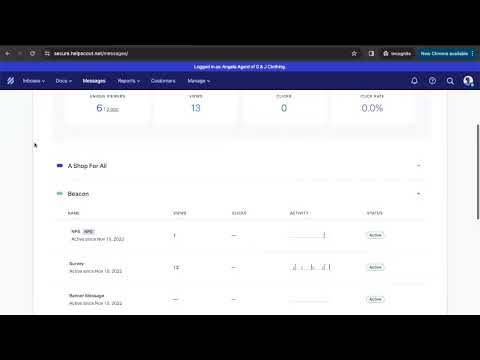
Help Scout's Beacon Widget
Frequently Asked Questions (FAQ)
What buyers ask before choosing Help Scout
Integrations What CRM integrations are available for Help Scout?
Help Scout offers seamless integration with several popular CRM platforms to enhance customer support and streamline workflows. Notably, it integrates with OnePageCRM, allowing users to add new contacts directly from Help Scout and access existing contact details without switching applications. Additionally, Help Scout pulls in customer activity details from Salesforce, enabling support teams to view crucial information within the Help Scout interface. Other CRM integrations include options for Shopify, WooCommerce, and Magento, which facilitate order management and customer interactions. By connecting Help Scout with these CRM systems, businesses can create a more cohesive customer experience, improve retention, and manage customer relationships more effectively.
Integrations How does Help Scout connect with Salesforce and what data can be synced?
Help Scout connects with Salesforce through a bi-directional integration that allows seamless data synchronization between the two platforms. This integration enables users to view Help Scout conversation history directly within Salesforce when accessing Accounts, Contacts, Leads, or Opportunities, ensuring that sales and support teams have access to crucial customer interactions and CRM information in one place. The data that can be synced includes customer fields, conversation logs, and other relevant CRM details, which helps streamline workflows and enhances collaboration between teams. By integrating Help Scout with Salesforce, businesses can improve customer service efficiency and maintain a comprehensive view of customer interactions, ultimately leading to better customer relationships and increased retention.
Integrations Can I integrate HubSpot with Help Scout to access customer data?
Yes, you can integrate HubSpot with Help Scout to access key customer data seamlessly. This integration allows you to bring contextual information about your customers directly into Help Scout, enhancing your support team's ability to provide personalized service. With HubSpot, you can create and manage contacts, companies, and deal records, and when connected to Help Scout, you can access vital details such as lifecycle stage, HubSpot owner, predictive lead score, total revenue, and the latest activities of your customers. This integration not only streamlines your workflow but also empowers your support team to respond more effectively to customer inquiries, ultimately improving customer satisfaction and retention.
Integrations What are the setup steps for connecting Help Scout with Salesforce?
To connect Help Scout with Salesforce, start by logging into your Help Scout account and navigating to the integrations section. Look for the Salesforce integration option and click on it to begin the setup process. You will need to authenticate your Salesforce account by entering your Salesforce credentials, allowing Help Scout to access your CRM data. Once authenticated, configure the settings to determine what data you want to sync, such as conversation history and customer profiles. After setting your preferences, save the changes, and test the integration to ensure that data flows correctly between Help Scout and Salesforce. This integration will enable your sales and support teams to access vital customer information seamlessly, enhancing collaboration and improving customer service efficiency.
Integrations Is there a bi-directional sync between Help Scout and HubSpot?
Yes, there is a bi-directional sync between Help Scout and HubSpot, allowing for seamless integration of customer data between the two platforms. This integration enables your support team to access key customer information directly within Help Scout, including lifecycle stages, HubSpot owner details, predictive lead scores, and more. By syncing data in both directions, any updates made in Help Scout can reflect in HubSpot and vice versa, ensuring that your teams are always working with the most current information. This capability enhances collaboration between sales and support teams, improves customer interactions, and streamlines workflows, ultimately leading to better customer service and satisfaction.
Integrations What limitations should I be aware of when integrating Help Scout with other tools?
When integrating Help Scout with other tools, there are a few limitations to consider. While Help Scout supports integration with over 90 tools, including popular platforms like Shopify, the functionality of these integrations may vary. Some integrations might not support all features available in Help Scout, which could limit your ability to leverage customer data fully. Additionally, the setup process for certain integrations may require technical expertise, and not all tools may offer seamless connectivity, potentially leading to data synchronization issues. It's also important to note that while Help Scout allows you to forward existing email accounts into its system, all email management must occur within the Help Scout inbox after integration, which may require adjustments to your existing workflows.
Features What does the automatic conversation routing feature do?
The automatic conversation routing feature in Help Scout streamlines the ticket assignment process by intelligently directing incoming customer inquiries to the appropriate agents or teams based on predefined criteria. This automation simplifies triage, ensuring that customer requests are handled by the most qualified personnel, which enhances response times and improves overall customer satisfaction. By eliminating the need for manual ticket assignments, businesses can create clearer ownership and expectations among team members, allowing for a more efficient workflow. This feature is particularly beneficial for organizations with high volumes of customer interactions, as it helps prioritize urgent issues and reduces the risk of tickets being overlooked, ultimately leading to a more organized and responsive customer support experience.
Features How do I tag a colleague in a Help Scout email thread?
To tag a colleague in a Help Scout email thread, simply use the @mention feature within the internal notes section of the conversation. Start by clicking on the conversation you want to comment on, then locate the internal notes area where you can add your comments. Type the "@" symbol followed by your colleague's name, and Help Scout will suggest matching team members. Select the correct name from the dropdown list, and your colleague will receive a notification about the mention. This feature allows you to ask for assistance on specific questions or provide context without cluttering the main email thread, ensuring that your team stays informed and engaged in the conversation. By effectively tagging colleagues, you enhance collaboration and streamline communication within your support team.
Features What is the purpose of the conversation status feature in Help Scout?
The conversation status feature in Help Scout is designed to streamline the management of customer interactions by allowing support teams to categorize and prioritize conversations effectively. This feature enables users to assign specific statuses to each conversation, such as "open," "pending," or "resolved," which helps in tracking the progress of customer inquiries and ensuring timely responses. By utilizing conversation statuses, teams can easily identify urgent issues, manage workloads, and prevent important messages from slipping through the cracks. This not only enhances team efficiency but also improves customer satisfaction by ensuring that inquiries are addressed promptly and appropriately. Overall, the conversation status feature is a vital tool for maintaining organized and effective communication within customer support operations.
Features How can I use AI to get up to speed on conversations in Help Scout?
To get up to speed on conversations in Help Scout using AI, you can leverage features like AI Summarize and AI Assist. AI Summarize provides concise overviews of ongoing conversations, allowing you to quickly grasp the context and key points without sifting through every message. Meanwhile, AI Assist can help you draft responses based on previous interactions and customer data, ensuring your replies are relevant and timely. Additionally, integrating Help Scout with your existing tools can enhance your workflow by centralizing customer interactions, making it easier to manage and respond to inquiries efficiently. By utilizing these AI capabilities, you can significantly reduce the time spent on catching up and improve your overall response effectiveness.
Features What functionalities does the Docs knowledge base provide in Help Scout?
The Docs knowledge base in Help Scout provides a robust platform for creating and managing customer self-service resources. It allows businesses to build a user-friendly help center without any coding, enabling customers to find answers to common questions quickly, which can reduce support volume by at least 30%. Users can create articles that cover specific issues, categorize them for easy navigation, and even set up internal knowledge bases accessible only to support team members. Additionally, Help Scout offers the Beacon widget, which can be embedded on websites to allow customers to search for answers while browsing. This functionality not only enhances customer satisfaction but also streamlines support operations by minimizing the number of incoming inquiries. Overall, Docs empowers teams to improve efficiency and provide timely assistance to customers.
Features How do I set up workflows to automate tasks in Help Scout?
To set up workflows to automate tasks in Help Scout, start by navigating to the Workflows section within your Help Scout account. Here, you can create new workflows using if/then logic to define specific rules for filtering emails and automating actions. For example, you can set conditions based on the content of incoming messages or the sender's email address. Once you've established your criteria, specify the actions that should occur when those conditions are met, such as assigning conversations to team members or sending automated replies. Additionally, consider integrating with tools like Make to enhance your workflows further, allowing for more complex automation across various applications. This setup will streamline your customer support processes, enabling your team to respond more efficiently and effectively.
ROI & pricing What measurable business value can Help Scout provide for my customer service team?
Help Scout provides measurable business value for your customer service team through its comprehensive analytics and insights, which track key metrics such as response time, handle time, and wait time. By utilizing these metrics, teams can identify areas for improvement, streamline operations, and enhance overall efficiency. Custom reports allow you to focus on specific companies or conversation types, enabling targeted strategies that can lead to improved customer satisfaction and reduced email volume by up to 30%. Additionally, Help Scout integrates with over 90 tools, allowing you to leverage customer data effectively, which can further optimize your service processes and drive better customer engagement. This holistic approach not only enhances team productivity but also contributes to higher retention rates and potential revenue growth.
ROI & pricing How can I calculate the return on investment (ROI) for using Help Scout?
To calculate the return on investment (ROI) for using Help Scout, you can follow a straightforward formula: ROI = ((money gained - money spent) / money spent) x 100. Start by determining the total costs associated with implementing Help Scout, including subscription fees and any additional resources. Next, assess the financial benefits, such as increased sales leads generated through improved customer support, reduced support staff time due to enhanced efficiency, and any cost savings from decreased email volume. For example, if Help Scout helps you reduce support inquiries by 30% and saves your team significant hours, quantify that time in monetary terms. By comparing these gains against your initial investment, you can effectively measure the ROI and understand the value Help Scout brings to your customer service operations.
ROI & pricing What are the potential cost savings associated with implementing Help Scout?
Implementing Help Scout can lead to significant cost savings for businesses, primarily by streamlining customer support operations. By consolidating various communication channels—such as email, live chat, and social media—into a single platform, teams can work more efficiently, reducing the time spent on managing multiple tools. Help Scout's knowledge base feature empowers customers to find answers independently, potentially decreasing email volume by up to 30%, which translates to lower labor costs for support teams. Additionally, the platform's AI assistant can automate routine inquiries, allowing staff to focus on more complex issues, further enhancing productivity. Overall, Help Scout's affordable pricing plans cater to growing businesses, making it a cost-effective solution compared to other competitive tools in the market.
ROI & pricing What pricing plans does Help Scout offer, and what do they include?
Help Scout offers several pricing plans designed to accommodate different team sizes and needs. The Free plan is available at $0 per month for up to 5 users, allowing teams to deliver email support and create a knowledge base. The Standard plan costs $25 per user per month for up to 25 users, while the Plus plan is priced at $45 per user per month for up to 50 users, adding support for WhatsApp. The Pro plan, which costs $75 per user per month, is designed for unlimited users with a minimum of 10. All paid plans enable support across multiple channels, including email, live chat, self-service, Instagram, and Facebook Messenger, making Help Scout a versatile choice for growing businesses looking to enhance their customer support capabilities.
ROI & pricing How quickly can I expect to see value from Help Scout after implementation?
After implementing Help Scout, many users report seeing value almost immediately, often within the first few days. The platform's intuitive design allows teams to quickly consolidate customer conversations from email, live chat, and social media, streamlining workflows and enhancing efficiency. Additionally, the ability to create a knowledge base can reduce email volume by up to 30%, enabling support teams to focus on more complex inquiries. With features like custom Views and automated workflows, teams can prioritize urgent messages and improve response times right away. Furthermore, Help Scout's analytics provide insights into customer interactions, helping businesses identify areas for improvement and optimize their support strategies from the outset. Overall, the combination of these features allows for a rapid realization of value post-implementation.
ROI & pricing What is the total cost of ownership for using Help Scout over time?
The total cost of ownership (TCO) for using Help Scout over time includes several factors such as subscription fees, potential add-ons, and the savings generated from increased efficiency. Help Scout offers affordable pricing plans tailored for growing businesses, which can significantly reduce costs compared to competitive tools. Additionally, by centralizing customer conversations and providing features like a knowledge base and live chat support, Help Scout can help reduce email volume by up to 30%, leading to lower operational costs. While there may be additional costs for integrations with over 90 tools, the overall investment is often offset by the enhanced productivity and customer satisfaction that Help Scout delivers. It's essential to evaluate your team's specific needs and usage patterns to accurately estimate the TCO for your organization.
Capabilities What features does Help Scout offer for managing customer conversations?
Help Scout offers a comprehensive suite of features designed to manage customer conversations effectively across multiple channels, including email, live chat, and social media platforms like Facebook Messenger, Instagram, and WhatsApp. Users can consolidate all customer interactions into a single system, allowing for faster response times and improved workflow. The platform includes a knowledge base that empowers customers to find answers independently, potentially reducing email volume by up to 30%. Additionally, Help Scout provides live chat support and the ability to send in-app messages for onboarding or feature introductions. With integrations available for over 90 tools, including Shopify, WooCommerce, and Magento, businesses can leverage customer data to enhance their support processes and improve overall customer satisfaction.
Capabilities Can Help Scout automatically route conversations to specific team members?
Yes, Help Scout can automatically route conversations to specific team members, ensuring that the right person handles each inquiry without unnecessary redirects. This feature enhances efficiency by allowing you to assign messages based on predefined criteria, such as the type of inquiry or the expertise of the team member. By streamlining the assignment process, Help Scout helps your support team respond to customers more quickly and accurately, reducing the chances of important messages slipping through the cracks. This capability not only improves response times but also enhances customer satisfaction, as inquiries are directed to the most qualified individuals from the outset. Overall, automatic routing is a valuable tool for optimizing team performance and ensuring effective communication within your organization.
Capabilities Does Help Scout provide pre-built reporting dashboards for tracking metrics?
Help Scout does not offer pre-built reporting dashboards; however, it provides robust analytics and insights that allow users to create custom reports tailored to their specific needs. Users can track key metrics such as response time, handle time, and wait time, which help identify areas for improvement in customer service. Additionally, by integrating with BlinkMetrics, Help Scout users can access a Done-For-You Custom Reporting Dashboard that simplifies the reporting process, offering unified views of marketing, sales, operations, and financial data. This integration eliminates setup headaches and provides real-time visibility, enabling teams to optimize performance and drive business success. Thus, while Help Scout itself does not have pre-built dashboards, the integration with BlinkMetrics enhances reporting capabilities significantly.
Capabilities Can I create custom reporting filters in Help Scout to track specific conversations?
Yes, you can create custom reporting filters in Help Scout to track specific conversations effectively. Help Scout allows you to track custom data points on each conversation, which can be utilized in your reporting and workflows. By leveraging these custom fields, you can zoom in on particular companies, types of conversations, or any other metrics that matter to your team. This capability enables you to generate tailored reports that provide insights into customer interactions, response times, and overall performance. Additionally, the analytics feature in Help Scout helps you understand volume and key metrics, ensuring you can focus on areas that require attention. This level of customization enhances your ability to analyze data and improve customer service strategies.
Capabilities Is Help Scout compliant with industry security standards and regulations?
Yes, Help Scout is compliant with industry security standards and regulations, prioritizing the protection of customer data. The platform adheres to industry-standard security practices and is hosted on AWS, ensuring high availability, robust backups, and effective recovery measures. Help Scout is also SOC2 Type 2 certified, which verifies its commitment to security and availability. This certification demonstrates that Help Scout has implemented stringent controls to protect sensitive information and maintain operational integrity. For businesses seeking assurance regarding data security, Help Scout provides transparency through its compliance reports, which can be requested by contacting help@helpscout.com. This commitment to security not only safeguards user data but also helps businesses meet their own compliance requirements.
Capabilities Does Help Scout support collaboration features like tagging colleagues in email threads?
Yes, Help Scout supports robust collaboration features, including the ability to tag colleagues directly in email threads. This functionality allows team members to easily involve others in conversations, whether for assistance on challenging questions or to provide context through private comments. By tagging colleagues, users can ensure that the right people are engaged in discussions, which enhances communication and streamlines workflows. Additionally, Help Scout's collaboration tools help keep everyone organized and informed, reducing the chances of important messages slipping through the cracks. This feature is particularly valuable for teams of any size, as it fosters a collaborative environment where team members can work together efficiently to resolve customer inquiries.
Use cases How can SDRs use Help Scout to improve communication with leads across multiple locations?
Sales Development Representatives (SDRs) can leverage Help Scout to enhance communication with leads across multiple locations by centralizing all customer interactions in one platform. Help Scout allows SDRs to manage conversations from email, live chat, and social media, ensuring no lead is overlooked regardless of their preferred communication channel. By utilizing features like custom Views and workflows, SDRs can prioritize messages and assign them to the appropriate team members, streamlining the follow-up process. Additionally, the integration with over 90 tools, including CRM systems, enables SDRs to access customer data quickly, facilitating personalized communication. The built-in knowledge base can also help SDRs provide instant answers to common inquiries, improving response times and overall lead engagement.
Use cases What features of Help Scout can marketers leverage to enhance customer support and engagement?
Marketers can leverage several powerful features of Help Scout to enhance customer support and engagement effectively. The platform allows for the management of email, live chat, and social media conversations from a single system, ensuring a seamless customer experience. Marketers can create a knowledge base to empower customers to find answers independently, which can significantly reduce support inquiries. Additionally, Help Scout's AI-powered chatbot can provide instant responses to common questions, improving engagement and satisfaction. The ability to send in-app messages helps marketers onboard customers and introduce new features effectively. Furthermore, with integrations available for platforms like Shopify, WooCommerce, and Magento, marketers can streamline their customer interactions and utilize customer data to personalize communications, ultimately driving better engagement and support outcomes.
Use cases In what ways can RevOps teams utilize Help Scout to streamline customer communication and task assignment?
RevOps teams can utilize Help Scout to streamline customer communication and task assignment by consolidating all customer interactions—email, live chat, and social media—into a single platform, which enhances efficiency and response times. The ability to create custom Views allows teams to prioritize and manage conversations effectively, ensuring that urgent messages are addressed promptly. Help Scout's workflow automation features enable teams to assign the right conversations to the appropriate team members without unnecessary redirects, improving accountability and response accuracy. Additionally, integrating Help Scout with tools like Shopify, WooCommerce, and Magento allows RevOps teams to leverage customer data for informed decision-making, while the knowledge base and AI-powered chatbot can reduce repetitive inquiries, freeing up time for more complex tasks. Overall, Help Scout enhances collaboration and communication, making it easier for RevOps teams to deliver exceptional customer experiences.
Use cases How does Help Scout help sales leaders manage customer conversations more efficiently during deal cycles?
Help Scout enhances efficiency for sales leaders managing customer conversations during deal cycles by consolidating all communication channels—email, live chat, and social media—into one unified platform. This integration allows sales teams to respond quickly and effectively, ensuring that no important messages slip through the cracks. With features like custom Views and automated workflows, sales leaders can prioritize urgent inquiries and assign conversations to the appropriate team members without unnecessary redirects. Additionally, Help Scout's analytics provide insights into customer interactions, enabling sales leaders to identify trends and focus on high-impact areas. By streamlining communication and leveraging data, Help Scout empowers sales teams to engage customers more effectively, ultimately accelerating the deal cycle and improving conversion rates.
Use cases What specific workflows can teams implement in Help Scout to reduce inbox triage time and balance workloads?
In Help Scout, teams can implement several specific workflows to significantly reduce inbox triage time and balance workloads. For instance, they can set up automatic routing rules that assign incoming conversations to the appropriate team or individual based on the content of the message, ensuring that complex inquiries, like API questions, are directed to the right experts without manual intervention. Additionally, workflows can be configured to flag urgent messages or categorize conversations by type, such as sales or support, which helps prioritize tasks effectively. By utilizing if/then logic, teams can automate repetitive tasks, streamline communication, and ensure that no important messages slip through the cracks, ultimately enhancing efficiency and responsiveness in customer support.
Use cases How can organizations adopt Help Scout to empower their customer support teams and improve response times?
Organizations can adopt Help Scout to empower their customer support teams and improve response times by leveraging its all-in-one platform that consolidates customer conversations across email, live chat, and social media. To get started, teams should create a centralized inbox within Help Scout to manage all incoming requests efficiently. Utilizing features like custom Views can help prioritize urgent messages, ensuring that the right team member addresses each inquiry without unnecessary redirects. Additionally, implementing a knowledge base allows customers to find answers independently, reducing the volume of incoming queries by up to 30%. Integrating Help Scout with over 90 tools, including Shopify, can further streamline workflows and enhance data utilization, ultimately leading to faster response times and improved customer satisfaction.
Alternatives What are the key differences between Help Scout and Intercom?
Help Scout and Intercom are both leading customer support platforms, but they cater to different business needs. Help Scout is ideal for teams seeking an intuitive, user-friendly experience with a strong emphasis on AI features that enhance team engagement. It boasts a higher G2 rating for customer support, ease of use, and setup, making it suitable for smaller teams or those with limited budgets. In contrast, Intercom excels in automation capabilities and offers native phone and SMS support, appealing to larger support teams that require multiple communication channels without additional tools. However, Intercom's pricing structure can be prohibitive for smaller teams due to significant jumps between plans. Ultimately, the choice between Help Scout and Intercom depends on your team's specific requirements and budget considerations.
Alternatives Why should I choose Help Scout over Front for customer support?
Choosing Help Scout over Front for customer support can be advantageous for teams focused on traditional customer service, particularly in SaaS and ecommerce sectors. Help Scout offers a more affordable pricing structure, including a free plan for small businesses, which can be significantly less expensive than Front's starting price of $25 per user per month. Additionally, Help Scout provides robust features such as customizable knowledge bases on all paid plans, while Front restricts customization to its higher-tier plans. Although Front has more advanced AI features and social media integration capabilities, Help Scout's simplicity and cost-effectiveness make it an ideal choice for teams prioritizing straightforward customer support without the need for extensive automation or complex integrations. Ultimately, Help Scout is well-suited for businesses looking for a reliable, budget-friendly solution.
Alternatives What are the best alternatives to Help Scout for small businesses?
For small businesses seeking alternatives to Help Scout, two notable options are Zendesk and Front. Zendesk is ideal for companies anticipating significant growth, offering robust enterprise-grade features and a comprehensive support system that includes email, live chat, and self-service options. It is particularly suited for businesses that require scalability and advanced analytics. On the other hand, Front provides a collaborative inbox that combines email and messaging, making it easier for teams to manage customer interactions in a unified platform. Both alternatives cater to different needs: Zendesk excels in feature richness for larger operations, while Front focuses on team collaboration and communication efficiency. Ultimately, the choice depends on your specific business requirements and growth expectations.
Alternatives How does Help Scout compare to Intercom in terms of AI features?
Help Scout and Intercom both offer valuable AI features, but they cater to different needs. Help Scout focuses on enhancing team engagement with its AI assistant, which can draft email replies using historical support data, summarize lengthy email threads, and assist with grammar and translation. However, its AI capabilities are primarily limited to email and live chat interactions, requiring agents to review and send AI-generated replies. In contrast, Intercom emphasizes automation, allowing businesses to automate responses across multiple channels, which can streamline customer interactions significantly. While Help Scout is ideal for teams seeking AI support for email communication, Intercom is better suited for those looking to automate customer support across various platforms. Ultimately, the choice depends on whether your priority is engaging support or extensive automation.
Alternatives Is Help Scout a better choice than Front for ease of use?
When comparing Help Scout and Front in terms of ease of use, both platforms are rated similarly, each achieving a score of 9.2 out of 10 on G2. This indicates that users find both tools relatively straightforward to navigate and set up. However, Help Scout may be perceived as a better choice for teams seeking a more traditional customer support experience, particularly for SaaS and ecommerce businesses. Its user-friendly interface and features tailored for these sectors can enhance the overall support workflow. While Front offers additional AI capabilities that may appeal to teams focused on automation, the simplicity and affordability of Help Scout make it an attractive option for those prioritizing ease of use without the need for advanced features. Ultimately, the best choice depends on your team's specific needs and support strategy.
Alternatives What makes Help Scout a preferred option for teams switching from Intercom?
Help Scout is often preferred by teams switching from Intercom due to its user-friendly interface and higher customer support ratings, boasting a G2 score of 9.1/10 compared to Intercom's 8.6/10. Many users appreciate Help Scout's focus on enhancing team engagement through AI features, which can streamline workflows and improve customer interactions. Additionally, Help Scout's pricing structure is generally more accessible for smaller teams, avoiding the significant pricing jumps that can make Intercom less feasible for those with tighter budgets. The platform also emphasizes personalized communication and efficient message management, making it easier for support teams to prioritize and respond to customer inquiries effectively. Overall, Help Scout's combination of affordability, superior support, and engaging features makes it an attractive alternative for teams looking to enhance their customer service capabilities.
Help Scout Competitors


Help Scout Features
- Low
- Medium
- High
| FEATURE | RATINGS AND REVIEWS |
|---|---|
| AI Powered | Read Reviews (2) |
| Custom Reports | Read Reviews (321) |
| Analytics | Read Reviews (57) |
| CAPABILITIES | RATINGS AND REVIEWS |
|---|---|
| AI Powered | Read Reviews (2) |
| Custom Reports | Read Reviews (321) |
| Analytics | Read Reviews (57) |
Help Scout Integrations
Help Scout integrates with a wide range of software applications through its robust data import and export capabilities.



Few API Integrations for Help Scout


Software Failure Risk Guidance
?for Help Scout
Overall Risk Meter
Top Failure Risks for Help Scout
Help Scout Inc. News
Connect SMS to Help Scout to Send and Receive Messages
Help Scout has integrated SMS functionality, allowing businesses to send and receive text messages directly from their Help Scout inbox. This integration uses Twilio's platform to connect SMS numbers, enabling seamless communication without the need for separate texting apps. The feature supports multiple numbers per inbox and is available on all paid plans.
Webhooks | Help Scout Developers
Help Scout has enhanced its webhook capabilities, allowing users to configure event listeners for various customer interactions. The update includes detailed event types and verification methods for secure integration. This feature supports multiple programming languages, including PHP, C#, Ruby, Node.js, and Java, facilitating seamless integration with external systems.
Import Emails or Tickets Into Help Scout - Help Scout Support
Help Scout has partnered with Import2 to simplify the migration of emails and tickets from various providers into Help Scout. This new import tool supports data transfer from platforms like Zendesk, Salesforce, and Microsoft 365, enhancing user transition by allowing the import of customer profiles and tags. The tool is available for all Standard, Plus, and Pro plans, with a cost structure for imports exceeding 500,000 records.
Help Scout Joins the Shopify Plus Certified App Program - Business Wire
Help Scout has joined the Shopify Plus Certified App Program, enhancing its integration capabilities with Shopify's platform.
Help Scout Inc. Profile
Company Name
Help Scout Inc.
Company Website
https://www.helpscout.com/HQ Location
100 City Hall Plaza, 5th Floor, Boston, MA 02108, US
Employees
101-250
Social


Financials
SERIES B

