


What customers say about Kustomer AI: ratings, outcomes and feedback
Kustomer AI customer experience covers what customers value in day-to-day use and where customers see room for improvement. Both aspects are addressed in the subsections below.
What works well
Customer feedback on Kustomer AI touches on round-the-clock service demands, platform selection, and day-to-day agent experience. One customer's words capture the support burden directly: "We provide customer service 7 days a week, 365 days a year. To accommodate this, everyone in our company, including me, has an evening or weekend shift." On the platform selection side, another customer describes the moment Kustomer stood out: "We requested demos from various platforms, but Kustomer stood out because it was everything I had envisioned in a customer engagement tool." That same team reports faster issue resolution, pointing to features like a single customer profile and order tagging as tools that ease agents' daily work. They also anticipate that being more proactive will result in happier customers and agents who feel more empowered.
Where customers see room for improvement
Kustomer AI draws customer feedback across reporting latency, interface feel, manual contact creation, and integration breadth. On reporting, one customer notes "Reporting numbers change day to day. This means that if you are creating a report or reviewing data you will need to wait at least 24 hours" — a friction point for teams that depend on real-time data. On the interface side, one customer's words capture a broader frustration: "It was just clunky. We needed something cleaner, smarter, and built around how we actually work." Beyond those two concerns, customers point to several workflow gaps. Creating a new contact manually every time someone reaches out for the first time is described as time-consuming. SLA tracking could be improved from a managerial standpoint. Templates are harder to create and share across teams than customers would like. Integrations across more platforms would be helpful. The conversational assistant is described as powerful, but customers say it would benefit from a visual or "tree"-like designer similar to what is seen in the workflow builder. When building business rules, customers would find it useful to see examples of which customers or conversations a given set of conditions would affect. Email thread visibility and exporting emails to PDF are also raised as areas with room to grow.
Kustomer Customer wins, Case studies
Frequently Asked Questions (FAQ)
What buyers ask before choosing Kustomer
Integrations What CRM integrations are available for Kustomer?
Kustomer offers a variety of CRM integrations designed to enhance customer experience and streamline operations. Notable integrations include popular platforms such as Shopify, BigCommerce, and Magento, which allow businesses to merge customer data across different systems and channels into a unified workspace. This integration capability enables users to view a single customer timeline, providing a comprehensive overview of all interactions and transactions. Additionally, Kustomer supports integrations with other CRM solutions like Zendesk, Salesforce, and Freshdesk, allowing businesses to choose the best tools that fit their needs. By leveraging these integrations, companies can improve their customer service efficiency and create a more personalized experience for their clients.
Integrations How does Kustomer connect with Salesforce and HubSpot?
Kustomer connects with Salesforce and HubSpot through seamless integrations that enhance customer relationship management and streamline workflows. For Salesforce, Kustomer allows users to merge customer data from various sources into a unified command center, enabling a comprehensive view of customer interactions and history. This integration helps businesses leverage Salesforce's robust CRM capabilities while benefiting from Kustomer's customer-centric features. Similarly, Kustomer integrates with HubSpot to synchronize marketing and customer service efforts, ensuring that all customer touchpoints are aligned and actionable. By utilizing these integrations, businesses can enhance their customer experience, improve data accuracy, and drive better engagement across their tech stack, ultimately leading to more efficient operations and increased customer satisfaction.
Integrations How does Kustomer connect with Salesforce, HubSpot, or Marketo?
Kustomer connects with Salesforce, HubSpot, and Marketo through robust integrations that enhance customer relationship management and streamline workflows. By integrating with Salesforce, Kustomer allows users to merge customer data from various sources into a unified command center, enabling a comprehensive view of customer interactions. Similarly, the integration with HubSpot facilitates seamless marketing automation and customer engagement, while the Marketo integration supports advanced lead management and nurturing processes. These connections empower businesses to leverage their existing CRM and marketing tools alongside Kustomer's AI-driven capabilities, ensuring a cohesive customer experience across all platforms. This integration strategy not only enhances operational efficiency but also provides actionable insights that drive better customer engagement and satisfaction.
Integrations What are the setup steps for integrating Kustomer with third-party applications?
To integrate Kustomer with third-party applications, start by accessing the integration setup documentation provided by Kustomer, which outlines the necessary steps for a quick and easy setup. First, ensure you have the appropriate permissions and access to both Kustomer and the third-party application you wish to integrate. Next, follow the specific instructions to establish the connection, which may involve API keys or authentication tokens. Once connected, you can configure the integration to automatically sync interactions from the third-party application into Kustomer, enabling intelligent QA evaluations and leveraging AI for insights. Finally, test the integration to ensure data flows correctly and make any necessary adjustments to optimize performance. This streamlined process enhances your customer experience by providing deeper visibility and actionable insights.
Integrations How does data flow between Kustomer and other integrated systems?
Data flows between Kustomer and other integrated systems through a seamless integration process that allows for the merging of customer data from various sources into a centralized workspace. Kustomer's platform enables businesses to connect with multiple tools, such as Salesforce, Zendesk, and other CRM systems, ensuring that customer interactions and information are synchronized in real-time. This integration allows for a single customer timeline, where all interactions are displayed in an actionable format, making it easier for teams to access and act on relevant data. By utilizing Kustomer's API and integration capabilities, businesses can automate workflows, enhance customer service, and maintain a comprehensive view of customer journeys across different channels, ultimately driving better customer experiences and operational efficiency.
Integrations Are there any limitations to Kustomer's API access for integrations?
Kustomer's API access for integrations is designed to be robust, allowing developers to create custom applications and enhance customer experiences. However, there are some limitations to consider. These may include restrictions based on the partnership level and program, which can affect the extent of API functionalities available to different users. Additionally, while Kustomer provides extensive documentation and resources for developers, the complexity of certain integrations may require a deeper understanding of the platform's architecture. It's essential for developers to review the API documentation thoroughly and engage with the Kustomer community for support. Overall, while Kustomer's API offers significant capabilities, understanding these limitations is crucial for successful integration projects.
Integrations What is the sync behavior when connecting Kustomer with platforms like Shopify and Magento?
When connecting Kustomer with platforms like Shopify and Magento, the sync behavior is designed to ensure seamless integration and real-time data flow between the systems. Kustomer automatically synchronizes customer data, order information, and interactions, allowing businesses to manage their customer experience from a unified platform. This means that any updates made in Shopify or Magento, such as new orders or customer inquiries, are reflected in Kustomer instantly, enabling agents to access the most current information. Additionally, Kustomer's centralized workspace allows for a comprehensive view of customer interactions across all channels, enhancing the ability to provide personalized support. This integration ultimately streamlines operations, reduces response times, and improves overall customer satisfaction.
Integrations What is the sync behavior when connecting Kustomer with other platforms?
When connecting Kustomer with other platforms, the sync behavior typically involves the seamless merging of customer data across various systems into a unified, customer-centric workspace. This integration allows for a single customer timeline that displays all interactions in an actionable format, ensuring that customer service representatives have a comprehensive view of the customer journey. The synchronization process is designed to be efficient, enabling real-time updates and data sharing between Kustomer and integrated platforms like Shopify, BigCommerce, and Magento. This ensures that any changes made in one system are reflected in Kustomer, enhancing the overall customer experience and operational efficiency. By leveraging Kustomer's integration capabilities, businesses can streamline their workflows and improve their responsiveness to customer needs.
Features What does the personalized chatbot feature do?
The personalized chatbot feature allows businesses to deploy highly customized chatbots that enhance the user experience throughout the entire customer journey. These chatbots can automate routine service interactions, providing quick responses to common inquiries while ensuring a seamless transition to human agents when necessary. By utilizing AI Profiles, administrators can tailor the chatbot's behavior to align with their brand's voice, including specific language preferences and keyword restrictions. This personalization not only improves customer engagement but also increases efficiency by handling multiple customer queries simultaneously. Additionally, the chatbots can leverage multi-step workflows, enabling them to perform complex tasks based on customer input and CRM data, ultimately leading to a more effective and satisfying customer service experience.
Features How do I deploy a personalized chatbot in Kustomer?
To deploy a personalized chatbot in Kustomer, start by accessing the Kustomer platform and navigating to the AI Agent Studio. Here, you can create a new chatbot by selecting the option to build a personalized experience tailored to your customer journey. Utilize Kustomer's extensive documentation and resources to define the chatbot's responses, workflows, and triggers based on customer input and CRM data. You can implement multi-step workflows that allow the chatbot to perform a sequence of actions, enhancing its ability to handle complex queries. Once configured, test the chatbot to ensure it meets your requirements, and then deploy it across your digital channels. This approach not only automates routine service interactions but also allows for seamless handoffs to human agents when necessary, ensuring a smooth customer experience.
Features How do I deploy personalized chatbots across the user journey?
To deploy personalized chatbots across the user journey using Kustomer, start by defining the key touchpoints where customer interactions occur, such as your website, mobile app, and social media channels. Next, utilize Kustomer's omnichannel capabilities to integrate AI agents into these platforms, ensuring they can engage users via chat, email, voice, SMS, and social media without disrupting your existing helpdesk. Customize the chatbot's responses based on user data and interaction history to provide contextual support, enhancing the customer experience. Leverage Kustomer's AI for Reps to suggest next steps during conversations, allowing for a seamless transition between automated and human support. Finally, monitor performance through Kustomer's reporting and analytics tools to refine the chatbot's effectiveness and ensure it meets your business objectives.
Features What are multi-step workflows and how do they work in Kustomer?
Multi-step workflows in Kustomer are automated sequences that allow businesses to streamline complex customer service processes by connecting multiple actions and conditions into a single, cohesive flow. These workflows enable teams to define a series of steps that can include tasks such as sending follow-up messages, tagging tickets, or routing conversations based on specific criteria. By visually building these workflows, Kustomer empowers agents to automate repetitive tasks, significantly reducing response times and enhancing overall efficiency. This not only frees up agents to focus on higher-value interactions but also ensures a consistent and personalized customer experience. The ability to create tailored multi-step workflows is particularly beneficial for organizations looking to scale their customer service operations while maintaining exceptional service quality.
Features How can I create and configure multi-step workflows in Kustomer?
To create and configure multi-step workflows in Kustomer, start by accessing the Kustomer Workflows feature within your dashboard. From there, you can visually design your workflow by dragging and dropping various components such as tasks, business rules, and skills-based routing into the workflow canvas. Each step can be customized to automate specific actions, like routing conversations or sending follow-up messages, ensuring a seamless customer experience. Once your workflow is designed, you can test it to ensure it functions as intended before activating it. This automation not only streamlines repetitive tasks but also allows your customer service agents to focus on higher-value interactions, ultimately enhancing efficiency and customer satisfaction.
Features How can I configure multi-step workflows based on customer input?
To configure multi-step workflows based on customer input using Kustomer, start by accessing the Kustomer Workflows feature within your dashboard. Begin by creating a new workflow and select the trigger that will initiate the process, such as a customer inquiry or specific action. Next, utilize conditional branching to define the paths the workflow will take based on the customer's responses or data inputs. You can add multiple steps that build on each other, allowing for a tailored experience that adapts to the customer's needs. Incorporate actions like sending follow-up messages, tagging tickets, or routing conversations to the appropriate team. Finally, test the workflow to ensure it operates as intended, allowing your team to provide a more personalized and efficient customer experience.
Features What functionality does the analytics dashboard provide in Kustomer?
The analytics dashboard in Kustomer provides a comprehensive suite of functionalities designed to enhance customer experience management. It offers real-time data visualization through live dashboards, allowing users to monitor team efficiency and optimize performance effectively. Users can access detailed metrics, trend tracking, and insights into agent performance, queue analytics, sentiment analysis, and customer satisfaction (CSAT) scores. The dashboard simplifies reporting by turning complex data into clear visuals and actionable recommendations, eliminating the need for exports or analysts. With over 250 guided starters available, users can easily explore various aspects of their operations, such as forecasting and SLA health, ensuring that decision-makers have the clarity and confidence needed to drive impactful business results.
Features What functionality does the analytics dashboard provide?
The analytics dashboard in Kustomer provides real-time data access through live dashboards that allow users to monitor team efficiency and optimize performance effectively. It offers insights into every metric and pattern, enabling users to understand what is happening, why it is happening, and what actions to take next, all without the need for exports or analysts. The dashboard transforms reporting into a conversational tool, making it easier for CX leaders and managers to derive actionable recommendations quickly. Additionally, features like the Team Pulse dashboard enhance visibility into agent activities, allowing managers to view real-time workloads and adjust resources accordingly to improve service levels. This functionality ultimately drives better business outcomes by providing clarity and confidence in decision-making.
Features How do I use the task management feature in Kustomer?
To use the task management feature in Kustomer, start by accessing the platform and navigating to the "Tasks" section. Here, you can create new tasks by clicking on the "Add Task" button, where you can assign specific responsibilities to team members, set due dates, and prioritize tasks based on urgency. Utilize Kustomer's tagging system to categorize tasks effectively, ensuring that your team can quickly identify high-priority items. You can also create custom workflows that automate task assignments based on predefined business rules, which helps streamline operations and improve efficiency. Regularly review the task dashboard to monitor progress and adjust priorities as needed, ensuring that your customer service team remains organized and responsive. This feature ultimately enhances collaboration and helps maintain exceptional customer experiences.
Features How do I use the self-service portal to enhance customer engagement?
To enhance customer engagement using the self-service portal in Kustomer, start by ensuring that the portal is easily accessible and user-friendly. Customize the portal to include a comprehensive knowledge base with FAQs, tutorials, and troubleshooting guides that empower customers to find solutions independently. Utilize Kustomer's AI capabilities to provide personalized recommendations based on customer behavior and preferences, making the experience more relevant. Encourage customers to engage with the portal by promoting it through various channels, such as email campaigns and social media. Additionally, monitor usage analytics to identify areas for improvement and gather feedback to continuously refine the portal's content and functionality, ultimately fostering a more engaged and satisfied customer base.
ROI & pricing What measurable business value can Kustomer provide for my organization?
Kustomer provides measurable business value by enhancing customer experience through real-time visibility and data-driven insights. With its AI capabilities, Kustomer automates up to 60% of support requests, allowing your team to focus on complex issues while improving response times and operational efficiency. The platform's centralized customer timeline merges data across various channels, enabling a comprehensive view of customer interactions, which leads to better decision-making and increased customer satisfaction. Additionally, Kustomer's reporting and analytics tools help track key performance indicators, such as customer satisfaction scores and automation rates, allowing organizations to justify investments and optimize workflows. By leveraging Kustomer, businesses can expect improved service delivery, higher customer retention, and ultimately, increased revenue.
ROI & pricing What measurable business outcomes can Kustomer provide for my company?
Kustomer can deliver several measurable business outcomes that significantly enhance customer experience and operational efficiency. By leveraging real-time data visibility and advanced reporting capabilities, Kustomer enables companies to make informed decisions that lead to improved customer satisfaction and retention rates. The platform's AI capabilities streamline workflows, allowing customer service representatives to respond more quickly and accurately, which can reduce response times and increase resolution rates. Additionally, Kustomer's omnichannel support ensures that customer interactions are seamless across various platforms, leading to higher engagement levels. Companies using Kustomer often report increased productivity among their teams and a more robust understanding of customer sentiments, ultimately driving revenue growth and fostering long-term loyalty.
ROI & pricing How does Kustomer impact ROI and cost savings for businesses?
Kustomer significantly impacts ROI and cost savings for businesses by leveraging AI capabilities to automate up to 60% of support requests, which reduces the need for extensive human resources and lowers operational costs. The platform's centralized customer data and single timeline view streamline workflows, enabling support teams to resolve inquiries more efficiently and effectively. By replacing traditional ticketing systems with a comprehensive customer-centric workspace, Kustomer enhances customer satisfaction and retention, leading to increased revenue. Additionally, its robust reporting and analytics tools provide actionable insights that help businesses optimize their customer service strategies, ultimately driving smarter spending and better outcomes. This combination of automation, efficiency, and data-driven decision-making positions Kustomer as a valuable investment for companies looking to enhance their customer experience while achieving significant cost savings.
ROI & pricing How does Kustomer help in achieving a positive ROI for customer service operations?
Kustomer helps achieve a positive ROI for customer service operations by leveraging AI and automation to streamline workflows and enhance efficiency. By automating general inquiries through channels like WhatsApp and in-app chat, Kustomer enables businesses to handle a higher volume of customer interactions without a proportional increase in staffing costs. This results in faster response times and improved customer satisfaction, as evidenced by a 40% increase in CSAT for general inquiries. Additionally, Kustomer's omnichannel capabilities allow for seamless customer engagement across various platforms, reducing the need for multiple tools and simplifying management. The integration of data analytics further empowers businesses to make informed decisions, optimizing resource allocation and ultimately driving profitability in customer service operations.
ROI & pricing What are the different pricing plans available for Kustomer, and how do they fit various business needs?
Kustomer offers flexible pricing plans designed to accommodate various business needs, including both seat-based and usage-based options. This allows companies to choose a plan that aligns with their team size and customer service demands, ensuring scalability as they grow. For instance, businesses can opt for pay-as-you-go pricing for Kustomer Voice, which includes features like talk, SMS, and transcription, making it suitable for organizations with fluctuating communication needs. Additionally, Kustomer's transparent pricing structure enables businesses to understand costs upfront, facilitating smarter budgeting decisions. Whether a small startup or a large enterprise, Kustomer's adaptable pricing plans cater to diverse operational requirements, ensuring that every organization can deliver exceptional customer support efficiently.
ROI & pricing What are the different pricing plans available for Kustomer, and how do they fit various business sizes?
Kustomer offers flexible pricing plans designed to accommodate various business sizes and needs, including both seat-based and usage-based options. This allows businesses to choose a plan that aligns with their support team size and operational requirements. For smaller teams, Kustomer's pricing can be more cost-effective with seat-based plans, while larger enterprises may benefit from usage-based plans that scale with their customer service demands. Additionally, Kustomer Voice services, which include talk, SMS, and transcription, operate on a pay-as-you-go basis, providing further flexibility. This transparent pricing structure ensures that businesses can deliver exceptional customer support without overspending, making Kustomer suitable for organizations of all sizes, from startups to large enterprises.
ROI & pricing What is the total cost of ownership when using Kustomer for customer service?
The total cost of ownership (TCO) when using Kustomer for customer service includes several factors that contribute to the overall investment in the platform. Kustomer offers flexible pricing plans, allowing businesses to choose between seat-based or usage-based options tailored to their team's needs. This adaptability helps organizations scale effortlessly while managing costs effectively. Additionally, businesses should consider potential savings from enhanced efficiency, as Kustomer's AI capabilities can resolve up to 60% of support requests, reducing the need for extensive human resources. Other costs may include integration with existing systems, training for staff, and ongoing support. By evaluating these elements, companies can gain a comprehensive understanding of the TCO associated with implementing Kustomer for their customer service operations.
ROI & pricing What is the total cost of ownership when using Kustomer for our contact center needs?
The total cost of ownership (TCO) when using Kustomer for your contact center needs includes several factors that contribute to the overall investment. Kustomer offers flexible pricing plans, allowing you to choose between seat-based or usage-based options tailored to your team's requirements. Additionally, Kustomer Voice services, which encompass talk, SMS, and transcription, operate on a pay-as-you-go basis, adding to the variable costs depending on usage. Other considerations for TCO include potential integration costs with existing systems, training expenses for your team, and ongoing support fees. By evaluating these components, you can gain a comprehensive understanding of the financial commitment involved in implementing Kustomer as your customer service solution, ensuring it aligns with your budget and operational goals.
ROI & pricing How quickly can I expect to see value from implementing Kustomer in my business?
When implementing Kustomer, businesses can expect to see value relatively quickly, often within a few weeks of deployment. Kustomer's AI capabilities, such as automated responses for general inquiries and real-time assistance for complex issues, can lead to immediate improvements in customer satisfaction and operational efficiency. For instance, companies like APLAZO have reported significant enhancements in response times and a 40% increase in customer satisfaction for general inquiries shortly after integrating Kustomer. Additionally, the platform's centralized data and reporting tools provide clarity and actionable insights, enabling teams to make informed decisions quickly. Overall, the combination of Kustomer's AI-driven support and comprehensive analytics allows businesses to streamline operations and enhance customer experience almost immediately after implementation.
ROI & pricing How quickly can we expect to see value from implementing Kustomer in our customer service strategy?
When implementing Kustomer in your customer service strategy, you can expect to see value relatively quickly, often within a few weeks. Kustomer's AI capabilities, such as automating general inquiries and providing real-time support suggestions, can lead to immediate improvements in response times and customer satisfaction (CSAT). For instance, businesses like APLAZO have reported a 40% increase in CSAT for general inquiries shortly after integrating Kustomer, alongside a 36% rise in automation share of total inquiries. Additionally, Kustomer replaces traditional ticketing systems with a comprehensive timeline view, streamlining workflows and enhancing efficiency. By leveraging Kustomer's robust reporting tools, you can gain real-time insights into customer interactions, allowing for data-driven decisions that further enhance your service strategy.
ROI & pricing What factors should I consider when evaluating the pricing of Kustomer's services?
When evaluating the pricing of Kustomer's services, consider several key factors to ensure you select the best plan for your business needs. First, assess whether a seat-based or usage-based pricing model aligns with your team's size and expected service volume. Next, evaluate the specific features included in each package, such as Kustomer Voice, omnichannel support, and AI capabilities, as these can significantly impact your customer experience. Additionally, consider the scalability of the pricing plans, ensuring they can grow with your business. Finally, review any additional costs associated with integrations, such as those with Salesforce, to understand the total investment required. By carefully analyzing these factors, you can make an informed decision that maximizes the value of Kustomer's services for your organization.
ROI & pricing What cost savings can we anticipate by using Kustomer compared to traditional contact center solutions?
By implementing Kustomer, businesses can anticipate significant cost savings compared to traditional contact center solutions. Kustomer's AI capabilities automate up to 60% of support requests, reducing the need for extensive human resources and allowing teams to focus on more complex inquiries. This automation leads to a 36% increase in the share of automated inquiries, which translates to faster response times and more efficient workflows, ultimately lowering operational costs. Additionally, Kustomer's omnichannel platform consolidates customer interactions, minimizing the expenses associated with managing multiple systems. As a result, companies can achieve improved customer satisfaction and operational efficiency while reducing overall contact center expenditures, making Kustomer a financially savvy choice for enhancing customer experience.
Capabilities What AI capabilities does Kustomer offer for customer engagement?
Kustomer offers a range of AI capabilities designed to enhance customer engagement by unifying data, channels, and automation for smarter, contextual support. Its AI agents utilize natural language understanding to autonomously resolve issues, providing faster resolutions and improving customer satisfaction. Features like AI Assistants and the AI Reasoning Engine ensure that interactions are not only efficient but also explainable and aligned with brand values. Kustomer's platform supports proactive service and self-service options, allowing customers to find answers independently, which can significantly reduce support volume. Additionally, Kustomer integrates seamlessly with various platforms, enhancing the overall customer experience by delivering personalized interactions across multiple channels. This comprehensive approach empowers businesses to engage customers effectively while optimizing operational efficiency.
Capabilities What AI capabilities does Kustomer offer for customer interactions?
Kustomer offers a robust suite of AI capabilities designed to enhance customer interactions and streamline service processes. Key features include AI Assistants that autonomously resolve issues with human-like efficiency, enabling seamless handoffs and authentic conversations. The platform also incorporates AI for Customers and AI for Reps, which provide personalized recommendations and insights to improve engagement. Additionally, Kustomer's Data Explorer allows businesses to analyze customer data effectively, while omnichannel reporting and analytics ensure that interactions are tracked across various platforms. These capabilities not only empower customer service representatives but also enhance the overall customer experience, making Kustomer a powerful tool for businesses looking to elevate their customer interactions through AI-driven solutions.
Capabilities Can Kustomer support omnichannel communication across various platforms?
Yes, Kustomer is designed to support omnichannel communication across various platforms, allowing businesses to engage with customers seamlessly through email, chat, SMS, social media, and voice. This unified approach ensures that all customer interactions are consolidated into a single timeline, providing agents with complete visibility of the customer journey without the need to switch between different views. By integrating all channels into one interface, Kustomer enhances agent productivity and improves the overall customer experience, as customers do not have to repeat themselves and agents can respond more effectively. This capability not only streamlines communication but also leverages historical customer data to personalize interactions, making Kustomer a powerful tool for businesses looking to enhance their customer support strategy.
Capabilities Can Kustomer support omnichannel communication for customer service?
Yes, Kustomer is designed to support omnichannel communication for customer service, allowing businesses to engage with customers seamlessly across various channels such as email, chat, SMS, social media, and voice. This omnichannel approach ensures that all interactions are unified in a single view, enabling agents to access complete customer histories and preferences without the need for customers to repeat themselves. By integrating all communication channels into one platform, Kustomer enhances agent productivity and improves customer satisfaction, as agents can manage conversations without toggling between different systems. This capability not only streamlines support processes but also fosters stronger customer relationships through personalized and consistent interactions, making Kustomer a powerful tool for businesses aiming to deliver exceptional customer service.
Capabilities Does Kustomer provide tools for creating personalized chatbots?
Yes, Kustomer provides robust tools for creating personalized chatbots that enhance customer interactions across various digital channels. These chatbots are designed to automate routine service interactions, allowing customers to find answers quickly and efficiently. Kustomer's platform enables businesses to deploy highly personalized chatbots that can engage users throughout their journey, utilizing advanced AI capabilities to tailor responses based on customer data and input. Additionally, these chatbots can seamlessly hand off complex inquiries to human agents when necessary, ensuring a smooth transition and maintaining high service quality. By leveraging Kustomer's chatbot tools, businesses can improve customer satisfaction, reduce support costs, and scale their customer service operations effectively.
Capabilities Does Kustomer provide tools for reporting and analytics?
Yes, Kustomer provides robust tools for reporting and analytics that enable businesses to gain valuable insights into their customer service operations. The platform features an Omnichannel Reporting & Analytics capability, allowing users to track performance metrics across various channels and understand customer interactions comprehensively. This functionality helps businesses identify trends, measure agent performance, and optimize workflows for improved efficiency. Additionally, Kustomer's Data Explorer allows users to dive deeper into their data, facilitating customized reporting that can be tailored to specific business needs. By leveraging these analytics tools, organizations can make informed decisions that enhance customer satisfaction and drive overall business growth.
Capabilities Can Kustomer handle multi-step workflows for customer interactions?
Yes, Kustomer can handle multi-step workflows for customer interactions, allowing businesses to automate complex processes that go beyond simple "if this, then that" rules. With Kustomer's advanced workflow capabilities, teams can create customized, multi-step workflows that respond dynamically to customer inputs and leverage CRM data to perform a sequence of actions. This functionality enables businesses to streamline their customer service operations, ensuring that interactions are not only efficient but also personalized. By automating these workflows, Kustomer helps reduce response times and enhances the overall customer experience, allowing agents to focus on higher-value tasks while maintaining exceptional service quality.
Capabilities Can Kustomer handle workflows for different teams within an organization?
Yes, Kustomer can effectively handle workflows for different teams within an organization by allowing users to create custom workflows and data objects tailored to specific team needs. With Kustomer Workflows, teams can visually build automations that cater to various functions, such as customer support, sales, or marketing, ensuring that each team has the tools necessary to operate efficiently. This flexibility enables organizations to route conversations to the appropriate teams, set specific business rules, and implement skills-based routing, which enhances collaboration and streamlines processes. By automating repetitive tasks, Kustomer empowers teams to focus on higher-value work, ultimately improving response times and customer satisfaction across the board.
Capabilities Is Kustomer compliant with industry security standards like ISO 27001?
Yes, Kustomer is compliant with industry security standards, including ISO 27001. The Kustomer platform operates on AWS, utilizing fully certified data centers that implement rigorous security controls and system checks to safeguard customer data. Kustomer prioritizes data security through a multi-layered approach, which includes employee education to mitigate social engineering threats and strict internal operations security controls. Additionally, Kustomer provides customers with complete control over their platform instance, allowing for granular management of user permissions. This commitment to security and compliance not only protects sensitive customer information but also enhances trust and reliability in Kustomer's services, making it a robust choice for businesses seeking a secure customer management solution.
Capabilities What security features does Kustomer implement to protect customer data?
Kustomer implements a comprehensive suite of security features to protect customer data, ensuring robust safeguards throughout its platform. The Kustomer platform operates on AWS within fully certified data centers, applying stringent security controls and system checks to maintain data integrity. To mitigate social engineering threats, Kustomer emphasizes internal operations security through employee education and best practices. Customers have granular control over their Kustomer instances, allowing them to manage user permissions and ensure that only credentialed users have access. Additionally, Kustomer employs regular security reviews and third-party penetration testing to identify and address vulnerabilities. These layered security measures are designed to protect personal data from loss, theft, and unauthorized access, aligning with industry standards and compliance requirements.
Capabilities Does Kustomer allow for granular user permission management within the platform?
Yes, Kustomer does allow for granular user permission management within the platform, enabling businesses to tailor access levels based on roles and responsibilities. This feature is crucial for maintaining data security and ensuring that sensitive customer information is only accessible to authorized personnel. Administrators can define specific permissions for different user roles, allowing them to control what data and functionalities each user can access. This level of customization not only enhances security but also streamlines workflows by ensuring that team members have the tools they need without unnecessary clutter. By implementing granular user permissions, Kustomer helps organizations maintain compliance with data privacy regulations while optimizing their customer service operations.
Use cases How can SDRs use Kustomer to streamline their lead management process?
Sales Development Representatives (SDRs) can leverage Kustomer to streamline their lead management process by utilizing its comprehensive CRM capabilities and automated workflows. Kustomer allows SDRs to merge customer data from various sources into a single, actionable timeline, providing a clear view of each lead's journey. This centralized data enables SDRs to quickly access relevant information, prioritize leads based on engagement, and tailor their outreach strategies effectively. Additionally, Kustomer's AI Assistants can automate repetitive tasks, such as follow-up reminders and data entry, freeing up SDRs to focus on building relationships and closing deals. By integrating Kustomer with other tools like Salesforce or Zendesk, SDRs can enhance their lead management efficiency, ultimately driving higher conversion rates and improving overall sales performance.
Use cases How can SDRs use Kustomer to improve their lead follow-up process?
Sales Development Representatives (SDRs) can leverage Kustomer to enhance their lead follow-up process by utilizing its robust CRM capabilities and AI-driven insights. Kustomer allows SDRs to track interactions with leads in real-time, providing a comprehensive timeline of customer engagement that helps personalize follow-ups. By automating routine tasks and utilizing AI Assistants, SDRs can prioritize leads based on engagement levels and historical data, ensuring timely and relevant communication. Additionally, Kustomer's reporting and analytics features enable SDRs to analyze the effectiveness of their follow-up strategies, allowing for continuous improvement. This streamlined approach not only increases efficiency but also enhances the overall customer experience, ultimately leading to higher conversion rates.
Use cases What are the best practices for marketers to implement Kustomer in their customer engagement workflows?
To effectively implement Kustomer in customer engagement workflows, marketers should start by centralizing customer data from various channels into Kustomer's unified platform, allowing for a comprehensive view of customer interactions. Next, utilize Kustomer's AI capabilities to automate responses and provide personalized experiences, ensuring timely and relevant communication. Establish clear tagging and prioritization systems within Kustomer to manage urgent inquiries efficiently. Additionally, leverage Kustomer's integrations with platforms like Shopify and BigCommerce to streamline order-related communications. Regularly analyze engagement metrics through Kustomer's reporting and analytics tools to refine strategies and improve customer satisfaction. Finally, foster collaboration among teams by utilizing Kustomer's omnichannel capabilities to ensure a cohesive customer experience across all touchpoints.
Use cases What workflows can marketing teams implement using Kustomer for better customer engagement?
Marketing teams can implement a variety of workflows using Kustomer to enhance customer engagement effectively. For instance, they can automate follow-up messages after customer interactions, ensuring timely communication that keeps customers informed and engaged. Additionally, Kustomer allows teams to set up workflows for tagging and prioritizing customer inquiries, enabling swift responses to urgent issues. Marketing teams can also create personalized campaigns by leveraging customer data to send targeted messages based on behavior or preferences. Furthermore, integrating Kustomer with other platforms like Salesforce or Zendesk can streamline data sharing, allowing for a more cohesive customer experience. By utilizing these workflows, marketing teams can foster stronger relationships with customers, ultimately driving loyalty and satisfaction.
Use cases In what scenarios should RevOps teams leverage Kustomer's analytics dashboard for performance tracking?
RevOps teams should leverage Kustomer's analytics dashboard for performance tracking in scenarios where real-time data visibility is crucial for decision-making and operational efficiency. For instance, when monitoring team performance, Kustomer's live dashboards provide insights into agent productivity, customer satisfaction (CSAT), and sentiment analysis, enabling teams to identify trends and areas for improvement instantly. Additionally, during strategic planning or performance reviews, the dashboard can help visualize key metrics and outcomes, facilitating data-driven discussions in the boardroom. By utilizing Kustomer's analytics, RevOps teams can optimize workflows, enhance customer experience (CX), and justify operational changes with clear, actionable insights, ultimately driving better business results.
Use cases In what scenarios should RevOps teams leverage Kustomer for optimizing operational efficiency?
RevOps teams should leverage Kustomer when they aim to enhance operational efficiency through streamlined customer interactions and improved data management. Kustomer's AI capabilities automate routine inquiries across channels like WhatsApp and in-app chat, allowing teams to focus on more complex issues while ensuring faster response times. This is particularly beneficial in high-volume environments where maintaining personalized service is crucial. Additionally, Kustomer's unified dashboard provides a comprehensive view of customer interactions, enabling teams to quickly access and act on information, which can lead to increased customer satisfaction and reduced operational costs. By integrating Kustomer into their workflows, RevOps teams can optimize processes, enhance collaboration, and ultimately drive better business outcomes.
Use cases How can sales leaders utilize Kustomer to enhance their team's customer interaction strategies?
Sales leaders can utilize Kustomer to enhance their team's customer interaction strategies by leveraging its comprehensive CRM capabilities, which integrate AI, data, and omnichannel support. By centralizing customer data into a single timeline view, Kustomer allows sales teams to track all interactions and gain insights into customer behavior, enabling personalized engagement. The platform's AI Assistants can automate routine inquiries, freeing up team members to focus on more complex customer needs, thus improving response times and overall satisfaction. Additionally, Kustomer's reporting and analytics tools provide real-time visibility into performance metrics, helping sales leaders make informed decisions and refine their strategies. By utilizing these features, sales teams can foster stronger relationships with customers and drive better outcomes.
Use cases How can sales leaders utilize Kustomer to track and manage their team's performance effectively?
Sales leaders can effectively utilize Kustomer to track and manage their team's performance by leveraging its robust reporting and analytics capabilities. Kustomer provides real-time visibility into key performance metrics such as average handle time, first response time, and customer satisfaction scores (CSAT). By using Kustomer's in-platform reporting tools, sales leaders can analyze these metrics to identify trends, assess team performance, and make data-driven decisions that align with business goals. Additionally, Kustomer's tagging system allows leaders to prioritize urgent issues, ensuring that their teams address high-priority tasks promptly. This clarity in data not only empowers sales leaders to steer their operations confidently but also fosters continuous improvement and accountability within their teams, ultimately driving better customer experiences and business outcomes.
Use cases What steps should a customer service team take to adopt Kustomer for improving response times?
To adopt Kustomer for improving response times, a customer service team should start by assessing their current workflows and identifying areas where automation can enhance efficiency. Next, they should schedule a live demo with Kustomer to understand the platform's capabilities, including AI agents that can handle up to 60% of support requests. After gaining insights, the team should develop a clear implementation plan that includes training staff on Kustomer's features, such as the full timeline view that replaces traditional ticketing systems. Additionally, integrating Kustomer with existing tools like Salesforce or HubSpot can streamline operations further. Finally, it's essential to monitor performance metrics post-implementation to ensure that response times improve and to make adjustments as necessary based on customer feedback and service outcomes.
Use cases What are the best practices for documenting business requirements before implementing Kustomer?
To effectively document business requirements before implementing Kustomer, start by clearly defining your internal business objectives and use cases. Engage stakeholders from various departments to gather diverse insights and ensure comprehensive coverage of needs. Create a structured format for documentation that includes current-state processes, desired outcomes, and any specific challenges faced. Prioritize requirements based on their impact on customer experience and operational efficiency. Additionally, consider using visual aids like flowcharts to illustrate workflows and identify gaps. This foundational documentation will not only guide the implementation planning but also facilitate productive working sessions with Kustomer, where your inputs can be reviewed and aligned with the platform's capabilities. By following these best practices, you can enhance system adoption and streamline the go-live preparation process.
Use cases How can Kustomer's custom workflows be tailored to fit the specific needs of a sales team?
Kustomer's custom workflows can be tailored to fit the specific needs of a sales team by allowing users to create and modify workflows visually, ensuring that they align with the unique processes and goals of the team. Sales teams can utilize Kustomer's automation capabilities to streamline repetitive tasks such as lead routing, follow-up reminders, and ticket tagging, which enhances efficiency and reduces response times. By leveraging customizable business rules and skills-based routing, sales representatives can ensure that inquiries are directed to the most appropriate team members based on their expertise. Additionally, Kustomer's ability to merge customer data into a single timeline view allows sales teams to access comprehensive customer insights, enabling them to personalize interactions and improve conversion rates effectively. This flexibility ultimately empowers sales teams to focus on high-value activities, driving better outcomes and customer satisfaction.
Use cases How can Kustomer facilitate project management for teams during the go-live preparation phase?
Kustomer facilitates project management for teams during the go-live preparation phase by coordinating essential activities such as scheduling, agenda planning, and participant alignment for project sessions. The platform conducts a Kick-Off meeting to establish key objectives, introduce team members, and outline communication protocols, ensuring everyone is aligned on success criteria and milestones. Kustomer also prepares a comprehensive project plan that identifies tasks, resources, responsibilities, and time estimates, which is jointly managed with the client to provide coordinated support across all workstreams. Additionally, Kustomer offers advisory guidance on early design considerations, extensibility planning, and data integration readiness, helping teams effectively prepare for a smooth transition to the new system. This structured approach enhances collaboration and ensures that all stakeholders are engaged and informed throughout the implementation process.
Alternatives What are the key differences between Kustomer and Salesforce Service Cloud?
Kustomer and Salesforce Service Cloud are both robust customer relationship management (CRM) platforms, but they differ significantly in their approach and features. Kustomer emphasizes an omnichannel communication strategy, allowing businesses to manage customer interactions across email, chat, social media, SMS, and voice from a single interface, which enhances customer experience. Additionally, Kustomer offers powerful process automation and AI capabilities that streamline workflows and improve efficiency, as evidenced by brands like UNTUCKit, which reported a 25% boost in productivity after switching. In contrast, Salesforce Service Cloud is known for its extensive customization options and integration capabilities, making it suitable for larger enterprises with complex needs. Ultimately, the choice between Kustomer and Salesforce Service Cloud depends on a business's specific requirements for customer engagement and operational efficiency.
Alternatives Why should businesses consider switching from Oracle Service Cloud to Kustomer?
Businesses should consider switching from Oracle Service Cloud to Kustomer for several compelling reasons. Kustomer offers a ticket-free customer service CRM that unifies omnichannel operations, allowing companies to merge customer data across various systems into a single, customer-centric workspace. This integration leads to improved efficiency, as evidenced by brands like Rainbow Shops and UNTUCKit, which reported significant reductions in abandonment rates and overall productivity improvements after switching. Kustomer's advanced AI capabilities enhance both customer and representative experiences, providing tools like AI Assistants and Data Explorer for actionable insights. Additionally, Kustomer boasts higher ratings in ease of use, customization, and quality of support compared to Oracle, making it a more attractive option for businesses looking to enhance their customer service operations.
Alternatives Why should I choose Kustomer over Oracle Service Cloud?
Choosing Kustomer over Oracle Service Cloud can provide significant advantages for businesses seeking a more efficient and customer-centric CRM solution. Kustomer offers a ticket-free customer service experience, which streamlines interactions and enhances customer satisfaction by unifying omnichannel operations into a single, actionable timeline view. This allows teams to merge customer data seamlessly across various platforms, improving response times and overall service quality. Additionally, Kustomer's advanced AI capabilities, such as AI for customers and AI for reps, empower businesses to automate processes and gain insights through its Data Explorer feature. Brands that have switched from Oracle to Kustomer have reported up to a 25% cost savings and notable improvements in efficiency, making Kustomer a compelling alternative for organizations looking to enhance their customer service operations.
Alternatives How does Kustomer compare to Gorgias in terms of customer service efficiency?
Kustomer and Gorgias both offer robust customer service solutions, but Kustomer tends to excel in efficiency metrics. For instance, brands using Kustomer, like Bulletproof, have reported a 50% reduction in average handle time and a 20% improvement in service quality. Additionally, Kustomer's omnichannel capabilities allow for a seamless integration of customer interactions, enabling agents to view the entire customer journey in a single timeline, which enhances response times and overall service efficiency. In contrast, while Gorgias provides solid support features, it generally scores lower in customization and AI capabilities compared to Kustomer. This difference can impact how effectively customer service teams can manage inquiries and resolve issues, making Kustomer a preferred choice for brands seeking to optimize their customer service operations.
Alternatives What makes Kustomer a better alternative to Freshdesk for customer support?
Kustomer is often considered a superior alternative to Freshdesk for customer support due to its comprehensive features and enhanced customer experience capabilities. Kustomer offers a single customer timeline that consolidates all interactions, allowing support teams to view the entire customer journey at a glance, which is crucial for personalized service. Additionally, Kustomer excels in metrics that matter, with clients like Paddle reporting over 80% improvement in service level agreements (SLAs) and a 99%+ customer satisfaction score shortly after implementation. Its advanced AI capabilities, such as contextual engagement and support automation, further streamline operations, enabling agents to resolve 60% of support requests efficiently. In contrast, Freshdesk, while functional, lacks some of these advanced features, making Kustomer a more robust choice for businesses seeking to optimize their customer support processes.
Alternatives What makes Kustomer a better alternative to Freshdesk?
Kustomer is often considered a superior alternative to Freshdesk due to its advanced features and customer-centric approach. It excels in metrics that matter, with clients like Paddle reporting over 80% improvement in service level agreements (SLAs) and a 99%+ customer satisfaction score shortly after switching. Kustomer offers a more comprehensive omnichannel experience, with higher ratings in areas such as chat support, voice capabilities, and ticket collaboration. Additionally, its robust customization options and superior integration capabilities allow businesses to create a tailored customer service environment. Kustomer's focus on contextual engagement and support automation further enhances efficiency, making it a compelling choice for brands seeking to optimize their customer service operations compared to Freshdesk.
Alternatives In what ways does Kustomer outperform Intercom for omnichannel communication?
Kustomer outperforms Intercom in omnichannel communication by providing a truly integrated platform that consolidates all customer interactions—email, chat, SMS, voice, and social media—into a single, unified timeline. This eliminates the need for agents to switch between different views, which can lead to inefficiencies and fragmented conversations. Kustomer's design allows agents to access real-time context and a complete customer history, enabling them to deliver personalized and relevant support seamlessly. Additionally, Kustomer leverages AI capabilities that are deeply connected to customer data, enhancing the ability to understand customer preferences and past interactions. This holistic approach not only boosts agent productivity but also enhances the overall customer experience, making Kustomer a superior choice for businesses seeking effective omnichannel communication solutions compared to Intercom.
Alternatives In what ways does Kustomer outperform Intercom for customer support?
Kustomer outperforms Intercom in several key areas for customer support, primarily through its efficient, ticket-free CRM approach that streamlines interactions across multiple channels, including email, chat, social media, SMS, and voice. This omnichannel capability allows support teams to manage conversations seamlessly, enhancing the customer experience. Additionally, Kustomer leverages advanced AI capabilities, such as AI Assistants and AI for Reps, which provide proactive service and self-service options, reducing response times and improving resolution rates. Kustomer's Data Explorer feature offers robust reporting and analytics, enabling businesses to gain deeper insights into customer interactions and support performance. Furthermore, companies switching from Intercom to Kustomer can save up to 25%, making it a cost-effective solution for enhancing customer support operations.
Alternatives What are the reasons companies are choosing Kustomer over Zendesk?
Companies are increasingly choosing Kustomer over Zendesk for several compelling reasons. Many Zendesk users report slower support, generic responses, and a lack of product improvements, often attributed to recent layoffs and reduced resources within Zendesk. In contrast, Kustomer offers a complete customer experience (CX) platform designed for scalability, providing true omnichannel support that integrates all customer interactions into a single timeline. Kustomer's AI capabilities are deeply connected to customer data, allowing for personalized and relevant interactions, which enhances customer relationships rather than merely closing cases. Additionally, Kustomer's proactive service model enables businesses to engage customers before issues arise, fostering loyalty and satisfaction. This shift reflects a desire for more effective, responsive, and personalized customer service solutions that Kustomer delivers.
Alternatives What are the best alternatives to Kustomer for CRM solutions?
When considering alternatives to Kustomer for CRM solutions, several notable options stand out. Salesforce Service Cloud is a leading competitor, offering robust features for customer service and support, though some users have reported challenges with complexity and cost. Zendesk is another popular choice, known for its user-friendly interface and strong ticketing system, making it suitable for businesses focused on customer support. Intercom provides a conversational approach to customer engagement, ideal for companies looking to enhance real-time communication. Freshdesk is also a viable alternative, offering a comprehensive suite of tools for customer support at competitive pricing. Each of these alternatives has its strengths and weaknesses, so evaluating them based on your specific business needs and goals is essential.
How Kustomer AI uses AI in practice
Kustomer AI is built around artificial intelligence as its core offering, not as an add-on. The vendor positions autonomous AI agents, AI-powered rep assistance, and AI-driven analytics as the foundation of every capability on the platform — not supplementary features. AI agents, real-time intelligence, and AI-generated insights run across the full product. The vendor describes this as a promise to elevate every experience with AI, targeting three audiences at once: as the vendor puts it, faster resolutions for customers, smarter tools for reps, better insights for leaders.
Agentic AI
Read detailsKustomer AI deploys specialized AI agents that work across CRM, billing, shipping, and fraud systems on every support channel. The vendor describes these agents as autonomous — capable of resolving customer issues end-to-end without human initiation. They can collaborate with each other, and when a situation calls for it, hand off to a human representative.
Generative AI
Read detailsKustomer AI applies large language models across several distinct output types. It generates suggested replies and draft responses to help agents compose messages. Before a conversation begins, it can produce a pre-conversation summary drawn from customer history and knowledge base content. When a conversation transfers between agents, it generates a handoff summary grounded in the same sources. It also produces AI-powered explanations of analytics anomalies, again drawing on customer history and knowledge base content.
Anomaly / Pattern Detection
Read detailsKustomer AI detects problems and tells you what caused them — without waiting for anyone to go looking. The platform continuously monitors volume, handle time, sentiment, and CSAT in real time. When something shifts, Kustomer AI surfaces the anomaly automatically. It then identifies the root cause and generates an AI-powered explanation. That explanation comes paired with recommended next steps, so operators have a clear path to act on what they're seeing.
Predictive ML
Read detailsKustomer AI applies confidence-threshold-based decision logic to control where automation runs and where it stops. The system evaluates each situation and decides whether the AI should act, escalate to a human, or hold back entirely. That judgment combines deterministic rules with learned reasoning, so the boundary isn't fixed — it shifts based on the predicted confidence of the outcome. When confidence is high enough, the AI proceeds. When it isn't, the system defers rather than guesses.
Kustomer AI pricing and value: plans, costs and ROI
Kustomer AI mixes published unit rates with sales-gated subscription tiers, so buyers will need a direct conversation to get full pricing. The vendor does publish specific figures: $0.025 per message, plus pay-as-you-go options for Voice and WhatsApp. Seat-based, usage-based, and pay-as-you-go models are all available, with pricing framed around engaged conversations and customer outcomes. Named tier prices are not listed publicly. Customer-reported results show operational gains across several dimensions. One team cut cost per contact by 40% and reached an NPS two times higher than the industry average. Another reduced software costs by 20% by consolidating 13 legacy tools into a single platform. A third reported 25% time savings through Kustomer AI's Tasks feature, which eliminated unnecessary steps. Customers also describe maintaining a lean team while improving customer satisfaction.
ROI evidence from 3 customers
- 25% in time savings by eliminating unnecessary steps using Kustomer's Tasks feature.
- maintaining a lean, cost-effective team while significantly improving customer satisfaction.
- Reduced cost per contact by 40% and NPS two times higher than the industry average
- UNTUCKit increased agent productivity 25% by creating a more efficient and holistic experience using Kustomer.
Time-to-value: what implementations take
- Paddle achieved 99%+ CSAT score within 5 months of switching to Kustomer.
- Rainbow Shops saw a 60% reduction in abandon rate within three weeks of switching from Salesforce to Kustomer.
Who it fits: value by company size
Kustomer AI is positioned as an intelligent CX platform that unifies AI and orchestration, offered through a combined Kustomer AI + Platform package. The vendor describes flexible enterprise solutions, built to scale with you, and frames its pricing as flexible pricing that fits your business needs. The available facts speak to enterprise scale and flexibility; no entry-level or small-business tier is described in the grounding.
Some specific price points are published (e.g. "$0.025 per message", "$50 per GB per month", pay-as-you-go for Voice and WhatsApp), while the primary named tiers (Kustomer AI and Kustomer AI + Platform) are sales-gated with "Talk to Sales" and no published seat or subscription price.
Kustomer AI
Deploy AI agents, deliver real-time insights, and orchestrate customer experiences with your existing CX stack. Pricing built around engaged conversations and customer outcomes With annual contract. Talk to Sales
Kustomer AI + Platform
Power smarter, faster customer experiences with an intelligent CX platform that unifies AI and orchestration. Flexible enterprise solutions, built to scale with you Starting rate for AI Add-ons. Talk to Sales
Plans as published by the vendor on Pricing | Kustomer.
Kustomer AI vs. Microsoft, Oracle, Pegasystems and other platforms
Kustomer AI brings AI-powered agents, omnichannel interaction management, workflow automation, and reporting to the CRM Customer Engagement Center — a category built around case management tools that unify external customer interactions with internal process orchestration to deliver service through both self- and assisted-service channels. The multi-agent framework called The Krew deploys specialized autonomous AI agents for customer issue resolution and agent assistance. Workflows cover conversation routing, SLA reminders, quality checks, task assignments, and multi-step conditional process automation. The omnichannel capability handles voice, email, live chat, SMS, WhatsApp, Instagram, and Facebook Messenger from one unified interface. Reporting and analytics surfaces real-time queue health, AI efficiency, and customer sentiment through live dashboards with AI-generated insights. Where Kustomer AI sits relative to Microsoft, Oracle, Pegasystems, and Salesforce is best read from the comparison table, which highlights where these vendors differ most rather than offering a full feature-by-feature accounting — keep that scope in mind when drawing conclusions.
CRM Customer Engagement Center
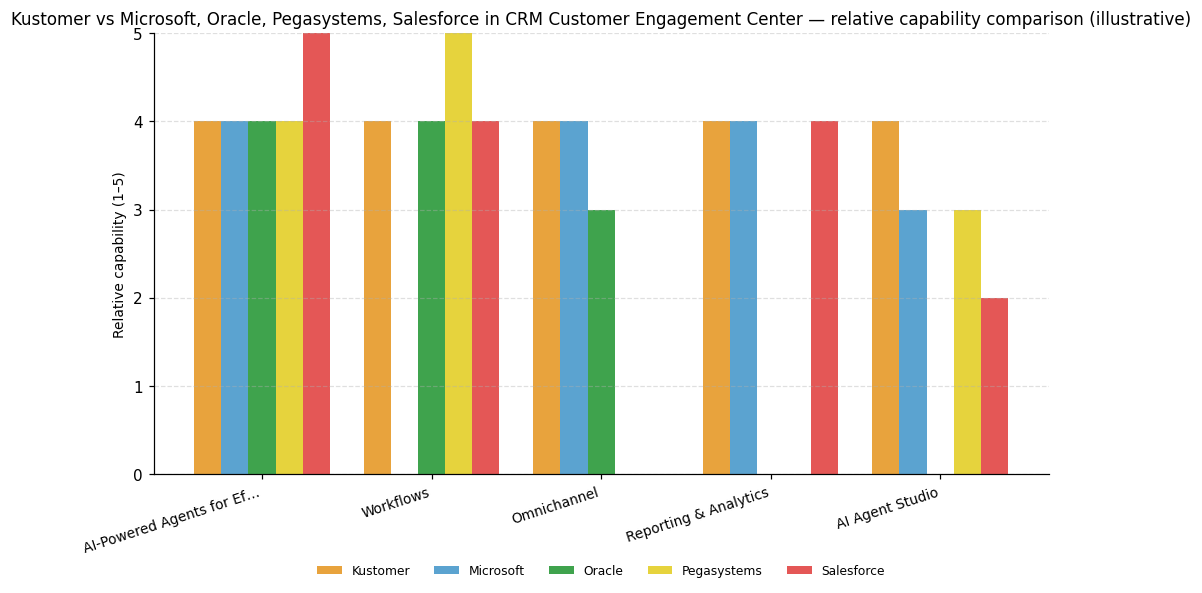
| Capability | Kustomer | Microsoft | Oracle | Pegasystems | Salesforce |
|---|---|---|---|---|---|
| AI-Powered Agents for Efficient Customer Support | 4 | 4 | 4 | 4 | 5 |
| Workflows | 4 | — | 4 | 5 | 4 |
| Omnichannel | 4 | 4 | 3 | — | — |
| Reporting & Analytics | 4 | 4 | — | — | 4 |
| AI Agent Studio | 4 | 3 | — | 3 | 2 |
Kustomer
AI-Powered Agents for Efficient Customer Support: AI-Powered Agents ('The Krew') provides a multi-agent framework of specialized autonomous AI agents for customer issue resolution and agent assistance.; Workflows: Workflows capability enables conversation routing, SLA reminders, quality checks, task assignments, and multi-step conditional process automation for CX teams.; Omnichannel: Omnichannel capability manages interactions across voice, email, live chat, SMS, WhatsApp, Instagram, and Facebook Messenger from a single unified interface.; Reporting & Analytics: Reporting and Analytics provides real-time visibility into queue health, AI efficiency, and customer sentiment via live dashboards with AI-generated insights.; AI Agent Studio: AI Agent Studio is a no-code environment for designing, configuring, testing, deploying, and monitoring custom AI Agent teams without requiring developer skills.
Microsoft
AI-Powered Agents for Efficient Customer Support: Dynamics 365 Customer Service makes strong use of AI including GenAI to drive customer, agent, and administrator automation.; Omnichannel: Delivers new functionality at a rapid pace including voice, messaging, and AI assistant capabilities across digital channels.; Reporting & Analytics: Delivers richer self-service and assisted-service experiences by leveraging unified interaction and transactional process data in real time.
Oracle
AI-Powered Agents for Efficient Customer Support: AI-powered decision automation analyzes issues and prepares action plans for agents, reducing service interaction turnaround times.; Workflows: AI-powered knowledge and decision automation analyzes issues and prepares agent action plans, enabling end-to-end service process orchestration.
Pegasystems
AI-Powered Agents for Efficient Customer Support: GenAI Blueprint automates workflow lifecycle generation, reducing complexity and time required to develop and deploy new service workflows.; Workflows: Pega Customer Service combines workflow automation, AI decisioning, and cross-workflow referencing to enable end-to-end complex enterprise service process automation.
Salesforce
AI-Powered Agents for Efficient Customer Support: Delivers many CEC automation innovations at pace enabled by customer input across many industries, organic GenAI research, and a growing patent portfolio.; Workflows: Service Cloud delivers strong process automation unified with interaction orchestration capabilities at the core of its CEC platform.; Reporting & Analytics: Data Cloud data lakehouse capabilities underpin a Unified Knowledge solution and GenAI assistive agent that power smarter real-time service interactions.




Connect Kustomer AI with your stack: integrations and partner ecosystem
Kustomer AI ships with 154 native integrations spanning 134 partner categories. Those categories include areas such as AI Chatbot / Conversational Commerce, AI Chatbot / Customer Support Automation, and AI Customer Service Automation.
Kustomer is built to ingest customer data from third-party systems. It offers plug-and-play apps alongside turnkey integrations with platforms like Shopify, Salesforce, and Stripe. For cases that go beyond standard connectors, it supports custom integrations via REST API and webhooks. The vendor also makes professional services experts available to build custom integrations for the most unique use cases. On the workflow side, flexible workflows powered by Apps, Hooks, and REST API calls let teams automate business processes across those connections. You can connect all your tools, processes and data with easy-to-install apps and turnkey integrations. Technical buyers evaluating extensibility will find REST API, webhooks, and a plug-and-play app ecosystem all represented here.
| Partner category | Integration partners | Native count | Flow direction |
|---|---|---|---|
| AI Chatbot / Conversational Commerce | Certainly | 1 | Unknown |
| AI Chatbot / Customer Support Automation | Ada Support | 1 | Unknown |
| AI Customer Service Automation | DigitalGenius | 1 | Unknown |
| AI Customer Support Automation | Siena, Thankful, Tymely, Yuma | 4 | Unknown |
| AI Customer Support Platform | Forethought | 1 | Unknown |
| AI Recruiting / HR Technology | Stella.ai | 1 | Unknown |
| AI Sales / Commerce Tool | Aurasell | 1 | Unknown |
| AI Self-Service / Customer Support Automation | Solvvy | 1 | Unknown |
| AI-Powered Lead Engagement / SMS Outreach | Verse.io | 1 | Unknown |
| AI-Powered Support Automation / Text Analytics | Lang.ai | 1 | Unknown |
| AI-Powered Translation / Multilingual Customer Support | Unbabel | 1 | Unknown |
| AR-Powered Visual Support / Remote Assistance | Streem | 1 | Unknown |
| Appointment Scheduling Software | Acuity Scheduling | 1 | Unknown |
| Aviation Data / Situational Awareness Software | Snowflake Software | 1 | Unknown |
| B2B Data Enrichment / Intelligence | Clearbit | 1 | Unknown |
| B2B Marketing Analytics | CaliberMind | 1 | Unknown |
| BPO / Customer Support Outsourcing | SupportNinja | 1 | Unknown |
| BPO / Customer Support Services | First Class Connection Corp | 1 | Unknown |
| Business Intelligence / Data Analytics | Looker Data Sciences | 1 | Unknown |
| Business Intelligence / Data Visualization | Tableau Software | 1 | Unknown |
| Business Text Messaging / SMS Platform | Zipwhip | 1 | Unknown |
| CRM | Salesforce | 1 | Bidirectional |
| CRM / Marketing Automation | HubSpot | 1 | Unknown |
| CRM Software | BIGContacts | 1 | Unknown |
| Cloud Communications / AI Phone System | Dialpad | 1 | Unknown |
| Cloud Communications / CPaaS | Twilio | 1 | Unknown |
| Cloud Communications / Managed Services | Fusion Connect | 1 | Unknown |
| Cloud Communications / Omnichannel Messaging | MessageBird | 1 | Unknown |
| Cloud Communications / UCaaS | 8x8, RingCentral | 2 | Unknown |
| Cloud Contact Center Software | Five9, Talkdesk, UJET | 3 | Unknown |
| Cloud Data Warehouse | Snowflake | 1 | Unknown |
| Cloud Phone System / Call Center Software | JustCall | 1 | Unknown |
| Cloud Telephony / Contact Center | Masvoz | 1 | Unknown |
| Cloud-Based Call Center Software | CloudTalk.io Inc | 1 | Unknown |
| Cloud-Based Phone System / Call Center Software | Aircall | 1 | Unknown |
| Compliance Automation / Security Audits | Thoropass | 1 | Unknown |
| Contact Center Automation Platform | babelforce | 1 | Unknown |
| Contact Center Intelligence / AI Analytics | Level AI | 1 | Unknown |
| Contact Center Platform | Genesys | 1 | Unknown |
| Conversation Intelligence / Call Analytics | Tethr | 1 | Unknown |
| Conversational AI / Chatbot Platform | Snaps | 1 | Unknown |
| Conversational AI / Contact Center Automation | Replicant Solutions Inc | 1 | Unknown |
| Customer Analytics / Predictive Marketing | Custora | 1 | Unknown |
| Customer Data Platform | Amperity, Segment | 2 | Unknown |
| Customer Data Platform / Data Pipeline | RudderStack | 1 | Unknown |
| Customer Data Platform / Marketing Automation | Simon Data | 1 | Unknown |
| Customer Experience Consulting | Compass Experience Labs | 1 | Unknown |
| Customer Feedback / Agent Coaching Platform | Stella Connect | 1 | Unknown |
| Customer Feedback / NPS Software | AskNicely, Delighted | 2 | Unknown |
| Customer Feedback Analytics | Chattermill | 1 | Unknown |
| Customer Satisfaction / Feedback Rating Tool | Hively | 1 | Unknown |
| Customer Satisfaction / Feedback Survey Tool | Customer Thermometer, Nicereply, Simplesat | 3 | Unknown |
| Customer Service AI Platform | Flip | 1 | Unknown |
| Customer Support Analytics | Customer HD, SupporTrends | 2 | Unknown |
| Customer Support Integration Tool | SupportSync | 1 | Unknown |
| Customer Support Optimization Platform | Boostopia | 1 | Unknown |
| Customer Support Outsourcing | HiOperator, LTVplus LLC | 2 | Unknown |
| Customer Support Outsourcing / AI | Chatdesk Inc | 1 | Unknown |
| Customer Support Quality Assurance | Klaus, MaestroQA | 2 | Unknown |
| Customer Support Staffing / Outsourcing | Talent Pop | 1 | Unknown |
| Cybersecurity Compliance & Audit Services | A-LIGN | 1 | Unknown |
| Data Pipeline / ETL Integration | Fivetran | 1 | Unknown |
| Data Security / Email Encryption | Virtru | 1 | Unknown |
| Delivery Experience / Post-Purchase Platform | Convey | 1 | Unknown |
| Digital Experience Analytics | FullStory | 1 | Unknown |
| Document Automation / Direct Mail Platform | Inkit | 1 | Unknown |
| E-Commerce / Cloud Services | Amazon | 1 | Unknown |
| E-Commerce Agency / Platform | Trellis Commerce | 1 | Unknown |
| E-Commerce Customer Support Integration | ChannelReply | 1 | Unknown |
| E-Commerce Financial Services / Growth Capital | Ampla | 1 | Unknown |
| E-Commerce Loyalty & Rewards Platform | LoyaltyLion | 1 | Unknown |
| E-Commerce Returns Management | Loop Returns, Returnly | 2 | Unknown |
| Email Marketing Software | AWeber | 1 | Unknown |
| Event Services | Domaine | 1 | Unknown |
| Financial Planning & Business Intelligence | Drivetrain | 1 | Unknown |
| IT / Customer Experience Services | Tollanis Solutions | 1 | Unknown |
| Identity Resolution / Contact Data Enrichment | FullContact Inc. | 1 | Unknown |
| In-App Voice / Video Call for Customer Support | SnapCall | 1 | Unknown |
| Interactive Content / Zero-Party Data Platform | Jebbit, Inc. | 1 | Unknown |
| Interactive Decision Tree / Agent Scripting | Zingtree | 1 | Unknown |
| Knowledge Management / AI Search | Shelf | 1 | Unknown |
| Live Chat Software | Olark | 1 | Unknown |
| Messaging / Social Media Platform | Messenger | 1 | Unknown |
| Mobile App Bug Reporting & Feedback | Instabug | 1 | Unknown |
| Mobile Commerce / Shopify App Builder | Tapcart | 1 | Unknown |
| Movie Theater / Entertainment | Regal Entertainment Group | 1 | Unknown |
| NPS / Customer Feedback Software | Promoter.io | 1 | Unknown |
| On-Demand Customer Support Outsourcing | Simplr | 1 | Unknown |
| Online Survey Software | SmartSurvey, SurveyMonkey | 2 | Unknown |
| Open-Source E-Commerce Platform | Solidus, Spree Commerce | 2 | Unknown |
| Order Fulfillment / Logistics | Rush Order | 1 | Unknown |
| Personalization / A/B Testing Platform | Ninetailed | 1 | Unknown |
| Product Quality / User Feedback Analytics | unitQ | 1 | Unknown |
| Quality Assurance / Agent Coaching Software | EvaluAgent | 1 | Unknown |
| Reverse ETL / Data Activation | Census | 1 | Unknown |
| Reviews & Loyalty Platform for E-Commerce | Stamped | 1 | Unknown |
| SMS / Text Messaging for E-Commerce | Tone | 1 | Unknown |
| SMS / email marketing automation | Attentive | 1 | Bidirectional |
| SMS Marketing / Conversational Commerce | Emotive | 1 | Unknown |
| SMS Marketing Platform | Postscript | 1 | Unknown |
| Sales / Customer Support Outsourcing | CloudTask | 1 | Unknown |
| Sales Engagement / Email Automation | Reply.io | 1 | Unknown |
| Sales Phone / Call Automation | Kixie | 1 | Unknown |
| Search / Cloud / Advertising Technology | 1 | Unknown | |
| Security Compliance Automation | Vanta Inc. | 1 | Unknown |
| Social Media Platform | 1 | Unknown | |
| Spreadsheet / Data Analytics Tool | Actiondesk | 1 | Unknown |
| Subscription Billing / Revenue Management | Chargify | 1 | Unknown |
| Subscription Commerce / Recharge Alternative | Prive | 1 | Unknown |
| Subscription Payments / E-Commerce | Recharge | 1 | Unknown |
| Sustainable Investing / Fintech | Swell | 1 | Unknown |
| Team Collaboration / Messaging | Slack | 1 | Unknown |
| Transactional Email Delivery Service | Postmark | 1 | Unknown |
| Travel Services | Acai Travel | 1 | Unknown |
| Venture Capital | Battery Ventures | 1 | Unknown |
| Workflow Automation / Integration Platform | ApiX-Drive, Onlizer, Zapier | 3 | Unknown |
| Workforce Engagement / Quality Management | Playvox | 1 | Unknown |
| Workforce Engagement Management / Contact Center Software | Calabrio, Inc. | 1 | Unknown |
| Workforce Management Software | Assembled | 1 | Unknown |
| conversation intelligence / AI quality assurance | Loris | 1 | Upstream |
| customer service / helpdesk software | Zendesk | 0 | Bidirectional |
| eCommerce platform | BigCommerce, Magento, Shopify | 3 | Upstream |
| knowledge management | Guru | 1 | Bidirectional |
| messaging platform | 1 | Upstream | |
| payments processing | Stripe | 1 | Upstream |
| post-purchase / order tracking and returns | parcelLab | 1 | Upstream |
| post-purchase / returns and shipping protection | Corso | 1 | Bidirectional |
| post-purchase / shipment tracking | AfterShip | 1 | Upstream |
| post-purchase experience / order tracking | Narvar | 1 | Upstream |
| project management / issue tracking | Jira | 1 | Bidirectional |
| quality assurance / contact center performance management | Scorebuddy | 1 | Upstream |
| social commerce / eCommerce marketplace | TikTok Shop | 1 | Bidirectional |
| social media platform | Facebook, Instagram | 2 | Upstream |
| subscription commerce management | OrderGroove | 1 | Bidirectional |


Kustomer, Inc. News
Kustomer Continues to Build Its AI Engine Around a Simple Idea ...
Kustomer launched the Kustomer Architect to enhance AI-driven customer experience, focusing on outcomes like satisfaction and revenue growth. HexClad uses Kustomer's platform to reduce costs and boost loyalty. The platform integrates customer data, workflows, and AI, enabling brands to transform reactive support into strategic CX. Kustomer emphasizes AI's role in driving business growth and customer retention.
Kustomer Announced the Launch of "Kustomer AI - Signals"
Kustomer has launched "Kustomer AI - Signals," a new AI feature that provides real-time customer insights to support teams. This tool analyzes customer behavior and sentiment to deliver actionable context before interactions, enhancing response efficiency. It is integrated into the Kustomer platform and available for Zendesk users, reflecting Kustomer's strategy to expand its AI capabilities across the CX market.
Kustomer Launches AI Signals to Power Real-Time CX Intelligence
Kustomer has introduced "Kustomer AI Signals," an AI-driven solution designed to enhance customer experience intelligence. This tool offers real-time context, sentiment analysis, and escalation risk detection, enabling customer support teams to make informed decisions swiftly. Integrated within the Kustomer platform and compatible with others like Zendesk, it aims to improve response quality and customer satisfaction by providing actionable insights.
Kustomer, Inc. Profile
Company Name
Kustomer, Inc.
Company Website
//kustomer.comHQ Location
318 W 39th St. 5th floor, New York, NY 10018
Employees
101-250
Social


Financials
SERIES D