Salesloft revenue orchestration platform: transforming how modern sales teams operate

Salesloft® is a leading revenue orchestration platform for B2B sales teams, unifying capabilities across sales engagement, sales automation software, conversation intelligence software, forecasting, and pipeline management. Designed to help sellers execute with precision, Salesloft includes modules like Cadence™, Rhythm™, Deals, Forecast, and Conversations, enabling seamless AI-powered sales workflows. The platform supports automated prospecting workflows, multichannel outreach, and smart prioritization to improve sales efficiency and boost conversion rates. With integrations across CRM and productivity tools, Salesloft empowers GTM teams to engage buyers and accelerate pipeline growth.

Orchestrating modern sales: top Salesloft features

  • Rhythm™: AI-powered workflow prioritization
    Rhythm analyzes intent signals, CRM data, and sales activity to guide reps on next-best actions. Salesloft users saw close rates rise by 25% as Rhythm cut admin time and surfaced higher-converting opportunities.
  • Cadence™: multichannel sales outreach automation
    Cadence supports automated email sequences, call scheduling, and messaging frameworks. Customers cite a 4–5x lift in engagement, using A/B-tested templates and AI-generated email copy.
  • Show more...

Other features: Salesloft includes sales analytics, mobile access, role-based governance, CRM sync, and customizable AI agents. Its sales coaching platform supports playbooks, playlist curation, and call intelligence. Some users noted UI onboarding complexity and occasional dialer lag as areas for improvement.


Security and compliance: Salesloft is GDPR-compliant and offers SSO, call recording compliance, permission-based access, and role-specific control over automation. Suitable for regulated industries like financial services and healthcare.

Integrations and partnerships: The platform integrates with Salesforce, HubSpot, Microsoft Dynamics, LinkedIn, ZoomInfo, and over 180 tools. iPaaS connectors enable revenue workflow automation and tailored orchestration via low-code agents.

Salesloft use-cases and solutions

  • Sales pipeline creation and lead engagement
    Reps automate top-funnel outreach using intent data, cadence management tools, and prioritization engines. Buyers report pipeline uplift and improved reply rates.
  • Opportunity management and deal acceleration
    Forecasting AI and deal inspection tools help AEs identify blockers, adjust next steps, and shorten sales cycles using sales pipeline acceleration tools.
  • Show more...

Other Use-Cases: Salesloft also powers account-based marketing, cross-functional team handoffs, and real-time play execution. One area needing further development is mobile-optimized workflows for field sales professionals.

Salesloft value proposition to different roles

  • SDRs automate outreach, track activity, and reduce manual CRM updates using AI sequencing and task prioritization.
  • AEs manage opportunities using AI-powered deal reviews, CRM-integrated actions, and pipeline visibility.
  • Show more...

Other Roles Supported: Marketing, enablement, and partner teams use Salesloft to coordinate messaging and outbound timing. Solution engineers have limited direct support for demo orchestration.

Challenges or limitations in the Salesloft platform

Salesloft has evolved significantly, but users cite onboarding complexity and dialer reliability as persistent challenges. Enterprise implementations may face steep learning curves, and analytics customization options are narrower than some peer platforms.

Salesloft platform evolution and innovation trajectory

Over the last six years, Salesloft evolved from cadence automation into a full-fledged sales engagement software and orchestration platform. New capabilities like agentic playbooks, Drift integration, and AI-powered forecast scoring reflect an execution-first approach. This makes it a strong candidate for companies seeking AI-native, sales productivity tools with practical impact.

Wyz Ask Wyz

Market footprint and customer base for Salesloft

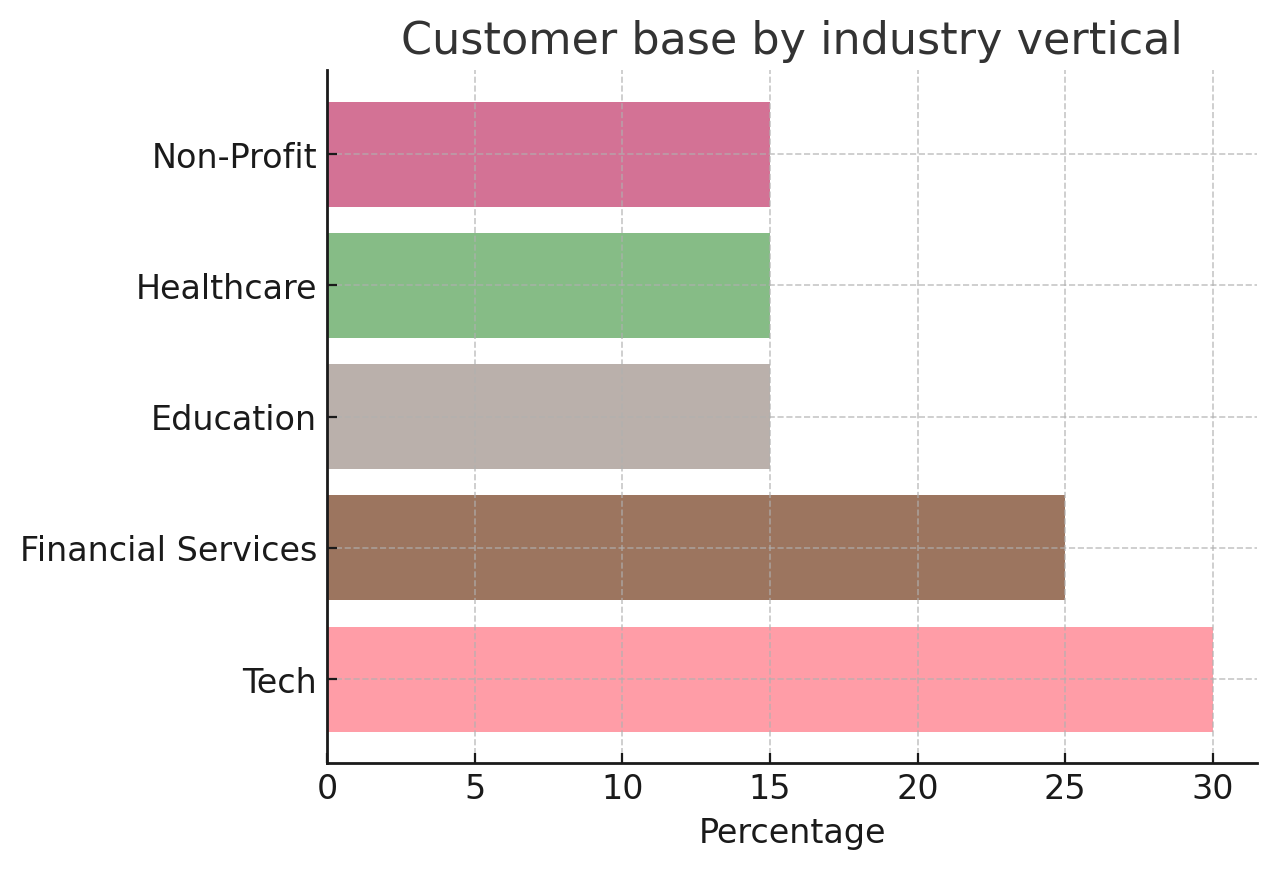
Salesloft supports over 5,000 customers across technology, financial services, education, non-profit, and healthcare sectors. Clients include 3M, IBM, NFP, Wrike, Advanced, Boomi, HBX Group, and ORIGO Education. These companies span mid-market to enterprise segments, with global implementations across North America, Europe, and APAC.
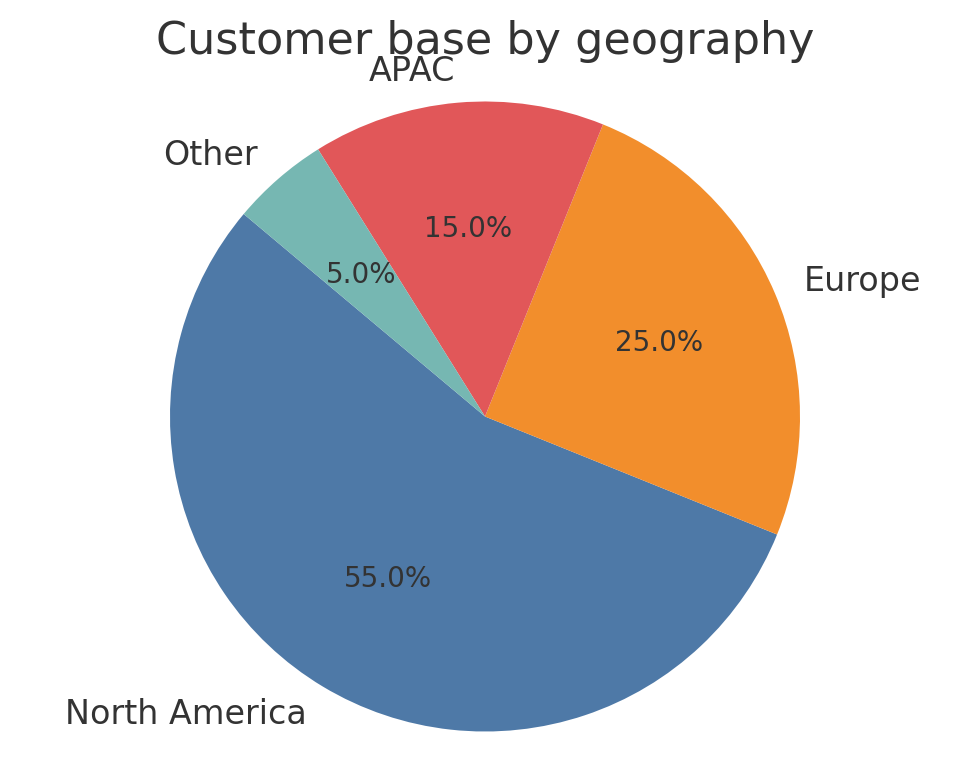
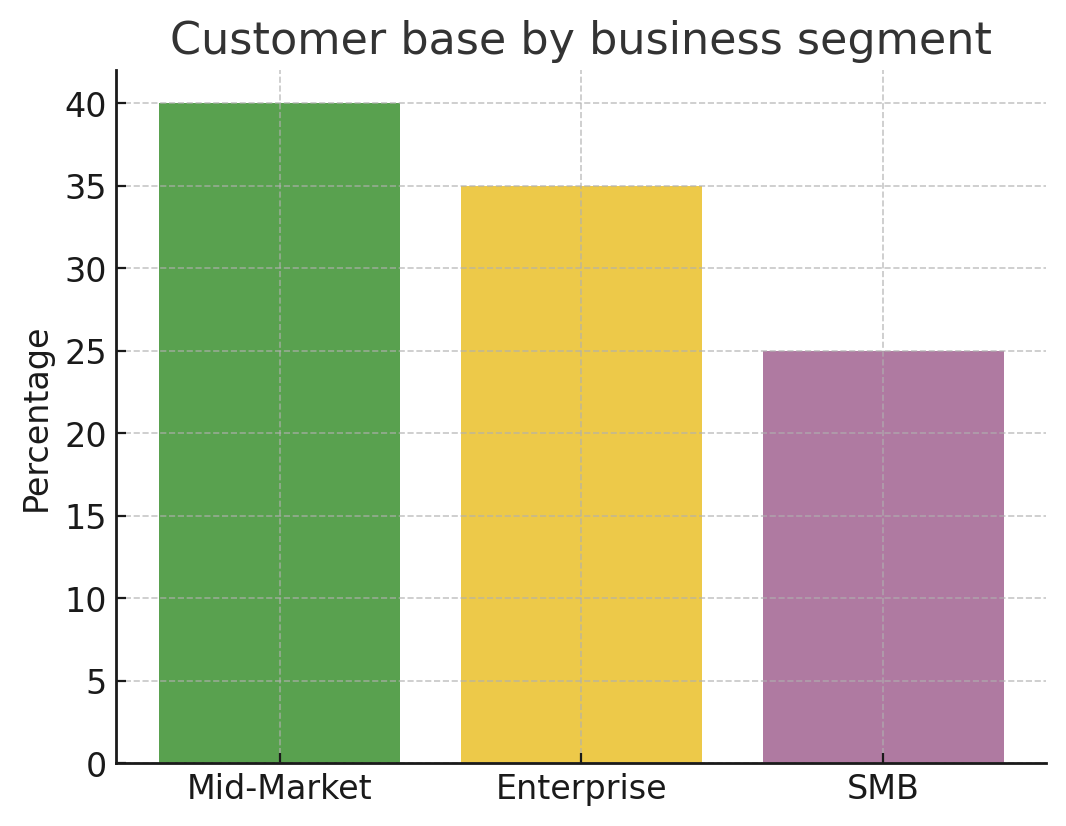
Customer base by geography Customer base by business segment Customer base by industry vertical

Salesloft Customer wins, Customer success stories, Case studies


Zscaler says it suffered data breach following Salesloft Drift compromise - TechRadar

Salesloft's Drift platform was compromised, leading to a data breach at Zscaler. Attackers accessed sensitive customer data, including names, emails, and product information, but Zscaler's systems re...mained secure. The breach is linked to third-party cyberattacks, with ShinyHunters and UNC6395 suspected. Zscaler revoked Drift integrations and is investigating.

Read on →

OneCause - Non Profit Organization Management - Medium

Salesloft helped OneCause increase sales activities by 20%. OneCause struggled with pipeline visibility and data quality using only their CRM. The team faced slow processes and inefficient sales mana...gement. With Salesloft's Deals, they gained a clear view of their pipeline. This improved efficiency and sales engagement for their nonprofit fundraising solutions.

ORIGO Education - Education - Medium

Salesloft helped ORIGO Education fix pipeline visibility in just 60 days. Before, their sales data was scattered and forecasting was hard. With Salesloft, they found deal gaps and coached reps better.... This led to higher win rates and more predictable revenue. The sales team felt more motivated and focused.

Seamless.AI - Information Technology And Services

Salesloft helped Seamless.AI improve customer success operations. Seamless.AI had problems with fragmented communication and manual processes. Their teams could not see all customer interactions in o...ne place. Salesloft gave them better tools to manage renewals and account growth. The platform increased retention rates and made support more consistent.

durhamlane - Marketing And Advertising

Salesloft helped durhamlane boost SDR productivity. The platform automated manual tasks and made prospecting easier. SDRs now use one view instead of many browser tabs. Salesloft gave structured, mul...ti-channel cadences for consistent messaging. Managers gained better visibility for coaching and performance improvement. This led to more efficient outbound engagement for durhamlane's B2B clients.

Vention - Manufacturing

Salesloft helped Vention organize and streamline its sales process. Vention switched to another platform to cut costs but faced disorganized data and slow sales. Salesloft's customizable cadences and... easy-to-use interface improved rep efficiency and productivity. The team quickly adopted Salesloft again. New reps used Salesloft's AI and Rhythm features to ramp up faster and drive results.

Salesloft Product Overview

Video Thumbnail

Frequently Asked Questions(FAQ)

for Salesloft

What CRM integrations are available for the software?

The software offers a variety of CRM integrations to enhance your business processes and streamline customer relationship management. Key integrations include Salesforce, which allows for seamless data synchronization and improved sales tracking, and HubSpot, enabling effective marketing automation and lead management. Additionally, the software can integrate with Zoho CRM, providing a comprehensive view of customer interactions and sales performance. These integrations facilitate better communication between teams, enhance data accuracy, and ultimately drive more informed decision-making. By leveraging these CRM integrations, businesses can improve customer engagement, optimize sales strategies, and foster long-term relationships with clients, thereby increasing overall productivity and revenue.

b2b analyticsrevenue intelligenceaccount-based marketing

How can I connect my marketing automation platform to the software?

To connect your marketing automation platform to the software, you typically need to follow a series of steps that may vary slightly depending on the specific platforms involved. First, check if your software offers native integrations with popular marketing automation tools like HubSpot, Marketo, or Salesforce. If a native integration is available, you can usually find it in the software's settings or integrations section, where you will be guided through the authentication process. If a native integration is not available, consider using third-party integration tools like Zapier or Integromat, which can facilitate data transfer between the two platforms. Ensure you map the necessary fields correctly to maintain data integrity. Finally, test the integration to confirm that data flows seamlessly between your marketing automation platform and the software, allowing for efficient campaign management and lead tracking.

b2b analyticsrevenue intelligenceaccount-based marketing

What data providers can be integrated with the software?

The software offers integration capabilities with a variety of data providers to enhance its functionality and streamline workflows. While specific data providers may vary based on the software's version and updates, common integrations often include platforms like Salesforce for customer relationship management, HubSpot for marketing automation, and various data enrichment services that provide additional insights into customer profiles. These integrations allow businesses to leverage existing data, improve data accuracy, and create a more cohesive ecosystem for managing customer interactions. By connecting with these data providers, users can automate data entry, enhance reporting capabilities, and ultimately drive better decision-making based on comprehensive data analysis. For the most accurate and up-to-date list of supported data providers, it is recommended to consult the software's official documentation or support resources.

b2b analyticsrevenue intelligenceaccount-based marketing

How does the API work for integrating third-party applications?

The API (Application Programming Interface) serves as a bridge that allows third-party applications to communicate with our software seamlessly. It provides a set of defined protocols and tools that developers can use to access specific features and data within our platform. To integrate a third-party application, developers typically start by obtaining API keys, which authenticate their requests. They can then use RESTful endpoints to send and receive data, enabling functionalities such as data retrieval, updates, and user authentication. The API documentation outlines the available endpoints, request formats, and response structures, ensuring developers can effectively implement the integration. This capability enhances business value by allowing organizations to customize workflows, automate processes, and improve data synchronization across different systems, ultimately leading to increased efficiency and productivity.

b2b analyticsrevenue intelligenceaccount-based marketing

What features does the software offer for lead management?

The software offers a comprehensive suite of features for lead management designed to streamline the process of capturing, nurturing, and converting leads. Key functionalities include automated lead capture from various sources, such as web forms and social media, ensuring no potential customer is overlooked. The software also provides robust lead scoring capabilities, allowing businesses to prioritize leads based on engagement and potential value. Additionally, it includes customizable workflows for lead nurturing, enabling personalized communication through email campaigns and follow-ups. Integration with popular CRM platforms like Salesforce and HubSpot enhances the lead management process by centralizing data and facilitating seamless communication across teams. Overall, these features empower businesses to effectively manage their leads, improve conversion rates, and ultimately drive revenue growth.

b2b analyticsrevenue intelligenceaccount-based marketing

How do I set up the integration with my existing CRM?

To set up the integration with your existing CRM, first, identify the specific CRM platform you are using, such as Salesforce, HubSpot, or Zoho. Next, access the integration settings within your B2B software, where you will typically find an option to connect to your CRM. Follow the prompts to authenticate your CRM account, which may involve entering API keys or logging in directly. Once authenticated, configure the data synchronization settings to determine what information you want to share between the systems, such as leads, contacts, or sales data. Finally, test the integration to ensure that data flows correctly between your B2B software and your CRM, making adjustments as necessary to optimize performance.

b2b analyticsrevenue intelligenceaccount-based marketing

What are the steps to configure the software with my marketing automation tools?

To configure the software with your marketing automation tools, start by identifying the specific tools you are using, such as HubSpot, Marketo, or Salesforce. Next, access the integration settings within the software and select the marketing automation tool you wish to connect. Follow the prompts to authenticate your account, which may involve entering API keys or logging into your marketing automation platform. Once authenticated, configure the data sync settings to determine what information should be shared between the software and your marketing automation tool, such as leads, campaigns, or analytics. Finally, test the integration to ensure data flows correctly and make any necessary adjustments. This process enhances your marketing efforts by streamlining data management and improving campaign effectiveness.

b2b analyticsrevenue intelligenceaccount-based marketing

Can I customize the API endpoints for specific use cases?

Yes, you can customize the API endpoints to suit specific use cases. Many B2B software solutions offer flexible API frameworks that allow developers to modify existing endpoints or create new ones tailored to their business needs. This customization can enhance integration with other systems, streamline workflows, and improve data exchange between applications. To achieve this, you typically need to access the API documentation provided by the software vendor, which outlines the available endpoints and customization options. Additionally, leveraging tools like Postman or Swagger can facilitate testing and development of your custom endpoints. By customizing API endpoints, businesses can ensure that their software solutions align more closely with their operational requirements, ultimately driving efficiency and effectiveness in their processes.

b2b analyticsrevenue intelligenceaccount-based marketing

How does the software handle data synchronization with external systems?

The software handles data synchronization with external systems through robust integration capabilities that ensure seamless data flow and consistency across platforms. It utilizes APIs to connect with various external systems, allowing for real-time data updates and synchronization. This means that any changes made in one system are automatically reflected in the other, minimizing the risk of data discrepancies. Additionally, the software supports scheduled synchronization, enabling users to set specific intervals for data updates based on their operational needs. This flexibility ensures that businesses can maintain accurate and up-to-date information across all their systems, enhancing decision-making and operational efficiency. By leveraging these integration features, organizations can streamline their workflows and improve overall productivity.

b2b analyticsrevenue intelligenceaccount-based marketing

What reporting features are available for tracking integration performance?

While specific reporting features for tracking integration performance can vary by software, many B2B platforms offer robust analytics tools to help businesses monitor their integration effectiveness. Common features include real-time dashboards that display key performance indicators (KPIs), such as data transfer success rates, error logs, and processing times. Additionally, some platforms provide customizable reports that allow users to drill down into specific metrics, enabling them to identify trends and areas for improvement. Integration with tools like Salesforce or HubSpot can enhance reporting capabilities by consolidating data from multiple sources, providing a comprehensive view of performance. Ultimately, these reporting features empower businesses to make data-driven decisions, optimize their integrations, and improve overall operational efficiency.

b2b analyticsrevenue intelligenceaccount-based marketing

How does the software's integration with CRM improve sales processes?

Integrating your software with a Customer Relationship Management (CRM) system significantly enhances sales processes by streamlining data flow and improving communication. This integration allows sales teams to access real-time customer information, track interactions, and manage leads more effectively. By automating data entry and eliminating manual processes, sales representatives can focus on building relationships and closing deals rather than administrative tasks. Additionally, the integration provides valuable insights through analytics, enabling teams to identify trends, forecast sales, and tailor their strategies to meet customer needs. Overall, this synergy between your software and CRM fosters a more efficient sales process, ultimately driving revenue growth and improving customer satisfaction.

b2b analyticsrevenue intelligenceaccount-based marketing

What specific features help SDRs manage their leads more effectively?

Sales Development Representatives (SDRs) can manage their leads more effectively through features such as lead scoring, automated follow-ups, and integrated communication tools. Lead scoring prioritizes leads based on their engagement and potential value, allowing SDRs to focus on the most promising prospects. Automated follow-ups ensure timely communication, reducing the risk of leads going cold. Additionally, integrated communication tools, such as email and chat functionalities, streamline interactions, enabling SDRs to engage with leads directly within the platform. Furthermore, analytics and reporting features provide insights into lead behavior and campaign performance, helping SDRs refine their strategies. By leveraging these features, SDRs can enhance their productivity, improve lead conversion rates, and ultimately drive more sales for their organization.

b2b analyticsrevenue intelligenceaccount-based marketing

How can I use the software to automate my marketing campaigns?

To automate your marketing campaigns using our software, start by defining your campaign goals and target audience within the platform. Utilize the built-in automation tools to create workflows that trigger specific actions based on user behavior, such as sending emails or social media posts when a lead engages with your content. You can segment your audience for personalized messaging, ensuring that your campaigns resonate with different customer groups. Additionally, integrate the software with platforms like Salesforce or HubSpot to streamline data flow and enhance your marketing efforts. Monitor campaign performance through analytics features to refine your strategies over time, ensuring continuous improvement and higher engagement rates. By leveraging these capabilities, you can save time, reduce manual tasks, and increase the effectiveness of your marketing initiatives.

b2b analyticsrevenue intelligenceaccount-based marketing

What are the technical requirements for setting up the API?

To set up the API, you will need to ensure that your system meets certain technical requirements. First, you should have a compatible programming environment, typically supporting languages such as Python, Java, or JavaScript. Additionally, a stable internet connection is essential for API calls. You will also need to obtain an API key from our platform, which is necessary for authentication and access to the API endpoints. Ensure that your server can handle HTTPS requests, as secure communication is a requirement. Familiarity with RESTful principles is beneficial, as our API follows REST architecture. Lastly, reviewing the API documentation will provide you with detailed information on endpoints, request formats, and response structures, which are crucial for successful integration.

b2b analyticsrevenue intelligenceaccount-based marketing

How does the software support data import from various providers?

Our software supports data import from various providers through a user-friendly interface that simplifies the process. Users can easily upload data files in multiple formats, such as CSV, Excel, or JSON, ensuring compatibility with a wide range of data sources. Additionally, our software offers integration capabilities with popular platforms like Salesforce, HubSpot, and Marketo, allowing for seamless data transfer directly from these systems. The import process is designed to include validation checks to ensure data accuracy and integrity, minimizing errors during the upload. Furthermore, users can schedule regular imports or set up automated workflows to keep their data up-to-date without manual intervention. This flexibility not only enhances operational efficiency but also empowers businesses to leverage their data effectively for informed decision-making.

b2b analyticsrevenue intelligenceaccount-based marketing

What features are available for tracking customer interactions?

Tracking customer interactions is crucial for understanding engagement and improving customer relationships. Many B2B software solutions offer features such as customer activity logs, which record every interaction a customer has with your business, including emails, calls, and meetings. Additionally, tools often include analytics dashboards that visualize customer behavior and engagement metrics, allowing businesses to identify trends and areas for improvement. Some platforms provide automated tracking of customer interactions across multiple channels, such as social media and email, ensuring a comprehensive view of customer touchpoints. Integration with CRM systems like Salesforce or HubSpot can enhance these tracking capabilities by centralizing customer data and interactions, enabling more personalized communication and targeted marketing efforts. Overall, these features help businesses optimize their strategies and foster stronger customer relationships.

b2b analyticsrevenue intelligenceaccount-based marketing

How can I configure alerts and notifications through integrations?

To configure alerts and notifications through integrations, you typically need to access the settings of the specific software or platform you are using. Start by identifying the integration options available within your software, such as Salesforce, HubSpot, or Marketo. Once you have selected the appropriate integration, navigate to the alerts or notifications section in the settings menu. Here, you can customize the types of alerts you want to receive, such as email notifications for specific events or updates. Ensure that you connect the necessary accounts and set the criteria for when alerts should be triggered. Finally, test the configuration to confirm that notifications are being sent as expected. This process enhances communication and ensures that your team stays informed about critical updates in real-time.

b2b analyticsrevenue intelligenceaccount-based marketing

What role does the API play in custom feature development?

An API, or Application Programming Interface, plays a crucial role in custom feature development by enabling different software applications to communicate and interact with each other. In the context of B2B software, APIs allow developers to access the functionalities and data of a platform, facilitating the integration of custom features tailored to specific business needs. This means that businesses can enhance their existing software solutions by building new functionalities or connecting with other tools, such as CRM systems or analytics platforms, without having to start from scratch. By leveraging APIs, companies can streamline processes, improve user experiences, and ultimately drive greater efficiency and innovation within their operations. Thus, the API serves as a bridge that empowers businesses to customize their software solutions effectively.

b2b analyticsrevenue intelligenceaccount-based marketing

How does the software integrate with social media platforms?

The software integrates seamlessly with various social media platforms, allowing businesses to enhance their online presence and streamline their marketing efforts. By connecting with platforms such as Facebook, Twitter, LinkedIn, and Instagram, users can automate posting, track engagement metrics, and analyze audience interactions directly from the software interface. This integration enables businesses to schedule content, monitor brand mentions, and gather insights on social media performance, all in one place. Additionally, the software supports API connections, making it easier to customize and extend functionality based on specific business needs. Overall, this integration not only saves time but also improves the effectiveness of social media campaigns, driving better engagement and conversion rates.

b2b analyticsrevenue intelligenceaccount-based marketing

What are the benefits of using the software's integration with data providers?

Using the software's integration with data providers offers several key benefits that enhance business operations. Firstly, it allows for seamless access to real-time data, which can improve decision-making and operational efficiency. By integrating with reputable data providers, businesses can enrich their existing datasets, gaining deeper insights into customer behavior and market trends. This integration also facilitates automation, reducing manual data entry and minimizing errors, which saves time and resources. Additionally, having access to high-quality data can enhance analytics capabilities, enabling more accurate forecasting and strategic planning. Overall, leveraging these integrations empowers businesses to make informed decisions, optimize processes, and ultimately drive growth.

b2b analyticsrevenue intelligenceaccount-based marketing

How can I ensure data security during the integration process?

To ensure data security during the integration process, start by conducting a thorough risk assessment to identify potential vulnerabilities in your systems. Utilize encryption protocols for data in transit and at rest to protect sensitive information from unauthorized access. Implement access controls to limit who can view or manipulate data during the integration, ensuring that only authorized personnel have the necessary permissions. Regularly update and patch your software to protect against known vulnerabilities. Additionally, consider using secure APIs and integration platforms that offer built-in security features. It's also advisable to conduct regular audits and monitoring to detect any unusual activity or breaches. By following these steps, you can significantly enhance the security of your data throughout the integration process.

b2b analyticsrevenue intelligenceaccount-based marketing

What features assist in managing customer relationships through integrations?

Managing customer relationships effectively can be significantly enhanced through various integrations offered by B2B software solutions. Key features that assist in this area include customer relationship management (CRM) integrations, which allow seamless data sharing between platforms like Salesforce, HubSpot, and Marketo. These integrations enable businesses to track customer interactions, manage leads, and automate follow-ups, ensuring that no opportunity is missed. Additionally, features such as email marketing tools, social media management, and analytics dashboards provide insights into customer behavior and preferences, allowing for more personalized communication. By leveraging these integrations, businesses can create a cohesive view of customer interactions, streamline their processes, and ultimately improve customer satisfaction and retention.

b2b analyticsrevenue intelligenceaccount-based marketing

How does the software's reporting feature work with integrated data?

The software's reporting feature works by aggregating and analyzing data from various integrated sources, allowing users to generate comprehensive reports that reflect real-time insights. When you connect platforms such as Salesforce, HubSpot, or Marketo, the software pulls in relevant data points, which can include sales figures, customer interactions, and marketing performance metrics. This integration enables users to create customized reports that highlight key performance indicators and trends, facilitating informed decision-making. Additionally, the reporting feature often includes visualization tools, making it easier to interpret complex data sets. By leveraging integrated data, businesses can gain a holistic view of their operations, identify areas for improvement, and ultimately drive better outcomes.

b2b analyticsrevenue intelligenceaccount-based marketing

What are the best practices for configuring the software with other tools?

When configuring software with other tools, best practices include ensuring compatibility between systems, utilizing APIs for seamless data exchange, and prioritizing user authentication and security protocols. Start by mapping out the workflows to identify which tools need integration and how data will flow between them. Use standardized data formats to minimize errors during transfers. Regularly update both the software and the integrated tools to maintain compatibility and security. Additionally, consider implementing monitoring tools to track integration performance and troubleshoot issues proactively. Documentation is crucial; maintain clear records of configurations and changes to facilitate future updates or troubleshooting. Lastly, engage with user communities or support forums for insights and shared experiences that can enhance your integration strategy.

b2b analyticsrevenue intelligenceaccount-based marketing

How does the software help in lead scoring through integrations?

The software enhances lead scoring through seamless integrations with platforms like Salesforce, HubSpot, and Marketo, allowing businesses to leverage data from multiple sources for more accurate scoring. By connecting with these CRM and marketing automation tools, the software can analyze various lead attributes, such as engagement levels, demographic information, and behavioral data. This integration enables real-time updates to lead scores based on interactions, ensuring that sales teams prioritize high-quality leads effectively. Additionally, the software can utilize predictive analytics to refine scoring models, helping businesses identify which leads are most likely to convert. Overall, these integrations streamline the lead scoring process, improve sales efficiency, and ultimately drive better conversion rates.

b2b analyticsrevenue intelligenceaccount-based marketing

What integration options are available for e-commerce platforms?

E-commerce platforms typically offer a variety of integration options to enhance functionality and streamline operations. Common integrations include payment gateways like PayPal and Stripe, which facilitate secure transactions, and shipping solutions such as ShipStation or FedEx for efficient order fulfillment. Additionally, many platforms integrate with customer relationship management (CRM) systems like Salesforce or HubSpot to manage customer interactions and data effectively. Marketing automation tools, such as Mailchimp or Klaviyo, can also be integrated to enhance email marketing efforts. Furthermore, analytics tools like Google Analytics provide insights into customer behavior and sales performance. By leveraging these integrations, businesses can improve their operational efficiency, enhance customer experience, and drive sales growth.

b2b analyticsrevenue intelligenceaccount-based marketing

How can I leverage the software's features for better customer segmentation?

To leverage the software's features for better customer segmentation, start by utilizing its data analytics capabilities to gather insights on customer behavior and preferences. Use the segmentation tools to categorize your audience based on demographics, purchase history, and engagement levels. Implement automated workflows to tailor marketing messages and campaigns to each segment, ensuring that your communications resonate with their specific needs. Additionally, take advantage of any integration options with CRM platforms like Salesforce or HubSpot to enrich your customer profiles with external data, enhancing your segmentation accuracy. Regularly analyze the performance of your segmented campaigns to refine your strategies and improve targeting over time, ultimately leading to higher conversion rates and customer satisfaction.

b2b analyticsrevenue intelligenceaccount-based marketing

What are the limitations of the API when integrating with other systems?

When integrating with other systems using an API, there are several limitations to consider. Common constraints include rate limits, which restrict the number of requests that can be made in a given timeframe, potentially impacting performance during peak usage. Additionally, APIs may have specific data format requirements, necessitating data transformation before integration, which can complicate workflows. Security protocols, such as OAuth, may also introduce complexity, requiring proper authentication and authorization processes. Furthermore, not all APIs provide comprehensive documentation, which can hinder developers' ability to effectively utilize the API's features. Lastly, some APIs may have limited functionality or lack support for certain endpoints, restricting the integration capabilities with other platforms. Understanding these limitations is crucial for businesses to ensure seamless integration and optimal performance.

b2b analyticsrevenue intelligenceaccount-based marketing

How does the software facilitate real-time data updates across integrations?

The software facilitates real-time data updates across integrations by utilizing advanced APIs and webhooks that enable seamless communication between different platforms. When data is updated in one system, the software automatically triggers updates in connected applications, ensuring that all systems reflect the most current information without manual intervention. This real-time synchronization is crucial for businesses that rely on accurate and timely data for decision-making, customer relationship management, and operational efficiency. By integrating with popular platforms like Salesforce, HubSpot, and Marketo, the software ensures that teams can access consistent data across their tools, enhancing collaboration and reducing the risk of errors associated with outdated information. This capability ultimately leads to improved productivity and better-informed business strategies.

b2b analyticsrevenue intelligenceaccount-based marketing

What specific features can help marketing teams optimize their campaigns?

Marketing teams can optimize their campaigns using several specific features offered by B2B software solutions. Key features include advanced analytics and reporting tools that provide insights into campaign performance, allowing teams to identify what works and what doesn’t. A/B testing capabilities enable marketers to experiment with different messages and visuals to determine the most effective approach. Automation tools streamline repetitive tasks, ensuring timely follow-ups and consistent messaging across channels. Additionally, customer segmentation features allow for targeted campaigns based on user behavior and demographics, enhancing engagement and conversion rates. Integration with platforms like Salesforce or HubSpot can further enhance these capabilities by providing a comprehensive view of customer interactions and facilitating data-driven decision-making. By leveraging these features, marketing teams can refine their strategies, improve ROI, and ultimately drive better results.

b2b analyticsrevenue intelligenceaccount-based marketing

What are the measurable business benefits of using this software?

The measurable business benefits of using our software include increased operational efficiency, enhanced data accuracy, and improved decision-making capabilities. By automating routine tasks, the software reduces manual errors and saves time, allowing employees to focus on higher-value activities. Additionally, the software provides real-time analytics and reporting features, enabling businesses to track key performance indicators (KPIs) and make data-driven decisions that can lead to revenue growth. Furthermore, the integration capabilities with platforms like Salesforce and HubSpot facilitate seamless data flow across departments, enhancing collaboration and customer relationship management. Overall, these benefits contribute to a stronger competitive advantage, better resource allocation, and ultimately, a higher return on investment (ROI) for the organization.

b2b analyticsrevenue intelligenceaccount-based marketing

How can I calculate the ROI of implementing this software?

To calculate the ROI of implementing this software, start by identifying the total costs associated with the software, including purchase price, implementation expenses, and ongoing maintenance fees. Next, quantify the benefits by measuring the financial gains attributed to the software, such as increased revenue, cost savings, or improved efficiency. A common formula to calculate ROI is: (Net Profit / Total Investment) x 100. Net Profit is determined by subtracting total costs from total benefits. Additionally, consider qualitative benefits like enhanced customer satisfaction or improved team collaboration, which may not have direct monetary value but contribute to overall business success. By systematically analyzing these factors, you can effectively assess the ROI of the software and make informed decisions about its value to your organization.

b2b analyticsrevenue intelligenceaccount-based marketing

What cost savings can I expect from using this software?

The cost savings you can expect from using our software largely depend on your specific business needs and operational efficiencies. By automating routine tasks, reducing manual errors, and streamlining workflows, our software can significantly lower labor costs and increase productivity. Additionally, you may experience savings from improved resource allocation and reduced overhead expenses, as our solution often integrates seamlessly with existing tools like Salesforce or HubSpot, minimizing the need for additional software investments. Many users report a decrease in operational costs by up to 30% within the first year of implementation, as the software enables better decision-making through data-driven insights. Ultimately, the exact savings will vary based on your current processes and how effectively you leverage the software's capabilities.

b2b analyticsrevenue intelligenceaccount-based marketing

How does this software impact revenue generation for my business?

The software significantly impacts revenue generation for your business by streamlining operations, enhancing customer engagement, and providing valuable insights through data analytics. By automating repetitive tasks, it allows your team to focus on high-value activities, ultimately increasing productivity and efficiency. Additionally, the software can improve customer relationship management, leading to better retention rates and higher customer lifetime value. With features that enable targeted marketing campaigns and personalized communication, you can effectively reach your audience, driving more conversions and sales. Furthermore, the analytics capabilities help identify trends and opportunities, allowing for informed decision-making that can optimize pricing strategies and product offerings, ultimately contributing to increased revenue growth.

b2b analyticsrevenue intelligenceaccount-based marketing

What pricing plans are available for this software?

To provide accurate information regarding the pricing plans available for this software, it is essential to visit the official website or contact the sales team directly, as pricing can vary based on factors such as the size of your business, the number of users, and specific features required. Typically, software solutions offer tiered pricing plans that may include a basic plan for small teams, a professional plan for growing businesses, and an enterprise plan for larger organizations with advanced needs. Additionally, many software providers offer free trials or demos, allowing potential customers to evaluate the product before committing to a subscription. For the most current and detailed pricing information, including any promotional offers, please refer to the software's pricing page or reach out to their customer support.

b2b analyticsrevenue intelligenceaccount-based marketing

Are there different tiers of pricing for this software, and what do they include?

Yes, there are typically different tiers of pricing for B2B software, which often include a range of features and services tailored to various business needs. These tiers usually encompass a basic plan that offers essential functionalities, a mid-tier plan that adds more advanced features and support, and a premium plan that includes all features along with priority support and additional services. The specific inclusions can vary by provider, but common elements may include user limits, access to integrations, reporting capabilities, and customer support levels. Businesses should evaluate their requirements and budget to choose the most suitable tier, ensuring they receive the necessary tools to optimize their operations while managing costs effectively.

b2b analyticsrevenue intelligenceaccount-based marketing

What is the total cost of ownership for this software over three years?

The total cost of ownership (TCO) for software over three years includes several components: the initial purchase price or subscription fees, ongoing maintenance and support costs, training expenses, and any additional costs for integrations or upgrades. To calculate the TCO, first, determine the software's upfront costs, then estimate annual maintenance and support fees, which can vary based on the vendor's pricing model. Additionally, factor in training costs for your team and any potential costs associated with integrating the software with existing systems, such as CRM or ERP platforms. By summing these costs over three years, you can gain a comprehensive understanding of the financial commitment required for the software, enabling better budgeting and decision-making for your organization.

b2b analyticsrevenue intelligenceaccount-based marketing

How quickly can I expect to see value from this software after implementation?

The time it takes to see value from software implementation can vary based on several factors, including the complexity of the software, the size of your organization, and the specific use case. Generally, businesses can expect to see initial value within a few weeks to a couple of months after implementation, as users become familiar with the software and begin to leverage its features effectively. For instance, if the software includes automation tools, you may notice increased efficiency and productivity shortly after deployment. However, for more complex functionalities, such as advanced analytics or integrations with existing systems like Salesforce or HubSpot, it may take longer to fully realize the benefits. To maximize your return on investment, ensure proper training and support are in place during the rollout phase.

b2b analyticsrevenue intelligenceaccount-based marketing

What are the implementation costs associated with this software?

The implementation costs associated with our software can vary significantly based on several factors, including the size of your organization, the complexity of your existing systems, and the specific features you choose to utilize. Typically, these costs may encompass initial setup fees, customization expenses, training for your team, and ongoing support. It's essential to consider both direct costs, such as licensing and installation, and indirect costs, like potential downtime during the transition. To get a precise estimate tailored to your needs, we recommend scheduling a consultation with our sales team, who can provide a detailed breakdown based on your unique requirements and help you understand the overall investment needed for a successful implementation.

b2b analyticsrevenue intelligenceaccount-based marketing

How does this software improve operational efficiency?

This software improves operational efficiency by automating routine tasks, streamlining workflows, and enhancing collaboration among teams. By integrating with existing tools such as Salesforce and HubSpot, it eliminates manual data entry and reduces the likelihood of errors, allowing employees to focus on higher-value activities. The software provides real-time analytics and reporting features, enabling businesses to identify bottlenecks and optimize processes effectively. Additionally, its user-friendly interface facilitates quicker onboarding and adoption, ensuring that teams can leverage its capabilities without extensive training. Overall, by enhancing productivity and reducing operational costs, this software empowers organizations to achieve their goals more efficiently and effectively.

b2b analyticsrevenue intelligenceaccount-based marketing

Can this software help reduce overhead costs for my business?

Yes, this software can significantly help reduce overhead costs for your business by streamlining operations and improving efficiency. By automating routine tasks, minimizing manual errors, and optimizing resource allocation, the software allows your team to focus on higher-value activities, ultimately leading to cost savings. Additionally, the software provides valuable insights through data analytics, enabling informed decision-making that can further reduce unnecessary expenditures. By integrating with existing tools and platforms, such as Salesforce or HubSpot, it enhances collaboration and communication, which can also lead to reduced operational costs. Overall, leveraging this software can lead to a more efficient workflow, allowing your business to operate at a lower cost while maintaining or even improving service quality.

b2b analyticsrevenue intelligenceaccount-based marketing

What metrics should I track to measure the success of this software?

To measure the success of your software, it's essential to track several key metrics that reflect its performance and impact on your business. Start by monitoring user engagement metrics, such as active users, session duration, and feature usage, which indicate how effectively users are interacting with the software. Additionally, track conversion rates to assess how well the software is driving desired actions, such as sales or lead generation. Customer satisfaction metrics, including Net Promoter Score (NPS) and customer feedback, provide insights into user experience and areas for improvement. Finally, consider operational metrics like uptime and response time to ensure the software is performing reliably. By analyzing these metrics, you can gain a comprehensive understanding of the software's effectiveness and make informed decisions for future enhancements.

b2b analyticsrevenue intelligenceaccount-based marketing

Is there a free trial or demo available to assess the software's value?

Yes, there is a free trial available for our software, allowing potential users to assess its value before making a commitment. This trial provides full access to the software's features, enabling you to explore its capabilities and determine how it can meet your business needs. During the trial period, you can test functionalities, integrate with your existing tools, and evaluate the overall user experience. Additionally, we offer personalized demos for those who prefer a guided walkthrough of the software, showcasing its key features and benefits tailored to your specific requirements. To get started, simply visit our website and sign up for the free trial or request a demo, and our team will assist you in the process.

b2b analyticsrevenue intelligenceaccount-based marketing

What are the long-term financial benefits of using this software?

The long-term financial benefits of using our software primarily stem from increased efficiency, cost savings, and improved decision-making capabilities. By automating routine tasks and streamlining workflows, businesses can reduce labor costs and minimize errors, leading to significant savings over time. Additionally, our software provides valuable insights through data analytics, enabling companies to make informed strategic decisions that can enhance revenue growth and market competitiveness. The scalability of our solution allows businesses to adapt to changing needs without incurring substantial additional costs, further contributing to financial stability. Ultimately, investing in our software not only optimizes current operations but also positions businesses for sustainable growth and profitability in the long run.

b2b analyticsrevenue intelligenceaccount-based marketing

How does this software compare to competitors in terms of ROI?

To evaluate how our software compares to competitors in terms of ROI, it's essential to consider several factors, including initial investment, operational efficiency, and long-term benefits. Our software typically offers a lower total cost of ownership due to its user-friendly interface and streamlined implementation process, which can lead to quicker adoption and reduced training costs. Additionally, many users report increased productivity and enhanced decision-making capabilities, translating to higher revenue generation. In contrast, some competitors may have higher upfront costs or longer implementation timelines, which can delay ROI realization. By analyzing case studies and customer testimonials, potential users can gain insights into the specific ROI metrics achieved with our software compared to alternatives, ensuring they make an informed decision that aligns with their business goals.

b2b analyticsrevenue intelligenceaccount-based marketing

What additional costs should I consider when budgeting for this software?

When budgeting for software, it's essential to consider several additional costs beyond the initial purchase price. These may include subscription fees for ongoing access, which can vary based on the number of users or features required. Additionally, factor in costs for implementation, such as training for your team and potential consulting services to ensure a smooth transition. Maintenance and support fees are also important, as they can add to your total expenditure over time. Don't forget to account for any necessary hardware upgrades or integrations with existing systems, such as CRM platforms like Salesforce or marketing tools like HubSpot. Lastly, consider potential costs for future upgrades or additional features that may be needed as your business grows.

b2b analyticsrevenue intelligenceaccount-based marketing

How scalable is this software as my business grows?

The scalability of our software is designed to accommodate your business growth seamlessly. As your organization expands, our solution can easily adapt to increased user demands, data volume, and additional features without compromising performance. This is achieved through a flexible architecture that supports both vertical and horizontal scaling, allowing you to add resources as needed. Furthermore, our software integrates with various platforms such as Salesforce and HubSpot, enabling you to enhance functionality and streamline operations as your business evolves. By investing in our scalable software, you ensure that your technology infrastructure can grow alongside your business, minimizing disruptions and maximizing efficiency in the long run.

b2b analyticsrevenue intelligenceaccount-based marketing

What kind of support is included in the pricing plans?

The support included in our pricing plans varies based on the tier you select. Generally, all plans come with access to our comprehensive online knowledge base, which features tutorials, FAQs, and troubleshooting guides to help you navigate our software effectively. Additionally, customers on higher-tier plans benefit from priority email support and dedicated account managers who can provide personalized assistance and guidance tailored to your business needs. For those on the basic plan, standard email support is available during business hours, ensuring you receive timely responses to your inquiries. We also offer live chat support for immediate assistance, available to all users during specified hours. This structured support system is designed to ensure that you can maximize the value of our software while receiving the help you need when you need it.

b2b analyticsrevenue intelligenceaccount-based marketing

Are there any hidden fees associated with this software?

When considering whether there are hidden fees associated with our software, it's important to note that transparency is a core value of our pricing model. We provide a clear breakdown of all costs involved, including subscription fees, any optional add-ons, and potential charges for exceeding usage limits. Our pricing structure is designed to avoid unexpected expenses, ensuring that you can budget effectively for your software needs. Additionally, we encourage potential users to review our pricing page and reach out to our sales team for any clarifications. By doing so, you can gain a comprehensive understanding of the total cost of ownership and avoid any surprises down the line.

b2b analyticsrevenue intelligenceaccount-based marketing

How does the software's pricing structure align with my budget?

To understand how our software's pricing structure aligns with your budget, it's essential to consider the various pricing tiers we offer, which are designed to accommodate businesses of different sizes and needs. Our pricing model typically includes options such as monthly subscriptions, annual plans, and pay-as-you-go features, allowing you to choose a plan that best fits your financial situation. Additionally, we provide a detailed breakdown of features included at each pricing level, ensuring transparency and helping you assess the value relative to your budget. We also offer a free trial period, enabling you to evaluate the software's capabilities without immediate financial commitment. By analyzing your specific requirements and comparing them with our pricing options, you can make an informed decision that aligns with your budget constraints.

b2b analyticsrevenue intelligenceaccount-based marketing

What is the average time to implement this software?

The average time to implement software can vary significantly based on several factors, including the complexity of the software, the size of the organization, and the specific requirements of the business. Generally, implementation can take anywhere from a few weeks to several months. For instance, simpler solutions may be set up in as little as four to six weeks, while more complex systems that require extensive customization or integration with existing tools may take three to six months or longer. It's essential to consider the resources available for training and support during the implementation phase, as these can also impact the overall timeline. Engaging with the software provider for a detailed implementation plan can help set realistic expectations and ensure a smoother transition.

b2b analyticsrevenue intelligenceaccount-based marketing

How can this software help improve customer satisfaction and retention?

This software can significantly enhance customer satisfaction and retention by providing tools that streamline communication, personalize customer interactions, and gather valuable feedback. By utilizing features such as automated responses and customer support ticketing, businesses can ensure timely and effective resolutions to customer inquiries, which fosters a positive experience. Additionally, the software's analytics capabilities allow companies to track customer behavior and preferences, enabling them to tailor their offerings and marketing strategies accordingly. This personalized approach not only meets customer needs more effectively but also builds loyalty, as customers feel valued and understood. Furthermore, by implementing feedback mechanisms, businesses can continuously improve their services based on direct customer input, leading to higher satisfaction rates and increased retention over time.

b2b analyticsrevenue intelligenceaccount-based marketing

What are the key features that drive the value of this software?

The key features that drive the value of our software include robust data analytics, seamless integration capabilities, user-friendly interfaces, and customizable workflows. The data analytics feature allows businesses to gain actionable insights from their data, enhancing decision-making processes. Seamless integration with platforms like Salesforce and HubSpot ensures that users can connect their existing tools, streamlining operations and improving efficiency. The user-friendly interface simplifies navigation and reduces the learning curve for new users, while customizable workflows enable businesses to tailor the software to their specific needs, enhancing productivity. Together, these features not only improve operational efficiency but also drive better business outcomes, making our software a valuable asset for organizations looking to optimize their processes.

b2b analyticsrevenue intelligenceaccount-based marketing

How often are pricing plans updated or changed?

Pricing plans for B2B software can vary significantly based on the company’s strategy, market conditions, and customer feedback. Typically, companies review their pricing structures annually or biannually to ensure they remain competitive and aligned with the value provided. However, some companies may adjust their pricing more frequently in response to changes in demand, new features, or competitive pressures. It’s essential for businesses to stay informed about any updates by regularly checking the software provider's website or subscribing to their newsletters for announcements. Additionally, reaching out to customer support can provide clarity on any upcoming changes. Ultimately, understanding the frequency of pricing updates can help businesses budget effectively and make informed decisions about their software investments.

b2b analyticsrevenue intelligenceaccount-based marketing

What is the expected payback period for this software investment?

The expected payback period for a software investment can vary significantly based on several factors, including the type of software, the size of the organization, and the specific use case. Generally, businesses can expect a payback period ranging from a few months to a couple of years. To calculate this, consider the total cost of the software, including licensing, implementation, and ongoing maintenance, and compare it to the anticipated financial benefits, such as increased efficiency, cost savings, or revenue growth. For instance, if a software solution costs $50,000 and is projected to save the company $25,000 annually, the payback period would be two years. Understanding this timeframe helps businesses assess the return on investment and make informed decisions about their software purchases.

b2b analyticsrevenue intelligenceaccount-based marketing

Can I customize the software to fit my specific business needs?

Yes, you can customize the software to fit your specific business needs. Many B2B software solutions offer a range of customization options, allowing you to tailor features, workflows, and user interfaces to align with your unique processes. This can include modifying dashboards, creating custom reports, or integrating with other tools you already use, such as Salesforce or HubSpot. Additionally, some platforms provide APIs that enable deeper integration and functionality adjustments. Customization not only enhances user experience but also improves efficiency by ensuring the software aligns closely with your operational requirements. Before committing, it's advisable to evaluate the extent of customization available and whether it meets your specific needs, as some solutions may offer more flexibility than others.

b2b analyticsrevenue intelligenceaccount-based marketing

What are the risks of not investing in this software?

Not investing in this software can expose your business to several significant risks. Firstly, you may face inefficiencies in operations, as manual processes or outdated systems can lead to errors, wasted time, and increased costs. Additionally, without the software's advanced analytics and reporting capabilities, you might miss critical insights that could inform strategic decisions, ultimately hindering growth and competitiveness. Security vulnerabilities are another concern; without robust software solutions, your data may be more susceptible to breaches, leading to potential financial and reputational damage. Furthermore, lacking the latest technology can result in poor customer experiences, as clients increasingly expect seamless and efficient interactions. Overall, not investing in this software can limit your business's potential and expose it to operational, financial, and reputational risks.

b2b analyticsrevenue intelligenceaccount-based marketing

How does this software facilitate better decision-making in my business?

This software facilitates better decision-making in your business by providing data-driven insights and analytics that help you understand key performance indicators and trends. By aggregating and visualizing data from various sources, it enables you to identify patterns, forecast outcomes, and evaluate the impact of different strategies. The intuitive dashboards and reporting features allow decision-makers to access real-time information, ensuring that choices are based on the most current data available. Additionally, the software often includes collaboration tools that foster communication among team members, allowing for a more comprehensive approach to problem-solving. Ultimately, by leveraging these capabilities, your business can make informed decisions that enhance operational efficiency and drive growth.

b2b analyticsrevenue intelligenceaccount-based marketing

What training resources are available to help with implementation?

To assist with the implementation of our software, we offer a variety of training resources designed to ensure a smooth onboarding process. These include comprehensive user manuals that detail each feature and functionality, as well as video tutorials that provide step-by-step guidance on using the software effectively. Additionally, we host live webinars where users can interact with our experts, ask questions, and gain insights into best practices. For personalized support, our dedicated customer success team is available to provide tailored training sessions based on your specific needs. Furthermore, we offer a community forum where users can share experiences and solutions, fostering a collaborative learning environment. These resources collectively empower users to maximize the value of our software from the outset.

b2b analyticsrevenue intelligenceaccount-based marketing

How does this software integrate with existing systems to maximize value?

This software integrates seamlessly with existing systems to maximize value by utilizing APIs and pre-built connectors that facilitate data exchange and workflow automation. By connecting with popular platforms such as Salesforce, HubSpot, and Marketo, the software ensures that data flows smoothly between systems, reducing manual entry and minimizing errors. Additionally, it supports integration with various databases and third-party applications, allowing businesses to leverage their current technology stack effectively. This interoperability not only enhances operational efficiency but also provides a unified view of customer interactions and business processes, enabling better decision-making and improved customer experiences. By maximizing the use of existing systems, businesses can achieve greater ROI and streamline their operations.

b2b analyticsrevenue intelligenceaccount-based marketing

What are the best alternatives to Tool A?

When considering the best alternatives to Tool A, it's essential to evaluate options based on your specific business needs and use cases. Some popular alternatives include Tool B, which offers robust features for project management and collaboration, and Tool C, known for its user-friendly interface and strong customer support. Additionally, Tool D provides advanced analytics capabilities, making it suitable for data-driven organizations. Each of these tools has its strengths; for instance, Tool B excels in integration with platforms like Salesforce and HubSpot, while Tool C is often praised for its ease of use. Ultimately, the best alternative will depend on factors such as budget, required features, and the existing tech stack within your organization.

b2b analyticsrevenue intelligenceaccount-based marketing

How does Tool A compare to Tool B?

To effectively compare Tool A and Tool B, it's essential to evaluate their key features, pricing, and user experience. Tool A is known for its robust analytics capabilities and user-friendly interface, making it ideal for businesses that prioritize data-driven decision-making. In contrast, Tool B offers extensive customization options and integrations with platforms like Salesforce and HubSpot, which can be beneficial for companies needing tailored solutions. While Tool A may excel in ease of use and quick implementation, Tool B's flexibility and adaptability might appeal more to organizations with specific requirements. Ultimately, the choice between Tool A and Tool B will depend on your business needs, budget, and the specific functionalities that are most important to your operations.

b2b analyticsrevenue intelligenceaccount-based marketing

What are the key differentiators between Tool A and Tool C?

To effectively compare Tool A and Tool C, it's essential to consider their unique features and functionalities. Tool A is known for its user-friendly interface and robust analytics capabilities, making it ideal for businesses that prioritize ease of use and data-driven decision-making. In contrast, Tool C excels in customization options and integration capabilities, allowing businesses to tailor the software to their specific needs and seamlessly connect with platforms like Salesforce and HubSpot. Additionally, Tool A may offer superior customer support, while Tool C might provide more advanced automation features. Ultimately, the choice between Tool A and Tool C will depend on your organization's specific requirements, such as the need for ease of use versus customization and integration flexibility.

b2b analyticsrevenue intelligenceaccount-based marketing

Why should I choose Tool A over Tool B?

When deciding between Tool A and Tool B, it's essential to consider the specific features and benefits each offers. Tool A may excel in user-friendly design and seamless integration with platforms like Salesforce and HubSpot, making it ideal for teams that prioritize ease of use and quick onboarding. Additionally, Tool A might provide superior customer support and more robust analytics capabilities, allowing businesses to make data-driven decisions effectively. On the other hand, Tool B could offer unique functionalities or pricing structures that may better suit certain business models or budgets. Ultimately, the choice should align with your organization's specific needs, goals, and existing tech stack to ensure optimal performance and return on investment.

b2b analyticsrevenue intelligenceaccount-based marketing

What makes Tool A a better option than Tool D?

To determine what makes Tool A a better option than Tool D, it's essential to consider specific features, usability, and overall value. Tool A may offer superior integration capabilities with platforms like Salesforce and HubSpot, allowing for seamless data flow and enhanced productivity. Additionally, Tool A might provide a more intuitive user interface, making it easier for teams to adopt and utilize effectively. On the other hand, Tool D could excel in certain areas such as pricing or niche functionalities that may appeal to specific business needs. Ultimately, the choice between Tool A and Tool D will depend on your organization's unique requirements, including budget constraints, desired features, and integration needs, making it crucial to evaluate both tools in the context of your operational goals.

b2b analyticsrevenue intelligenceaccount-based marketing

What are the unique strengths of Tool A compared to Tool E?

Tool A and Tool E each have unique strengths that cater to different business needs. Tool A is known for its user-friendly interface and robust customer support, making it an excellent choice for teams that prioritize ease of use and quick onboarding. Additionally, Tool A offers advanced analytics features that provide deep insights into user behavior, helping businesses make data-driven decisions. On the other hand, Tool E excels in integration capabilities, seamlessly connecting with a wide range of platforms such as Salesforce and HubSpot, which is ideal for organizations looking to streamline their workflows across multiple tools. While Tool A focuses on usability and analytics, Tool E's strength lies in its extensive integration options, making it essential for businesses that require a more interconnected software ecosystem. Ultimately, the choice between Tool A and Tool E will depend on your specific operational priorities and integration needs.

b2b analyticsrevenue intelligenceaccount-based marketing

Is Tool A more cost-effective than Tool B?

To determine whether Tool A is more cost-effective than Tool B, it's essential to analyze several factors, including pricing structures, features, and the specific needs of your business. Tool A may offer a lower upfront cost but could lack certain functionalities that Tool B provides, which might lead to additional expenses in the long run. Conversely, Tool B might have a higher initial investment but could deliver greater value through enhanced features, better support, or improved efficiency, ultimately saving costs over time. It's crucial to evaluate the total cost of ownership for both tools, considering not just the purchase price but also maintenance, training, and potential ROI. Conducting a thorough comparison based on your unique requirements will help you make an informed decision on which tool aligns better with your budget and business goals.

b2b analyticsrevenue intelligenceaccount-based marketing

What features set Tool A apart from Tool F?

To effectively compare Tool A and Tool F, it's essential to examine their unique features. Tool A distinguishes itself with advanced analytics capabilities, offering real-time data insights and customizable reporting options that allow businesses to make informed decisions quickly. Additionally, Tool A integrates seamlessly with popular platforms like Salesforce and HubSpot, enhancing its functionality within existing workflows. In contrast, Tool F may focus more on user-friendly interfaces and streamlined onboarding processes, making it ideal for teams that prioritize ease of use. While Tool F might excel in customer support and training resources, Tool A's robust feature set and integration capabilities provide significant business value for organizations looking to leverage data-driven strategies. Ultimately, the choice between Tool A and Tool F will depend on specific business needs and priorities.

b2b analyticsrevenue intelligenceaccount-based marketing

How does Tool A perform against Tool G in terms of user experience?

To evaluate how Tool A performs against Tool G in terms of user experience, it's essential to consider several factors such as interface design, ease of navigation, and customer support. Tool A is often praised for its intuitive interface, which allows users to quickly adapt and utilize its features without extensive training. In contrast, Tool G may offer a more complex interface that, while powerful, can lead to a steeper learning curve for new users. Additionally, Tool A typically provides robust customer support, enhancing the overall user experience by ensuring that users can resolve issues promptly. On the other hand, Tool G may have limited support options, which could impact user satisfaction. Ultimately, the choice between Tool A and Tool G will depend on the specific needs and preferences of the users regarding usability and support.

b2b analyticsrevenue intelligenceaccount-based marketing

What are the advantages of switching from Tool B to Tool A?

Switching from Tool B to Tool A can offer several advantages that enhance operational efficiency and productivity. Tool A may provide a more user-friendly interface, making it easier for teams to adopt and utilize effectively. Additionally, Tool A could offer superior features such as advanced analytics, better integration capabilities with platforms like Salesforce or HubSpot, and enhanced customer support, which can lead to improved user satisfaction. Furthermore, Tool A might have a more flexible pricing model, allowing businesses to scale their usage according to their needs without incurring excessive costs. Ultimately, the transition to Tool A can streamline workflows, improve collaboration, and drive better business outcomes, making it a compelling choice for organizations looking to optimize their processes.

b2b analyticsrevenue intelligenceaccount-based marketing

Which is better for small businesses: Tool A or Tool H?

When comparing Tool A and Tool H for small businesses, it's essential to consider their specific features and how they align with your business needs. Tool A is known for its user-friendly interface and robust customer support, making it ideal for small businesses that may lack extensive technical resources. It offers essential functionalities that help streamline operations without overwhelming users. On the other hand, Tool H provides advanced analytics and integration capabilities, which can be beneficial for businesses looking to leverage data for growth and decision-making. However, it may require a steeper learning curve and more technical expertise. Ultimately, the choice between Tool A and Tool H depends on your business's specific requirements, budget, and the level of technical support you have available.

b2b analyticsrevenue intelligenceaccount-based marketing

What are the main differences between Tool A and Tool I?

Without specific details about Tool A and Tool I, I can provide a general framework for comparing two software tools. Typically, the main differences between two tools can include features, pricing, user interface, customer support, and integration capabilities. For instance, Tool A may offer advanced analytics and reporting features, making it ideal for data-driven businesses, while Tool I might focus on user-friendly design and ease of use, appealing to teams that prioritize simplicity. Additionally, pricing structures can vary significantly; Tool A might have a subscription model based on usage, whereas Tool I could offer a flat-rate pricing plan. Understanding these differences can help businesses choose the right tool based on their specific needs, budget, and operational requirements. For a more tailored comparison, please provide additional details about Tool A and Tool I.

b2b analyticsrevenue intelligenceaccount-based marketing

Why is Tool A preferred over Tool J by industry experts?

While there are no specific details provided about Tool A and Tool J, industry experts often prefer one tool over another based on several key factors such as functionality, user experience, integration capabilities, and customer support. Tool A may be favored for its robust features that align closely with industry needs, offering superior performance in areas like automation, analytics, or scalability. Additionally, if Tool A integrates seamlessly with popular platforms like Salesforce or HubSpot, it can enhance workflow efficiency, making it more appealing to businesses. On the other hand, Tool J might lack certain advanced features or integrations that are critical for specific industries, leading experts to recommend Tool A as the more effective solution. Ultimately, the preference hinges on how well each tool meets the unique requirements of businesses within the industry.

b2b analyticsrevenue intelligenceaccount-based marketing

What are the top reasons to choose Tool A instead of Tool K?

When considering Tool A over Tool K, there are several compelling reasons to make the switch. Tool A typically offers a more user-friendly interface, which can lead to quicker onboarding and higher productivity for teams. Additionally, Tool A may provide superior customer support, ensuring that users can resolve issues promptly and effectively. Another advantage is Tool A's robust integration capabilities with popular platforms like Salesforce and HubSpot, allowing for seamless data flow and enhanced functionality. Furthermore, Tool A often includes advanced analytics features that can help businesses make data-driven decisions, whereas Tool K may lack some of these capabilities. Ultimately, the choice between Tool A and Tool K will depend on your specific business needs, but Tool A's ease of use, support, integration, and analytics make it a strong contender.

b2b analyticsrevenue intelligenceaccount-based marketing

How does Tool A stack up against Tool L in functionality?

To effectively compare Tool A and Tool L in terms of functionality, it's essential to evaluate their core features and capabilities. Tool A is known for its robust project management capabilities, offering features like task tracking, team collaboration, and resource allocation, which are ideal for teams looking to enhance productivity and streamline workflows. In contrast, Tool L excels in data analytics and reporting, providing advanced insights and visualization tools that help businesses make informed decisions based on real-time data. While Tool A focuses on improving team efficiency through task management, Tool L prioritizes data-driven decision-making. Ultimately, the choice between Tool A and Tool L will depend on whether your primary need is for project management or data analytics, making it crucial to assess your specific business requirements before deciding.

b2b analyticsrevenue intelligenceaccount-based marketing

What are the best alternatives to Tool A for project management?

When considering alternatives to Tool A for project management, several robust options are available that cater to various business needs. Notable competitors include Asana, which offers a user-friendly interface and strong collaboration features, making it ideal for teams focused on task management. Trello is another popular choice, known for its visual Kanban boards that simplify project tracking and organization. For those seeking comprehensive project management capabilities, Monday.com provides extensive customization options and automation features. Additionally, Jira is favored by software development teams for its agile project management tools. Each of these alternatives has unique strengths, so the best choice will depend on your team's specific requirements, such as ease of use, scalability, and integration capabilities with other tools like Slack or Microsoft Teams.

b2b analyticsrevenue intelligenceaccount-based marketing

How does Tool A compare with Tool M in terms of pricing?

To compare Tool A and Tool M in terms of pricing, it's essential to look at their respective pricing structures and what they offer. Tool A typically operates on a subscription model, with tiered pricing based on features and user count, which can range from a basic plan suitable for small businesses to more comprehensive plans for larger enterprises. In contrast, Tool M may offer a pay-as-you-go model, which can be more cost-effective for businesses with fluctuating needs, but might lack some advanced features found in Tool A's higher tiers. Additionally, consider any hidden costs, such as setup fees or additional charges for premium support. Ultimately, the best choice depends on your specific business needs, budget, and the features that are most critical to your operations.

b2b analyticsrevenue intelligenceaccount-based marketing

What unique features does Tool A offer that Tool N does not?

Without specific details about Tool A and Tool N, it's challenging to provide a precise comparison of their unique features. However, generally speaking, Tool A may offer specialized functionalities such as advanced analytics, customizable dashboards, or unique integrations with platforms like Salesforce or HubSpot that Tool N does not provide. Additionally, Tool A might focus on user experience with a more intuitive interface or offer superior customer support options. On the other hand, Tool N could excel in areas such as pricing, scalability, or specific industry applications that Tool A lacks. To make an informed decision, it's essential to evaluate the specific features of both tools in the context of your business needs and objectives.

b2b analyticsrevenue intelligenceaccount-based marketing

Is Tool A more user-friendly than Tool O?

When comparing the user-friendliness of Tool A and Tool O, it's essential to consider various factors such as interface design, ease of navigation, and overall user experience. Tool A is often praised for its intuitive interface, which allows users to quickly adapt and utilize its features without extensive training. In contrast, Tool O may have a steeper learning curve due to its more complex functionalities, which can be beneficial for advanced users but may overwhelm beginners. Ultimately, the choice between Tool A and Tool O depends on your team's specific needs and technical proficiency. If ease of use is a priority for your organization, Tool A might be the better option, while Tool O could be more suitable for those requiring advanced capabilities and are willing to invest time in learning the tool.

b2b analyticsrevenue intelligenceaccount-based marketing

What are the pros and cons of Tool A versus Tool P?

When comparing Tool A and Tool P, it's essential to consider their respective advantages and disadvantages. Tool A is known for its user-friendly interface and robust customer support, making it ideal for businesses that prioritize ease of use and quick onboarding. However, it may lack some advanced features that more experienced users might require. On the other hand, Tool P offers a comprehensive suite of functionalities, catering to complex business needs and providing extensive customization options. This can be a significant advantage for larger organizations or those with specific requirements. Nonetheless, Tool P may have a steeper learning curve and potentially higher costs associated with implementation and maintenance. Ultimately, the choice between Tool A and Tool P will depend on your organization's specific needs, budget, and the level of expertise of your team.

b2b analyticsrevenue intelligenceaccount-based marketing

Why might a company switch from Tool B to Tool A?

Companies might consider switching from Tool B to Tool A for several reasons, primarily focusing on enhanced functionality, improved user experience, and better integration capabilities. Tool A may offer features that are more aligned with the company's specific needs, such as advanced analytics, superior customer support, or a more intuitive interface, which can lead to increased productivity and efficiency. Additionally, if Tool A integrates seamlessly with existing platforms like Salesforce or HubSpot, it can streamline workflows and reduce the time spent on manual tasks. Cost-effectiveness is another factor; if Tool A provides a better return on investment through its features or pricing structure, it can make the switch more appealing. Ultimately, the decision to switch is often driven by the desire for improved performance and alignment with business goals.

b2b analyticsrevenue intelligenceaccount-based marketing

What are the best alternatives to Tool A for collaboration?

When considering alternatives to Tool A for collaboration, several robust options are available that cater to various business needs. Notable alternatives include Microsoft Teams, which offers seamless integration with Office 365 and provides features like chat, video conferencing, and file sharing. Slack is another popular choice, known for its user-friendly interface and extensive app integrations, making it ideal for team communication. Asana is also a strong contender, particularly for project management, allowing teams to collaborate on tasks while tracking progress effectively. Trello, with its visual board system, is great for organizing projects and workflows collaboratively. Each of these tools has unique strengths, so the best choice will depend on your team's specific collaboration requirements and existing software ecosystem.

b2b analyticsrevenue intelligenceaccount-based marketing

How does Tool A's customer support compare to Tool Q?

When comparing Tool A's customer support to Tool Q's, it's essential to consider several factors such as response time, availability, and support channels. Tool A typically offers 24/7 customer support through multiple channels, including live chat, email, and phone, ensuring that users can receive assistance whenever needed. In contrast, Tool Q may have limited support hours and primarily relies on email and a knowledge base for user inquiries, which could lead to longer resolution times. Additionally, Tool A often receives positive feedback for its proactive support team, while Tool Q's support may vary in responsiveness based on user experiences. Ultimately, the choice between Tool A and Tool Q will depend on your specific support needs and preferences.

b2b analyticsrevenue intelligenceaccount-based marketing

What makes Tool A a better choice than Tool R for analytics?

When comparing Tool A and Tool R for analytics, several factors can make Tool A a better choice depending on your business needs. Tool A typically offers more advanced data visualization capabilities, allowing users to create interactive dashboards that provide deeper insights into their data. Additionally, Tool A often integrates seamlessly with popular platforms like Salesforce and HubSpot, enhancing its functionality and making it easier to pull in data from various sources. Furthermore, Tool A may provide more robust customer support and a user-friendly interface, which can significantly reduce the learning curve for new users. On the other hand, Tool R might excel in specific areas such as pricing or niche features, so it's essential to evaluate both tools based on your specific analytics requirements and budget constraints.

b2b analyticsrevenue intelligenceaccount-based marketing

What are the key differences between Tool A and Tool S?

To accurately compare Tool A and Tool S, it's essential to consider their core functionalities, user interfaces, and target audiences. Tool A is designed primarily for project management, offering features like task tracking, team collaboration, and deadline management, making it ideal for teams focused on delivering projects efficiently. In contrast, Tool S specializes in customer relationship management (CRM), providing robust features for managing customer interactions, sales tracking, and marketing automation, which is beneficial for sales teams looking to enhance customer engagement. Additionally, Tool A may offer integrations with platforms like Slack and Trello, while Tool S might integrate with Salesforce and HubSpot. Ultimately, the choice between Tool A and Tool S depends on whether your primary need is project management or customer relationship management, aligning with your business objectives.

b2b analyticsrevenue intelligenceaccount-based marketing

How does Tool A perform in comparison to Tool T for scalability?

When comparing Tool A and Tool T for scalability, both tools offer unique advantages depending on the specific needs of a business. Tool A is designed with a robust architecture that allows for seamless scaling as user demands increase, making it ideal for rapidly growing companies. It supports horizontal scaling, enabling businesses to add more resources without significant downtime. On the other hand, Tool T excels in vertical scaling, allowing users to enhance existing resources for improved performance. This can be beneficial for organizations that require high processing power for specific tasks. Ultimately, the choice between Tool A and Tool T for scalability will depend on your business's growth trajectory and resource management preferences, so it's essential to evaluate your specific requirements before making a decision.

b2b analyticsrevenue intelligenceaccount-based marketing

What are the unique selling points of Tool A over Tool U?

Without specific details about Tool A and Tool U, I can provide a general framework for comparing unique selling points. Tool A may offer advantages such as superior user interface design, enhanced customer support, or advanced analytics capabilities that provide deeper insights into user behavior. Additionally, Tool A might integrate seamlessly with popular platforms like Salesforce or HubSpot, making it easier for businesses to streamline their operations. On the other hand, Tool U could excel in pricing flexibility, offering more cost-effective plans for small businesses or startups, or it might have unique features tailored to specific industries. Ultimately, the choice between Tool A and Tool U will depend on the specific needs and priorities of your business, such as budget constraints, required features, and integration capabilities.

b2b analyticsrevenue intelligenceaccount-based marketing

Is Tool A more reliable than Tool V for data security?

When comparing the reliability of Tool A and Tool V for data security, it's essential to evaluate their specific features and performance metrics. Tool A is known for its robust encryption protocols and comprehensive compliance with industry standards, which can enhance its reliability in protecting sensitive data. On the other hand, Tool V may offer advanced threat detection capabilities and a user-friendly interface, making it appealing for organizations prioritizing ease of use alongside security. Ultimately, the choice between Tool A and Tool V will depend on your organization's specific security needs, regulatory requirements, and the types of data being protected. Conducting a thorough assessment of both tools, including user reviews and security audits, can help determine which tool aligns better with your data security objectives.

b2b analyticsrevenue intelligenceaccount-based marketing

What are the best alternatives to Tool A for CRM solutions?

When considering alternatives to Tool A for CRM solutions, several noteworthy options stand out. Salesforce is a leading choice, known for its extensive customization capabilities and robust ecosystem of integrations, making it suitable for businesses of all sizes. HubSpot CRM offers a user-friendly interface and is particularly appealing for small to medium-sized businesses due to its free tier and marketing automation features. Zoho CRM is another strong contender, providing a comprehensive suite of tools at competitive pricing, ideal for budget-conscious organizations. Additionally, Microsoft Dynamics 365 integrates seamlessly with other Microsoft products, making it a great option for companies already using the Microsoft ecosystem. Each of these alternatives has unique strengths, so the best choice will depend on your specific business needs and existing technology stack.

b2b analyticsrevenue intelligenceaccount-based marketing

How does Tool A compare to Tool W in terms of integration capabilities?

Tool A and Tool W both offer robust integration capabilities, but they cater to different needs and ecosystems. Tool A is known for its seamless integration with platforms like Salesforce and HubSpot, allowing businesses to streamline their workflows and enhance data synchronization across sales and marketing teams. In contrast, Tool W excels in its compatibility with a wider range of third-party applications, making it a versatile choice for organizations that utilize diverse software solutions. While Tool A may provide deeper integration with specific tools, Tool W's broader compatibility can be advantageous for businesses looking to connect multiple systems. Ultimately, the choice between Tool A and Tool W will depend on your specific integration requirements and the existing software landscape within your organization.

b2b analyticsrevenue intelligenceaccount-based marketing

What benefits does Salesloft offer for Engagement Management?

How efficiently Does Salesloft manage your Communication Management?

What benefits does Salesloft offer for Sales Call Management?

What makes Salesloft ideal for Coaching?

What solutions does Salesloft provide for Onboarding?

Competitive landscape in sales engagement and orchestration

Salesloft competes with Gong, Outreach, Clari, Salesforce, and others in the sales automation software and revenue orchestration space. Compared to Gong, Salesloft offers broader orchestration and better workflow integration. Against Outreach, it wins on UI design and implementation. Clari leads in forecasting depth but relies on add-ons for engagement. Salesforce has improved in AI guidance but still lags in ease of use and integration.

Emerging competitors include BoostUp, Aviso, People.ai, and Revenue.io — with strengths in analytics or CI, but lacking unified orchestration. Salesloft’s all-in-one design and strategic integrations with Drift, ZoomInfo, and Salesforce allow it to adapt quickly and support scalable, AI-first revenue teams.
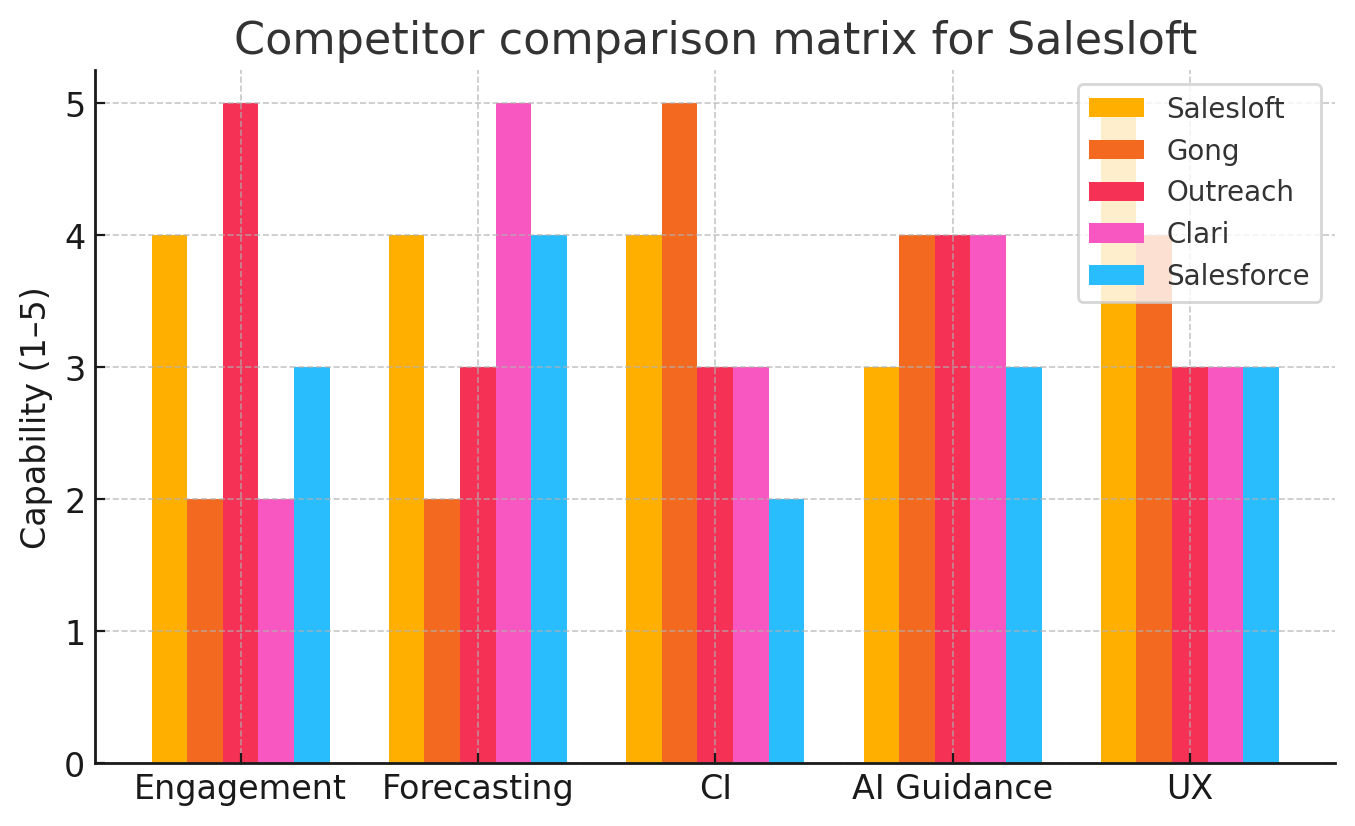
Competitor comparison matrix for Salesloft
Wyz Ask Wyz

Salesloft Integrations

Salesloft integrates with a wide range of software applications through its robust data import and export capabilities.

Wyz Ask Wyz
Data Export
Data Import


Few API Integrations for Salesloft

Software Failure Risk Guidance

?

for Salesloft

Overall Risk Meter

Low Medium High

Top Failure Risks for Salesloft

Pricing and licensing insights inferred from platform usage

Tier Buying Segment Pricing Model
Core Mid-sized sales teams Per-user with core modules
Premier High-growth B2B organizations Per-user plus add-on modules
Enterprise Global enterprise accounts Site-license with modular gating

Brief Salesloft pricing insights: Salesloft employs a tiered model, with foundational engagement tools in lower tiers and advanced orchestration, AI, and forecasting capabilities added as license tiers increase. Enterprise packages often include bundled site-wide capabilities with selective access to premium agents.

What’s new in Salesloft: product updates and strategic growth

In the past six months, Salesloft launched its Command Center to provide a single control panel for revenue orchestration across Cadence, Deals, and Forecast. Agentic Plays were added to automate cross-functional signals into rep workflows. Additionally, Drift's deep integration unlocked full-cycle buyer interaction visibility. These innovations underscore Salesloft's focus on revenue workflow automation, AI-powered prioritization, and enterprise-grade platform extensibility.

Executive

Clari + Salesloft Appoints CRO and CTO to Scale Revenue Execution and AI

Clari + Salesloft has appointed Brian Benfer as Chief Revenue Officer and Rajesh Krishnaswami as Chief Technology Officer to enhance its revenue execution and AI capabilities. These appointments aim to scale the company's Predictive Revenue System, which integrates fragmented revenue data for real-time insights and automated execution. Benfer and Krishnaswami bring extensive experience in revenue leadership and AI-driven platform development, respectively, to drive the company's global growth and technological advancement.

Partnership

Clari + Salesloft Connect Forecasting to Execution and Launch MCP Server

Clari and Salesloft have integrated their forecasting and execution capabilities with the launch of the MCP Server. This collaboration aims to enhance revenue operations by streamlining processes and improving data accuracy.

Partnership

Clari + Salesloft Connect Forecasting to Execution, Open Revenue Data ...

Clari and Salesloft have launched new capabilities to integrate Clari's forecasting insights with Salesloft's execution layer, enhancing real-time revenue intelligence. The new Model Context Protocol (MCP) Server allows AI tools to access live Salesloft data, enabling seamless workflows and improved decision-making. This integration aims to close the gap between insight and action, streamlining processes for revenue teams.

Partnership

Clari + Salesloft and Vidyard Expand to Boost Buyer Engagement

Clari + Salesloft and Vidyard have expanded their strategic partnership to enhance buyer engagement by integrating AI-powered video and engagement signals into revenue workflows. This collaboration aims to improve personalized communication, increase engagement metrics, and provide better visibility into buyer behavior, ultimately boosting sales performance and forecast accuracy.

Recent awards for Salesloft

  • Recognized as a Leader in the 2024 Forrester Wave for Revenue Orchestration Platforms:contentReference[oaicite:0]{index=0}
  • Included in the Baird Disruptors 2025 list for innovative sales and martech solutions:contentReference[oaicite:1]{index=1}
  • Top-rated Sales Engagement Software on G2 across enterprise, mid-market, and SMB

Salesloft, Inc Profile

Company Name

Salesloft, Inc

Company Website

https://salesloft.com/

Year Founded

2011

HQ Location

1180 West Peachtree Street NW Suite 600 Atlanta, GA 30309

Employees

251-500

Social

Financials

SERIES D