


Nimbata Overview
Nimbata offers lead management and call tracking features such as call recordings, greetings, surveys, call tagging, IVR, call capping, and whispers. Creativity is set in motion by combining these features.
Use Cases
Customers recommend Tracking & Monitoring Communications, Call Analytics, Advertisement, as the business use cases that they have been most satisfied with while using Nimbata.
Business Priorities
Improve ROI and Acquire Customers are the most popular business priorities that customers and associates have achieved using Nimbata.
Nimbata Use-Cases and Business Priorities: Customer Satisfaction Data
Nimbata works with different mediums / channels such as Phone Calls. Website. and Social Media.
Nimbata's features include Dashboard, Recording, Landing Page, etc. and Nimbata support capabilities include 24/7 Support, Phone Support, Email Support, etc. also Nimbata analytics capabilities include Custom Reports, and Analytics.
Reviews
"...Knowledge about how to spend your money on advertisement according to what kind of advertisement will bring you more clients...." Peer review by Exarchou K, Speech and language therapist, Education
Peer review evidence (same sources as the product rating summary)
"...This is arguably the most important reason for law firms to adopt a call tracking solution. ..." Industry by Industry Nimbata Call Analytics
"...Nimbata offers a simple to use call analytics platform so that marketers can optimize sales, spend budgets smarter and enhance the visitor experience...." Peer review
"...Knowing which ads or journeys lead to a phone booking shouldn t have to be a hassle. ..." Industry by Industry Nimbata Call Analytics
Nimbata, Ringba, SecondStreet, NetLine Corporation, 2Ship, etc., all belong to a category of solutions that help Demand Generation. Each of them excels in different abilities. Therefore, determining the best platform for your business will depend on your specific needs and requirements.
Popular Business Setting
for Nimbata
Top Industries
- Marketing and Advertising
- Human Resources
- Media Production
Popular in
- Small Business
- Mid Market
- Large Enterprise
Nimbata is popular in Marketing And Advertising, Human Resources, and Media Production and is widely used by Small Business, Mid Market, and Large Enterprise.
Nimbata Customer wins, Customer success stories, Case studies
What Are the key features of Nimbata for Tracking & Monitoring Communications?
What benefits does Nimbata offer for Call Analytics?
How can Nimbata optimize your Advertisement Workflow?
Why is Nimbata the best choice for Campaign Management?
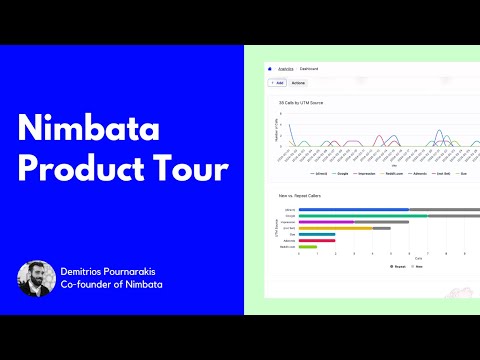
Nimbata Call Tracking Product Tour
Frequently Asked Questions (FAQ)
What buyers ask before choosing Nimbata
Integrations What CRM integrations are available for Nimbata?
Nimbata offers seamless integrations with several popular CRM platforms, enhancing your lead management and call tracking capabilities. Specifically, it integrates with HubSpot, Salesforce, and Pipedrive, allowing call data such as source, duration, and caller ID to flow directly into your CRM as new leads or activities. This automation eliminates the need for manual data entry, ensuring your sales team has accurate and up-to-date information. Additionally, Nimbata connects with Zoho CRM, enriching your records with campaign and outcome data for every call. By leveraging these integrations, businesses can streamline their processes, improve lead tracking, and ultimately convert more leads into paying customers.
Integrations How does Nimbata connect to Salesforce and what data is synced?
Nimbata connects to Salesforce through a seamless integration that automatically logs every inbound call as a CRM contact. This integration enriches the call data with essential information, including the marketing source, lead quality, and call outcome, ensuring that all relevant details are captured without manual entry. When a new caller reaches out, Nimbata auto-creates a lead in Salesforce, while also updating existing records with the latest call insights. This streamlined process allows businesses to track phone leads effectively, attributing them to specific campaigns and sources from day one. By syncing this data, Nimbata enhances the visibility of lead quality and performance metrics within Salesforce, enabling teams to focus on high-intent leads and optimize their sales strategies.
Integrations Can I integrate Nimbata with HubSpot and how does the setup process work?
Yes, you can integrate Nimbata with HubSpot, and the setup process is straightforward. To begin, log into your Nimbata account and navigate to the integrations section, where you will find HubSpot listed among the available options. Click on the HubSpot integration and follow the prompts to connect your accounts, which typically involves authorizing Nimbata to access your HubSpot data. Once connected, Nimbata will automatically log every inbound call as a new contact in HubSpot, including essential details like marketing source, lead quality, and call outcome. This seamless integration ensures that your HubSpot pipeline remains complete and up-to-date, allowing your team to focus on converting leads into customers without the hassle of manual data entry.
Integrations What is the data flow between Nimbata and Pipedrive during integration?
The data flow between Nimbata and Pipedrive during integration is designed to streamline the management of inbound calls and enhance sales processes. When a call is received, Nimbata automatically logs it as a new contact or updates an existing one in Pipedrive, capturing essential details such as the marketing source, call outcome, and lead context. This real-time data transfer ensures that every inbound call is converted into a Pipedrive deal, allowing sales teams to have immediate access to relevant information needed for closing deals. Additionally, Nimbata's AI capabilities analyze call conversations, scoring leads and providing insights that are synced back to Pipedrive, thereby enriching the CRM with valuable data that helps in optimizing sales strategies and improving lead management.
Integrations Are there any limitations when integrating Nimbata with Zoho CRM?
When integrating Nimbata with Zoho CRM, users may encounter some limitations primarily related to the depth of data synchronization and customization options. While Nimbata effectively captures every inbound call and logs it as a new lead in Zoho CRM, including essential details like marketing source, lead quality, and call outcome, the integration may not support all advanced CRM functionalities or custom fields that some businesses require. Additionally, users should be aware that while the integration automates lead management processes, any specific workflows or customizations in Zoho CRM may need to be manually configured to align with Nimbata's data flow. Overall, while the integration enhances lead tracking and management, businesses should evaluate their specific needs to ensure compatibility with their existing Zoho CRM setup.
Integrations How can I use Nimbata with Zapier to automate my workflows?
You can use Nimbata with Zapier to automate your workflows by integrating call tracking data seamlessly into your existing applications. Once you connect Nimbata to Zapier, it triggers an action immediately after a call ends, allowing you to push call data to over 6,000 apps without manual updates. To set this up, create a Zap in Zapier that connects Nimbata as the trigger app, selecting the event that occurs when a call ends. Then, choose the action app where you want the data to go, such as Google Sheets for reporting or Slack for team notifications. This integration helps streamline your lead generation process, enhances data accuracy, and eliminates repetitive tasks, ultimately improving your team's efficiency and response times.
Features What does the Call Flow Builder feature do in Nimbata?
The Call Flow Builder feature in Nimbata allows businesses to automate and customize the way incoming calls are managed, enhancing the overall call handling process. With this tool, users can set up various elements such as greetings, routing rules, IVR menus, and fallback options, all within a single interface. This means that when a call comes in, it can be directed to the appropriate department or agent based on predefined criteria, ensuring that inquiries are handled efficiently. By streamlining call management, the Call Flow Builder not only improves customer experience but also helps businesses optimize their resources and reduce response times, ultimately leading to better lead conversion rates and enhanced operational efficiency.
Features How do I set up automated workflows using Nimbata's Workflow Builder?
To set up automated workflows using Nimbata's Workflow Builder, start by logging into your Nimbata account and navigating to the Workflow Builder section. Here, you can create a new workflow by selecting the triggers that will initiate the automation, such as specific call outcomes or tags. Next, define the actions you want to take place after the trigger, which can include tagging calls, sending notifications, or updating your CRM with relevant data. Utilize the 30+ real-time conditions available to customize your workflow based on call source, duration, or AI-driven tags. Once your workflow is configured, save it and test it to ensure it operates as intended. This automation streamlines post-call processes, enhances lead management, and improves overall efficiency in handling inquiries.
Features What insights can I gain from Nimbata's AI-powered call tracking?
Nimbata's AI-powered call tracking provides a wealth of insights that can significantly enhance your marketing strategies and decision-making processes. By analyzing conversations, Nimbata tags key elements such as intent, emotion, and conversion probability, allowing you to understand what drives successful calls. This means you can identify which marketing campaigns are generating warm leads and optimize your spending accordingly. Additionally, the platform categorizes calls by product type, enabling you to filter and report on specific areas of interest without manual sorting. With real-time call tracking reports, you gain visibility into call performance, uncover conversation insights, and ultimately improve your ROI by focusing on what truly works for your business.
Features How do I customize my dashboards and reports in Nimbata?
To customize your dashboards and reports in Nimbata, start by accessing the dashboard interface where you can select the specific metrics and data points that matter most to your business. Nimbata allows you to apply filters based on various criteria such as time ranges, campaigns, and call types, ensuring you focus on the most relevant information. You can also transform available or custom fields into structured datasets that flow seamlessly into Google Looker dashboards, enabling real-time visualization of your data. Additionally, you can create custom tags for calls based on conversation context, which helps in organizing and categorizing your data effectively. Once you’ve tailored your dashboard to your needs, you can easily export the filtered reports for further analysis or sharing with your team.
Features What is the Number Pool Calculator and how does it work in Nimbata?
The Number Pool Calculator is a feature within Nimbata designed to help businesses determine the exact number of tracking phone numbers they need for effective call attribution without overspending. By analyzing your call volume and marketing campaigns, the calculator ensures that you acquire only the necessary numbers to capture every call accurately, preventing budget waste on unnecessary numbers. It works by assessing your specific requirements and providing a tailored recommendation, allowing you to optimize your call tracking strategy. This tool not only enhances your ability to attribute calls to the right sources but also contributes to a more efficient allocation of your marketing budget, ultimately leading to improved ROI and clearer insights into your marketing performance.
Features How can I automate post-call actions with Nimbata's features?
To automate post-call actions with Nimbata, you can utilize its Workflow Builder, which allows you to create customized workflows that trigger specific actions after each call. Start by setting up filters and conditions based on call data, such as source, duration, and AI-driven tags. This enables you to score leads, tag calls, and sync data seamlessly in real-time. Additionally, Nimbata's AI can automatically identify intent and categorize calls, ensuring that the right follow-up actions are taken without manual intervention. By integrating Nimbata with your CRM, such as HubSpot or Salesforce, you can ensure that all call insights and updates are automatically recorded, streamlining your post-call processes and enhancing overall efficiency.
ROI & pricing What measurable business outcomes can I expect from using Nimbata?
Using Nimbata for call tracking can lead to several measurable business outcomes that significantly enhance your marketing and sales efforts. By providing detailed insights into call performance, Nimbata enables you to identify which campaigns drive the most valuable calls, allowing for better allocation of marketing resources. The platform's AI capabilities help automatically categorize calls and score lead quality, ensuring that your team focuses on high-value inquiries. Additionally, with integrations to popular CRMs like HubSpot and Salesforce, call data flows seamlessly into your existing systems, streamlining lead management and reducing manual entry. Businesses have reported increased conversion rates, improved lead attribution, and optimized marketing strategies, ultimately leading to higher revenue and growth. By leveraging Nimbata's analytics, you can make data-driven decisions that directly impact your bottom line.
ROI & pricing How does Nimbata help in maximizing ROI for marketing campaigns?
Nimbata maximizes ROI for marketing campaigns by providing comprehensive call tracking and analytics that connect inbound calls to specific campaigns, keywords, or website visits in real time. This allows businesses to identify which marketing efforts are driving valuable leads and conversions, enabling them to optimize their strategies effectively. With features like automated lead management, call categorization, and AI-driven insights, Nimbata helps users understand call patterns, peak inquiry times, and agent performance. By eliminating guesswork and manual entry, businesses can focus their resources on high-performing campaigns, ultimately increasing conversion rates and revenue. Additionally, Nimbata's straightforward pricing model, which charges per answered call rather than per minute, ensures that companies can manage their marketing budgets more effectively, further enhancing their return on investment.
ROI & pricing What are the different pricing plans available for Nimbata, and what do they include?
Nimbata offers several pricing plans tailored to different business needs, including a free trial, monthly, and annual subscriptions. The free trial allows new users to explore Nimbata's full features for 14 days, capped at 2 tracking numbers and 50 answered calls, with no credit card required. For ongoing use, the Marketing plan starts at $222 per month, which includes unlimited client accounts, 5 tracking numbers per client, 500 calls, and custom automation rules. The Agency plan, designed for medium usage clients, is priced at $175 per month for 5 clients, while the Complete plan costs $1,250 per month for 5 clients, offering additional features like unlimited call flows and advanced marketing reports. Each plan is designed to help businesses effectively track and manage their phone leads.
ROI & pricing How can Nimbata contribute to cost savings in my marketing efforts?
Nimbata can significantly contribute to cost savings in your marketing efforts by providing transparent pricing and actionable insights that optimize your ad spend. Unlike other call tracking services that may charge per minute or include hidden fees, Nimbata charges only for answered calls, allowing you to manage your budget more effectively. Additionally, Nimbata integrates seamlessly with platforms like Google Ads and Meta, enabling you to track real conversion data and adjust your campaigns based on actual performance. This data-driven approach helps identify which marketing strategies yield the highest returns, allowing you to reallocate resources away from underperforming campaigns. By leveraging Nimbata's AI capabilities to analyze call data and detect intent, you can focus on high-quality leads, ultimately leading to increased conversions and reduced marketing costs.
ROI & pricing What is the typical time-to-value when implementing Nimbata for my business?
The typical time-to-value when implementing Nimbata for your business is impressively quick, with most agencies up and running in under 30 minutes. The process involves adding the Nimbata tracking snippet to your website, acquiring tracking numbers, and connecting your ad platforms, all of which can be accomplished without any coding expertise. Nimbata also provides step-by-step onboarding guides to facilitate a smooth setup. Once implemented, you can immediately start tracking and analyzing your inbound calls, linking them to specific campaigns, keywords, or visits that drove them. This rapid deployment allows businesses to quickly gain insights into their call performance, optimize marketing strategies, and ultimately enhance conversion rates, delivering significant value almost instantly.
ROI & pricing How does Nimbata's pricing model of charging per answered call impact overall costs?
Nimbata's pricing model, which charges per answered call rather than per-call or per-minute, significantly impacts overall costs by aligning expenses directly with the value received. This approach ensures that businesses only pay for calls that have the potential to convert into leads or sales, eliminating the risk of incurring hefty bills from lengthy conversations that may not yield results. Unlike traditional per-minute pricing, which can penalize teams for spending time with high-intent customers, Nimbata's model encourages thorough engagement without financial worry. As a result, businesses can better manage their budgets, optimize their marketing strategies based on actual performance, and ultimately improve their return on investment by focusing on the quality of interactions rather than the duration of calls.
Capabilities Can Nimbata connect inbound calls to specific marketing campaigns?
Yes, Nimbata can connect inbound calls to specific marketing campaigns, providing businesses with precise attribution for their marketing efforts. By utilizing unique tracking numbers for each campaign, Nimbata allows you to identify which marketing channels—such as Google Ads, Facebook, or email campaigns—are driving calls. This real-time connection means you can see exactly which campaign, keyword, or ad triggered the call, enabling you to optimize your marketing strategies based on actual performance data. This level of insight helps eliminate guesswork, allowing businesses to focus on the most effective campaigns and improve their return on investment. With Nimbata, you gain clarity on your call performance, ensuring that every inbound call is linked to the right marketing initiative.
Capabilities Does Nimbata support real-time tracking of call conversions?
Yes, Nimbata supports real-time tracking of call conversions, allowing businesses to monitor and analyze their call performance as it happens. This feature is crucial for understanding which marketing campaigns are driving calls and how effectively those calls convert into leads or sales. With Nimbata, call data—including source, duration, and caller ID—flows directly into your CRM, such as HubSpot or Salesforce, in real-time, eliminating the need for manual entry and ensuring that you have up-to-date insights. This capability not only enhances lead management but also enables businesses to make informed decisions quickly, optimizing their marketing strategies for better ROI.
Capabilities Can Nimbata help agencies analyze lead quality and revenue generation?
Yes, Nimbata can significantly help agencies analyze lead quality and revenue generation through its advanced call tracking and analytics features. By utilizing AI-driven insights, Nimbata automatically identifies and tags calls based on intent, allowing agencies to score lead quality and determine which inquiries are high-value. Additionally, Nimbata captures actual revenue generated from calls, enabling agencies to measure true ROI rather than just tracking leads. This comprehensive analysis helps agencies optimize their marketing strategies, allocate budgets more effectively, and focus on campaigns that drive the best results. With Nimbata, agencies can transform their call data into actionable insights, ultimately enhancing their lead management processes and boosting revenue generation.
Capabilities Does Nimbata provide insights into which keywords drive high-quality leads?
Yes, Nimbata provides valuable insights into which keywords drive high-quality leads through its Keyword-to-Sale Attribution feature. This functionality allows businesses to track and analyze the search terms that result in revenue-generating calls, helping you identify which keywords are most effective in attracting serious prospects. By understanding the keywords that lead to successful conversions, you can optimize your marketing strategies and allocate your budget more effectively. Nimbata's AI capabilities further enhance this process by analyzing call data, detecting intent, and providing actionable insights, enabling you to refine your campaigns and focus on the keywords that yield the best results. This comprehensive approach ensures that your marketing efforts are aligned with actual performance, ultimately driving better ROI.
Capabilities Can Nimbata automate lead management processes for marketing teams?
Yes, Nimbata can automate lead management processes for marketing teams, significantly enhancing efficiency and effectiveness. The platform utilizes AI to automatically identify and tag leads based on conversation context, ensuring that inquiries are routed to the appropriate agents or teams without manual intervention. This automation allows marketing teams to focus on high-value leads, as Nimbata scores lead quality and flags high-intent buyers or renters. Additionally, Nimbata integrates seamlessly with popular CRMs like HubSpot, Salesforce, and Pipedrive, enabling call data to flow directly into these systems as new leads or activities. By automating these processes, marketing teams can optimize their campaigns, reduce manual work, and ultimately convert more leads into paying customers, driving better ROI for their marketing efforts.
Capabilities Does Nimbata ensure compliance with data security and privacy regulations?
Yes, Nimbata is committed to ensuring compliance with data security and privacy regulations. The company prioritizes the confidentiality, integrity, and availability of customer data by implementing robust security measures that vary based on the sensitivity of the information collected, processed, and stored. Nimbata adheres to privacy policies that require only the minimum necessary information from users to perform its services, thereby aligning with best practices in data protection. Additionally, Nimbata acts as a data controller for personal data provided by website visitors and takes responsibility for the security of this data. While Nimbata strives to protect against unauthorized access and data breaches, it acknowledges that no system can guarantee absolute security. Overall, Nimbata's policies and practices reflect a strong commitment to maintaining compliance with relevant data security and privacy regulations.
Use cases How can SDRs use Nimbata to improve lead qualification during phone calls?
Sales Development Representatives (SDRs) can leverage Nimbata to enhance lead qualification during phone calls by utilizing its AI-powered transcription and analysis features. As calls are recorded, Nimbata automatically generates summaries and assigns custom qualification tags such as "qualified lead" or "wrong number," allowing SDRs to quickly assess the quality of each interaction. This real-time feedback helps SDRs identify high-intent leads and prioritize follow-ups effectively. Additionally, by integrating Nimbata with CRMs like Salesforce and HubSpot, SDRs can seamlessly track call data, ensuring that every lead is categorized and managed efficiently within their sales pipeline. This structured approach not only streamlines the qualification process but also provides valuable insights for optimizing future outreach strategies.
Use cases What workflows can marketers implement with Nimbata to optimize their Google Ads campaigns?
Marketers can implement several effective workflows with Nimbata to optimize their Google Ads campaigns. By integrating Nimbata with Google Ads, they can automatically track every inbound call as a conversion, attributing calls to specific campaigns, keywords, and ads. This allows for the transition from manual CPC bidding to automated, value-based bidding, enhancing bidding accuracy based on actual revenue generated from calls. Additionally, marketers can utilize Nimbata's AI features to filter out spam and low-value calls, ensuring cleaner data for more precise reporting. By routing call data into Google Sheets, teams can gain a unified view of performance, enabling deep analysis and automated adjustments in Google Ads based on total revenue from both calls and online forms. This comprehensive approach helps marketers refine their strategies and focus on high-quality leads that drive revenue.
Use cases In what scenarios should RevOps teams leverage Nimbata for tracking offline conversions?
RevOps teams should leverage Nimbata for tracking offline conversions in scenarios where phone calls are a significant part of the sales process, particularly when these calls lead to high-value transactions. For instance, businesses in sectors like real estate, insurance, or finance can benefit from Nimbata's ability to attribute calls to specific marketing campaigns, allowing teams to understand which ads drive valuable leads. By integrating Nimbata with platforms like Google Ads and CRM systems such as HubSpot and Salesforce, RevOps teams can automate the tracking of call conversions, ensuring accurate data flow and eliminating manual entry. This enables them to optimize marketing spend based on true ROI, enhance lead management, and ultimately improve conversion rates by focusing on the most effective channels and strategies.
Use cases How do sales leaders utilize Nimbata to analyze call performance and improve team training?
Sales leaders utilize Nimbata to analyze call performance by leveraging its comprehensive analytics capabilities, which provide a 360° view of call patterns, peak inquiry times, and agent performance. By automatically tagging calls and scoring lead quality through AI, Nimbata helps identify high-intent, sales-ready leads, allowing leaders to focus their training efforts on areas that drive revenue. The platform enables sales teams to filter and customize reports based on specific metrics, such as call outcomes and product types, facilitating targeted training sessions. Additionally, integrating Nimbata with Salesforce allows for seamless tracking of call data within the CRM, ensuring that sales leaders can monitor performance in real-time and adjust strategies accordingly. This data-driven approach not only enhances team training but also optimizes marketing efforts to improve overall sales effectiveness.
Use cases What are the best practices for implementing Nimbata in a marketing team's call tracking strategy?
To effectively implement Nimbata in a marketing team's call tracking strategy, start by clearly defining your goals, such as measuring campaign ROI or improving lead qualification. Next, integrate Nimbata with your existing platforms like Google Ads and CRM systems to ensure seamless data flow. Assign unique tracking numbers to different marketing channels, including social media, email campaigns, and print materials, to accurately attribute calls. Utilize Nimbata's AI features to analyze call data, tagging conversations based on context for deeper insights. Regularly review and customize your reports to identify trends and optimize campaigns. Finally, ensure compliance with privacy regulations like GDPR and CCPA by familiarizing your team with Nimbata's data protection features, thus maintaining trust with your customers while maximizing the effectiveness of your call tracking strategy.
Use cases How can teams use Nimbata's AI features to enhance their lead scoring and routing processes?
Teams can leverage Nimbata's AI features to significantly enhance their lead scoring and routing processes by utilizing its intelligent tagging and scoring capabilities. When inquiries come in, Nimbata's AI automatically detects the intent behind each call and assigns relevant tags based on the conversation context, such as "auto insurance inquiry" or "mortgage application." This allows teams to categorize leads effectively and prioritize high-value buyers or renters. Additionally, the AI scores lead quality in real-time, ensuring that the most promising leads are routed to the appropriate agents or teams without manual intervention. By automating these processes, teams can focus on engaging with leads that are more likely to convert, ultimately improving efficiency and increasing conversion rates.
Alternatives What are the best alternatives to Nimbata for call tracking?
When considering alternatives to Nimbata for call tracking, several notable options stand out. CallRail is a popular choice, offering robust call tracking features, including dynamic number insertion and detailed analytics, making it suitable for marketing agencies. Another strong contender is Twilio, which provides a flexible API for custom call tracking solutions, ideal for businesses looking for tailored integrations. Additionally, Grasshopper offers a user-friendly interface with essential call tracking capabilities, particularly appealing to small businesses. Lastly, RingCentral provides comprehensive communication solutions, including call tracking, which can be beneficial for organizations seeking an all-in-one platform. Each of these alternatives has unique strengths, so the best choice will depend on your specific business needs and budget.
Alternatives How does Nimbata compare to CallRail in terms of features and usability?
Nimbata and CallRail both offer robust call tracking solutions, but they differ significantly in features and usability. Nimbata emphasizes flexibility, allowing users to customize dashboards, reports, and automations to fit their specific workflows, rather than adhering to rigid templates. It also provides smarter AI insights, delivering instant intent, sentiment, and value detection on every lead, which enhances lead analysis. In contrast, CallRail may have a more structured approach, which some users might find limiting. Additionally, Nimbata's pricing model is straightforward, charging per answered call without hidden fees, while CallRail may include additional costs that can accumulate. Ultimately, Nimbata's focus on user adaptability and transparent pricing makes it a compelling choice for businesses seeking a tailored call tracking experience.
Alternatives What unique strengths does Nimbata have over other call tracking platforms?
Nimbata stands out among call tracking platforms due to its unique pricing model, which charges clients only for answered calls rather than per call or per minute, eliminating hidden fees and providing greater cost control. This approach ensures that businesses only pay for warm leads, making call tracking more affordable and transparent. Additionally, Nimbata integrates seamlessly with WordPress, allowing users to create multiple swap groups for tracking calls tied to specific campaigns, enhancing attribution and ROI analysis. The platform also prioritizes user privacy, complying with regulations like GDPR and CCPA, and offers robust reporting features that provide insights into call performance and lead journeys. These strengths make Nimbata a flexible and user-friendly choice for businesses looking to optimize their call tracking efforts.
Alternatives Why should I choose Nimbata instead of CallTrackingMetrics?
Choosing Nimbata over CallTrackingMetrics can be advantageous for businesses seeking a more straightforward and cost-effective call tracking solution. Nimbata uniquely charges per "answered call," eliminating hidden fees associated with per-minute charges that can inflate costs, making it easier to manage your budget. Additionally, Nimbata offers seamless integration with platforms like WordPress, allowing for automatic number swapping and comprehensive attribution of calls to specific campaigns. This flexibility enables businesses to customize their reporting and gain deeper insights into call performance without the rigidity often found in other tools. Furthermore, Nimbata prioritizes user privacy and compliance with regulations like GDPR and CCPA, ensuring that your data is handled responsibly. Overall, Nimbata's focus on simplicity, flexibility, and actionable insights makes it a compelling choice for effective call tracking.
Alternatives What are the key differences between Nimbata and RingCentral for call analytics?
Nimbata and RingCentral both offer call analytics, but they cater to different needs and functionalities. Nimbata specializes in call tracking and analytics, focusing on marketing insights by providing detailed reports on call sources, lead quality, and campaign performance. It charges per answered call, ensuring businesses only pay for valuable leads, and integrates seamlessly with platforms like HubSpot, Salesforce, and Google Ads. In contrast, RingCentral is a comprehensive communication platform that includes call analytics as part of its broader suite of services, such as video conferencing and team messaging. While RingCentral offers robust call management features, it may not provide the same level of marketing-focused insights as Nimbata. Ultimately, the choice between the two depends on whether a business prioritizes specialized call tracking or an all-in-one communication solution.
Alternatives Is Nimbata a better option than CallRail for marketing agencies?
Nimbata and CallRail both offer robust call tracking solutions tailored for marketing agencies, but they cater to different needs. Nimbata stands out with its flexibility, allowing users to customize dashboards, reports, and automations to fit specific workflows, rather than adhering to rigid templates. Additionally, Nimbata charges per answered call, eliminating hidden fees associated with per-minute charges, which can lead to more predictable costs. On the other hand, CallRail provides strong features like call attribution and conversation intelligence, which some users may prefer. Ultimately, the choice between Nimbata and CallRail depends on your agency's specific requirements, such as budget, desired features, and the level of customization needed for effective call tracking and lead management.
Nimbata Competitors


Nimbata Features
- Low
- Medium
- High
| FEATURE | RATINGS AND REVIEWS |
|---|---|
| AI Powered | Read Reviews (2) |
| Custom Reports | Read Reviews (176) |
| Analytics | Read Reviews (175) |
| CAPABILITIES | RATINGS AND REVIEWS |
|---|---|
| AI Powered | Read Reviews (2) |
| Custom Reports | Read Reviews (176) |
| Analytics | Read Reviews (175) |
Nimbata Integrations
Nimbata integrates with a wide range of software applications through its robust data import and export capabilities.


Software Failure Risk Guidance
?for Nimbata
Overall Risk Meter
Top Failure Risks for Nimbata
Nimbata, LLC News
Product Updates Nimbata
Nimbata introduces a Workflow Builder to enhance call tracking operations, offering a smarter management approach. The update includes a unified view for tracking client forms, a Script Status Checker, and new notification features, improving user experience and operational efficiency.
Nimbata Product Update January 2025
Nimbata has released a product update featuring new automation and AI call summary capabilities, enhancing call tracking, lead management, and integration with platforms like Google Ads and HubSpot.
Nimbata, LLC Profile
Company Name
Nimbata, LLC
Company Website
https://www.nimbata.com/HQ Location
265 Franklin Street, Suite 1702, Boston, MA 02110, US
Employees
1-10
Social


Financials
SEED


How does Nimbata address your Social Media Analytics Challenges?