


WebinarNinja Overview
WebinarNinja is your go-to for simplifying webinars while boosting teaching, marketing, and sales outcomes. Over 30,000 businesses have already delivered more than 3 million webinars using this all-in-one platform. It offers seamless integration of landing pages, email marketing, and analytics, which makes it easy to capture leads and drive engagement. Whether you’re hosting live sessions or automated webinars, WebinarNinja ensures a smooth experience, allowing you to focus on delivering compelling content. With a promise of ease of use, even creating a webinar can be done in just five minutes. Join a thriving community and see why so many choose WebinarNinja to elevate their presentations and reach.
Use Cases
Customers recommend Attendee Engagement, Helpdesk Management, Coaching, as the business use cases that they have been most satisfied with while using WebinarNinja.
Business Priorities
Attract More Attendees and Customizable Branding are the most popular business priorities that customers and associates have achieved using WebinarNinja.
WebinarNinja Use-Cases and Business Priorities: Customer Satisfaction Data
WebinarNinja works with different mediums / channels such as E-Mail. Chat. and Video.
WebinarNinja's features include Recording, Personalization, Templates, etc. and WebinarNinja support capabilities include 24/7 Support, Chat Support, Email Support, etc. also WebinarNinja analytics capabilities include Analytics, and Custom Reports.
Reviews
"I used to hate running webinars because of how long they took to setup and integrate with landing pages and my CRM. Since switching to WebinarNinja I now spend minutes rather than hours setting up webinars and the professional looking landing pages ...and email auto-responder sequences that go with them." - Loren Bartley
Peer review evidence (same sources as the product rating summary)
"...Built-in email Send automatic notifications, reminders, thank-yous, and follow-ups with ease. ..." The Best Webinar Platform 2022
"...Two health & wellness coaches use webinars to grow their community. Share Emma and Carla, a.k.a. , used webinars to help build a supportive, judgement-free community for health and fitness programs with a focus on self-acceptance...." Case Study The MerryMaker Sisters
"...For more detailed strategy (and email templates), see business coach Mitch Russo's. ..." Webinars: How to Create, Host, and Promote
WebinarNinja, Demio, BigMarker Webinars, Livestorm Webinar, YouCanBook.me, etc., all belong to a category of solutions that help Webinar and Conferencing. Each of them excels in different abilities. Therefore, determining the best platform for your business will depend on your specific needs and requirements.
WebinarNinja is the best all-in-one webinar software for teaching, marketing, and selling. Sign up free for landing pages, emails, sales, and analytics.
Popular Business Setting
for WebinarNinja
Top Industries
- Marketing and Advertising
- Health, Wellness and Fitness
- Professional Training & Coaching
Popular in
- Small Business
- Mid Market
- Enterprise
WebinarNinja is popular in Marketing And Advertising, Health, Wellness And Fitness, and Professional Training & Coaching and is widely used by Small Business, Mid Market, and Enterprise.
WebinarNinja Customer wins, Customer success stories, Case studies
What Are the key features of WebinarNinja for Attendee Engagement?
What solutions does WebinarNinja provide for Helpdesk Management?
What benefits does WebinarNinja offer for Coaching?
How can WebinarNinja optimize your Collaboration Workflow?
What benefits does WebinarNinja offer for Content Management?
| CUSTOMERS | TESTIMONIALS |
|---|---|

|
I used to hate running webinars because of how long they took to setup and integrate with landing pages and my CRM. Since switching to WebinarNinja I now spend minutes rather than hours setting up webinars and the professional looking landing pages and email auto-responder sequences that go with th...em. |

|
It's stupid simple to use! I use WebinarNinja to present free webinars to build awareness for our firm, position us as subject matter experts and generate sales leads. We also use it to present paid online workshops and events. WebinarNinja has been great for both! Setting up and getting going trul...y can not be any easier or faster. They've made it really easy. |

|
In 2015, I ran my first webinar with WebinarNinja. That webinar allowed me to get my FIRST 100 CUSTOMERS and launched my Recipe for SEO Success business! Testimonial By Kate Toon |
| CUSTOMERS | TESTIMONIALS |
|---|---|
|
Loren Bartley Founder Impactiv8 |
I used to hate running webinars because of how long they took to setup and integrate with landing pages and my CRM. Since switching to WebinarNinja I now spend minutes rather than hours setting up webinars and the professional looking landing pages and email auto-responder sequences that go with th...em. |
|
Steve Henke Founder Harpeth Marketing |
It's stupid simple to use! I use WebinarNinja to present free webinars to build awareness for our firm, position us as subject matter experts and generate sales leads. We also use it to present paid online workshops and events. WebinarNinja has been great for both! Setting up and getting going trul...y can not be any easier or faster. They've made it really easy. |
|
Kate Toon Founder Recipe for SEO Success |
In 2015, I ran my first webinar with WebinarNinja. That webinar allowed me to get my FIRST 100 CUSTOMERS and launched my Recipe for SEO Success business! Testimonial By Kate Toon |
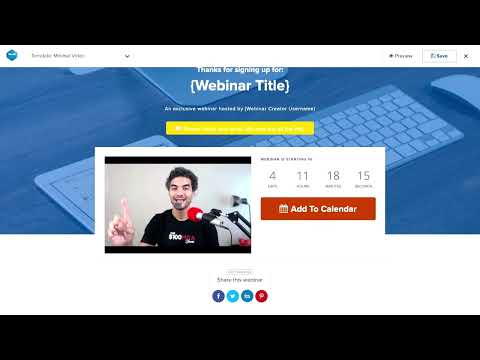
How to Create Effective Thank You Pages for Your Webinars | Day 15
Frequently Asked Questions (FAQ)
What buyers ask before choosing WebinarNinja
Integrations What CRM integrations are available with WebinarNinja?
WebinarNinja offers seamless integrations with several popular CRM platforms to enhance your webinar experience and streamline your workflow. You can connect WebinarNinja with major CRMs such as HubSpot, Keap (formerly Infusionsoft), and others, allowing you to automate follow-ups, sync contacts, and manage your leads effectively. This integration helps you capture and segment webinar registrants, enabling personalized follow-ups that can significantly improve engagement and conversion rates. Additionally, WebinarNinja supports integration through Zapier, which connects with over 1,000 apps, further expanding your options for CRM integration. By utilizing these integrations, you can ensure that your webinar data flows smoothly into your CRM, enhancing your marketing efforts and customer relationship management.
Integrations How does WebinarNinja connect to HubSpot for contact syncing?
WebinarNinja connects to HubSpot for contact syncing through its seamless integration, allowing businesses to capture and segment webinar registrants directly within HubSpot. This integration enables automatic syncing of contacts, ensuring that all registrant information is updated in real-time. When a participant registers for a webinar, their details are instantly transferred to HubSpot, where you can personalize follow-up communications based on their engagement. This not only streamlines your workflow but also enhances your marketing efforts by allowing you to tailor your outreach based on specific audience segments. By leveraging this integration, businesses can optimize their client management processes and improve overall engagement with automated follow-ups, making it easier to nurture leads and convert them into customers.
Integrations What are the setup steps for integrating WebinarNinja with Salesforce?
To integrate WebinarNinja with Salesforce, start by logging into your WebinarNinja account and navigating to the integrations section. Look for the Salesforce integration option and click on it to begin the setup process. You will be prompted to connect your Salesforce account by entering your Salesforce credentials and granting the necessary permissions for WebinarNinja to access your data. Once connected, you can configure the integration settings, such as mapping webinar registration fields to Salesforce leads or contacts. After saving your settings, test the integration by running a webinar and checking if the participant data is correctly reflected in Salesforce. This integration allows you to streamline your lead management and enhance your marketing efforts by automatically syncing webinar data with your Salesforce CRM.
Integrations Can I use Zapier to connect WebinarNinja with other applications?
Yes, you can use Zapier to connect WebinarNinja with a wide range of other applications, enhancing your webinar experience and streamlining your workflow. WebinarNinja integrates with over 1,000 popular apps through Zapier, allowing you to automate tasks such as syncing contacts, managing registrations, and sending follow-up emails without manual effort. This integration enables you to connect WebinarNinja with tools like CRM systems, email marketing platforms, and other essential business applications, ensuring a seamless flow of information across your tech stack. By leveraging Zapier, you can customize your webinar processes to better fit your business needs, ultimately improving efficiency and engagement during your online events.
Integrations What limitations should I be aware of when integrating WebinarNinja with email marketing tools?
When integrating WebinarNinja with email marketing tools, there are a few limitations to consider. While WebinarNinja supports popular platforms like MailChimp, AWeber, and HubSpot, the depth of integration may vary. For instance, some features like advanced segmentation or automation workflows might not be fully compatible, limiting your ability to tailor communications based on specific webinar interactions. Additionally, while you can automate email reminders and follow-ups, the customization options for these emails may be restricted compared to standalone email marketing platforms. It's also important to note that while integrations with tools like Zapier can enhance functionality, they may require additional setup and management. Understanding these limitations can help you better plan your webinar marketing strategy and ensure a seamless experience for your audience.
Integrations How does data flow between WebinarNinja and my chosen CRM system?
Data flows seamlessly between WebinarNinja and your chosen CRM system through its robust integration capabilities. When you connect WebinarNinja to your CRM, such as HubSpot or Salesforce, participant information is automatically synced, allowing you to manage leads efficiently. This integration enables the automatic transfer of registration details, attendance data, and engagement metrics directly into your CRM, ensuring that your sales and marketing teams have access to up-to-date information. Additionally, you can set up automated follow-ups and nurture campaigns based on webinar participation, enhancing your lead management process. By streamlining this data flow, WebinarNinja helps you maintain a cohesive workflow, improve communication, and ultimately drive better engagement and conversion rates.
Features What does the built-in landing page feature do?
The built-in landing page feature of WebinarNinja allows users to quickly create unique, branded, and high-converting registration pages for their webinars. This feature includes customizable templates that incorporate proven strategies to maximize signups, ensuring that the landing pages not only reflect your brand but also effectively engage potential attendees. By utilizing these templates, businesses can streamline the registration process, making it easier to attract and convert leads into participants. This capability is essential for enhancing the overall effectiveness of webinars as a marketing tool, as it directly impacts the number of signups and, consequently, the success of the webinar in generating leads and driving sales.
Features How do I create and manage handouts for my webinar?
To create and manage handouts for your webinar using WebinarNinja, start by preparing your content, such as PDFs or e-books, that you want to share with your attendees. Once your materials are ready, log into your WebinarNinja account and navigate to the webinar setup section. Here, you can upload your handouts directly to the platform, ensuring they are easily accessible during the live session. During the webinar, you can share these handouts with participants at strategic moments, enhancing their learning experience. Additionally, consider sending follow-up emails with links to the handouts after the webinar concludes, reinforcing the value of your content and keeping your audience engaged. This approach not only enriches the webinar experience but also helps in lead generation by providing valuable resources to your attendees.
Features What functionality does the audience presenters feature provide during a webinar?
The audience presenters feature in webinar software, such as WebinarNinja, allows selected attendees to join the presenter on camera, enhancing interactivity and engagement during the session. This functionality enables real-time participation, where audience members can share their insights, ask questions, or provide testimonials, creating a more dynamic and immersive experience. By incorporating audience presenters, hosts can foster a sense of community and collaboration, making the webinar feel less like a one-sided presentation and more like a conversation. This feature not only enriches the content being delivered but also encourages greater involvement from attendees, ultimately leading to higher satisfaction and retention rates.
Features How do I set up paid webinars with Stripe integration?
To set up paid webinars with Stripe integration using WebinarNinja, first log in to your WebinarNinja account and click on "Create New Webinar." Choose your webinar type and give it a catchy title. In the settings, you can set a fee for your webinar, which will be processed through Stripe. Ensure that your Stripe account is connected by navigating to the integrations section and following the prompts to link your Stripe account. Once connected, registrants will be able to pay for the webinar directly from your custom registration page, streamlining the payment process. Finally, set up automated email notifications to keep your registrants informed and engaged. This integration not only simplifies payment collection but also enhances your ability to generate revenue from your webinars.
Features What analytics can I track with WebinarNinja after my webinar?
With WebinarNinja, you can track a comprehensive range of analytics after your webinar to gain valuable insights into participant engagement and overall performance. Key metrics include the number of registrants, attendees, and their joining times, as well as detailed engagement statistics such as average watch time, chat participation, poll answers, and offer clicks. Additionally, you can analyze handout downloads and minutes attended to understand how effectively your content resonated with your audience. This data not only helps you gauge the success of your webinar but also informs future strategies for improving content and engagement, ultimately driving better results for your business.
Features How do I automate follow-up emails based on attendee engagement?
To automate follow-up emails based on attendee engagement using WebinarNinja, first ensure that you have set up your webinar with the platform's built-in features. When a participant registers, WebinarNinja automatically triggers a sequence of emails tailored to their actions during the webinar. For instance, if an attendee asks a question or participates in a poll, you can segment your follow-up emails to address their specific interests or inquiries. This personalized approach not only enhances engagement but also nurtures leads effectively. Additionally, you can customize the timing and content of these emails to align with your marketing goals, ensuring that your communication remains relevant and timely. By leveraging these automated email sequences, you can maintain a connection with your audience and guide them further along the sales funnel.
ROI & pricing What measurable business outcomes can I expect from using WebinarNinja?
Using WebinarNinja can lead to several measurable business outcomes that significantly enhance your marketing and sales efforts. By leveraging its all-in-one platform, you can expect increased lead generation through engaging webinars that attract and convert potential customers. The advanced analytics and reporting features allow you to track key performance indicators such as attendee engagement, conversion rates, and overall webinar effectiveness, enabling data-driven decisions. Additionally, the automated email reminders help improve attendance rates, while customizable branding options enhance your brand visibility. Businesses have reported improved customer retention and satisfaction through effective onboarding webinars, which can lead to higher lifetime customer value. Overall, WebinarNinja empowers you to create impactful webinars that drive measurable growth in your business.
ROI & pricing How does WebinarNinja contribute to cost savings and increased revenue for businesses?
WebinarNinja contributes to cost savings and increased revenue for businesses by streamlining the webinar process into an all-in-one platform, eliminating the need for multiple tools and reducing associated costs. With features like automated registration, email reminders, and high-quality video streaming, businesses can efficiently engage with their audience without incurring additional expenses for separate software. The platform's advanced analytics allows companies to track performance and optimize their strategies, leading to higher conversion rates and increased sales. Additionally, by offering various webinar formats for lead generation, customer training, and product demos, WebinarNinja helps businesses maximize their outreach and revenue potential while minimizing the time and resources spent on organizing and managing webinars.
ROI & pricing What are the different pricing plans available for WebinarNinja, and what do they include?
WebinarNinja offers a variety of pricing plans to cater to different needs, starting with a free 14-day trial that allows users to explore the platform's features without commitment. After the trial, paid plans begin at just $29 per month, which includes access to essential features such as unlimited webinars, attendees, and replays. Higher-tier plans provide additional functionalities like advanced analytics, integrations with major CRMs and email marketing tools, and options for paid webinars, allowing users to monetize their sessions. Each plan is designed to scale with your business, making it suitable for everything from small workshops to large corporate events. Users can easily switch plans as their needs evolve, ensuring flexibility in their webinar strategy.
ROI & pricing What is the total cost of ownership for using WebinarNinja over time?
The total cost of ownership for using WebinarNinja over time includes the subscription fees, which start at just $29 per month after a 14-day free trial, making it a cost-effective choice compared to competitors like Zoom, which begins at $55 per month. Additionally, WebinarNinja offers an all-in-one platform that eliminates the need for multiple tools, reducing potential costs associated with managing separate software for registration, email automation, and analytics. Users benefit from built-in features such as automated follow-ups and customizable landing pages, which can enhance marketing efforts without incurring extra expenses. Furthermore, the platform supports large-scale webinars, making it suitable for various business needs, thus providing long-term value as your webinar requirements grow. Overall, WebinarNinja's pricing structure and comprehensive features contribute to a favorable total cost of ownership for businesses looking to engage and convert leads effectively.
ROI & pricing How quickly can I see a return on investment after implementing WebinarNinja?
The return on investment (ROI) after implementing WebinarNinja can vary based on several factors, including your specific goals, audience engagement, and the frequency of webinars you conduct. Many users report seeing significant results within a few weeks, especially if they leverage the platform's features effectively, such as automated email reminders and advanced analytics to optimize their webinars. By utilizing WebinarNinja's all-in-one capabilities for hosting live and automated webinars, businesses can streamline their marketing efforts, enhance lead generation, and improve sales conversions. Additionally, the ability to run unlimited webinars allows for continuous engagement with your audience, which can further accelerate ROI. Ultimately, the speed at which you see returns will depend on how actively you use the platform to connect with your target market and drive conversions.
ROI & pricing What are the implementation costs associated with starting to use WebinarNinja?
The implementation costs associated with starting to use WebinarNinja primarily depend on the subscription plan you choose, as the platform offers various pricing tiers to accommodate different business needs. WebinarNinja provides a free 14-day trial, allowing you to explore its features without any upfront investment. After the trial, you can select from monthly or annual plans, which include all essential features such as unlimited webinars, automated email reminders, and advanced analytics. There are no additional costs for hosting or technical setup, as WebinarNinja operates entirely in the cloud and requires no software installation. Additionally, if you plan to use paid webinars, there may be transaction fees associated with payment processing, but these are typically minimal compared to the overall value gained from the platform's capabilities.
Capabilities What types of webinars can I host on WebinarNinja?
On WebinarNinja, you can host a variety of webinar types to suit your business needs, including live, automated, series, and hybrid webinars. Live webinars allow for real-time interaction with your audience, while automated webinars enable you to schedule evergreen content that can be accessed anytime. Series webinars are perfect for delivering content over multiple sessions, keeping your audience engaged over time. Hybrid webinars combine elements of both live and automated formats, offering flexibility in how you present your material. Each format is designed to enhance audience engagement through interactive features like chat, Q&A, and polls, making WebinarNinja an ideal platform for teaching, selling, or training employees effectively.
Capabilities Can WebinarNinja support thousands of attendees for large-scale webinars?
Yes, WebinarNinja is fully equipped to support thousands of attendees for large-scale webinars. The platform is designed to scale effectively, making it ideal for corporate webinars, product launches, and internal company events. With advanced analytics and multi-host capabilities, WebinarNinja ensures that you can manage large audiences seamlessly. Additionally, it offers branding customization and secure streaming options, which are essential for maintaining a professional appearance during high-stakes presentations. Whether you're hosting live, automated, or hybrid webinars, WebinarNinja provides the necessary tools to engage a vast audience while delivering high-quality video and audio. This scalability makes it a robust choice for businesses looking to maximize their reach and impact through webinars.
Capabilities Does WebinarNinja provide advanced analytics and reporting for webinar performance?
Yes, WebinarNinja provides advanced analytics and reporting features that are essential for evaluating webinar performance. The platform collects and interprets a wide range of data, including registrant statistics, attendance rates, engagement metrics such as chat participation and poll responses, and overall viewer behavior. This comprehensive analytics suite allows users to track key performance indicators, enabling businesses to understand audience engagement and optimize future webinars for better results. By leveraging these insights, organizations can enhance their content, improve marketing strategies, and ultimately drive higher ROI from their webinars. With WebinarNinja's user-friendly interface, accessing and analyzing these reports is straightforward, making it easier for hosts to make data-driven decisions.
Capabilities Can I customize the branding of my webinar pages and rooms in WebinarNinja?
Yes, you can fully customize the branding of your webinar pages and rooms in WebinarNinja. The platform allows you to design custom registration pages using pre-made templates, ensuring they align with your brand's identity. You can also create custom sales and thank you pages that match your branding, enhancing your professional image and maximizing lead generation. Additionally, WebinarNinja enables you to use a custom branded URL for your webinars, further reinforcing your brand recognition. This level of customization helps create a cohesive and premium experience for your audience, which can increase trust and engagement during your webinars. Overall, these features ensure that your webinars not only deliver valuable content but also reflect your brand's unique style and tone.
Capabilities Does WebinarNinja offer secure streaming options for corporate webinars?
Yes, WebinarNinja offers secure streaming options specifically designed for corporate webinars. The platform ensures that your webinars are delivered with high-quality video and audio while maintaining the security of your content and attendee data. This is particularly important for businesses conducting sensitive presentations, product launches, or internal training sessions. WebinarNinja's secure streaming capabilities help protect against unauthorized access and ensure compliance with international privacy laws and regulations. Additionally, the platform's integration with enterprise CRMs enhances security by allowing you to manage attendee information safely. Overall, WebinarNinja provides a reliable and secure environment for hosting corporate webinars, making it an ideal choice for organizations looking to engage their audience without compromising on security.
Capabilities Can WebinarNinja automate follow-ups based on attendee engagement?
Yes, WebinarNinja can automate follow-ups based on attendee engagement, enhancing your ability to nurture leads effectively. The platform allows you to track various engagement metrics, such as who attended, who clicked on links, and who made purchases during the webinar. Based on this data, you can set up automated email sequences that tailor follow-up messages to specific attendee actions, ensuring that your communications are relevant and timely. For instance, if an attendee shows interest in a particular product, you can automatically send them additional information or offers related to that product. This level of automation not only saves time but also helps maximize conversion rates by delivering personalized content that resonates with your audience's interests and behaviors.
Use cases How can SDRs use WebinarNinja to generate and nurture leads effectively?
Sales Development Representatives (SDRs) can leverage WebinarNinja to effectively generate and nurture leads by utilizing its all-in-one platform to create engaging webinars that provide valuable content to potential customers. By hosting lead generation webinars, SDRs can attract interested participants and collect their contact information through registration forms. WebinarNinja's automated email reminders ensure that attendees are engaged and informed, while advanced analytics allow SDRs to track performance and understand audience behavior. Additionally, SDRs can use interactive features like polls and Q&A sessions to foster engagement during webinars, making the experience more personal and impactful. After the webinar, SDRs can follow up with attendees using targeted email campaigns, nurturing these leads through tailored communication that addresses their specific needs and interests, ultimately guiding them through the sales funnel.
Use cases What are the best practices for marketers to optimize their webinar workflows with WebinarNinja?
To optimize webinar workflows with WebinarNinja, marketers should follow several best practices. First, create engaging and informative content tailored to your audience's interests, ensuring that your webinars provide real value. Utilize the platform's automated email sequences to send reminders and follow-ups, which helps increase attendance and engagement. Leverage the advanced analytics and reporting features to track performance metrics, allowing you to refine future webinars based on audience feedback and engagement levels. Additionally, promote your webinars across social media channels and through targeted email campaigns to maximize reach. Finally, consider using various webinar formats, such as live Q&A sessions or automated webinars, to cater to different audience preferences and enhance overall engagement. By implementing these strategies, marketers can effectively streamline their webinar processes and achieve better results with WebinarNinja.
Use cases In what scenarios should RevOps teams implement WebinarNinja for better customer engagement?
RevOps teams should implement WebinarNinja in scenarios where they aim to enhance customer engagement through interactive and informative webinars. This platform is particularly effective for onboarding new customers, as it allows teams to host engaging sessions that educate users about product features and best practices, thereby improving customer satisfaction from day one. Additionally, WebinarNinja can be utilized for product demonstrations, enabling RevOps teams to showcase offerings to a global audience while gathering real-time feedback through polls and Q&A sessions. The platform's advanced analytics also helps teams track engagement metrics, allowing for continuous improvement in customer interactions. By consolidating webinar management into one easy-to-use tool, WebinarNinja streamlines the process, making it ideal for RevOps teams looking to boost customer retention and loyalty.
Use cases How can sales leaders leverage WebinarNinja to enhance their product demonstrations and close deals?
Sales leaders can leverage WebinarNinja to enhance their product demonstrations and close deals by utilizing its all-in-one platform designed for seamless engagement and interaction. By creating high-quality, visually appealing webinars, they can showcase their products effectively while incorporating features like real-time chat, polls, and Q&A sessions to engage attendees and gather valuable feedback. WebinarNinja also allows for personalized experiences, enabling sales leaders to tailor their presentations to specific audience needs. Additionally, the platform supports automated email reminders and provides advanced analytics to track performance, helping sales leaders refine their strategies. By integrating with popular CRM and email tools, WebinarNinja streamlines the entire process, making it easier to follow up with leads and convert them into customers, ultimately driving sales growth.
Use cases What types of webinars are most effective for building brand awareness using WebinarNinja?
WebinarNinja supports various types of webinars that can effectively build brand awareness, including live, automated, series, and hybrid formats. Live webinars allow for real-time interaction, enabling you to engage directly with your audience, answer questions, and showcase your expertise, which can significantly enhance brand recognition. Automated webinars provide a consistent way to deliver your message to a wider audience without the need for constant live sessions, making them ideal for evergreen content. Series webinars can create anticipation and ongoing engagement, while hybrid webinars combine the benefits of both live and automated formats. Utilizing interactive tools like chat, Q&A, and polls within these webinars can further enhance audience engagement, making your brand memorable and fostering a stronger connection with potential customers.
Use cases How can teams adopt WebinarNinja for hosting paid workshops and online conferences successfully?
Teams can successfully adopt WebinarNinja for hosting paid workshops and online conferences by following a few key steps. First, they should create an account and log in to the platform, then click "Create New Webinar" to set up their event. It's essential to choose the appropriate webinar type, craft an engaging title, and set a registration fee that reflects the value offered. Next, teams can utilize WebinarNinja's automated email notifications to keep registrants informed and engaged, ensuring higher attendance rates. Additionally, leveraging the platform's advanced analytics will help teams track performance and gather insights for future events. By utilizing the all-in-one features of WebinarNinja, including branding customization and secure streaming options, teams can create a professional and seamless experience for their audience, ultimately driving engagement and revenue.
Alternatives WebinarNinja vs. Zoom: What are the key differences between these two webinar platforms?
WebinarNinja and Zoom serve different purposes, with key differences that cater to distinct user needs. WebinarNinja is specifically designed for webinars, offering features like registration pages, automated email notifications, and advanced analytics, which streamline the entire webinar process. It allows users to create engaging presentations without juggling multiple screens, as everything is integrated into one platform. In contrast, Zoom is primarily a video conferencing tool that can host webinars but lacks the dedicated marketing features that WebinarNinja provides. While Zoom excels in real-time meetings and collaboration, WebinarNinja focuses on enhancing lead generation and audience engagement through its tailored webinar functionalities. Therefore, businesses looking for a comprehensive webinar solution may find WebinarNinja to be the superior choice, especially for marketing-driven events.
Alternatives What makes WebinarNinja a better choice than GoToWebinar for hosting webinars?
WebinarNinja is often considered a superior choice over GoToWebinar for hosting webinars due to its focused design and user-friendly interface tailored specifically for webinars. Unlike GoToWebinar, which was not originally built for this purpose, WebinarNinja offers an all-in-one platform that includes essential marketing tools such as registration and thank-you pages, automated email notifications, and advanced analytics to track performance. Users benefit from a seamless experience without juggling multiple screens, as everything is integrated into one platform. Additionally, WebinarNinja supports higher attendee limits at a lower cost, making it more accessible for businesses of all sizes. With features designed to enhance engagement and reduce technical issues, WebinarNinja provides a more efficient and effective solution for hosting impactful webinars.
Alternatives How does WebinarNinja compare to WebinarJam in terms of user experience and features?
WebinarNinja and WebinarJam both offer robust webinar solutions, but they differ significantly in user experience and features. WebinarNinja is designed with an all-in-one approach, providing a seamless interface that simplifies the webinar creation process without the need for additional software for automated webinars, which are included in its Pro and Business plans. Users appreciate its intuitive setup, allowing them to create webinars in seconds and manage everything from registration pages to email notifications in one place. In contrast, WebinarJam can be more complex, often requiring users to navigate multiple tools and settings. While WebinarJam offers advanced features like live streaming to Facebook and YouTube, WebinarNinja focuses on delivering a streamlined experience with high-quality video and audio, making it easier for users to engage their audience effectively.
Alternatives What are the advantages of choosing WebinarNinja over Crowdcast for my webinar needs?
Choosing WebinarNinja over Crowdcast offers several advantages tailored to enhance your webinar experience. WebinarNinja supports up to 1,000 live attendees per session, making it ideal for larger audiences, while also providing built-in marketing tools to help attract more participants. The platform features a user-friendly interface that allows seamless slide uploads without the hassle of juggling multiple screens, ensuring a smooth presentation. Additionally, WebinarNinja includes automated webinars in every Pro and Business plan, enabling you to engage audiences even when you're not live. With robust analytics and reporting capabilities, you can easily track performance metrics, and its direct integrations with popular tools streamline your workflow. Overall, WebinarNinja is designed specifically for webinars, offering a comprehensive solution that can simplify your processes and improve engagement compared to Crowdcast.
Alternatives Are there any compelling reasons to switch from WebinarJam to WebinarNinja?
There are several compelling reasons to consider switching from WebinarJam to WebinarNinja. Firstly, WebinarNinja offers an all-in-one platform that simplifies the webinar creation process, eliminating the need for additional software for automated webinars, which are included in the Pro and Business plans. Users appreciate the intuitive interface that allows for quick setup and management of webinars without the confusion often associated with WebinarJam. Additionally, WebinarNinja provides robust marketing tools such as customizable registration pages, automated email reminders, and advanced analytics to track performance effectively. The platform is specifically designed for webinars rather than meetings, ensuring a seamless experience with features like integrated slide presentations and audience engagement options. Overall, WebinarNinja focuses on enhancing the teaching and learning experience, making it a strong alternative for businesses looking to streamline their webinar efforts.
Alternatives What are the best alternatives to WebinarNinja for businesses looking to host webinars?
When considering alternatives to WebinarNinja for hosting webinars, several notable options stand out. Zoom is a popular choice, primarily known for its video conferencing capabilities, but it lacks the dedicated marketing tools that WebinarNinja offers, such as registration pages and automated email notifications. GoToWebinar is another alternative, though it is often criticized for being outdated and not specifically designed for webinars, which can complicate the user experience. WebinarJam provides a robust platform with features like automated webinars, but it may involve additional costs for certain functionalities. Crowdcast is also a contender, offering a user-friendly interface and live interaction features, yet it may not match the all-in-one capabilities of WebinarNinja. Each of these platforms has its strengths, so the best choice depends on your specific webinar needs and marketing goals.
WebinarNinja Competitors



WebinarNinja Features
- Low
- Medium
- High
| FEATURE | RATINGS AND REVIEWS |
|---|---|
| Analytics | Read Reviews (13) |
| Custom Reports | Read Reviews (91) |
| CAPABILITIES | RATINGS AND REVIEWS |
|---|---|
| Analytics | Read Reviews (13) |
| Custom Reports | Read Reviews (91) |
WebinarNinja Integrations
WebinarNinja integrates with a wide range of software applications through its robust data import and export capabilities.


Software Failure Risk Guidance
?for WebinarNinja
Overall Risk Meter
Top Failure Risks for WebinarNinja
WebinarNinja, LLC Profile
Company Name
WebinarNinja, LLC
Company Website
https://webinarninja.com/HQ Location
Employees
11-50
Social


Financials
PRIVATE

