


GoFormz overview: capabilities, features, use cases, and value by role
GoFormz is a mobile forms and reporting solution.
Top capabilities of GoFormz
Mobile & Online Form Completion
Read detailsGoFormz is a mobile and desktop form platform that works online and offline. It captures data types like images, eSignatures, GPS, and sketches directly from a device. As Jaguar Coffee puts it, "The simplicity of creating and changing the form templates...as soon as we saw that, I knew that GoFormz was going to be the right solution." Inspecta points to both ease of use and integration in the same breath: "It's flexible and user friendly, especially with mobile devices. A key feature is instantly linking the completed form data to ServiceMax." The time savings reported by customers are concrete. In one customer's words, a task ended up only taking about 1/6th of that time. Federal Mfg reports that GoFormz probably saves us between 200-250 man hours a week.
conditional logic
Read detailsGoFormz supports conditional logic that makes fields appear, hide, or change behavior based on earlier responses. As HELP Home Services puts it, "GoFormz helped create conditional logic that automatically directs the data to the appropriate vendor based on specific criteria. That's all possible with the power of GoFormz." PurAir is equally direct: "A lot of the conditional logic that is present in GoFormz would have been impossible on a paper form. It has saved us countless times." Pacific Seafood pairs the same feature with over 200 automations to standardize their verification process.
Offline Forms and Data Capture
Read detailsGoFormz supports offline data collection — forms fill and save locally, then sync to connected systems once a connection returns. A-C Electric Company puts it plainly: "The biggest impact GoFormz has had on us is the ability to have offline capabilities". Vestas took that capability further, boosting field accuracy and saving over $100K in only one year. ServiceMaster credits offline forms with accelerating billing processes by 57%.
image capture
Read detailsGoFormz lets users capture images directly within digital forms using their mobile device camera, embedding those photos as structured data points alongside other form fields for richer documentation.
Form Data Export & Routing
Read detailsGoFormz sends completed form data to connected platforms, spreadsheets, dashboards, and databases through integrations and an open API. The time savings are concrete. As Schenk Tanktransport puts it, "In the time that we have been using GoFormz, we have saved tens of thousands of Euros." Ferry Electric reports saving about 1-2 business days by sending completed forms electronically rather than mailing or delivering them from the field.
Manufacturing solution
Read detailsGoFormz brings manufacturing workflows into digital form by capturing safety, inspection, quality control, and operational data from any device, then routing that data through workflow automation and into enterprise systems.
Field Service forms
Read detailsGoFormz supports field service teams through digital form capabilities that cover safety checklists, inspection records, time and materials data, and daily reports — all capturable from any device whether online or offline.
Form Sharing & Distribution
Read detailsGoFormz connects completed digital forms directly to the people and systems that need them. Forms can be shared instantly for review, routed to specific recipients, or uploaded straight to cloud storage — and that works for both internal teams and external contacts.
Enterprise System Integration
Read detailsGoFormz links its digital forms to the rest of a company's software stack through both turnkey integrations and an open REST API. Connected systems include Salesforce, Procore, Snowflake, SQL, Acumatica, and Google Workspace. One global construction operation used these integrations to accelerate processes by 95%.
Barcode Scanning
Read detailsGoFormz builds barcode scanning directly into digital forms, so field teams can capture data such as long HVAC serial numbers from their mobile devices without manual transcription; separately, Automated Workflows eliminate manual data entry, saving 350+ project manager hours annually.
Procore integration
Read detailsGoFormz includes a pre-built Procore integration that automatically routes completed forms and field data into Procore project management records, eliminating manual re-entry. A company in the mid-market segment highlights Procore Integration alongside ease of form setup and customer service as standout strengths.
Form Logic & Automation
Read detailsGoFormz handles conditional logic and automated calculations on digital forms without requiring any code, adjusting formatting and populating fields dynamically based on what users enter — whether the logic involved is simple or complex.
image-to-text (OCR) field population
Read detailsGoFormz uses OCR to read text from images and fill form fields automatically, reducing manual entry and improving accuracy. Service providers using pre-filled digital forms have seen technician data processing accelerated by 75%.
multi-step approval routing
Read detailsDigital forms in GoFormz can travel through a defined approval chain before any data reaches a downstream system — moving step by step, getting rejected with notes when needed, and resubmitted until they clear the full sequence.
Acumatica integration
Read detailsGoFormz links digital forms directly to Acumatica ERP through a pre-built integration that automates data synchronization and keeps records centralized across both systems.
Cloud Data Storage & Review
Read detailsGoFormz keeps submitted forms and data in cloud-based storage, so teams can access, review, and manage completed documents from anywhere in real time.
Rich Data Collection
Read detailsGoFormz captures rich, diverse data directly from any device through digital form fields that collect GPS coordinates, barcode data, image fields, audio recordings, and more in real time.
Native Device Data Capture
Read detailsGoFormz captures rich data directly within mobile forms by tapping native mobile device features. GPS, camera images, electronic signatures, and barcode scanning are all accessible from within a form, so field teams record accurate information on the spot.
Form Pre-population from Integrated Systems
Read detailsGoFormz pre-populates forms automatically by pulling data from connected CRM, ERP, and database systems, so field teams receive forms already filled with relevant information rather than entering it by hand.
GPS tracking
Read detailsGoFormz gives field teams a way to capture GPS data and geotags directly inside digital forms, enabling precise asset location recording, real-time error flagging, and documentation that meets the requirements of regulated pipeline and construction work. WBI Energy has completed over 4,000 forms and is looking to expand GoFormz into other engineering departments.
web application (desktop)
Read detailsGoFormz extends its form-building environment to desktop browsers, where users can build, manage, complete, and submit digital forms without needing the mobile app.
Responsive Form Display Configuration
Read detailsGoFormz adapts its forms for small screens through a dedicated mobile display mode that keeps every field clear and responsive on any device. The form's existing logic and automations carry over unchanged.
Cross-template Form Reporting
Read detailsGoFormz makes it possible to pull data from multiple form templates into a single report — tracking trends, measuring productivity and compliance, and surfacing real-time insights into business operations.
Scheduled Report Automation
Read detailsGoFormz takes recurring reporting off your plate by scheduling automated report delivery — completed data lands in a user's inbox or uploads directly to connected platforms, with no manual steps required.
Filtered & Dynamic Report Refinement
Read detailsGoFormz filters reports so teams see only the form data that matters, producing focused analytics that scale as data collections grow.
Two-way Data Sync with External Systems
Read detailsGoFormz keeps data moving in both directions automatically — form submissions update your connected spreadsheets, databases, and CRM/ERP records in real time, and those same systems can push information back into your forms.
Form Update and Deployment Management
Read detailsForm templates in GoFormz update instantly for every user the moment an administrator pushes a change, keeping compliance requirements and customer information current across the board.
custom branding
Read detailsGoFormz supports form template customization through branding controls that let teams upload logos, adjust fonts and colors, and attach headers or footers to align digital forms with a company's visual identity.
GoFormz for Education
Read detailsGoFormz for Education enables administrators across departments to digitize paper documents into mobile forms, automate workflows, and securely store and analyze data — all without IT knowledge or retraining — and customers have seen the time to complete documentation processes cut by more than 60%.
Windows mobile forms app
Read detailsGoFormz covers Windows phones and tablets with a free mobile forms app, matching the fill-and-submit workflow already available on iOS and Android devices.
GoFormz for Retail
Read detailsGoFormz for Retail digitizes retail team operations across scheduling, timesheets, order forms, inventory tracking, and merchandising contracts. Automation, mobile access, and native integrations to existing platforms deliver these capabilities through the GoFormz product.
Top features of GoFormz
Digital Forms
Read detailsGoFormz Digital Forms lets teams convert existing paper forms into digital versions — usable on phones, tablets, and computers — without writing any code. Forms support images, sketches, GPS, maps, and barcode data. They work fully offline. Once connectivity returns, data syncs to the cloud automatically. The digital forms are designed to look identical to the paper originals, which customers say makes adoption straightforward: as one user notes, the digital forms are identical to the paper forms employees were already familiar with made the transition very intuitive. DiCAN, Inc. evaluated several platforms before settling here, noting "I knew there were certain things that we wanted the digital forms to be able to do. So I tried out maybe three or four different companies prior to landing on GoFormz." The impact on field compliance can be direct: Robert Henry Corporation says, "Daily job briefings weren't getting done before GoFormz. And now they're getting done and we know they're getting done." NQCranes reports 50% less time spent on paperwork, and Petrol Services Australia credits the platform with $350K in annual savings.
Automations & Workflows
Read detailsGoFormz's Automations & Workflows feature handles routing completed forms to colleagues, customers, and cloud storage, pre-filling and dispatching forms to any device, and updating spreadsheets, dashboards, and connected databases in real time — using either ready-made recipes or custom no-code automations. Pacific Seafood notes that GoFormz has more advanced workflows and backend integrations as well. One mid-market customer reports that Workflows that we have automated have changed everything. Our dashboards receive data directly. Teams have recorded savings of over 13,000 man hours through automated workflows, and one organization automated business-critical workflows and saves $350K annually.
Public Forms
Read detailsPublic Forms extends GoFormz forms to external recipients — anyone can fill out, sign, and submit a form through a shared link without needing a GoFormz account. Users control which fields are editable, pre-fill data, apply custom branding, and set expiration dates on those links. Prestage Farms found that placing an electronic employment application on their website allowed them to reach people who already have a job but want a different opportunity, with one person at the company noting I can't stress enough how many new opportunities the use of [Public Forms] has opened up for us. Bozzuto Construction Company says, It's much faster for our subcontractors because forms are automatically filed from the field. This time saved allows people to focus on other critical aspects of their jobs. As Leaps & Bounds Family Services Inc. puts it, "I would say that we have cut down the time that it takes to complete our documentation processes by more than 60%."
Online Forms
Read detailsGoFormz's Online Forms feature covers the full form lifecycle — building with a drag-and-drop editor, filling out online or offline via the mobile app, collecting eSignatures, and routing data automatically through logic and automation, all without writing code. Balmain & Co. puts it directly: "From a productivity point of view, the integration of our online forms into Procore and the automated workflow increased productivity, streamlining the administrative side of our post construction service." Teams have also seen measurable volume gains, including a 60% JSA submission increase through the platform.
Form Builder
Read detailsGoFormz's Form Builder gives teams two distinct paths to a finished digital form. The first starts with an existing PDF: upload it, and an AI-powered builder automatically identifies and places each field's type, size, and name. The second path starts from scratch, using a code-free drag-and-drop interface where users add logic, calculations, and conditional formatting. Whichever route a team takes, small-business customers report that the drag-and-drop form builder, along with the ready-made forms, makes creating new forms incredibly fast.
Electronic Signatures
Read detailsGoFormz handles electronic signatures end-to-end, from capture to delivery. The signatures and initials it collects meet both E-SIGN Act and UETA compliance standards. Forms can be signed on any device, including those with multi-touch input. Pre-filled templates support scenarios where multiple signers are involved, and completed forms are routed automatically once signing is done.
Starter Form Templates
Read detailsGoFormz comes ready to use from day one, bundled with a collection of free, pre-built digital form templates available immediately upon sign-up. The templates cover common business needs — incident reports, HIPAA authorizations, inspection forms, and timesheets among them. Each template can be customized to fit specific data collection needs, helping teams move to digital processes faster.
Top use cases for GoFormz
Inspections
Read detailsGoFormz replaces paper-based inspection processes end to end. Inspectors complete checklists, record issues, and take photos on mobile devices. Built-in logic and validation keep data clean before it leaves the field. Routing and data integration then deliver actionable reports to office teams in real time.
Safety & Compliance
Read detailsGoFormz brings digital forms, conditional logic, and multi-level approval workflows together in one platform, so field crews and HSE teams can run safety programs end to end without paper. Required fields and conditional logic keep data collection consistent in the field. Completed forms automatically generate immutable, timestamped, GPS-stamped records. Those records feed directly into platforms like Procore, SAP, and Salesforce.
Invoice & General Admin
Read detailsGoFormz lets teams complete digital invoices, internal forms, and customer-facing documents on mobile devices — with automatic data validation, field-level calculations, and offline support — then route completed forms instantly to finance, HR, or connected systems, eliminating manual entry errors, saving significant time, and producing a cleaner back-office operation.
Timekeeping & Scheduling
Read detailsGoFormz enables employees to log hours, notes, overtime, and signatures via mobile or web, with supervisor approvals and time entries routing automatically to payroll or HR systems for faster, more accurate time tracking with reduced manual data entry.
Work Order Management
Read detailsField teams and supervisors use GoFormz to create, assign, complete, and approve work orders through mobile-ready digital forms. Built-in logic, routing, and offline support keep work moving without paper. The result is real-time visibility into field activity, fewer data errors, and direct data flow into systems like Salesforce and Procore.
Client & Patient Intake
Read detailsGoFormz handles the full cycle of digital intake — from sending forms before an appointment to automatically routing completed responses to colleagues or cloud storage. Organizations can share forms ahead of appointments for clients or patients to complete from any location. Completed forms move automatically to colleagues or cloud storage through HIPAA-compliant configurations. The outcome is less paperwork time, faster patient onboarding, and more accurate information collection.
Permit Management
Read detailsGoFormz supports permit-to-work workflows spanning hot work, confined space, and electrical permits. Field teams request permits using mobile forms. Supervisors review and authorize those requests while enforcing compliance rules. Permit data is tracked in real time, with completed records flowing into cloud storage or back-office systems. Offline capability, conditional logic, and rich media capture are built into the process to strengthen safety and compliance.
E-Signatures & Contracts
Read detailsGoFormz handles contract and agreement workflows end-to-end — from compliant digital signatures through automatic delivery, approvals, reminders, archiving, and a full audit trail of who signed what and when. GoFormz routes digital forms through signature fields that comply with both the E-SIGN Act and UETA. Once a form is complete, GoFormz automatically delivers it to the right stakeholders. The process includes approvals and reminders, and every signed document is archived with a full record of who signed and when.
HR & Workforce Administration
Read detailsGoFormz supports hiring workflows by letting HR teams share digital job application forms with applicants anywhere, collecting legally binding eSignatures and auto-filled data, then automatically routing completed applications to hiring managers and connected systems such as Google Suite and Microsoft.
Value delivered by role with GoFormz
managers
Read detailsGoFormz gives managers live visibility into whether field employees are completing the correct forms accurately. This real-time oversight eliminates the wait for paper to return to the office, enabling immediate spot-checking across distributed teams. The platform guides users through disciplinary actions, housing applications, and other administrative workflows as a smooth, structured process. Balmain & Co. says GoFormz simplifies the experience for purchasers, residents and building managers, but also streamlines our internal workflow. Atlas Acon Electric Services adds that Our account managers have been very helpful. They helped us easily setup our forms and get started. Anytime we have questions, they are quick to answer them.
field teams
Read detailsGoFormz lets field teams complete and submit mobile forms from anywhere, including offline in remote locations, cutting hours of after-shift paperwork and keeping workers in sync with the office. Tickets can be signed and submitted the same day, which accelerates billing cycles. One organization saved over 13,000 hours a year by adopting the platform.
Technician
Read detailsGoFormz replaces paper-based field forms with digital ones that technicians complete and submit from phones, tablets, or computers. Pre-populated fields, barcode scanning, drop-down menus, and conditional logic work together to reduce data entry time to as little as a quarter of what paper processes required. Digital forms also eliminate illegible handwriting, lost paperwork, and unnecessary trips back to the office. As Jaguar Coffee puts it, "Before, we were at the mercy of the technician... now we don't have to be tracking people down for their forms." Pipe Line Unique Services puts the scaling problem plainly: "As our business grew, we had more locations and were adding more service technicians, and the amount of paper forms was becoming overwhelming."
Operations Director
Read detailsGoFormz turns paper-based field operations into automated, system-connected workflows — and for Operations Directors, that shift pays off in concrete terms. Paper scanning disappears. Document routing to systems like Salesforce happens automatically. Teams can grow headcount and revenue without rebuilding processes from scratch. Over time, GoFormz moves beyond simple paper replacement to become a core tool for data collection and transformation. The ROI shows up in the ability to do more with fewer people.
Systems Analyst
Read detailsGoFormz handles complex conditional logic and two-way data integration without requiring heavy development work. Systems Analysts can build that conditional logic directly in the platform. Bidirectional data integration means GoFormz pulls existing data into forms and pushes completed form data back into data warehouses. One organization saves approximately $350,000 a year by enabling more sales and work without adding headcount. For construction field teams, offline capability and ease of end-user adoption are the primary reasons buyers choose it.
project manager
Read detailsProject managers using GoFormz recover 350+ hours annually through automated workflows that eliminate manual data entry, with completed forms routed directly to them upon field submission for immediate review, annotation, and approval, and real-time visibility into field activity allowing issues to be addressed as soon as they arise to reduce project delays.
drivers
Read detailsGoFormz simplifies documentation for drivers through drop-down menus and automatic field population, so completing forms requires little to no writing or typing. Drivers can also photograph tickets on the spot and attach them directly to forms, cutting out the paper that used to travel with drivers for days or weeks before reaching the office. As RMK Trucking puts it, "The drivers really love GoFormz. Now they don't have to write anything, they don't even have to type anything for the most part because it's all drop downs or automatic" — and drivers there immediately thanked the team for making the switch. Adoption is straightforward even across a mixed-age workforce: as NTL Pipelines puts it, "It didn't require very much instruction for our transport division, even though our drivers range in age."
management team
Read detailsGoFormz brings management teams real-time visibility into job site productivity and field team activities. That visibility feeds data-driven decisions on how to guide and direct employees. Insights from digital form data open new opportunities for real-time operational decision-making, including driver performance monitoring and adherence to procedures. Management teams across industries also cite GoFormz's adaptability and ability to grow with the business as a key benefit.
accounting team
Read detailsGoFormz helps accounting teams track field data more accurately and process it more quickly by routing completed forms directly to the team and eliminating manual data entry from paper timesheets. The Noel Company, Inc. captures what that paper-based reality looked like before the switch: "We were losing money, we were losing time, we were losing data, it was a stress on our accounting department, on our project management team, it was a stressor on everybody."
administrative team
Read detailsAdministrative teams using GoFormz can send invoices to customers the moment a field form is completed, cutting the processing delays that come from manual data entry. The platform's automated workflows route accurate, legible data directly to office staff without requiring follow-up with field workers. That time savings adds up: admins report saving several hours a week on paperwork, and the QuickBooks integration alone accounts for approximately four hours a week recovered for higher-value work.
field personnel
Read detailsField teams get their paperwork done in the field — no office return trips required. GoFormz supports offline form completion from remote locations, so workers stay productive even without internet connectivity. The platform handles over 50 field employees at once and delivers a 15% efficiency increase for field workers, converting time previously spent on back-office reporting into additional field inspections.
office personnel
Read detailsGoFormz connects office and field teams by automating form routing, pre-populating digital forms dispatched to field crews, and giving back-office staff real-time access to submitted data for immediate invoice processing, customer communication, and employee hour monitoring. SiteMix puts it plainly: "GoFormz takes so much work off of our administrators, and eliminating the paper forms saves us thousands of dollars. GoFormz easily saves me 50-75 hours per month that would otherwise be spent just on office personnel tasks." Back-office teams at other organizations see similar gains, with Jaguar back-office personnel saving at least several hours a week.
President of DESHAZO's Service Group
Read detailsFor the President of DESHAZO's Service Group, GoFormz delivers operational efficiency and marketplace competitiveness through standardized digital documentation across all customer facilities. Field technicians can capture photos and annotations on-site, replacing paper-based checklists that could not support image capture. Centralized document storage and those efficiency gains are credited with sustaining the company's growth and customer demand.
Specialty Asset Manager
Read detailsField teams using GoFormz can swap paper checklists for digital forms without writing a single line of code, replicating existing templates directly rather than rebuilding form systems from scratch. GoFormz works offline, keeping crews productive where connectivity is unreliable. Equipment issues that once took three weeks to surface can now be identified within 24 hours. Teams typically see approximately 50% time savings alongside near-real-time equipment visibility.
Construction Manager
Read detailsConstruction managers using GoFormz gain real-time data transparency through integration with platforms like Procore, streamlining post-construction administration for purchasers, residents, and building managers at once. As Balmain & Co. puts it, "The biggest benefit is real-time data and transparency from a management point of view". The automated workflows increase productivity while positioning the digital process itself as a client-facing competitive advantage for construction firms.
Senior Technical Support Technician
Read detailsSenior Technical Support Technicians using GoFormz cut form-building and field population time in half from day one. That efficiency translates to over $100,000 in annual savings without a lengthy learning curve. Managers also gain live oversight into field submissions, enabling real-time spot-checking of form accuracy and compliance.
Corporate Safety Manager
Read detailsCorporate Safety Managers using GoFormz see a 60% increase in safety form submissions within 30 days of implementation. Incident reports route instantly from the field for immediate review and approval. QR code integration simplifies the submission process for workers. Voice-to-text support in multiple languages, including Spanish, keeps the platform accessible for diverse workforces. Digital safety forms remove the administrative burden of collecting and processing handwritten safety documentation.
Office Accountant
Read detailsGoFormz removes the bottleneck of waiting for physical forms by giving office accountants a real-time data entry workflow. Auto-calculating fields handle billing computations automatically. That removes the manual steps that push accounting work days behind schedule.
President
Read detailsFor organization presidents, GoFormz integrations with tools like Zapier and Dropbox automate practically all administrative processes, helping achieve the highest revenue per employee in their industry. The platform eliminates manual hand-ins, saving at least an hour per user per week. Multi-touch signature capability is unavailable from other vendors. Operations can expand without adding administrative overhead. As 360 Global Transportation puts it, "I am the president of the GoFormz fan club!"
Systems Administrator
Read detailsFor Systems Administrators managing field operations, GoFormz replaces manually captured data stored in disparate locations with centralized visibility across ERP systems like Acumatica. Digital form legibility eliminates time lost interpreting handwritten field notes. Billing throughput can shift from two jobs per day to twenty to twenty-five jobs per day, supporting high-volume document management across dozens of daily jobs.
Owner
Read detailsGoFormz eliminates significant manual work across both ownership and HR workflows. On the ownership side, the platform can remove follow-up work equivalent to two full-time positions annually. That reduction represents roughly $80,000–$90,000 in savings. Digital documentation also protects against hundreds of thousands of dollars in potential damage claims. GoFormz integrates with ERPs to generate management reports, and owners can monitor installations from any location. The platform also functions as a sales tool with new prospects. On the HR side, automated new hire data workflows cut onboarding time by 75%.
Director of Quality
Read detailsDirectors of Quality working with GoFormz access conditional logic that paper forms cannot replicate, which prevents errors through automated validation. GoFormz integrates with QuickBooks to automatically upload completed forms with pricing, cutting out days of delay before information reaches accounting systems. Labor savings from digitization are estimated in the tens to hundreds of thousands of dollars.
Install Team
Read detailsInstall Teams using GoFormz arrive on-site with immediate access to job details, product specifications, salesperson notes, and image pages through integrations with Dropbox and automated form routing. Pre-populated job information reduces the manual data entry required on-site. Completed forms are automatically uploaded and made available for Install Team review the moment they are submitted, eliminating communication delays between office and field.
production team
Read detailsProduction teams working with GoFormz trade manual data entry for auto-populated fields and optimized digital forms, cutting the documentation burden enough that one customer reports it routinely took an hour and a half to record a single oxygen fill before switching. Forms are iteratively refined to match team workflows, and members quickly recognize the efficiency gains from automation. The result is faster response to customer requests without sacrificing documentation accuracy.
Servicemen
Read detailsGoFormz shifts agricultural service teams away from paper forms and toward digital documentation completed on-site at remote farm locations. Field staff can capture critical production insights in the moment, rather than recording them after the fact. Supervisors, meanwhile, can pull historical service report data to verify compliance and address non-conforming growers or facilities. That audit trail directly supports the accountability and traceability requirements that come with agricultural service roles.
Vice President of IT
Read detailsThrough its Open API and SQL Server integration, GoFormz puts Vice Presidents of IT in full control of data routing, transformation, and business rule application. The platform supports seamless ERP connectivity and ETL process management. It also eliminates the two-step process of handwriting and re-entering data, replacing it with a single-step field-to-system workflow. Flexible integration architecture lets IT leaders adapt as systems evolve without being locked into rigid data flows.
supervisor
Read detailsGoFormz shifts field service oversight from paper-based reaction to proactive digital monitoring. Supervisors can pull historical service report data, verify compliance, and address non-conforming employees or facilities — all without waiting to get back to the office. Forms run on mobile devices. Required digital signatures can be gathered in the field. Supervisors can also create work orders that flag items needing additional attention. Taken together, these capabilities improve accountability and compliance tracking across distributed field operations.
Head of IT Services
Read detailsGoFormz delivers a fully paperless operation where no lost form disrupts a workflow. Completed forms route automatically via email notification, removing the operational risk of misplaced documentation. Account managers help configure forms quickly and respond to questions within the hour, making onboarding support a clear differentiator.
Operating Partner
Read detailsGoFormz saves Operating Partners 50–75 hours of office personnel time every month — enough to eliminate the need for a full-time administrative hire. The platform replaces handwritten tickets and manual tallying with automated digital workflows. That shift lets operations scale without adding administrative overhead.
Project Coordinator
Read detailsGoFormz cuts the administrative drag of paper-based form handling, saving Project Coordinators several hours per week per office while tightening inventory control over materials moving to the field. The platform fits into existing workflows rather than displacing them, and it scales with company growth without requiring process reinvention.
Solo Practitioner
Read detailsFor solo practitioners in healthcare settings, GoFormz supports pre-appointment digital intake so parents can complete forms before arriving. This gets patients into the chair within five minutes of arrival. The platform also improves insurance filing efficiency and speeds up information receipt from patients, cutting administrative time during appointments. Forms are completed correctly the first time, which eliminates rework and improves the overall patient experience.
Environmental Advisor
Read detailsGoFormz shifts environmental advisors off paper and onto real-time on-site documentation. The Image field and Sketch field work together to support photo markups directly in the field — something paper forms simply cannot do. Teams can build custom processes and reporting tailored to their specific project requirements. Dropping paper closes the lag between observation and completed report.
Diver Technician
Read detailsFor dive operations, GoFormz captures real-time paperwork as supervisors communicate with divers underwater, building a reliable digital record of dive history that supports career documentation and simplifies the volume of dive-related forms that once demanded dedicated administrative solutions.
Human Resources Manager
Read detailsGoFormz removes the paperwork chase for HR managers overseeing workers spread across multiple job sites. Instead of chasing down completed forms, conditional logic automatically emails them to the office the moment an employee submits. Remote workers see only the forms relevant to their location or role, which keeps documentation complete and supports compliance. The same digital form features that handle collection also surface optimization opportunities across onboarding, disciplinary, and compliance workflows.
Operations and Scheduling Coordinator
Read detailsFor Operations and Scheduling Coordinators, GoFormz eliminates the manual scanning and VIN-matching process that previously required scanning 20 forms per day at two pages each. Real-time field data becomes immediately accessible, so issues can be resolved without waiting for technicians to return to the office. The platform replicates the familiar look of existing paper forms, keeping the learning curve low for both coordinators and field staff.
payroll department
Read detailsGoFormz cuts a two-and-a-half day manual data import process down to 10 seconds through automated form-to-ERP integration. A single file upload replaces the manual collection and import of time data from over 50 employees every week, covering all crews across all jobs nationwide. That automation removes repetitive data entry and eliminates error risk in employee compensation processing.
Controller
Read detailsGoFormz eliminates the manual rekeying of field data for construction finance leaders, replacing it with automated upload and saving controllers 30–40 hours per week at an estimated value of $50 per hour. The platform also ensures daily job briefings are completed and verifiable, closing a compliance gap that paper processes could not confirm.
R&D Engineering Manager
Read detailsFor R&D Engineering Managers and Business Intelligence Architects, GoFormz cuts form completion time from 45 minutes to approximately 22 minutes per form — a 50% reduction. It replaces paper forms with 100% digital document storage in SharePoint, turning raw field data into a structured, reportable data asset with automated reporting capability.
safety team
Read detailsGoFormz converts paper-based hot work permit and safety form workflows into digital processes that field workers adopt rapidly. Safety directors distribute training via public share links and track completion centrally, with real-time visibility into which employees and subcontractors have finished required documentation. QR code and voice-to-text features simplify form submission for diverse workforces.
CEO
Read detailsCEOs use GoFormz to maintain real-time visibility into field operations — monitoring form completion, spotting connectivity issues, and acting on live data. One CEO estimated savings of up to $20,000 a day by recovering productive time across their workforce. The platform also supports programs where data quality is critical, including dementia intervention and housing eligibility management.
Office Manager
Read detailsGoFormz cuts the paper out of office management entirely, turning what used to be a week-long information lag into immediate data arrival. That speed lets Office Managers see both sides of a customer situation in real time. Faster access means faster response to customers and smoother coordination with insurance. Lost or delayed paperwork stops being a problem, and decision-making improves as a result.
Vice President
Read detailsGoFormz ties field execution to customer satisfaction and operational efficiency in one platform. Field teams capture the right data and follow program-specific requirements without switching tools. That consistency drives time and cost savings while improving data quality. Clearer communication between field and office follows naturally. Real-time issue resolution cuts project delays. GoFormz also supports setting customer expectations and expanding service capabilities beyond simple billing capture.
onsite safety representative
Read detailsField teams using GoFormz can close the gap between an incident and its official documentation — from days to minutes. Preliminary incident and near-miss reports are generated on the spot, by onsite safety representatives, without waiting for a return to the office. Those reports route immediately to corporate safety managers for review and approval. The result is documentation captured while details are still fresh, replacing what was once a multi-day paper process with a real-time digital workflow.
warehouse personnel
Read detailsGoFormz moves warehouse picking lists off paper and into a structured digital interface where staff can identify and record item selections. That same platform connects warehouse documentation to field and office operations within a single digital workflow.
Managing Director
Read detailsFor Managing Directors, GoFormz supports quantifiable savings — one reported $37,000 saved in year one — while eliminating on-site inspection visits through photo-based remote oversight. It also serves as a competitive differentiator in client pitches, with one Managing Director citing it as a key factor in winning a contract with one of the UK's largest builders.
Accounts Manager
Read detailsAccounts Managers using GoFormz recover at least two working days per week by replacing manual paperwork with digital form workflows across billing and administrative functions. One Accounts Manager put it plainly: GoFormz makes their life "so much easier."
General Manager
Read detailsFor General Managers, GoFormz closes the gap between field completion and back-office action: the moment a worker marks a form complete, it becomes available for invoicing and customer communication. Approval workflows route equipment-related escalations to the right stakeholders automatically. One General Manager described the shift plainly, saying their company is "completely different from where we were prior to GoFormz" with employees and customers both extremely satisfied.
Director of Information Services
Read detailsGoFormz cuts the daily paperwork burden for safety compliance from up to two and a half hours down to twenty to thirty minutes. It does this through QR code-based form submission, which gives Directors of Information Services real-time visibility into which subcontractors have completed required safety documentation like JHAs. When a subcontractor falls behind, safety directors can spot the gap immediately and take corrective action — no waiting for paper submissions to arrive.
IT Manager
Read detailsFor IT Managers, GoFormz cuts complex multi-step workflows down to under 10 minutes, freeing up time in the production facility without adding IT complexity. The platform is recognized as the easiest digital adoption a company has undertaken, reducing implementation friction and accelerating time-to-value for IT-led digital transformation initiatives.
service engineers
Read detailsGoFormz removes two persistent field-service problems at once: illegible handwriting and miscalculations in service reports. Engineers fill out a digital form, and once it's complete, all processing runs automatically. No follow-up action is required from the engineer.
Chief Inspector
Read detailsFor Chief Inspectors, GoFormz replaces a manual weekly report compilation process with automated form routing that delivers completed forms immediately upon field submission, centralizing data so inspectors can verify accuracy and compliance in real time rather than chasing paper records.
Data Lead
Read detailsGoFormz cuts the time from field data collection to analysis from days to minutes by connecting directly to external databases. The template editor has a quick learning curve, so teams can build and iterate on dozens of form templates without extensive technical overhead. GoFormz acts as the data collection backbone that feeds downstream analytics and reporting systems.
logistics manager
Read detailsFor logistics teams, GoFormz turns a multi-hour end-of-day data entry process into an automated, real-time workflow — logistics managers receive signed form copies the moment drivers complete their runs, removing the administrative contractor time previously needed to collect and input paper records into QuickBooks, while drivers adopt the platform quickly, reducing friction in the field and improving team morale.
Senior Estimator
Read detailsGoFormz cuts 2.5 hours of weekly project work for Senior Estimators by digitizing the Job Safety Analysis process. QR code integration makes submissions straightforward for workers, which drives a 60% increase in JSA submission rates within 30 days. Compliance stays measurable without adding administrative burden on estimators.
Senior Project Planner
Read detailsSenior Project Planners using GoFormz get pipeline problems surfaced before pipe goes into the ditch, by connecting real-time digital inspection data with tools like Smartsheet. Field data reaches planners immediately, replacing the wait for paper reports. Planners describe the resulting workflow as quick and efficient.
therapists
Read detailsGoFormz cuts after-hours documentation time for mobile healthcare workers, particularly therapists, by letting case notes be completed between appointments rather than at the end of the day. Speech-to-text on a mobile phone makes this practical. A therapist can fill out and submit forms during the drive from one appointment to the next, recovering time that would otherwise be spent on after-hours paperwork.
Director of Business Operations
Read detailsGoFormz replaces anecdotal service claims with documented, verifiable performance metrics. Digital service reports capture thorough, accurate data without slowing technicians down in the field. Those metrics can be shared directly with customers, which strengthens accountability and supports trackable reporting on service reliability and equipment performance.
Director of Operations
Read detailsGoFormz replaces the inefficient cycle of copying, faxing, and emailing paper forms with a digital forms solution built for multi-location operations, simplifying form management at scale and supporting consistent processes across franchise or multi-site environments.
Field Service Engineer
Read detailsField Service Engineers who use GoFormz can capture machine audit results on iPads and share service reports with customers the moment a job is complete. That immediacy replaces the lag of traditional report preparation. Issues stay fresh, which accelerates both quotes and sales.
Global Director of Service
Read detailsGoFormz cuts the gap between completed fieldwork and billed revenue by replacing paper forms and manual processing with a digital workflow that connects directly to billing systems. The result is real-time billing and measurably improved cash flow for service organizations operating at global scale.
Lab Manager
Read detailsGoFormz converts manual information-gathering into a digital process that spans lab managers, specialists, and HR teams. Lab managers get completable digital forms that new patients can access and fill out on their own. Specialists complete routine documents within the same platform. HR sees a 75% reduction in new hire data entry time.
Manufacturing Engineer
Read detailsGoFormz digitizes quality control on the factory floor, connecting issue flagging, damage reporting, and cost tracking in one workflow. Workers can flag problems like unauthorized additional paint coats directly in a digital form. The receiving department documents damage electronically, and reports escalate automatically to project managers and vendors. That automation makes participation more consistent across the floor, tightening quality control overall.
Project Engineer
Read detailsGoFormz keeps field work and office billing in sync for project-based teams — completed forms reach project engineers within a few minutes, all documented work links to the correct cost codes in near real time, and no billable activity slips through unrecorded.
QHSSE Employee and Security Advisor
Read detailsGoFormz moves compliance tracking off paper and into digital form workflows for QHSSE employees and security advisors in transport and logistics. The platform supports real-time monitoring of field operations, keeping drivers on correct procedures. It covers quality, health, safety, security, and environmental responsibilities in one place. Teams see tens of thousands of Euros in savings alongside improvements in driver safety oversight and policy compliance.
service teams
Read detailsGoFormz cuts duplicate data entry for field service teams by pre-populating digital forms with customer and equipment data pulled automatically from back-office systems. Field staff arrive on-site with forms already filled in; they capture only what is missing. As Güntner US puts it, "GoFormz makes it easy for our service teams. All they need to do is capture a few necessary fields on the job site, versus needing to capture everything that Salesforce has already populated."
Co-Founder
Read detailsGoFormz can embed itself so deeply in daily operations that it becomes a verb across the organization — "did you GoFormz that?" — while its rapid development environment lets teams build and deploy new form workflows without extensive technical resources.
Assistant Project Manager
Read detailsFor Assistant Project Managers working across distributed teams, GoFormz addresses the critical challenge of getting forms to and from employees outside the office. The platform eliminates delays in paperwork that previously caused project slowdowns, freeing approximately 63 hours per week on form completion. It cuts unnecessary phone conversations, prevents miscommunication, and allows distributed project teams to maintain documentation continuity without physical form handoffs.
business analyst
Read detailsGoFormz pulls Salesforce CRM data directly into field forms, so technicians arrive with job site details already filled in and only need to capture what isn't yet recorded. This cuts duplicate data entry. It also makes carrying all job information digitally more practical than managing paper on site.
CFO and CIO
Read detailsGoFormz is the workflow engine some enterprises say they cannot operate without. For CFOs and CIOs running enterprise operations, the platform integrates bidirectionally with ERP systems like Acumatica, pulling and pushing data to sustain core business processes. It also supports complex data flows and mobile forms at enterprise scale. As one customer put it, "we can't run this business without this workflow engine in place."
Application Specialist
Read detailsGoFormz addresses a specific pain point for Application Specialists in construction project management: forms filled out correctly the first time, without the rework and correction costs that paper-based inconsistencies tend to create.
Machine Process Coordinator and Project Manager
Read detailsGoFormz cuts detailed report completion time from 30 minutes to 5 minutes for Machine Process Coordinators and Project Managers, freeing team members to focus on higher-value work without sacrificing documentation quality or completeness.
Sales Manager
Read detailsGoFormz covers the full sales workflow for Sales Managers, from initial customer capture through install team handoff. Digital forms pre-populate customer and job information, which reduces errors and frees salespeople to focus on closing rather than paperwork. One organization grew from 7,000 to 13,000 club members in three years using GoFormz, building a resellable customer base that outpaces competitors.
Salesforce Consultant
Read detailsGoFormz removes the manual work from Salesforce audits and hands that time back to the people doing them. By digitizing the audit process and automating Salesforce data updates, it cuts sessions that previously ran 30 minutes each — across five to six audits a day. Sales reps use that recovered time to review quotes and prepare for appointments. Consultants, freed from manual data entry, can focus on higher-value advisory work.
VP of Human Resources and Safety
Read detailsGoFormz compresses field ticket turnaround from three weeks down to a single day, making weekly payroll on accurate field data a practical reality rather than an aspiration for VPs of Human Resources and Safety.
Wholesale Operations
Read detailsFor wholesale operations teams, GoFormz accelerates the information-to-invoice cycle, eliminating data loss and improving business responsiveness — with at least one wholesale operations team calling it 'a steal' relative to the business impact achieved.
Director of Support Services
Read detailsGoFormz allows Directors of Support Services to tailor forms to each client's specific eligibility requirements, configure program-specific workflows, and ensure stakeholder reports arrive complete and self-contained — cutting back-and-forth communication and accelerating program delivery across diverse client portfolios.
GIS Manager
Read detailsGoFormz equips GIS Managers to replicate the exact look and feel of required regulatory forms digitally, meeting government formatting standards without extensive programming knowledge and saving thousands of dollars in development costs.
construction professionals
Read detailsGoFormz connects directly to Autodesk Build and Autodesk Docs, so field teams can complete digital forms in the cloud and have that data flow into their project management platform automatically — no manual file transfers required.
Director of Marketing & Systems
Read detailsGoFormz puts real-time field data in front of Directors of Marketing & Systems, cutting out the delays that come with paper-based reporting and giving them the visibility they need to test assumptions and make operational decisions with confidence.
Division Manager
Read detailsGoFormz digital form workflows reclaim a combined 3–4 hours per day across project managers, superintendents, and project coordinators. That time had previously been consumed by manual coordination overhead spread across multiple roles. The efficiency gains compound across large project teams, producing substantial aggregate productivity improvements for Division Managers.
Operations Coordinator
Read detailsOperations Coordinators can have multiple people access and collaborate on the same form at the same time, removing the need to transfer or hand off physical documents. GoFormz eliminates the logistical challenges of paper form handoffs in multi-person processes such as solar installation documentation. This makes distributed team workflows possible without the friction of sequential document passing.
Project Business Administrator & Electronic Delivery Lead
Read detailsGoFormz cuts the paper, printing, and logistics costs that come with distributing forms to more than a thousand inspectors. Physical form distribution is replaced by digital delivery that all inspectors can access immediately. The result is a large-scale government inspection program that runs on digital operations rather than paper.
Quality Manager
Read detailsFor Quality Managers working in field service and construction environments, GoFormz centralizes document visibility in a way that eliminates lost paperwork and keeps quality documentation consistently retrievable across the organization, supporting audit readiness and compliance requirements.
sales team
Read detailsGoFormz cuts the administrative burden on sales teams by automatically pulling data from integrated systems like Salesforce, so team members spend less time on manual entry and more time on customer engagement.
HSE or operations team
Read detailsHSE and operations teams work through a no-code workflow builder that lets them configure safety compliance workflows without IT involvement. They can upload existing forms such as JSAs, LOTO procedures, incident reports, hot work permits, and permit-to-work documents. GoFormz mirrors those forms digitally within seconds. The platform keeps safety documentation consistently completed, routed, and stored without administrative overhead, so HSE professionals own and manage their own digital compliance processes directly.
Business Solutions Specialist
Read detailsGoFormz earns its reputation among Business Solutions Specialists primarily through its support team. That team helps organizations configure the platform for energy efficiency and weatherization programs specifically — and that responsiveness is what separates GoFormz from competing solutions.
Corporate Reliability Manager
Read detailsGoFormz supports Corporate Reliability Managers in digitizing existing paper forms while preserving their familiar look and feel, reducing change management friction and accelerating adoption across technical field teams.
Development Manager
Read detailsGoFormz reduces form preparation time from 30 minutes per form down to 10 minutes for Development Managers running complex multi-step housing workflows. The platform handles the high volume of paperwork involved in initial applications, qualifications, and year-round eligibility management.
What customers say about GoFormz: ratings, outcomes and feedback
GoFormz customer experience spans two dimensions: what customers value in day-to-day use and where they see room for improvement. Customers working with GoFormz have formed views on both sides of that picture, and the sections below lay out each in turn.
What works well
360 Global Transportation says the product has become part of everyday language: "GoFormz is now a verb here at 360 Global Transportation. I hear staff saying, 'did you GoFormz that?'" DiCAN, Inc. valued how closely the digital forms could mirror what their team already knew: "What I like most about GoFormz is we could make it look exactly like our pen and paper forms that we have been using for the last 15 years." For contractors dealing with 27-digit HVAC serial numbers, the barcode scanner eliminated the burden of manual entry and improved accuracy. Dore Designs, with staff split across three to five locations and working out of people's garages, could still access incoming work through GoFormz.
Where customers see room for improvement
GoFormz customers find room for improvement in a few recurring areas: form dispatch, design flexibility, integration setup, and interface feel. On sending forms, users note that you are only able to select one employee to send a form to at a time, with a stated desire to select multiple employees at once. Design customization has limits too — as one Small-Business customer puts it, "if you want very special designs, you can't change as much as you can if you write the form code yourself". Some customers have wished for deeper branding options, the ability to embed media, and more sophisticated control over conditional logic. The form experience itself is also a factor: as another customer notes, "It's just a normal form, not a chatbot there, so people might not finish long surveys". Parts of the interface can feel a bit clunky compared to other tools. Integrations, while available, can take extra time and effort to configure. User licensing costs and pricing can be a hurdle for smaller teams. Some users also note that self-teaching is required to get up to speed, though the layout of the web pages makes guidance relatively easy to follow.
GoFormz Customer wins, Case studies
Frequently Asked Questions (FAQ)
What buyers ask before choosing GoFormz
Integrations What CRM integrations are available for GoFormz?
GoFormz offers extensive integration capabilities with several popular CRM systems, making it easy to connect your digital forms with the applications you already use. Notable CRM integrations include Salesforce, which allows for real-time data transfer and reduces errors in processes like audits and quotes, as well as QuickBooks and Acumatica for seamless billing and financial management. Additionally, GoFormz can integrate with other platforms such as Procore and Autodesk, enhancing project management workflows. Through its open API and Zapier connection, users can also create custom integrations with virtually any CRM system, ensuring that GoFormz fits smoothly into your existing operations and enhances your data capture processes.
Integrations How does GoFormz connect with Salesforce for data synchronization?
GoFormz connects with Salesforce for data synchronization through a seamless integration that allows for real-time data flow between the two platforms. This integration enables users to pre-fill mobile forms with Salesforce data, significantly reducing manual entry and minimizing errors. Field staff can capture essential job site details directly on their mobile devices, and once submitted, the data is instantly synced back to Salesforce, enhancing project visibility and operational efficiency. Companies like Güntner US and FOR Energy have leveraged this integration to automate workflows, generate quotes quickly, and improve overall customer experience. By streamlining data management, GoFormz helps businesses focus on more critical tasks while ensuring accurate and timely information is available across teams.
Integrations How does GoFormz connect to Salesforce and what data is synced?
GoFormz connects to Salesforce through a seamless integration that allows for efficient data synchronization between the two platforms. When users capture data using GoFormz mobile forms, specific fields can be mapped directly to Salesforce cases, ensuring that relevant information is automatically updated in real-time. This integration eliminates the need for double-checking data, as field crews can input only the necessary information at job sites, while Salesforce pre-populates other fields. As a result, data collected from the field is instantly transferred into Salesforce, reducing errors and streamlining workflows. This capability not only enhances operational efficiency but also supports better decision-making by providing accurate and timely data to administrative staff.
Integrations What are the setup steps for integrating GoFormz with HubSpot?
To integrate GoFormz with HubSpot, start by logging into your GoFormz account and navigating to the integrations section. From there, select HubSpot and click on the "Connect" button. You will be prompted to authorize the connection by logging into your HubSpot account and granting the necessary permissions. Once connected, you can configure the integration settings, such as mapping GoFormz fields to corresponding HubSpot properties to ensure data flows seamlessly between the two platforms. After setting up the mappings, test the integration by submitting a form in GoFormz and checking if the data appears correctly in HubSpot. Finally, monitor the integration to ensure it continues to function as expected, making adjustments as necessary to optimize your workflow.
Integrations Can I integrate GoFormz with HubSpot or Marketo for data flow?
Yes, you can integrate GoFormz with HubSpot and Marketo to facilitate seamless data flow between these platforms. GoFormz offers extensive integration capabilities through its open API and connections via Zapier, allowing you to create custom workflows that automatically transfer data captured in GoFormz forms directly into HubSpot or Marketo. This integration enhances your marketing automation efforts by ensuring that leads and customer data are consistently updated and accurate across your systems. By leveraging these integrations, you can streamline your data management processes, improve lead nurturing, and enhance overall operational efficiency, making it easier to track and analyze your marketing efforts.
Integrations Can GoFormz integrate with Marketo, and if so, how does the data flow work?
Yes, GoFormz can integrate with Marketo, allowing for seamless data flow between the two platforms. When a user submits a form created in GoFormz, the data captured can be automatically sent to Marketo, where it can be utilized for marketing automation and lead management. This integration ensures that all relevant information, such as customer details and responses, is instantly available in Marketo, enabling businesses to streamline their marketing efforts and enhance customer engagement. The data flow works by utilizing APIs that connect GoFormz with Marketo, allowing for real-time updates and reducing the need for manual data entry. This integration ultimately improves efficiency and accuracy in managing leads and marketing campaigns.
Integrations What are the setup steps for integrating GoFormz with Acumatica?
To integrate GoFormz with Acumatica, start by ensuring you have an active GoFormz account and access to your Acumatica instance. First, navigate to the GoFormz platform and locate the integration settings. Here, you will find the option to connect to Acumatica; follow the prompts to authenticate your Acumatica account using your credentials. Once authenticated, you can configure the mapping of GoFormz forms to specific Acumatica records, allowing you to attach completed forms directly to Acumatica objects. After setting up the mappings, test the integration by submitting a form in GoFormz and verifying that the data appears correctly in Acumatica. For detailed guidance, refer to the GoFormz support documentation or contact their support team for assistance.
Integrations What API access does GoFormz provide for third-party integrations?
GoFormz provides robust API access that facilitates seamless third-party integrations, allowing businesses to connect their existing systems with the GoFormz platform. This API enables users to automate workflows, synchronize data, and enhance overall operational efficiency. Key integrations include popular platforms such as Salesforce, Autodesk Construction Cloud, and various cloud storage solutions like Google Drive and Dropbox. With GoFormz's API, businesses can create custom applications, manage form data programmatically, and leverage features like SQL Recipes for data synchronization. This flexibility empowers organizations to tailor their digital form processes to fit their unique needs, ultimately driving productivity and improving data accuracy across their operations.
Integrations How does the API access work for custom integrations with GoFormz?
GoFormz provides a robust API that allows businesses to create custom integrations tailored to their specific needs. With the GoFormz API, developers can access various functionalities, such as submitting forms, retrieving data, and managing user permissions programmatically. This flexibility enables seamless integration with existing systems and applications, enhancing workflow efficiency. To get started, developers can refer to the comprehensive API documentation available on the GoFormz website, which includes detailed instructions, endpoints, and examples. Additionally, GoFormz supports integration with popular platforms like Salesforce, QuickBooks, and Zapier, allowing for even broader connectivity. By leveraging the API, organizations can streamline their data capture processes and ensure that GoFormz fits seamlessly into their operational ecosystem.
Integrations Are there any limitations to the data sync behavior between GoFormz and other systems?
Yes, there are some limitations to the data sync behavior between GoFormz and other systems. While GoFormz offers robust integrations with platforms like Autodesk Construction Cloud, Google Drive, and Slack, the synchronization may depend on the specific capabilities of the integrated system. For instance, certain data types or fields may not be fully supported, which can affect the completeness of the data transfer. Additionally, the frequency of data sync can vary, with some integrations allowing real-time updates while others may operate on a scheduled basis. It's essential for businesses to review the integration documentation and test the sync behavior to ensure it meets their operational needs and to identify any potential gaps in data flow.
Integrations Are there any limitations on data flow between GoFormz and other systems?
GoFormz facilitates seamless data flow between its platform and other systems through secure integrations, primarily utilizing OAuth connections for data access. While there are no inherent limitations on the types of data that can be exchanged, the specifics of data flow depend on the capabilities of the third-party systems involved. GoFormz allows for the export of form data in various formats, enabling easy integration with other applications for reporting and archival purposes. However, users should be aware that the integration's effectiveness may vary based on the API limitations or data handling capabilities of the connected systems. Overall, GoFormz is designed to enhance interoperability while ensuring data security during transmission and at rest.
Features What does the GoFormz workflow builder do?
The GoFormz workflow builder is a powerful tool designed to streamline and automate business processes by allowing users to create custom workflows tailored to their specific needs. It enables organizations to design, implement, and manage workflows that enhance efficiency and reduce manual tasks. With features such as drag-and-drop functionality, users can easily map out processes, integrate forms, and automate approvals, ensuring a seamless flow of information. This not only accelerates operations but also improves accuracy and compliance by minimizing human error. By leveraging the GoFormz workflow builder, businesses can achieve greater productivity and agility, ultimately driving better outcomes and enhancing overall operational effectiveness.
Features What does the GoFormz digital forms platform do?
The GoFormz digital forms platform is a comprehensive solution designed to transform traditional paper forms into mobile, digital versions, enabling businesses to streamline their data capture processes. By allowing users to create customizable digital forms that replicate the exact layout of their existing paper forms, GoFormz enhances data accuracy and completeness. The platform supports various functionalities, including offline access, image capture, GPS integration, and electronic signatures, making it ideal for field teams in industries such as construction, energy, and healthcare. With its user-friendly online form builder, GoFormz empowers organizations to digitize workflows efficiently, ultimately improving productivity and facilitating better decision-making through real-time data access.
Features How do I create an approval workflow in GoFormz?
To create an approval workflow in GoFormz, start by logging into your GoFormz account and navigating to the Workflow Builder. Here, you can design your workflow by adding the necessary steps, such as form submissions and approval stages. Use the drag-and-drop interface to arrange these steps according to your process requirements. Next, configure the approval settings by specifying the approvers and any conditions that must be met for approval to proceed. You can also integrate with Power Automate for enhanced automation capabilities. Once your workflow is set up, test it to ensure it functions as intended, and then publish it for use. This streamlined process helps improve efficiency and ensures that all necessary approvals are captured systematically.
Features How do I create a custom digital form using GoFormz?
Creating a custom digital form using GoFormz is a straightforward process designed to be user-friendly. Start by logging into your GoFormz account and navigating to the Template Editor. Here, you can utilize the drag-and-drop functionality to add various field types, such as Text Fields, Checkboxes, and electronic Signature fields, to your form. You can customize each field's properties to tailor its behavior and appearance according to your specific workflow needs. If you prefer, you can also begin from scratch or upload an existing paper form to digitize it seamlessly. Additionally, GoFormz offers a collection of free Starter Templates that can help you kickstart your form creation process. Once your form is ready, you can easily deploy it across mobile devices and computers, ensuring accessibility for your team.
Features What features are included in GoFormz's document automation?
GoFormz's document automation features include AI-driven automation, enhanced integrations, and improved collaboration tools designed to streamline the form creation and data collection process. Key functionalities such as the AI Template Builder allow users to quickly generate customizable forms by uploading PDFs, while Image Text Detection facilitates faster data capture by enabling technicians to fill out forms using mobile devices and capture images directly. Additionally, SQL Recipes ensure seamless data synchronization, enhancing the overall efficiency of business processes. These features not only reduce manual setup and paperwork but also improve accuracy and speed in data handling, ultimately driving productivity and operational effectiveness for businesses across various industries.
Features What features are available for automating workflows in GoFormz?
GoFormz offers a comprehensive suite of features for automating workflows that significantly enhance operational efficiency. Users can configure automated actions triggered by form submissions, such as sending email notifications, generating PDFs, updating connected systems, or assigning follow-up tasks. The platform allows for tailored workflows based on specific form data conditions, ensuring that the right actions occur at the right time with minimal manual intervention. This automation capability helps eliminate bottlenecks, streamline processing, and accelerate data sharing across teams. Additionally, GoFormz integrates seamlessly with various systems, enabling real-time data capture and routing to enhance overall business operations. By leveraging these automation features, organizations can optimize their workflows and improve productivity.
Features How do I use the List View feature in GoFormz?
To use the List View feature in GoFormz, start by logging into your GoFormz account and navigating to the form you wish to manage. Once in the form, select the List View option, which allows you to see all submitted forms in a tabular format. This feature enables you to filter, sort, and search through your data efficiently, making it easier to manage and analyze submissions. You can customize the columns displayed to focus on the most relevant information, such as submission dates or specific data fields. Additionally, you can click on individual entries to view detailed responses or make edits as necessary. Utilizing List View enhances your workflow by providing real-time access to form data, streamlining your business processes, and improving overall productivity.
Features How can I capture data in real-time with GoFormz?
To capture data in real-time with GoFormz, you can utilize its mobile forms and data capture platform, which allows users to fill out forms on mobile devices and computers, even without an internet connection. Start by creating a digital form that mirrors your existing paper forms, incorporating features like conditional logic, required fields, and the ability to collect images, GPS data, and signatures. Once your form is set up, field teams can access it on their devices to input data as it happens, ensuring immediate data capture. The platform also supports automatic data syncing when a connection is available, allowing for seamless integration with your existing systems and real-time reporting capabilities. This approach enhances operational efficiency and ensures that critical information is available instantly for decision-making.
Features What is the process for setting up automated workflows in GoFormz?
Setting up automated workflows in GoFormz involves several straightforward steps to streamline your business processes. First, log into your GoFormz account and navigate to the "Workflow" section. Here, you can create a new workflow by selecting the type of form you want to automate. Next, define the triggers for your workflow, such as form submissions or specific data entries. You can then set up actions that should occur automatically, like sending notifications or routing forms for approval. Utilize the built-in tools to customize your workflow further, ensuring it meets your specific business needs. Finally, test the workflow to ensure it operates as intended before deploying it for regular use. This process enhances efficiency and reduces manual tasks, ultimately contributing to a more productive work environment.
Features What steps do I need to follow to share completed forms with colleagues in GoFormz?
To share completed forms with colleagues in GoFormz, first ensure that the forms are finalized and saved within the platform. Next, navigate to the specific form you wish to share and select the "Share" option. You can then choose to share the form via email by entering your colleagues' email addresses or by generating a shareable link that can be distributed through your preferred communication channels. Additionally, you can assign user permissions to control who can view or edit the form. If your colleagues need to fill out or review the form, consider using the Public Forms feature, which allows you to share links with users outside your GoFormz account. This streamlined process enhances collaboration and ensures that all team members have access to the necessary information.
Features How does GoFormz handle real-time form processing?
GoFormz handles real-time form processing by enabling users to fill out and submit digital forms instantly from mobile devices, which significantly reduces delays associated with traditional paper forms. The platform allows for immediate data capture and processing, ensuring that information is available to relevant stakeholders without the lag of manual entry. Features such as List View and database fields streamline the form-filling process, while functionalities like barcode scanning and image capture enhance data accuracy. Additionally, completed forms are automatically routed to the appropriate departments, improving communication and operational efficiency. This real-time capability not only accelerates workflows but also supports better decision-making and responsiveness in various industries, including healthcare, construction, and utilities.
Features How does GoFormz support offline data capture for remote work?
GoFormz supports offline data capture through its mobile app, allowing users to complete forms without an internet connection, which is essential for remote work in industries like construction and field service. While offline, users can fill out forms, capture electronic signatures, reference data sources, take photos, scan barcodes, and perform calculations, ensuring that workflows remain uninterrupted regardless of connectivity. All data collected is securely stored on the device and automatically syncs to the cloud once internet access is restored, providing a seamless transition between offline and online environments. This functionality not only enhances productivity but also ensures that teams can operate effectively in remote locations where network coverage may be unreliable.
ROI & pricing What measurable business outcomes can I expect from using GoFormz?
Using GoFormz can lead to significant measurable business outcomes across various industries. For instance, HELP Home Services experienced an 86% growth in their club membership program by transitioning from paper to digital forms, which reduced errors and data redundancy. Similarly, Robert Henry Corporation saved 30-40 hours per week by digitizing timesheets and job briefings, streamlining their billing process. Vestas reported annual savings of over $100,000 by digitizing 200 daily forms, enhancing accuracy and workflow efficiency. Aging Solutions improved patient stabilization times and communication through real-time data capture. Overall, businesses can expect increased productivity, reduced administrative burdens, enhanced data accuracy, and improved operational efficiency by implementing GoFormz.
ROI & pricing What measurable savings can businesses expect from using GoFormz?
Businesses using GoFormz can expect significant measurable savings through enhanced efficiency and reduced operational costs. For instance, companies like Vestas reported savings exceeding $100,000 annually by switching to GoFormz, primarily due to decreased personnel demands and improved processing efficiency. Additionally, users have noted savings of around $350,000 a year through streamlined workflows and automated processes, which eliminate the need for extensive administrative support. The platform also contributes to substantial reductions in paper usage, saving 20-25 tons of paper, and automates payroll and billing processes, resulting in further labor cost savings of approximately $300,000 annually. Overall, GoFormz not only accelerates data capture and processing but also directly impacts the bottom line by minimizing costs associated with manual paperwork and inefficiencies.
ROI & pricing How does GoFormz improve ROI through cost savings and efficiency?
GoFormz improves ROI by significantly reducing operational costs and enhancing efficiency through the digitization of paper forms. By automating data collection and processing, businesses like Vestas and Robert Henry Corporation have reported substantial time savings—up to 63 hours per week—by eliminating manual data entry and streamlining workflows. This leads to faster form completion and improved accuracy, as seen with FOR Energy's integration with Salesforce, which minimizes errors and accelerates the sales process. Additionally, companies benefit from real-time data access and automated routing of information, which enhances communication and decision-making. Overall, the transition to GoFormz not only cuts costs associated with paper and manual processes but also boosts productivity, ultimately driving a higher return on investment.
ROI & pricing How does GoFormz impact overall revenue growth for companies?
GoFormz positively impacts overall revenue growth for companies by streamlining data capture and automating workflows, which leads to increased efficiency and reduced operational costs. By digitizing forms and enabling real-time data collection, businesses can accelerate their billing cycles, ensuring faster invoicing and cash flow. This efficiency minimizes errors and enhances accuracy, allowing teams to focus on core activities rather than administrative tasks. Additionally, GoFormz integrates seamlessly with platforms like Salesforce, enabling instant data transfer and reducing the time spent on manual entry. As a result, companies can respond more quickly to customer needs, improve service delivery, and ultimately drive higher sales and revenue growth.
ROI & pricing What are the different pricing plans available for GoFormz, and what do they include?
GoFormz offers a variety of pricing plans tailored to meet different business needs, though specific pricing details are not publicly listed on their website. Typically, their plans include features such as customizable form creation, mobile access, data capture, and integration capabilities with platforms like Procore and Zoho. Users can expect to find options that cater to small businesses as well as larger enterprises, with varying levels of support and additional functionalities like AI-driven automation and enhanced collaboration tools. For the most accurate and up-to-date pricing information, it is recommended to contact GoFormz directly or visit their official website to explore the available plans and their respective features.
ROI & pricing What are the different pricing plans available for GoFormz?
GoFormz offers a variety of pricing plans designed to accommodate different business needs, including discounted options for non-profit organizations. The plans allow users to create and utilize up to 30 templates, with features such as auto-calculation of form fields, automated email notifications upon form completion, and the ability to collect signatures and approvals. While specific pricing details may vary, GoFormz typically provides tiered plans that cater to both small businesses and larger enterprises, ensuring flexibility and scalability as your organization grows. For precise pricing information and to determine which plan best suits your requirements, it is recommended to visit the GoFormz website or contact their sales team for personalized assistance.
ROI & pricing What is the total cost of ownership for implementing GoFormz in my organization?
The total cost of ownership (TCO) for implementing GoFormz in your organization includes several factors such as subscription fees, training costs, and potential savings from increased efficiency. GoFormz offers various pricing plans based on the features and number of users, which can be tailored to your organization's needs. Additionally, consider the costs associated with transitioning from paper forms to digital, including any initial setup and integration with existing systems like Salesforce or ERP platforms. However, many organizations, such as Vestas and HELP Home Services, have reported significant savings and productivity gains, often recouping their investment quickly through reduced manual processing and improved data accuracy. Ultimately, the TCO will vary based on your specific use case, but the potential for cost savings and enhanced operational efficiency makes GoFormz a valuable investment.
ROI & pricing What is the total cost of ownership when implementing GoFormz?
The total cost of ownership (TCO) when implementing GoFormz includes several factors that contribute to the overall investment in the platform. This encompasses the subscription fees for the GoFormz service, which vary based on the chosen plan and the number of users, as well as any potential costs for training and onboarding staff to effectively use the digital forms. Additionally, businesses should consider the savings generated from improved efficiency, reduced paper usage, and minimized data entry errors, which can significantly offset the initial costs. GoFormz also offers a savings calculator to help estimate potential financial benefits, making it easier for organizations to assess the long-term value of their investment. Overall, while there are upfront costs, the operational efficiencies gained can lead to substantial savings over time.
ROI & pricing How quickly can I see value from GoFormz after implementation?
After implementing GoFormz, businesses can see significant value almost immediately, often within weeks. For instance, Aging Solutions reported faster patient stabilization within four weeks of using GoFormz for real-time patient data capture. Similarly, FOR Energy experienced a reduction in manual entry and errors right after integrating digital forms with Salesforce, which streamlined their auditing process and improved customer experience. Companies like Vestas and Ferry Electric Company also noted substantial time savings—over $100,000 annually and 63 hours per week, respectively—by digitizing their forms and automating workflows. These examples illustrate that the transition to GoFormz not only enhances operational efficiency but also leads to quicker decision-making and improved communication, allowing organizations to realize the benefits of the platform swiftly.
ROI & pricing How quickly can businesses see a return on investment after adopting GoFormz?
Businesses can see a return on investment (ROI) after adopting GoFormz quite rapidly, often within a few weeks to a few months, depending on their specific use case and implementation speed. GoFormz streamlines data capture by transforming paper forms into mobile, digital versions, which enhances efficiency and accuracy in data collection. Many users report significant improvements in submission rates and operational efficiency shortly after implementation. For instance, one customer noted a 60% increase in Job Safety Analysis submissions within just 30 days of using GoFormz. This swift ROI is attributed to reduced paperwork, improved data management, and the ability to collect information in real-time, ultimately leading to better decision-making and cost savings for businesses.
ROI & pricing What kind of cost savings have other companies experienced by switching to GoFormz?
Companies that have switched to GoFormz have experienced significant cost savings through enhanced efficiency and reduced manual processes. For instance, Vestas saved over $100,000 annually by digitizing 200 daily paper forms, which cut form-building time in half and minimized data loss. Similarly, Ferry Electric Company reported saving approximately 63 hours per week by eliminating manual paperwork, while Robert Henry Corporation saved 30-40 hours weekly by streamlining billing and documentation processes. FOR Energy also benefited by saving 20 hours per week through the integration of digital forms with Salesforce, which reduced manual entry and errors. These examples illustrate how GoFormz not only improves operational efficiency but also leads to substantial financial savings for businesses across various industries.
ROI & pricing What cost savings have other companies reported after switching to GoFormz?
Many companies have reported significant cost savings after switching to GoFormz, highlighting its impact on operational efficiency. For instance, Vestas noted savings of over $100,000 annually due to reduced personnel demands and improved processing efficiency. Similarly, Logan Services claimed to save thousands of hours, translating into substantial financial benefits. FOR Energy experienced a decrease in errors and saved approximately $80,000 to $90,000 annually by eliminating the need for two full-time positions. Additionally, other users have reported tens of thousands of Euros in savings, showcasing GoFormz's ability to streamline workflows and enhance data accuracy. Overall, these examples illustrate how GoFormz can lead to impressive cost reductions across various industries.
Capabilities Can GoFormz automate business processes?
Yes, GoFormz can automate business processes effectively by leveraging its robust features designed for workflow automation and data capture. The platform enables users to create custom online forms and automate various tasks, such as document processing and data collection, which streamlines operations and enhances efficiency. With capabilities like OCR automated data capture and integration with tools like Salesforce and Microsoft Power Automate, GoFormz allows businesses to automate repetitive tasks, reduce manual errors, and improve overall productivity. By implementing GoFormz, organizations can transform their workflows, ensuring that processes are not only automated but also optimized for better performance and faster decision-making.
Capabilities What can GoFormz do for enterprise-level data capture and management?
GoFormz is a powerful platform designed to enhance enterprise-level data capture and management by providing flexible, mobile forms that can be tailored to meet the specific needs of various industries, including construction, healthcare, and energy. It allows users to fill out forms on mobile devices and computers, even in offline environments, ensuring seamless data collection regardless of location. With features like conditional logic, required field enforcement, photo capture, and e-signatures, GoFormz streamlines workflows and improves data accuracy. Additionally, it supports collaborative form completion, enabling multiple users to work on the same form simultaneously. By integrating with existing business applications, GoFormz helps enterprises modernize their operations, reduce billing cycle times, and enhance overall efficiency in data management.
Capabilities Does GoFormz support real-time data capture for field teams?
Yes, GoFormz supports real-time data capture for field teams, significantly enhancing operational efficiency across various industries. By utilizing mobile forms, field teams can instantly input and submit data from their devices, which eliminates delays associated with traditional paper forms. For instance, companies like Reynolds Machinery and Radiance Solar have successfully implemented GoFormz to improve field data capture and communication between job sites and offices. This real-time access allows for quicker decision-making and improved collaboration, as completed forms are immediately available to relevant stakeholders. Additionally, features such as offline access and the ability to include images and auto-calculating fields further streamline the data collection process, ensuring that field teams can operate effectively even in challenging environments.
Capabilities Can GoFormz support offline data collection for remote teams?
Yes, GoFormz fully supports offline data collection, making it an ideal solution for remote teams operating in areas with limited or no internet connectivity. With the GoFormz mobile app, users can complete forms, capture electronic signatures, reference data sources, take photos, scan barcodes, and perform calculations without needing an internet connection. All data collected offline is securely stored on the device and automatically syncs to the cloud once connectivity is restored, ensuring that no information is lost. This uninterrupted data collection capability allows teams to maintain productivity and streamline workflows during fieldwork, inspections, and other remote operations, ultimately enhancing efficiency and accuracy in data capture.
Capabilities Can GoFormz create customizable forms for different business needs?
Yes, GoFormz can create highly customizable forms tailored to various business needs. The platform allows users to easily design and modify forms by utilizing features such as drag-and-drop functionality, digital signatures, and the ability to embed forms on websites or share them electronically. Users can upload existing PDFs to generate customizable forms, ensuring brand consistency while streamlining the form creation process. This flexibility is particularly beneficial for businesses across different sectors, including construction, manufacturing, and consumer services, as it enables them to adapt forms for specific workflows, data collection requirements, and operational processes. By leveraging GoFormz's capabilities, organizations can enhance efficiency, reduce errors, and improve data accuracy in their operations.
Capabilities Does GoFormz provide compliance with HIPAA and GDPR regulations?
Yes, GoFormz provides compliance with both HIPAA and GDPR regulations, ensuring that your data is handled securely and in accordance with industry standards. The platform is designed with best-in-class security measures, including role-based access controls, full audit trails, and secure hosting powered by Microsoft Azure, which is known for its robust compliance certifications. GoFormz offers a HIPAA-compliant configuration as an add-on to your subscription, allowing healthcare organizations to securely complete medical history, intake, and authorization forms from anywhere. Additionally, GoFormz is also SOC 2 Type II certified and adheres to GDPR requirements, making it a reliable choice for businesses that prioritize data privacy and security.
Capabilities Does GoFormz ensure compliance with HIPAA for healthcare applications?
Yes, GoFormz ensures compliance with HIPAA for healthcare applications by providing HIPAA-secure mobile forms that protect patient data during collection and storage. This compliance is crucial for healthcare organizations, as it safeguards sensitive patient information and maintains confidentiality. GoFormz enables clinics like Lifeline Addiction Specialists and Aging Solutions to digitize patient intake forms and track patient behavior in real time while adhering to HIPAA regulations. The platform's customizable forms include required fields that ensure complete and accurate data collection, which not only streamlines the onboarding process but also enhances communication with healthcare providers and families. By using GoFormz, healthcare organizations can improve efficiency and patient satisfaction while remaining compliant with legal standards.
Capabilities Can GoFormz automate workflows for various business processes?
Yes, GoFormz can automate workflows for various business processes, significantly enhancing operational efficiency. The platform provides robust workflow automation tools that allow users to configure automated actions triggered by form submissions. For instance, upon receiving a completed form, GoFormz can automatically send email notifications, generate PDFs, update connected systems, or assign follow-up tasks based on specific conditions derived from the form data. This level of automation minimizes manual input and reduces bottlenecks, ensuring that the right actions occur at the right time. By streamlining these processes, businesses can improve productivity, accelerate response times, and ultimately enhance their overall workflow management.
Capabilities Can GoFormz handle offline form submissions for remote workers?
Yes, GoFormz can effectively handle offline form submissions for remote workers, making it an ideal solution for teams operating in areas with limited or no internet connectivity. Users can fill out mobile forms offline, ensuring that no data is lost even when internet access is unavailable. Once the device reconnects to the internet, the completed forms automatically sync with integrated platforms such as Dropbox, Basecamp, and Gmail. This capability not only enhances data accuracy and efficiency but also streamlines workflows by allowing field technicians to submit forms instantly from job sites. Companies like Paramount Heating & Air and Crux Subsurface Inc. have successfully utilized GoFormz to improve their operations, demonstrating the platform's value in facilitating seamless communication and documentation in remote environments.
Capabilities What security features does GoFormz offer for protecting sensitive data?
GoFormz offers a comprehensive suite of security features designed to protect sensitive data throughout its lifecycle. The platform is powered by Microsoft Azure, ensuring secure hosting and compliance with over 100 industry certifications, including GDPR, SOC 2, ESIGN, and HIPAA. Key security measures include end-to-end data encryption, role-based access controls that allow administrators to tailor user permissions, and detailed audit trails for tracking data access and modifications. Additionally, GoFormz performs daily backups of all data, which are securely stored, providing peace of mind against data loss. These robust security protocols enable businesses to confidently collect, share, and analyze sensitive information while maintaining compliance with industry standards.
Capabilities Does GoFormz provide features for image capture and barcode scanning?
Yes, GoFormz provides robust features for both image capture and barcode scanning, enhancing the efficiency of data collection in various industries. Users can easily capture images directly within forms, allowing for better documentation and visual evidence of work completed, which is particularly beneficial in construction and field service environments. Additionally, the barcode scanning feature enables teams to quickly and accurately input data, reducing the likelihood of errors and improving overall data integrity. This combination of image capture and barcode scanning not only streamlines workflows but also enhances real-time tracking and reporting capabilities, ultimately leading to significant time and cost savings for businesses.
Capabilities Does GoFormz support real-time data access and visibility for operations teams?
Yes, GoFormz supports real-time data access and visibility for operations teams, which is crucial for enhancing communication and decision-making in the field. By utilizing the GoFormz mobile forms and data capture platform, field teams can input data directly from their devices, ensuring that information is instantly available to back-office teams. This real-time access allows for immediate updates and insights, reducing delays in project management and enabling teams to address issues as they arise. Additionally, GoFormz offers features like multi-step approval routing and conditional logic, which further streamline workflows and ensure that only accurate and relevant data is shared across teams. This capability is particularly beneficial in industries such as construction and energy, where timely information can significantly impact project outcomes.
Use cases How can SDRs use GoFormz to streamline their lead capture processes?
Sales Development Representatives (SDRs) can leverage GoFormz to streamline their lead capture processes by utilizing its mobile forms and data capture capabilities. By creating customized digital forms that mirror their existing paper forms, SDRs can efficiently collect lead information directly from their mobile devices or computers, even when offline. This allows for real-time data entry, reducing the risk of errors associated with manual data transfer. Additionally, GoFormz enables the integration of multimedia elements such as images and signatures, enhancing the richness of the captured data. Once leads are captured, the information can be automatically routed to the appropriate team members or systems, ensuring a seamless follow-up process. Overall, GoFormz helps SDRs improve efficiency, accuracy, and responsiveness in their lead capture efforts.
Use cases What are the best practices for marketers to implement GoFormz in their campaign workflows?
To effectively implement GoFormz in marketing campaign workflows, marketers should start by defining clear objectives for data collection, ensuring that the digital forms align with campaign goals. It's essential to customize forms to reflect the brand's identity while maintaining user-friendliness to encourage higher completion rates. Integrating GoFormz with existing platforms like Salesforce or HubSpot can streamline data flow and enhance lead management. Marketers should also leverage GoFormz's offline capabilities to ensure data capture in various environments, maximizing reach. Regularly analyzing the collected data will provide insights into campaign performance, allowing for real-time adjustments. Lastly, training team members on best practices for using GoFormz will ensure consistency and efficiency in data handling throughout the campaign.
Use cases In what scenarios should RevOps teams consider using GoFormz for data management?
RevOps teams should consider using GoFormz for data management in scenarios where streamlined data capture and real-time insights are critical. For instance, when managing complex workflows that involve multiple departments, GoFormz allows teams to replicate existing paper forms digitally, ensuring consistency and ease of use. This is particularly beneficial in industries like construction, energy, and field service, where field teams need to collect data on-site using mobile devices, even offline. GoFormz enhances collaboration by enabling multiple users to work on the same form, improving data quality and communication between field and back-office teams. Additionally, its built-in features like conditional logic, photo capture, and e-signatures help enforce compliance and reduce project delays, making it an ideal solution for RevOps teams aiming to optimize their data management processes.
Use cases How can sales leaders leverage GoFormz to improve field service documentation and accountability?
Sales leaders can leverage GoFormz to enhance field service documentation and accountability by transitioning from paper forms to digital solutions that streamline data collection and reporting. With GoFormz, sales teams can create customizable mobile forms that capture essential information in real-time, reducing errors and improving data accuracy. The integration with platforms like Salesforce allows for pre-filled forms, minimizing manual entry and ensuring that critical customer data is readily available. Automated workflows route information to the appropriate teams, enhancing communication and accountability across the organization. By utilizing features such as image capture and conditional logic, sales leaders can ensure that field staff document service activities comprehensively, leading to improved visibility and faster decision-making. This ultimately boosts productivity and enhances customer satisfaction, making GoFormz a valuable tool for sales leaders aiming to optimize their field service operations.
Use cases How can sales leaders leverage GoFormz to improve their team's reporting and documentation?
Sales leaders can leverage GoFormz to enhance their team's reporting and documentation by utilizing its mobile forms and data capture capabilities, which streamline the collection of field data. By replacing traditional paper forms with GoFormz's digital solutions, sales teams can ensure that data is captured accurately and in real-time, reducing errors and improving the quality of information. The platform allows for customizable forms that can mirror existing paper formats, making it user-friendly even for those who are not tech-savvy. Additionally, GoFormz integrates seamlessly with Salesforce, enabling automatic data transfer that enhances reporting efficiency and provides management with actionable insights to drive business goals. This integration helps sales leaders monitor performance metrics and make informed decisions based on up-to-date field data, ultimately improving overall team productivity and effectiveness.
Use cases What specific workflows in construction can benefit from GoFormz's digital form capabilities?
GoFormz's digital form capabilities can significantly enhance various workflows in construction, including field data capture, job site documentation, and safety compliance. For instance, companies like Lennon, Smith, Souleret Engineering and Robert Henry Corporation have successfully digitized forms such as timesheets, incident reports, and job briefings, leading to substantial time savings and improved data accuracy. Features like dynamic image naming and offline access enable teams to work efficiently in remote areas, while automated workflows reduce user error and streamline processes. Additionally, integration with platforms like Procore allows for real-time collection of safety documentation from subcontractors, further enhancing compliance and communication. Overall, GoFormz empowers construction teams to automate and optimize their workflows, resulting in increased productivity and reduced operational costs.
Use cases What specific workflows benefit from using GoFormz in construction project management?
GoFormz significantly enhances various workflows in construction project management by streamlining data capture and communication between field teams and project managers. Key workflows that benefit include safety inspections, work orders, project documentation, and compliance reporting. With GoFormz, users can create customized forms that mirror existing workflows, ensuring ease of use even for those who are not tech-savvy. The platform supports real-time issue reporting, enabling teams to address problems as they arise, which helps reduce project delays. Additionally, features like conditional logic, photo capture, and e-signatures ensure that data is accurate and compliant, ultimately improving project efficiency and quality. By integrating seamlessly with existing systems, GoFormz empowers construction teams to maintain high standards while optimizing their operations.
Use cases How does GoFormz enhance real-time data capture for healthcare teams managing patient information?
GoFormz enhances real-time data capture for healthcare teams managing patient information by providing customizable mobile forms that allow staff to track patient behavior, care, and medication changes instantly. For instance, Aging Solutions utilizes GoFormz to capture patient data in real time, enabling faster patient stabilization, often within four weeks. The platform supports HIPAA compliance, ensuring secure data sharing while improving communication between healthcare providers, patients, and families. By digitizing forms, healthcare teams can quickly adjust to each patient's needs, ensuring accurate and complete data collection. This streamlined process not only reduces paperwork delays but also enhances overall efficiency, leading to improved patient outcomes and satisfaction.
Use cases How does GoFormz enhance field operations for teams working in remote locations?
GoFormz enhances field operations for teams working in remote locations by providing a mobile forms and data capture platform that allows users to fill out forms on any device, even without internet connectivity. This capability is crucial for industries like construction and energy, where field teams often operate in areas with limited or no cell service. GoFormz forms can mirror existing paper forms, enabling seamless data capture, including images, GPS, and e-signatures. The platform's built-in conditional logic and multi-step approval routing ensure that workflows remain efficient and compliant, regardless of location. By streamlining data collection and eliminating the need for physical paperwork, GoFormz empowers field teams to submit completed forms instantly, reducing delays and improving overall operational efficiency.
Alternatives What are the best alternatives to GoFormz for digital form creation?
When considering alternatives to GoFormz for digital form creation, several notable options stand out. JotForm is a popular choice, offering a user-friendly interface and a wide range of templates, making it easy to create forms quickly. Typeform is another strong contender, known for its engaging, conversational form design that enhances user experience. Google Forms provides a free and straightforward solution, ideal for basic form needs, while Microsoft Forms integrates seamlessly with Office 365, catering to businesses already using Microsoft products. Formstack is also worth mentioning, as it offers advanced features like workflow automation and data collection analytics. Each of these alternatives has unique strengths, so the best choice will depend on your specific business requirements and desired functionalities.
Alternatives How does GoFormz compare to Fulcrum in terms of features and usability?
GoFormz and Fulcrum both offer robust form-building solutions, but they cater to different user needs and preferences. GoFormz excels in replicating existing paper forms into a digital format without compromising layout, making it particularly user-friendly for teams transitioning from paper to digital. Its mobile-friendly design and offline functionality are ideal for field teams, allowing seamless data capture in various environments. In contrast, Fulcrum provides a more customizable platform with advanced data collection features, which may appeal to users needing extensive data management capabilities. While GoFormz focuses on ease of use and quick adoption, Fulcrum offers flexibility and depth for complex data workflows. Ultimately, the choice between GoFormz and Fulcrum will depend on whether a user prioritizes straightforward form replication or advanced data management features.
Alternatives Why should I choose Formitize over GoFormz for my business needs?
Choosing Formitize over GoFormz for your business needs may be beneficial depending on your specific requirements. Formitize offers a comprehensive suite of features tailored for field service management, including customizable forms, real-time data capture, and offline capabilities, which can enhance operational efficiency. Additionally, Formitize emphasizes user-friendly mobile access, making it easier for teams in the field to complete tasks without connectivity issues. While GoFormz excels in AI-driven form creation and has strong integrations with various platforms, Formitize may provide a more streamlined experience for businesses focused on field operations and customer service. Ultimately, the decision should be based on which platform aligns better with your workflow, budget, and specific feature needs.
Alternatives Is Formitize a better option than GoFormz for mobile forms?
When comparing Formitize and GoFormz for mobile forms, both platforms offer unique advantages tailored to different user needs. GoFormz excels in replicating existing paper forms into digital formats without compromising layout, making it ideal for teams transitioning from paper to digital. It provides robust offline capabilities, allowing users to fill out forms anywhere, with automatic syncing once reconnected. On the other hand, Formitize may offer features that cater to specific industries or workflows, potentially providing a more customized experience for certain users. Ultimately, the choice between Formitize and GoFormz depends on your specific requirements, such as ease of use, integration capabilities, and the importance of maintaining existing form layouts. Evaluating both platforms based on your business needs will help determine the better option for your mobile forms.
Alternatives What are the best alternatives to GoFormz for workflow automation?
When considering alternatives to GoFormz for workflow automation, several notable options stand out. Zapier is a popular choice, known for its extensive integration capabilities with various applications, allowing users to automate tasks without coding. Another strong contender is Microsoft Power Automate, which offers robust features for automating workflows within the Microsoft ecosystem and beyond. For businesses looking for open-source solutions, Odoo provides a comprehensive suite of business applications, including workflow automation tools. Additionally, Monday.com is recognized for its user-friendly interface and customizable workflows, making it suitable for teams of all sizes. Each of these alternatives offers unique features and benefits, so the best choice will depend on your specific business needs and existing software ecosystem.
Alternatives How does GoFormz stack up against iAuditor for field data collection?
GoFormz and iAuditor both serve the field data collection market but cater to different needs and workflows. GoFormz excels in replicating existing paper forms into a digital format, allowing users to maintain their familiar layouts while leveraging advanced features like offline functionality, image capture, and GPS integration. This makes it particularly beneficial for industries with complex workflows, such as construction and field service. In contrast, iAuditor focuses on inspections and audits, offering robust checklist capabilities and reporting features. While both platforms enhance data collection efficiency, GoFormz is ideal for businesses looking to digitize their specific forms seamlessly, whereas iAuditor is better suited for organizations prioritizing inspection processes. Ultimately, the choice between the two depends on your specific data collection needs and existing workflows.
Alternatives GoFormz vs iAuditor: Which tool offers more robust features?
When comparing GoFormz and iAuditor, both tools offer unique features tailored to different business needs. GoFormz excels in its AI-driven automation, allowing users to create customizable forms quickly by uploading PDFs, which streamlines digital transformation. Its capabilities include image text detection, barcode scanning, and real-time data capture, making it ideal for industries requiring extensive field data collection. On the other hand, iAuditor is renowned for its inspection and auditing capabilities, providing templates specifically designed for safety inspections and compliance checks. While GoFormz focuses on form creation and workflow automation, iAuditor emphasizes inspection management and reporting. Ultimately, the choice between GoFormz and iAuditor depends on whether your primary need is for versatile form-building and automation or specialized inspection and compliance features.
Alternatives What makes GoFormz a preferred choice over JotForm for businesses?
GoFormz is often preferred over JotForm for businesses due to its unique ability to replicate existing paper forms in a digital format without compromising their layout, which facilitates a seamless transition for teams accustomed to traditional forms. While JotForm offers a variety of templates, GoFormz focuses on creating interactive forms that can include complex workflows, making it particularly suitable for industries like construction and field service. Additionally, GoFormz supports offline functionality, allowing users to fill out forms without internet access, which is crucial for field operations. The platform also excels in customer support and ease of use, as highlighted by user testimonials, ensuring that businesses can effectively manage their data capture processes with minimal disruption.
Who uses GoFormz: customer base, geography, and industries
Among the 101 customers we looked at, GoFormz adoption is concentrated in North America, which accounts for 76 of the 94 customers where region is known, with EMEA, APAC, and Global customers making up the rest. Where the industry is known, Construction & Engineering is the top industry, appearing in 22 of 95 customers, followed at a distance by Specialized Consumer Services, Manufacturing, and Oil & Gas Exploration & Production. Where the segment is known, SMB customers are the largest group at 19, followed by Enterprise at 15 and Mid-Market at 7. Representative customers include A-C Electric Company and 360 Global Transportation. GoFormz itself markets to Construction, Energy, Engineering, Field Service, HVAC, Manufacturing, Agriculture, Beauty, Health & Wellness, Education, Fire Safety, First Responders, Food & Beverage, Food Processing, Government, Healthcare, Oil & Gas, Real Estate, Retail & Merchandising, Technology, Telecommunications, Transportation & Logistics, Waste Control, Digital Forms & Data Capture for Every Industry – GoFormz.
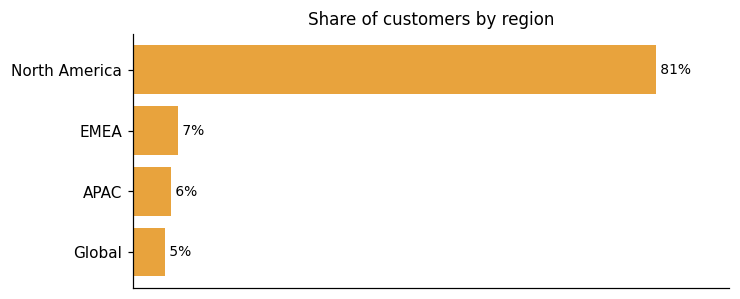
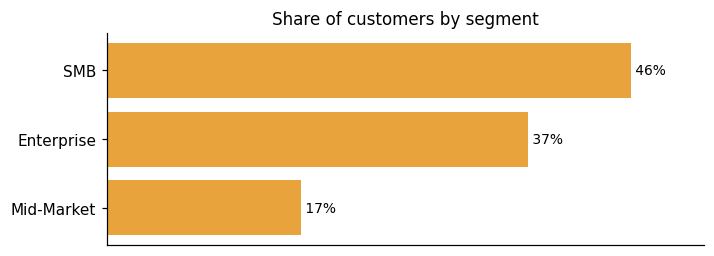
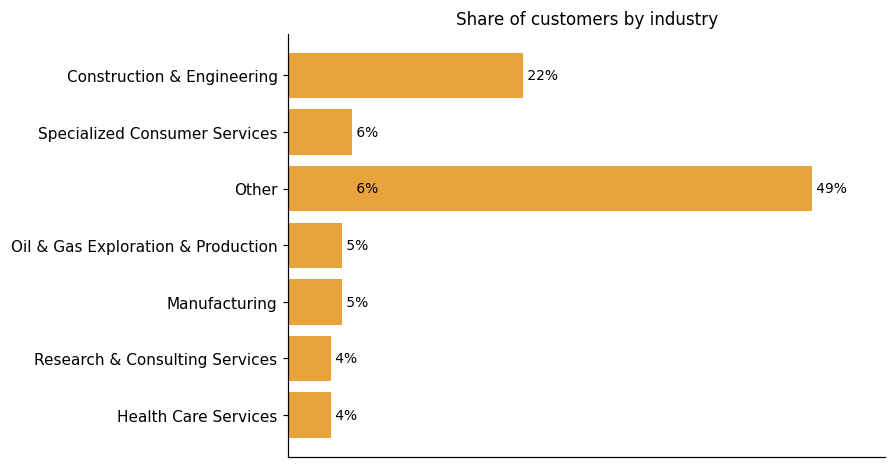
Representative customers: 10,001+ employees, 11-50 employees, 201-500 employees, 360 Global Transportation, 501-1,000 employees, 51-200 employees, A-C Electric Company
How GoFormz uses AI in practice
GoFormz uses AI to speed up one specific task: getting existing paper or PDF forms into the platform faster. When you upload a document, the builder automatically identifies and places each form field's type, size, and name rather than requiring manual configuration. That means teams can save hours with the AI-powered form builder during setup. The AI handles the initial conversion work. The platform's core job is digital forms and workflow automation, and the AI simply removes the friction of building those forms from scratch.
Predictive ML
Read detailsGoFormz uses AI to read an uploaded PDF and automatically identify its field types, sizes, and names. This happens at setup, reducing the manual configuration work that would otherwise fall to whoever is building the form.
GoFormz pricing and value: plans, costs and ROI
GoFormz offers a tiered subscription with per-seat pricing, ranging from a free Basic plan through Team and Advanced tiers to a sales-gated Enterprise option. The value evidence comes primarily from customers. Forty-seven different customers report 61 distinct ROI results, pointing to savings that show up in two places: development cost and field time. On the cost side, building a custom interface or hiring a programmer carries real expense — customers note that GoFormz removes both. On the time side, one customer describes a scenario where a paper-based process would require double the resources to complete a single form, making the time savings, in their words, "major." Cross-platform flexibility also feeds the ROI picture: one customer notes that GoFormz "works on Android, it works on iOS, and it even works on Kindle," which removes the need to standardize devices across a workforce. For teams that need a faster start, GoFormz offers professional services to help build form templates and add integrations, alongside dedicated real-time technical support.
ROI evidence from 47 customers
- the cost savings are significant. It costs money to hire someone to build a user interface, it costs money to hire a programmer
- That would require double the amount of resources to fill out just one form. So obviously there is major time savings here.
- One of the things we've really enjoyed about GoFormz [...] it's not platform-centric. It works on Android, it works on iOS, and it even works on Kindle.
- Savings of over 13,000 man hours via automated workflows
Time-to-value: what implementations take
- Digital forms that previously took a day to build can be set up in two hours
- The template was really easy to set up, and was ready in less than two hours
- "We saw a 60% increase in JSA submissions all within 30 days of implementing GoFormz."
- We put screenings in place super quickly. We borrowed the form from another business, tweaked a couple of things in the document, and within 24 hours had it implemented in the field.
- We put screenings in place super quickly... within 24 hours had it implemented in the field.
Who it fits: value by company size
GoFormz spans both large-team and enterprise use cases. It functions as a digital solution for large businesses and global operations, and some of the largest businesses in industries like energy, construction, and field service use GoFormz to modernize and streamline their daily operations. An Enterprise edition exists for organizations that need deeper configuration, and the platform is built for large teams to tailor workflows and automation. Smaller teams may face a different picture. Pricing may be a hurdle for smaller teams, and user licensing costs have drawn attention from customers. One customer has suggested that a tiered structure — where costs reduce as user counts hit certain thresholds — would be worth consideration. Another customer sees it differently, saying the price is very reasonable for what GoFormz delivers. The two perspectives sit side by side in the record, without a clear resolution.
Self-serve tiers (Basic at $0, Team at $24/user/mo billed annually or $30/user/mo billed monthly, Advanced at $48/user/mo billed annually or $60/user/mo billed monthly) are published; Enterprise tier is sales-gated ("Contact for Pricing" / "Request a Demo").
Basic
$0 forever
Team
$24 /user/mo. $30 Save up to 20% annually
Advanced
$48 /user/mo.
Enterprise
Contact us for pricing
Plans as published by the vendor on GoFormz Enterprise – GoFormz; Plans and Pricing for Mobile Forms – GoFormz.
GoFormz enterprise readiness: security, compliance, migration, and support
GoFormz covers four enterprise-readiness dimensions: security, compliance, migration, and customer support. Each of these areas is examined in the sections that follow.
Security controls and assurance
GoFormz runs on Microsoft Azure, which brings with it a broad compliance foundation. Daily full backups are stored securely in Azure data centers. GoFormz holds SOC 2 Type II certification. Data protection covers both directions: encryption in transit and at rest is standard, with TLS for data in transit and 256-bit AES for data at rest. Access control is handled through custom SSO, giving organizations a way to centralize and secure user authentication.
Compliance and data protection
GoFormz carries enterprise-ready security supporting GDPR, SOC 2, ESIGN, and HIPAA requirements, with administrative controls and auditability to help meet organizational policies. It complies with GDPR as a regulatory framework. Electronic signatures are ESIGN Act and UETA-compliant, covering use cases such as patient intake, treatment plans, and follow-ups. For its HIPAA compliance capability, GoFormz offers a dedicated add-on: keep sensitive PHI data accessible, secure, and in compliance with the GoFormz HIPAA compliance add-on offering, available at just $15/mo. That same capability supports maintaining compliance with electronic signatures across healthcare workflows.
Migration from competing platforms
GoFormz takes a conversion-first approach to migration: rather than rebuilding forms from scratch, it offers a proprietary conversion tool that brings existing PDF files into the digital space with no coding and no downtime required. The result is exact replication of your existing forms, so field teams work with layouts they already recognize. GoFormz is the only solution that maintains the exact formatting of your original document, making it easier for teams to get started. On the setup side, one customer notes that form setup was initially a bit tedious for us, but once everything was setup we have zero issues with this service.
Support and success
GoFormz provides on-demand video tutorials and a comprehensive Help Center with step-by-step guides, enabling customers to self-serve their onboarding and platform learning at any time. On the reactive side, support chat is a staffed channel; as A-C Electric Company puts it, "The support chat is by far my favorite support experience I've ever had on a platform." The same account also notes "The turnaround time for resolving issues has been impressive, and the overall experience of working with our account manager" — pointing to both issue resolution speed and an account management relationship. CHP Energy Solutions describes the support as outstanding, noting it as one of the reasons they chose GoFormz.
GoFormz vs. Adobe, Box, Conga and other platforms
Digital Transaction Management covers the digitization of paper-based document workflows, including e-signatures, content automation, mobile apps, identity verification, and API services. GoFormz competes in this category with a core product purpose-built for digital form creation and field data capture, supporting images, GPS, sketches, eSignatures, conditional logic, and offline sync across mobile and desktop devices. That mobile-first, offline-capable design reduces complexity for field users without requiring technical configuration. Where the category has expanded to encompass workflow automation, content AI, clickwrap transactions, and enhanced identity verification, the grounding provided does not show equivalent GoFormz capability on those dimensions — placing it behind peers such as Adobe, Box, Conga, and DocuSign in those areas. The comparison table below shows where these vendors differ most; it is a differentiation view, not a complete feature-by-feature accounting.
Digital Transaction Management
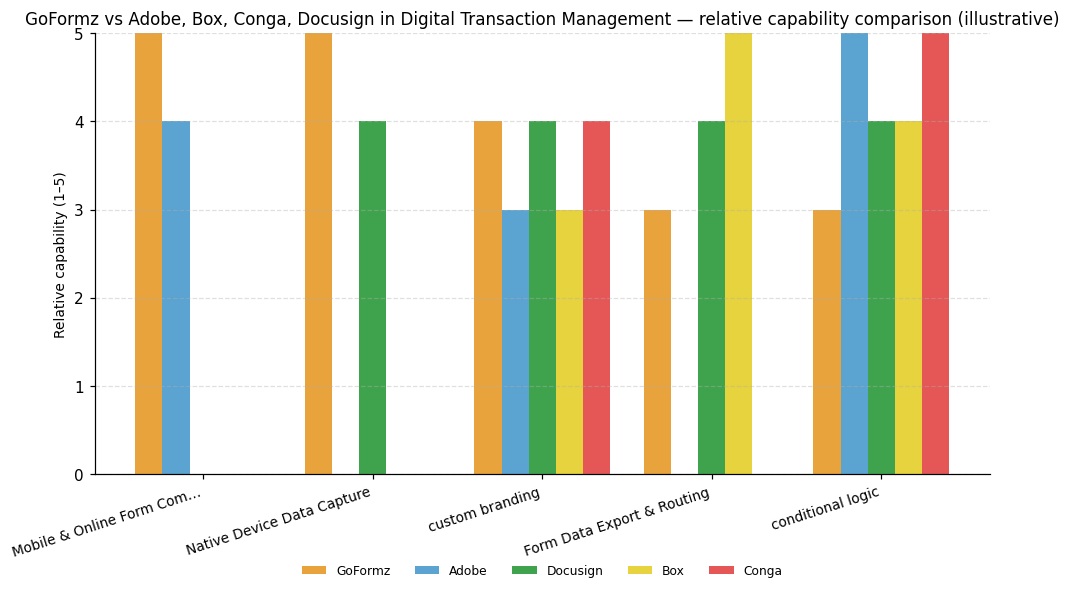
| Capability | GoFormz | Adobe | Box | Conga | Docusign |
|---|---|---|---|---|---|
| Mobile & Online Form Completion | 5 | 4 | — | — | — |
| Native Device Data Capture | 5 | — | — | — | 4 |
| custom branding | 4 | 3 | 3 | 4 | 4 |
| Form Data Export & Routing | 3 | — | 5 | — | 4 |
| conditional logic | 3 | 5 | 4 | 5 | 4 |
GoFormz
Mobile & Online Form Completion: Core product is purpose-built for digital form creation and field data capture, supporting images, GPS, sketches, eSignatures, conditional logic, and offline sync across mobile and desktop.; Native Device Data Capture: Core product is built around mobile form filling on phones and tablets, supporting offline data capture with GPS, images, sketches, and eSignatures from mobile devices.; custom branding: Conditional logic, mobile-first design, and offline capability are built to reduce complexity for field users without technical configuration requirements.
Adobe
Mobile & Online Form Completion: AEM Forms with Sensei AI enables intelligent form completion and scan enhancement, with batch conversion of PDF/XDP forms into adaptive forms.; conditional logic: AEM Forms supports batch conversion of PDF/XDP forms into adaptive forms and automated forms conversion at scale.
Box
Form Data Export & Routing: Box platform offers robust APIs enabling integration with over 1600 third-party applications to automate content processes.; conditional logic: Crooze acquisition adds a no-code business process application builder with metadata tools and customizable dashboards.
Conga
custom branding: Ease of use is explicitly rated as a strong capability for Conga.; conditional logic: Conga Composer is a dedicated content generation engine applied across multiple industries and revenue lifecycle use cases.
Docusign
Native Device Data Capture: Strong mobile signing experience is explicitly identified as a key strength.; custom branding: Ease of use is explicitly rated as a strong capability for Docusign.; Form Data Export & Routing: Strong APIs and a dedicated developer community are called out as a key capability.; conditional logic: Maestro workflow engine and Intelligent Agreement Platform announced in 2024 extend automation across the agreement lifecycle.


Connect GoFormz with your stack: integrations and partner ecosystem
GoFormz connects to 15 native integrations across 13 partner categories, covering areas such as CRM, Cloud Storage, and Data Warehouse. One integration partnership completes the ecosystem.
GoFormz connects to enterprise systems through two distinct layers. The first is a set of turnkey integrations covering platforms like Salesforce, Procore, Snowflake, and Google Workspace — ready to use without custom development. The second layer is an open REST API that enables additional connections and custom automations beyond the prebuilt list. The practical model positions GoFormz as a familiar data-entry layer sitting in front of your existing systems. Field-captured data flows directly into enterprise platforms to populate dashboards and records rather than sitting in a silo. Beyond the turnkey set, GoFormz supports a broad range of business systems — including cloud storage, ERP, and productivity tools — through its open API and Zapier connection. Because Zapier itself connects to thousands of applications, the practical reach extends to virtually any platform that exposes an API. Technical teams can use that combination to build custom integrations without waiting for a native connector to appear on the prebuilt list.
| Partner category | Integration partners | Native count | Flow direction |
|---|---|---|---|
| CRM | Salesforce | 1 | Bidirectional |
| Cloud Storage | Box, Dropbox, Google Drive | 3 | Downstream |
| Data Warehouse | Snowflake | 1 | Downstream |
| Spreadsheet Software | Microsoft Excel | 1 | Downstream |
| Accounting Software | QuickBooks | 1 | Downstream |
| Cloud Content Management | Egnyte | 1 | Downstream |
| Cloud Infrastructure | Microsoft Azure | 0 | Upstream |
| Collaborative Work Management | Smartsheet | 1 | Downstream |
| Construction Project Management | Autodesk Construction Cloud, Procore | 2 | Bidirectional, Downstream |
| ERP | Acumatica, SAP | 2 | Bidirectional |
| Integration Platform / iPaaS | Zapier | 0 | Bidirectional |
| Productivity Suite | Google Workspace | 1 | Bidirectional |
| Workflow Automation | Microsoft Power Automate | 1 | Bidirectional |


What's new in GoFormz
GoFormz has not released any product updates in the last nine months, though one partnership or integration announcement has emerged in that same window.
GoFormz and AASHTOWare Launch Data Alliance to Modernize DOT Field Operations
GoFormz connects directly with AASHTOWare, a software solution built specifically for state departments of transportation across the U.S. That partnership streamlines field data collection, automates workflows, and supports compliance requirements for DOT operations.
Read more →Goformz launches Australian data centre for data sovereignty
GoFormz launched an Australian data center to enhance data sovereignty for local businesses, particularly in construction and energy sectors. This infrastructure supports compliance with Australian Privacy Principles, offering lower latency and higher reliability for field operations. The platform enables real-time field data capture and integration with core business systems, strengthening digital operations for companies like VINCI Energies.
GoFormz Launches Australian Data Center, delivering In-Country Data ...
GoFormz has launched an Australian data center to enhance data sovereignty and performance for construction and energy enterprises. This infrastructure supports local data residency, reducing latency and improving reliability for field operations. The platform integrates with core business systems, offering real-time insights and compliance for high-risk environments.
Goformz launches Australian data centre for data sovereignty
GoFormz has launched a new data center in Australia to enhance data sovereignty for its customers. This expansion aims to provide improved data security and compliance with local regulations, supporting businesses in managing mobile forms and reporting more effectively.
GoFormz, Inc. Profile
Company Name
GoFormz, Inc.
Company Website
https://www.goformz.com/HQ Location
655 W Broadway, Suite 200, San Diego, CA 92101, US
Employees
11-50
Social


Financials
PRIVATE