


6sense Revenue AI: Account Based Marketing Platforms overview — capabilities, features, use cases and value by role
6sense Revenue AI™ is a platform that sits across three categories: Account Based Marketing Platforms, B2B Revenue Marketing Platforms, and Intent Data Providers For B2B. Account-based marketing platforms, as Gartner defines them, are software that enables B2B marketing and sales teams to run ABM programs at scale, covering account discovery and selection, planning, engagement, and reporting. The B2B Revenue Marketing Platforms category merges comprehensive demand and ABM marketing features into a central hub, with the goals of greater efficiency, better integrations, and enhanced data consolidation.
Top capabilities of 6sense Revenue AI
B2B Intent Data
Read detailsB2B Intent Data in 6sense® Revenue AI™, powered by 6AI™, captures and interprets buying signals across the web, third-party research sites, and first-party channels — covering intent across 40+ languages — to identify which accounts are actively researching and what topics they care about. One customer put it plainly: "Not having 6sense is like walking into a room with the lights off. How would you know where to look for the accounts that matter?" The capability shifts teams away from broad outreach toward signal-driven focus, as another customer describes: "6sense allows us to double down and be hyper-focused on who we are targeting by leaning into accounts with in-market signals versus our old spray-and-pray approach." That focus translates into measurable results — one team saw a 27% increase in net-new opportunity revenue quarter over quarter, and another uncovered over 4,000 newly engaged accounts in a single quarter.
Powered by: 6AI™, Signalverse™
Agents
Read details6sense Revenue AI's AI Email Agents capability automates routine outreach, follow-ups, and reply handling by combining comprehensive buyer data, machine-learning-based email classification, and human oversight to deliver personalized, brand-authentic one-to-one email conversations — covering use cases from inbound qualification and dormant contact revival to event follow-up and cross-sell/upsell — enabling pipeline creation at scale without scaling headcount. One customer put it plainly: "An SDR can't do the research and personalization for everyone engaging with us. Email Agents helped us bridge that execution gap." That same team saw meetings booked increase by 10% after engaging thousands of contacts with a lean sales team. Another team achieved a 42% reply rate and 23% qualified rate, both notably higher than typical outcomes without Email Agents. As one user described it: "What excited everyone about Email Agents was all the different types of use cases and campaigns it supported. We liked the idea of having a fifth BDR without adding headcount."
Powered by: 6AI™, Signalverse™
Sales Intelligence
Read details6sense Revenue AI's Sales Intelligence capability combines AI-driven predictive analytics, intent data, buyer data, and workflow automation to surface the accounts most likely to buy, identify key decision-makers, and guide sellers on the best way to engage them. The data foundation is substantial: the platform draws on 500B+ Intent Signals Analyzed Monthly and 600M+ B2B Buyer Profiles Captured. Coverage extends to 65M+ Company Profiles Published Across 200+ Countries, alongside 199M+ Verified Business Email Addresses. Teams can move fast: FireMon was able to roll out Sales Intelligence in just one month with 6sense Professional Services. Ivatti saw a 154% increase in win rates YoY using 6sense.
Powered by: 6AI™, Signalverse™
Revenue Marketing
Read details6sense Revenue AI is a B2B revenue marketing platform that combines account identification, intent data, audience building, advertising, reporting, and AI-driven email automation in one capability. Customers report a 268% increase to marketing pipeline and an 80% increase to pipeline generation. The platform ties these functions together through data, predictive analytics, and AI email agents working in concert.
Powered by: 6AI™, Signalverse™
Predictive Modeling
Read detailsPredictive Modeling, powered by 6AI, interprets buying signals from the Signalverse™ to determine where each account sits in its buying journey. It then translates that raw intent and behavioral data into account prioritization based on ICP fit, persona engagement, and revenue potential. Revenue teams can use the output to decide who to target, what to say, and when to engage. Research across 2,500 recent B2B buyers shows that buyers take an average of 11 months to complete their journey, with eight of those months invisible to sales, making this kind of signal interpretation central to how 6sense Revenue AI surfaces in-market accounts before competitors do.
Powered by: 6AI™, Signalverse™
B2B Buyer Data
Read detailsB2B Buyer Data, sourced through the Signalverse and validated by 6AI, gives revenue teams firmographic, technographic, and psychographic intelligence alongside verified contact details for decision-makers across 200+ countries. The database covers more than 65 million companies and 450 million individual B2B profiles. Firmographic data refreshes daily, technographic data is revalidated bi-weekly, and contact records are updated every 45–60 days.
Powered by: 6AI™, Signalverse™
Web Deanonymization
Read details6sense Revenue AI identifies anonymous and known buyers visiting a website, then matches their activity to specific accounts and contacts. It does this through account identification, intent signal analysis, smart form enrichment, and web traffic analysis. Revenue teams can detect buying signals and prioritize accounts showing real purchase intent before competitors engage them.
Powered by: Signalverse™
Data Preparation
Read details6sense Revenue AI handles the full data preparation lifecycle — cleaning, enriching, and compliance-checking B2B records before they reach your sales and marketing systems. Accuracy validation catches bad data at the door. Firmographic and technographic enrichment fills in the gaps. Field standardization keeps records consistent, and GDPR/CCPA compliance verification ensures the data meets regulatory requirements. CRM and MAP integration readiness checks round out the capability, so contact and account records arrive accurate, complete, and compliant.
Technographics Data
Read details6sense Revenue AI lets B2B revenue teams see what technologies their prospects are running — and use that to sharpen who they target. Its Technographics Data capability tracks 34K+ technologies across 15.8M+ companies spanning 148+ industries.
Top features of 6sense Revenue AI
Email Agents
Read details6sense Revenue AI's Email Agents automate personalized, one-to-one email outreach by combining buyer data from 6sense and CRM/MAP systems with out-of-the-box agent playbooks to generate and send tailored sequences; machine learning classifies incoming emails and sends AI- or human-generated responses, while built-in inbox warming, custom sending domains, and contact validation rules manage deliverability — with one customer reporting the agents conducted over 7,200 conversations, saving approximately 1,098 hours of BDR time.
Advertising
Read details6sense Revenue AI includes 6sense Advertising, a tool that lets digital marketers build dynamic B2B audiences and activate them across a native DSP or sync them with LinkedIn, Meta, and Google Ads. It supports Connected TV, Display, Native, Paid Search, Social, and Video formats. The tool manages budget efficiency by avoiding hidden fees, lowering max CPM bids, and distributing spend proportionately across targeted accounts. One customer noted that "Because we're advertising at the account level rather than the person level, we can reach people within these organizations that we didn't even know had an interest in these capabilities". Another described how "It takes the guesswork out of who to go after and what message we should be serving. Our AI-driven advertising model drives personalization and has the residual effect of improving performance across marketing channels outside of 6sense Display." One team reported a 440% increase in campaign member to opportunity rate from optimized LinkedIn advertising.
Intelligent Workflows
Read details6sense Revenue AI's Intelligent Workflows for Marketing lets marketers plan and launch campaigns across ads, email, web, and sales channels from a single drag-and-drop visual canvas. Audiences are automatically enriched in real time from the Signalverse. Nearly two dozen pre-built plays come ready to use, and each one adjusts based on AI-powered signals like engagement, intent, and buying stage. As one customer puts it, "Intelligent Workflows enables us to automate intricate, full-funnel buyer journeys with ease."
Powered by: Signalverse™, 6AI™
Account Prioritization
Read detailsAccount Prioritization in 6sense Revenue AI identifies which accounts and buyers are actively in-market and surfaces them to sellers through AI-powered dashboards. Those dashboards pull together intent signals, buying stage predictions, and engagement data from the Signalverse. Because only 10% of accounts are in-market at any given time, 6sense Predictive Modeling focuses pipelines on the accounts most ready to engage. Account intelligence views consolidate intent data, persona maps, and technographics in a single place.
Powered by: Signalverse™, 6AI™
Chrome Extension
Read details6sense Revenue AI's Chrome Extension puts the full 6sense Sales Intelligence platform's data directly inside the browser, so sellers never have to leave LinkedIn or a company website to get what they need. AI-driven intent data, technographic and firmographic signals, buying stage predictions, and contact details all appear as an overlay on whatever page the seller is already viewing. Contact details are verified by 15+ online sources and refreshed monthly. From that same interface, sellers can export verified contacts to CRM in one click or push them directly into SalesLoft or Outreach cadences.
Sales Copilot
Read details6sense Revenue AI delivers Sales Copilot, an AI-guided assistant for B2B sellers. It surfaces in-market accounts showing buying intent, generates personalized email drafts using connected CRM data, and compiles AI-powered account summaries — all powered by the Signalverse. Account prioritization, sales email writing, and account intelligence views surface directly within sellers' existing workflows.
Audience Builder
Read details6sense Revenue AI's Audience Builder gives revenue teams a single place to define their ICP and build dynamic target-account lists. It draws on 80+ segmentation filters that span intent signals, buying stage, first-party CRM and MAP data, campaign engagement, technographics, and firmographics. Contacts are automatically assigned to audience segments based on buyer behavior. Those segments then sync with Meta, LinkedIn, and Google Ads for omnichannel alignment.
Company and People Search
Read details6sense Revenue AI's Company and People Search brings prospecting into a single search interface, pulling from a database of more than 65 million companies across 200+ countries and 450 million individual B2B profiles. Revenue teams can filter by job title, location, tech stack, intent signals, and AI predictions. Those filters surface buying team members and map how engaged each persona is. Matched contacts export to a CRM or Sales Engagement Platform in one click.
Sales Alerts
Read detailsSales Alerts, a feature within 6sense Revenue AI, notifies sellers when buyer accounts show purchasing intent. It surfaces account activities such as web visits, competitor research, and intent topic changes. Alerts arrive daily via email, Slack, or other preferred channels, and sellers can jump directly into an account view in CRM or 6sense Sales Intelligence from within the alert — meeting buyers who are, as the vendor notes, roughly 70% of the way through their buying journey before they ever contact sales.
Smart Form Fill
Read detailsSmart Form Fill closes the gap between shorter web forms and complete buyer profiles by enriching submissions in real time using IP and email address data. When a prospect fills out a form, Smart Form Fill captures company name, size, and revenue range behind the scenes — so organizations can reduce the number of visible fields without losing profile completeness. The feature connects natively with Marketo, HubSpot, Pardot, and Eloqua, which cuts down on junk data and sharpens lead routing quality.
Reporting & Analytics
Read details6sense Revenue AI ties CRM and MAP systems together so reporting works from a single, unified data set rather than scattered silos. Pre-built reports and real-time dashboards come ready to use out of the box. Multi-channel campaign performance metrics are built in as well. Buying Stage reports and Funnel Insights track performance across the full revenue funnel. On top of that, AI predictions surface which prospects are a good fit and ready to buy.
List Builder
Read details6sense Revenue AI's List Builder powers dynamic account lists segmented by technographics, firmographics, demographics, buying stages, temperature scoring, campaign and website engagement, and intent signals, with those lists automatically updating inside connected CRMs and Sales Engagement Platforms, while surfacing the accounts showing the most buying intent so sellers can pinpoint which buyers to engage and when.
Data Packs
Read details6sense Revenue AI packages firmographic, technographic, keyword intent, web visit, predictive, ad media, and segment participation data into à la carte, scalable datasets called Data Packs. Enterprises can purchase and deploy them directly to Snowflake, Amazon S3, or SFTP without requiring a full platform subscription for select types. Refresh cadences range from daily to quarterly, driven by machine learning and human-in-the-loop processes.
People Data & Company Info APIs
Read details6sense Revenue AI's People Data & Company Info APIs connect CRM, MAP, data lake, and other internal systems through a suite of REST endpoints. The APIs cover company information, people search, contact enrichment, IP-to-account identification, and lead enrichment. All of this runs on real-time B2B data. Teams can reach 450M+ buyer profiles, 65M+ company profiles spanning 200+ countries. Access is managed through flexible API tokens and rate limiting, with compliance built in for applicable global data regulations.
Top use cases for 6sense Revenue AI
Target and engage in-market accounts with ABM
Read details6sense Revenue AI gives B2B marketing teams a way to find anonymous buyers who are actively in-market, predict where those buyers are in their purchasing journey, and then reach them with personalized campaigns across multiple channels. It pulls together intent data and predictive modeling to surface who is ready to buy. Audience building, display advertising, social advertising, and AI email agents then work in concert to move those buyers through the pipeline and connect marketing activity to revenue outcomes.
Run and optimize multichannel B2B ad campaigns
Read details6sense Revenue AI handles every step of the advertising activation workflow in one platform. It builds dynamic audiences from intent and buying-stage data, then pushes those audiences directly to a native DSP, LinkedIn, Meta, and Google Ads. Budget controls, viewability restrictions, and account-proportionate spend distribution all run through the same system. The result is targeted reach without wasted impressions.
Prioritize and close deals faster with AI-guided selling
Read detailsSales Copilot lets B2B sales reps focus on the highest-value opportunities and move deals forward faster. It surfaces the accounts and buyers showing the most purchasing intent, powered by the Signalverse. It also generates AI-crafted personalized emails drawn from CRM and intent data, and compiles complete account dossiers.
Grow revenue from existing customers through cross-sell and upsell
Read detailsMarketing and sales teams deploy 6sense Revenue AI's AI Email Agents to identify high-intent accounts and automate personalized, brand-authentic email sequences. The agents draw on intent signals, CRM and MAP data, and machine-learning response classification to keep leads engaged, revive dormant contacts, and surface cross-sell and upsell opportunities at scale — without increasing headcount.
Identify and research target accounts and contacts
Read details6sense Revenue AI's Company & People Search spans 65 million company and 450 million individual B2B profiles, letting sellers apply AI predictions, intent signals, and firmographic, technographic, and psychographic filters to surface in-market buyers, map buying teams, and push enriched contact data directly into CRM or sales engagement cadences.
Convert anonymous website visitors into qualified leads
Read details6sense Revenue AI removes the tradeoff between short web forms and complete contact data. Smart Form Fill shortens the forms buyers see while automatically enriching every submission with real-time firmographic and people data behind the scenes. That enrichment keeps junk records out of your CRM and MAP systems and improves how leads get routed once they arrive. Buyers reach complete profiles without filling out lengthy forms.
Prove and optimize marketing's revenue impact
Read details6sense Revenue AI's Reporting & Analytics consolidates CRM and MAP data into a unified view — eliminating the silos that typically separate those systems. Pre-built buying-stage reports, funnel-insight dashboards, and real-time campaign metrics all draw from that integrated foundation. Revenue and marketing teams use these tools to measure account-based KPIs. They can also demonstrate marketing's direct and indirect revenue contribution, then optimize spend across channels accordingly.
Maintain clean, enriched go-to-market data at scale
Read details6sense Revenue AI keeps sales and RevOps teams working from a single, accurate database by automating the work of building and maintaining that database for them. The feature behind this is Intelligent Workflows for Sales, which handles contact acquisition and data enrichment across firmographic, technographic, predictive, and people data. A visual workflow canvas with advanced decisioning logic runs these updates on autopilot, keeping records accurate without manual effort.
Automate personalized outbound sales outreach
Read detailsBDRs and sales reps use 6sense Revenue AI's outbound sales automation to turn buying signals into personalized 1-on-1 emails. A visual workflow canvas triggers automated outreach, while an AI Writer draws on CRM data and intent signals to shape each message. Automated contact acquisition keeps prospect records fresh and focused on the highest-intent accounts.
Value delivered by role with 6sense Revenue AI
sales team
Read details6sense Revenue AI unifies intent data, account insights, and contact prioritization into one destination so sales teams can focus outreach on accounts showing active purchase intent, with customers reporting 254% growth in created opportunities, 152% growth in won opportunities, and a 12-day reduction in sales cycle length. One customer describes it this way: "The integration has not only made our marketing efforts more targeted and efficient but has also provided our sales teams with actionable insights, significantly enhancing our overall sales performance". Another notes: "It's a tool that salespeople love, and as a marketer, that's the best thing you can ask for."
Business Development Representatives (BDRs)
Read details6sense Revenue AI targets BDR teams across account based marketing, B2B revenue marketing, and intent data workflows. Its Email Agents handle the majority of email execution, leaving BDRs to manage roughly 20% of the work and saving hundreds of hours of manual effort. Customers using 6sense report a 131% increase in qualified meetings and new pipeline at 176% of goal from their BDR organizations.
marketing team
Read details6sense Revenue AI surfaces hidden buying signals through intent data and AI-driven predictive modeling, giving marketing teams complete visibility into their total addressable market and ideal customer profile. That visibility lets teams shift from traditional MQL lead scoring to buying-committee identification and develop specific content tracks for different verticals. Automation and advanced analytics extend that reach even to small teams — as one customer notes, "Despite having a marketing team of around 50, our ABX team in North America consisted of just two professionals who were already at full capacity." Customers report outcomes including 9x ROI on marketing spend.
Sales Development Representatives (SDRs)
Read details6sense Revenue AI equips SDRs with intent data and buying-stage signals to time outreach precisely. The 6QA process aligns SDRs with revenue teams on when in-market accounts are ready to convert. Email Agents execute campaigns and follow up with leads that SDRs lack bandwidth to pursue. Customers report close rates of 3x for SDR-sourced opportunities alongside stronger qualification criteria and improved pipeline efficiency.
Director of ABM and Integrated Marketing
Read details6sense Revenue AI gives Directors of ABM and Integrated Marketing a structured way to move from broad, untargeted outreach toward focused engagement with accounts that are showing in-market signals. As buyers move through the funnel, 6sense Revenue AI dynamically tailors messaging and content to each buying stage. It also provides a framework for measuring lift across win rate, deal size, deal velocity, and pipeline created when reps engage 6QA accounts. That framework gives ABM leaders a clear, concrete way to communicate marketing's impact internally. Customers report 50% increases in buyer engagement behaviors. Small ABM teams, in particular, report being able to run campaigns with greater precision as a result.
senior director of marketing operations
Read detailsFor senior directors of marketing operations, 6sense Revenue AI acts as a central data platform that combines intent signals, engagement data, and account intelligence into a single source of truth across the marketing stack. It moves teams from limited visibility into key account behavior toward AI-driven advertising models that deliver messages based on journey stage. Customers report the platform paying for itself within six months, enabling teams to focus exclusively on accounts showing genuine intent.
senior director of revenue marketing and operations
Read details6sense Revenue AI centralizes buying-stage, persona, and buying group data so revenue marketing and operations teams can run more targeted campaigns and help sales focus their outbound efforts where the data points. Segmentation by buying stage and persona supports go-to-market programs that scale without losing precision. When integrated with complementary tools, 6sense Revenue AI delivers actionable insights directly to sales teams, making marketing more efficient in the process. Sales teams can use those same insights to be more tactical about high-touch outbound work — deciding where to spend time rather than chasing every account.
sellers
Read details6sense Revenue AI shifts sales teams away from manual prospecting by combining contact data, account insights, and intent signals inside its Sales Copilot feature. One customer put it this way: "We've seen 6sense be considered a strong source of data to help all of our sellers align their focus and attention on the accounts they target for the year, the quarter, the week, and the day". Teams using it have reported outcomes such as 100% daily login rate among sellers and 318% more pipeline in a single quarter.
revenue team
Read details6sense Revenue AI turns intent data into a working picture of who is actually ready to buy — replacing guesswork with targeted, evidence-based engagement across account based marketing, B2B revenue marketing, and intent data workflows. Dynamic account targeting, real-time insights, and predictive intelligence all feed into a single source of truth. That shared foundation supports pipeline inspection, performance optimization, and ROI proof in one place. In one customer's words: "The ability for our go-to-market team to see which of our key accounts are engaging with our website or marketing ads in nearly real-time is a complete game-changer."
sales leaders
Read details6sense Revenue AI helps sales leaders build opportunity health score reports, align daily with their teams around intent signals, and integrate account prioritization into monthly metrics — with one SVP crediting the platform's pattern recognition for surfacing the accounts most likely to convert based on historical performance behaviors, and one customer noting "We fundamentally believe in this approach and have made it the pillar of our outbound strategy."
Director of Demand Generation
Read details6sense Revenue AI shifts demand generation work away from CRM and marketing automation guesswork by applying predictive analytics and AI to real-time account behavior. The result is tightly focused targeting on accounts that are actively in-market. Teams using it have reported 27% increases in net-new opportunities within a single quarter, along with a clearer ability to show measurable pipeline impact to stakeholders. As one customer puts it, "I couldn't imagine doing what I do now without having 6sense in my pocket as part of the team."
Senior Manager of Web Marketing
Read details6sense Revenue AI lets Senior Managers of Web Marketing move rapidly from zero personalization toward global expansion by delivering personalized web experiences to their most valuable audiences without requiring a full-time dedicated resource. It provides a framework for communicating marketing's impact to internal stakeholders and for connecting disparate tools and ideas across the marketing stack into a cohesive strategy. Customers report that starting with a single high-quality audience creates a launching pad for expanding personalization programs even with limited team resources.
Vice President of Growth Marketing
Read details6sense Revenue AI shifts growth marketing teams from inbound-only models to precision ABM. The Email Agents handle BDR execution work directly, so outbound pipeline scales without adding headcount. Personalized, highly relevant emails drive strong engagement rates and closed-won deals. Customers also report that paid search becomes a top-performing digital marketing channel for quality pipeline after integrating 6sense.
Demand Generation Manager
Read details6sense Revenue AI compresses pipeline ROI timelines — one customer recovered two years of investment by Q4 of the first year. The 6sense Email Agents feature scales outreach across cold outreach, event promotion, and lead nurturing without additional hiring. Customers report peace of mind knowing every lead receives follow-up. They also describe the ability to drive innovation through AI-powered email workflows. Together, these capabilities serve Demand Generation Managers who need pipeline ROI that recoups tool costs faster than industry benchmarks.
Director of Marketing
Read details6sense Revenue AI targets a specific gap for Directors of Marketing: prospects who have gone dark and would otherwise sit untouched for days or weeks. Conversational email tools built into the platform handle cold outreach, event promotion, download follow-ups, and lead nurturing — making AI-powered re-engagement practical even inside teams that resist adopting new technology. Customers report that recovering lost accounts through 6sense has been their biggest win, and that AI assistants effectively maximize the bandwidth of existing teams.
customer success team
Read details6sense Revenue AI targets customer success teams, not just sales and marketing. It monitors account health scores and flags when customers engage with specific content, so CS teams can follow up with resources matched to each customer's maturity level. That shift moves teams from reactive support into proactive expansion motions, working alongside marketing to identify upsell opportunities within existing accounts. Customers report the approach enabling more value-based conversations rather than competing on price.
marketers
Read details6sense Revenue AI combines audience building, data enrichment, campaign automation, and account-based measurement in a single drag-and-drop canvas — all aimed at pipeline growth. 6sense Advertising extends those same audiences to any ad channel, reducing wasted spend in the process.
Operations
Read details6sense Revenue AI serves operations teams by enhancing form-fill data, building complete buyer profiles, and acquiring contact information for key decision-makers — improving lead routing and data quality across the tech stack while freeing ops from manual data management. Sales teams gain the information they need in a form they can act on directly, and the platform earns the kind of confidence captured in one customer's words: "6sense is quickly increasing revenue. It's a platform that I trust." — Head of Marketing Operations. That confidence translates to measurable pipeline outcomes, as with PTC, where Mariana Cogan, SVP of Digital Marketing Strategy & Operations at PTC, puts it that PTC is successfully "printing pipeline."
Account Executives (AEs)
Read detailsAccount executives using 6sense Revenue AI outperform peers who don't — by 26% more pipeline generated. The platform puts account status, intent signals, and win/loss reports directly in AE hands, supporting both global ABX targeting and sales cycle learning. Customers report individual AEs sourcing 16 opportunities within a single month. Some have achieved promotion through in-market account prioritization.
Senior Director of Global Marketing Programs
Read details6sense Revenue AI replaces guesswork in global marketing programs with clear visibility into which accounts to prioritize. One senior director described operating without it as "walking into a room with the lights off." Customers report it becoming central to paid media campaigns, enabling data-driven decisions about budget allocation. Marketing teams also gain a framework for demonstrating their value internally.
RDRs
Read details6sense Revenue AI shifts RDR prioritization away from traditional inbound follow-up and outbound prospecting by feeding buying signals directly into account selection. The platform's data guides RDR focus to the right accounts across every planning horizon — the year, the quarter, the week, and the day. Teams also use 6sense to identify accounts that have gone dark and bring them back through display advertising and targeted outreach. In one customer's words, "It gives our RDRs another avenue that's outside of outbound or following up with inbound. Then you couple this with 6sense, where you get the data that tells you who to chase down and what they're interested in."
Chief Marketing Officer
Read details6sense Revenue AI is built for Chief Marketing Officers who need to turn marketing into a measurable pipeline engine. The goal is concrete: higher win rates, higher average selling prices, and greater efficiency in driving revenue. Customers report that what began as a marketing initiative grew into the central driver of pipeline conversion across the entire go-to-market organization. That shift gives CMOs results they can point to — and restores trust with CEOs and board members who previously saw marketing as opaque.
Chief Revenue Officer
Read detailsChief Revenue Officers treat 6sense Revenue AI as a personal "fish finder," cutting through a sea of potential accounts to pinpoint exactly where to focus sales resources. Customers report CROs spending personal time in the platform to surface missed opportunities. When 6sense data reveals that the vast majority of won opportunities come from strong profile-fit accounts, CROs gain confidence in the revenue strategy the platform supports — with some calling it one of the most effective tools in their career.
What customers say about 6sense Revenue AI: ratings, outcomes and feedback
6sense Revenue AI™ earns praise and criticism along two clear lines: what works well in daily use, and what still needs work. Customers draw on the platform across Account Based Marketing Platforms, B2B Revenue Marketing Platforms, and Intent Data Providers For B2B.
What works well
"today, our data indicates we are significantly more likely to convert accounts that 6sense® has identified as in-market" source
Where customers see room for improvement
6sense Revenue AI™ draws recurring criticism across data reliability, usability, and ad performance. On data quality, customers report that you cannot trust the data completely, which leads some teams to supplement 6sense with manual LinkedIn prospecting. Marketing influence reporting gets a similar verdict: customers describe it as not reliable enough for actionable use. The Salesforce integration has its own accuracy gap, with one user noting that the accuracy of the SF tool could be much more precise. Display ads are a specific sore spot. Customers find it hard to track impact, and one user states we don't perform very well on 6sense display ads. The 6QA process frustrates users for a different reason. The breadth of account signals means that too much time gets spent chasing leads that go nowhere — sometimes researching the wrong person entirely. Notification timing is another friction point. Customers note that 6sense can be delayed on notifications sometimes, and instant alerts on website link clicks would be a welcome improvement. More customization of alerts would also help, particularly to avoid duplicates and sharpen relevance. Usability runs as a theme throughout. New users describe the platform as not very user friendly at the moment, and the volume of data can take real time to absorb. The website itself draws its own complaints, with customers saying it could be far easier to use. Sales reps add a practical concern: prospects sometimes wouldn't know what I was talking about, which suggests the platform's concepts don't always translate smoothly into sales conversations.
6sense Customer wins, Case studies
6sense Customers Redefine AI-Driven Revenue Execution at Breakthrough 2025 - Business Wire
Frequently Asked Questions (FAQ)
What buyers ask before choosing 6sense
Integrations What integrations does 6sense offer with CRM and marketing automation platforms?
6sense offers seamless integrations with a variety of CRM and marketing automation platforms, enhancing data sharing and operational efficiency. Notably, it integrates with Salesforce, providing a unified source of truth for marketing, sales, and operations teams, which helps streamline campaigns and improve lead management. Additionally, 6sense works with HubSpot and other marketing automation providers, enabling real-time form enrichment and allowing users to create rich, unified account profiles. This integration capability empowers businesses to deliver hyper-personalized buyer journeys at scale, optimize lead generation, and boost conversion rates by leveraging comprehensive data insights across platforms. By connecting with these tools, 6sense enhances the overall effectiveness of marketing and sales strategies.
Integrations How does the 6sense Audience Builder feature help in personalizing content for accounts?
The 6sense Audience Builder feature enhances content personalization by allowing marketers to create tailored content that aligns with each account's specific needs and interests. By utilizing over 80 segmentation filters, users can define their Ideal Customer Profile (ICP) and generate targeted account lists that reflect real-time buyer behavior and firmographic data. This capability enables businesses to spot potential buyers more effectively and craft campaigns that resonate with their audience. Additionally, 6sense integrates seamlessly with CRM and marketing automation tools, ensuring that all data is centralized and easily accessible, which facilitates the execution of account-based marketing (ABM) strategies. Ultimately, this leads to more relevant messaging, improved engagement, and higher conversion rates, making the 6sense Audience Builder an invaluable tool for B2B revenue teams.
Integrations What are the API capabilities of 6sense for integrating with other software solutions?
6sense offers robust API capabilities that facilitate seamless integration with various software solutions, enhancing the functionality of your tech stack. These APIs allow businesses to connect 6sense with customer relationship management (CRM) systems, marketing automation platforms (MAP), and other tools, enabling real-time data exchange and enriched account profiles. For instance, the integration with HubSpot allows for real-time form enrichment through 6sense’s Smart Form Fill, which auto-fills forms with rich data, improving lead generation efforts. Additionally, 6sense's APIs support data synchronization, enabling users to leverage insights from predictive analytics and sales intelligence across their existing platforms. This integration capability not only streamlines workflows but also enhances the overall effectiveness of marketing and sales strategies, driving predictable revenue growth.
Integrations How does 6sense intent data enhance account-based marketing strategies?
6sense enhances account-based marketing (ABM) strategies by leveraging intent data to uncover hidden buying signals from potential customers. By analyzing keywords and topics that prospects are researching, 6sense identifies accounts that are actively showing interest in specific products or services, even if they are not yet familiar with your brand. This allows marketing teams to prioritize high-potential accounts and tailor their outreach efforts effectively. Additionally, 6sense combines first-party and third-party data, providing a comprehensive view of buyer behavior and intent, which helps in creating hyper-personalized campaigns. The platform's predictive modeling further aligns marketing and sales teams by indicating the optimal times to engage with prospects, ultimately improving conversion rates and shortening sales cycles. This data-driven approach ensures that marketing efforts are focused on the right accounts, maximizing resource efficiency and effectiveness.
Integrations What is the process for setting up 6sense with Salesforce integration?
Setting up the 6sense integration with Salesforce involves a series of straightforward steps to ensure seamless connectivity between the two platforms. First, log into your Salesforce account and navigate to the AppExchange to find the 6sense app. Once installed, follow the prompts to authenticate your 6sense account, allowing it to access your Salesforce data. Next, configure the integration settings to align with your specific marketing and sales processes, ensuring that data flows smoothly between 6sense and Salesforce. This includes mapping fields and setting up any necessary workflows. Finally, test the integration to confirm that data is syncing correctly and that your teams can leverage the combined insights for enhanced campaign effectiveness. By following these steps, you can maximize the efficiency of your sales and marketing efforts through the powerful capabilities of both 6sense and Salesforce.
Integrations How can 6sense's predictive model assist sales teams in identifying high-intent accounts?
6sense's predictive model assists sales teams in identifying high-intent accounts by leveraging advanced AI and machine learning algorithms to analyze various data signals. This model predicts which accounts are actively researching products or services, allowing sales teams to focus their efforts on those most likely to convert. By combining first-party engagement data with third-party intent signals, 6sense provides a comprehensive view of account activity and readiness to buy. The platform's hot accounts dashboard highlights these high-potential accounts and their respective buying stages, enabling sales teams to prioritize outreach effectively. Additionally, actionable insights, such as profile fit and engagement recommendations, further enhance the ability to tailor messaging and improve conversion rates, ultimately streamlining the sales process and maximizing resource efficiency.
ROI & pricing What measurable outcomes can I expect from using 6sense ABM?
When using 6sense's Account-Based Marketing (ABM) platform, you can expect several measurable outcomes that significantly enhance your marketing effectiveness. Companies leveraging 6sense typically see a doubling of revenue impact while simultaneously cutting marketing operational costs in half. The platform's predictive insights enable targeted ABM strategies that align with your business goals, leading to optimized campaigns that yield measurable results. Additionally, 6sense's continuous campaign optimization ensures that you can track key performance indicators such as engagement rates, conversion rates, and overall return on investment. By integrating 6sense into your workflows, you gain access to accurate target account information and actionable insights, allowing for more effective decision-making and improved sales alignment. Overall, 6sense empowers organizations to achieve predictable revenue growth through data-driven strategies.
ROI & pricing How does 6sense help in maximizing ROI for B2B marketing efforts?
6sense maximizes ROI for B2B marketing efforts by leveraging AI, big data, and predictive analytics to identify and target the most promising accounts. The platform captures buyer signals and uncovers hidden intent, allowing marketers to focus their resources on prospects that are actively researching relevant products or services. By enabling hyper-personalized campaigns and providing a comprehensive view of prospect activity, 6sense helps businesses run omnichannel marketing strategies that respond in real-time to buyer behavior. This targeted approach not only reduces waste in marketing spend but also increases the likelihood of conversion, ultimately leading to higher revenue impact and a clearer understanding of the ROI generated from sales and marketing initiatives.
ROI & pricing What are the different pricing plans available for 6sense ABM?
6sense offers a range of pricing plans tailored to meet the diverse needs of businesses looking to implement account-based marketing (ABM). While specific pricing details are not publicly disclosed, 6sense typically provides customized quotes based on factors such as company size, the number of users, and the specific features required. Businesses can expect to engage in a consultation process to determine the most suitable plan, which may include options for basic access to advanced features like predictive analytics and intent data. Additionally, 6sense emphasizes the value of its platform in driving revenue growth and optimizing marketing costs, making it a worthwhile investment for organizations aiming to enhance their ABM strategies. For precise pricing information, potential customers are encouraged to contact 6sense directly for a personalized quote.
ROI & pricing How does 6sense reduce marketing operational costs while increasing revenue?
6sense reduces marketing operational costs while increasing revenue by leveraging advanced AI, big data, and predictive analytics to streamline and optimize marketing efforts. By identifying high-potential accounts and revealing buyer intent, 6sense enables businesses to focus their resources on the most promising leads, minimizing wasted spend on less effective campaigns. The platform allows for the execution of hyper-personalized, omnichannel campaigns from a single interface, which reduces the time and effort required for campaign management. Additionally, 6sense provides deep insights into prospect behavior and engagement, allowing marketers to continuously refine their strategies for better ROI. This combination of targeted outreach and operational efficiency ultimately leads to a significant increase in revenue potential while cutting marketing costs in half.
ROI & pricing What is the typical time-to-value when implementing 6sense ABM?
The typical time-to-value when implementing 6sense's Account-Based Marketing (ABM) platform can vary based on several factors, including the complexity of your existing technology stack and the alignment of your marketing strategies. However, many users report seeing measurable results within a few months of implementation. 6sense provides dedicated support through its Platform Adoption and Value Enablement teams, which helps ensure a smooth integration and effective utilization of the platform. By leveraging 6sense’s AI-driven insights and predictive analytics, businesses can quickly identify high-intent accounts and optimize their marketing efforts, leading to faster opportunity creation and improved campaign performance. Overall, companies often experience significant revenue impacts and operational cost reductions shortly after adopting 6sense, making it a valuable investment for enhancing ABM strategies.
ROI & pricing How does 6sense optimize campaigns for better revenue impact?
6sense optimizes campaigns for better revenue impact by leveraging AI, predictive analytics, and intent data to identify the best accounts to target and understand their research behaviors. By analyzing anonymous visitor data, 6sense provides insights into what prospects are researching and when they are most likely to engage, allowing marketers to create hyper-personalized campaigns that resonate with potential buyers. The platform enables users to run omnichannel campaigns that respond to real-time buyer activity, ensuring that marketing efforts are focused on the most promising leads. Additionally, 6sense ties campaign activity directly to pipeline and revenue in CRM systems, facilitating accurate attribution and enabling marketers to evaluate the effectiveness of their campaigns, ultimately maximizing ROI and driving predictable revenue growth.
Alternatives What are the key differences between 6sense and Demandbase for ABM?
The key differences between 6sense and Demandbase for account-based marketing (ABM) lie in their core functionalities and user experiences. Demandbase is recognized for its robust demand-side platform (DSP) specifically designed for B2B advertising, which allows for AI-optimized ad placements and higher ratings in customer satisfaction across various categories, according to G2 reviews. In contrast, 6sense focuses on providing deep insights into buyer intent and engagement, particularly within the technology sector, making it a strong choice for tech-focused companies. While Demandbase excels in aligning marketing and sales teams through unified data, 6sense offers innovative tools like the 6QA system for tracking prospect activities. Ultimately, the choice between the two will depend on specific business needs, such as industry focus and desired marketing capabilities.
Alternatives How does 6sense compare to ZoomInfo in terms of account-based marketing features?
6sense and ZoomInfo both offer robust account-based marketing (ABM) features, but they cater to slightly different needs. 6sense excels in providing intent data and predictive analytics, allowing users to identify high-potential accounts based on their online behavior and engagement signals. This helps prioritize outreach efforts effectively. Users appreciate 6sense for its ability to integrate account intent data with marketing activities, enhancing alignment between sales and marketing teams. In contrast, ZoomInfo is known for its extensive contact data coverage and accuracy, making it easier to find specific decision-makers. However, some users find 6sense's user interface less intuitive compared to ZoomInfo. Ultimately, the choice between the two may depend on whether a business prioritizes intent-driven insights or comprehensive contact data for their ABM strategies.
Alternatives What makes 6sense a better choice over Apollo for B2B sales intelligence?
6sense stands out as a superior choice over Apollo for B2B sales intelligence due to its advanced capabilities in leveraging AI and big data to provide deep insights into buyer behavior. While Apollo offers a robust database for prospecting, 6sense excels in capturing and analyzing over a trillion data points daily, enabling organizations to identify hidden buyer intent and optimize outreach strategies effectively. The platform's Signalverse technology allows for real-time data interpretation, which helps sales teams understand where prospects are in their buying journey, ultimately boosting pipeline growth by up to 318%. Additionally, 6sense facilitates seamless collaboration between sales and marketing teams, ensuring a unified approach to revenue generation, which can be a challenge with Apollo. This combination of predictive modeling and actionable insights makes 6sense a compelling choice for businesses aiming to enhance their sales intelligence efforts.
Alternatives How does 6sense's predictive analytics stack up against Bombora's intent data capabilities?
6sense's predictive analytics and Bombora's intent data capabilities serve complementary roles in B2B marketing. 6sense utilizes AI-driven predictions to analyze buyer behavior and identify where prospects are in their purchase journey, leveraging a vast array of signals, including website visits and content consumption. This allows for precise timing and personalization of outreach. In contrast, Bombora specializes in intent data through its Company Surge® methodology, which captures intent signals from a cooperative of B2B websites, providing insights into account-level engagement. While 6sense excels in predictive modeling and engagement strategies, Bombora offers robust intent data that enhances these capabilities. Together, they create a powerful synergy, enabling organizations to build hyper-targeted audiences and optimize their marketing efforts effectively.
Alternatives What are the advantages of using 6sense over Terminus for account-based marketing?
Using 6sense for account-based marketing (ABM) offers several advantages over Terminus. 6sense excels in its predictive analytics capabilities, allowing businesses to identify intent signals from potential customers based on their online behavior and keyword activity. This enables more precise targeting of high-potential accounts, ultimately saving time and resources by focusing efforts on leads that show genuine interest. Additionally, 6sense integrates seamlessly with various platforms, including HubSpot and Salesforce, acting as a central intelligence layer that unifies data across sales and marketing tools. This integration enhances visibility into customer insights and engagement, facilitating more personalized marketing strategies. In contrast, while Terminus provides solid ABM features, it may not offer the same depth of predictive insights and data integration that 6sense provides, making it a more robust choice for companies looking to optimize their ABM efforts.
Alternatives In what ways does 6sense outperform RollWorks in ABM strategies?
6sense outperforms RollWorks in several key areas of account-based marketing (ABM) strategies. Firstly, 6sense leverages advanced AI, known as 6AI, to analyze intent data and uncover hidden buying signals, enabling more precise targeting and engagement with potential customers. This predictive modeling helps align sales and marketing teams on the optimal timing for outreach, enhancing conversion rates. Additionally, 6sense offers Intelligent Workflows, which facilitate the orchestration of multi-channel campaigns, ensuring that marketers can deliver tailored messages across various platforms seamlessly. Furthermore, 6sense provides comprehensive onboarding support, including dedicated account managers and a robust knowledge base, which enhances user experience and effectiveness. In contrast, while RollWorks also offers ABM solutions, it may not match the depth of predictive insights and integration capabilities that 6sense provides, making it a more powerful choice for organizations aiming for significant revenue growth.
Who uses 6sense Revenue AI: customer base, geography, and verticals
Among the 55 customers we looked at, adoption is concentrated among Enterprise customers. Information Technology is the dominant industry, and North America leads on region. Representative customers include Assent, Auth0, Blue Yonder, Bonterra, Bynder, CallMiner, and Clari. The vendor targets industries including Software & Technology, Financial Services, Manufacturing, Business Services, and Banking.
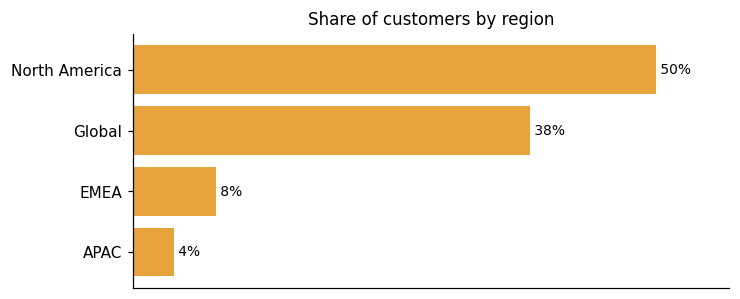
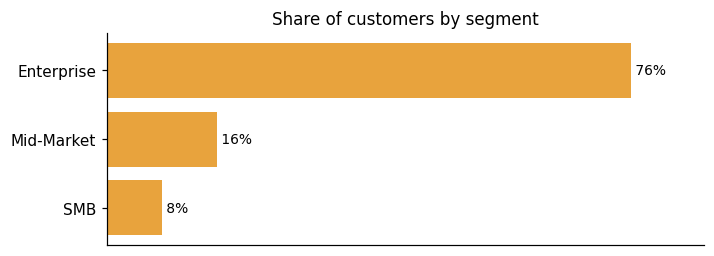
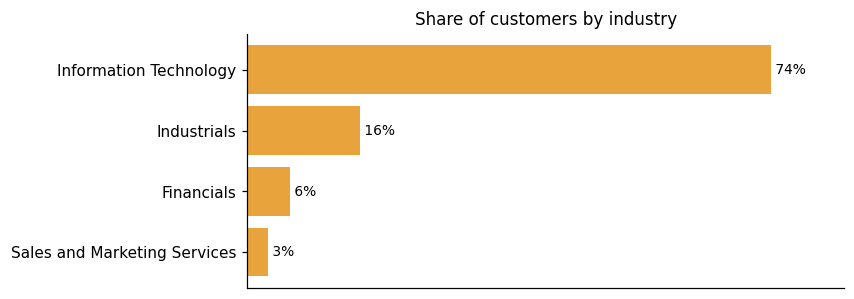
Representative customers: Assent, Auth0, Blue Yonder, Bonterra, Bynder, CallMiner, Clari
How 6sense Revenue AI uses AI in practice
6sense Revenue AI™ applies AI across the entire go-to-market workflow, from data ingestion through outreach execution. Remove the AI layer and the platform loses account identification, predictive buying-stage modeling, intent signal interpretation, and automated email agents. No primary function survives without it. The engine behind this is 6AI™, which the vendor describes as turning trillions of datapoints captured by the Signalverse™ into actionable insights daily. Those insights are not raw outputs — they are designed to drive immediate action across revenue teams. The vendor describes how 6sense® unifies your data, channels, and teams with purpose-built AI and intelligentAgents to connect every GTM motion. Intelligent Agents handle execution tasks, while the Signalverse™ supplies the underlying signal volume that feeds the models.
Predictive ML
Read details6sense Revenue AI™ uses machine learning trained on over a decade of B2B data to score accounts across three dimensions: ICP fit, buying stage, and revenue potential. The scoring is designed to help revenue teams prioritize the accounts most likely to convert in the near term.
Agentic AI
Read detailsThe autonomous email agents in 6sense Revenue AI span four distinct use cases: inbound qualification, dormant revival, event follow-up, and cross-sell outreach. For each, the agents handle the full workflow — generating personalized sequences, classifying inbound replies, and sending responses that are either AI-generated or human-generated. The vendor describes this as autonomous end-to-end execution, meaning the system can move through these steps without requiring a human to trigger each action. That said, human supervision remains configurable, so teams can set the boundaries of how much the agents act on their own.
Recommendation / Matching
Read details6sense Revenue AI gives sellers ranked account and contact recommendations by matching intent signals, technographics, persona engagement, and buying-stage data to ideal customer profiles. It also generates personalized email drafts and account summaries within sellers' existing workflows.
Generative AI
Read details6sense Revenue AI handles personalized email generation across both outbound sequences and inbound replies. It draws buyer signals from the Signalverse, CRM, and MAP systems to tailor copy to each individual recipient. The same process that crafts one message can produce many, without losing brand authenticity.
Anomaly / Pattern Detection
Read details6sense Revenue AI turns a trillion daily buyer signals into visible buying intent that would otherwise stay hidden. The platform draws those signals from keyword research, publisher content, and first-party data. It scans all three sources continuously, looking for patterns that indicate in-market behavior. Anonymous account activity gets surfaced through this process rather than slipping past unnoticed.
6sense Revenue AI pricing and value: quote-based costs, ROI and fit
6sense Revenue AI™ publishes ROI figures from 9 different customers, covering 10 distinct results. One customer saved approximately 1,098 hours — equivalent to seven months — of BDR time. JAGGAER saved $77,459 in just the first two months compared to the cost of hiring local in-house resources. One customer notes: "We are driving innovation with the AI email writer, and with a more automated and streamlined workflow for our follow-up process. Our team is collaborating to drive increased scale, and as a result, deliver greater business outcomes." Pricing follows a subscription model with a credit-gated free tier. The free tier includes 50 data credits per month. Four named tiers exist for Sales Intelligence, though specific prices for the paid tiers are not displayed — buyers are routed to sign up or contact sales instead.
ROI evidence from 9 customers
- We are driving innovation with the AI email writer, and with a more automated and streamlined workflow for our follow-up process. Our team is collaborating to drive increased scale, and as a result, deliver greater business outcomes.
- saved approximately 1,098 hours (equivalent to seven months) of BDR time
- JAGGAER saved $77,459 in just the first two months compared to the cost of hiring local in-house resources
- Being able to tie the data back to tangible business outcomes is crucial. We know it's not just this fluffy number
Time-to-value: what implementations take
- ROI from 6sense achieved within four months of implementation
- Working with 6sense Professional Services allowed FireMon to roll out Sales Intelligence in just one month, cutting launch time in half.
Who it fits: value by company size
The customer evidence includes mid-market and enterprise B2B contexts, and the pricing structure carries an affordability signal for smaller organizations. One customer note flags it plainly: the pricing structure may be challenging for smaller organizations, and occasional data accuracy or syncing issues with connected systems can require extra monitoring. On the enterprise and mid-market side, the evidence is concrete. Drata increased close rates by 3X and ASPs by 2X for mid-market and enterprise SDR-sourced opportunities. Reltio doubled their BDR capacity without adding headcount. JAGGAER operated with a lean team — as one customer described it, "our ABX team in North America consisted of just two professionals who were already at full capacity" against a broader marketing team of around 50. The affordability concern for smaller organizations comes directly from user-reported experience, not from 6sense® Revenue AI™'s published pricing tiers.
The page presents four named tiers for Sales Intelligence (including a free tier with 50 data credits/month) but publishes no specific prices for the paid tiers, routing buyers to sign up or contact sales rather than displaying dollar figures.
Free
Sales Intelligence
50 Data Credits per Month Company & People Search Sales Alerts List Builder Chrome Extension
Sales Intelligence + Data Credits
Sales Intelligence
Sales Copilot Chrome Extension AI Writer (Beta) Company & Contact Insights Persona Map Technographics Psychographics Web Visitor Identification Job Postings 3rd Party Intent Workflow & Engagement Alerts
Sales Intelligence + Predictive AI
Sales Intelligence
Predictive AI Model, Scores, & Dashboards Sales Copilot AI Recommended Actions AI Account Summaries Chrome Extension AI Writer (Beta) Company & Contact Insights Persona Map Technographics Psychographics
Sales Intelligence + Data Credits + Predictive AI
Sales Intelligence
Predictive AI Model, Scores, & Dashboards Sales Copilot AI Recommended Actions AI Account Summaries Chrome Extension AI Writer (Beta) Company & Contact Insights Company & Contact Data Acquisition
Plans as published by the vendor on Explore 6sense Sales Intelligence Pricing | 6sense.
6sense Revenue AI enterprise readiness: security, compliance, migration, and support
6sense Revenue AI™ addresses four enterprise-readiness dimensions: security, compliance, migration, and customer support.
Security controls and assurance
6sense® Revenue AI™ carries a CIO-reporting security department that spans programs covering incident response, vulnerability management, secure SDLC, continuous monitoring, threat hunting, vendor management, customer assurance, and risk management. The breadth of that structure signals a mature, enterprise-oriented posture. On the certification front, the platform holds ISO/IEC 27001:2022 and SOC 2 Type 2 — the two attestations most procurement teams treat as baseline requirements. It also complies with applicable global regulations to keep data secure and protected. Independent validation is built into the annual cycle: third-party penetration assessments cover network, web application, and API surfaces each year. Infrastructure runs on highly available AWS infrastructure with multiple systems backing the service, designed around defined RTO and RPO commitments.
Compliance and data protection
6sense Revenue AI holds SOC 3 attestation and TRUSTe GDPR Validation, alongside documented compliance with GDPR, CCPA/CPRA, and the UK-US and Swiss-US Data Privacy Framework. GDPR and CCPA compliance is validated through independent third-party audits. The privacy program is structured across two layers: an executive layer involving the CFO, CTO, and Legal, and an engineering layer. The legal team includes an Assistant General Counsel – Privacy & Compliance and an Associate Privacy Counsel. That dedicated privacy management program reflects a formal internal commitment rather than a lightweight checkbox approach.
Migration from competing platforms
Getting 6sense Revenue AI running takes real effort upfront. The platform can feel complex and overwhelming at first, especially for teams without dedicated resources for setup. That complexity is a recurring observation, not an outlier. Teams that push through the implementation curve do report strong outcomes. Ivanti nearly tripled BDR-contributed opportunities within a year. Bynder saw a 250% increase in outbound pipeline after implementing 6sense Revenue AI. ServiceMax reported a close conversion rate increase over 100% through a global ABX deployment. The platform also supports more granular post-sale segmentation. One customer describes how they segmented adverts based on what customers need at different stages, with specific content directed at customers who might need onboarding resources or out-of-box solution information.
Customer support experience
Support for 6sense Revenue AI gets solid marks for onboarding. Customers report that comprehensive training and onboarding is a consistent strength. That said, some areas of the platform require heavy support or training to fully leverage. Segments and journeys in particular can be difficult without that ongoing help. Some users also flag that the UI is not friendly, support response times can be slow, and training materials fall short of what the platform's complexity demands. On the security and compliance side, the vendor maintains a Trust Center via SafeBase where NDA-gated policies and procedures are available to prospects and customers who need to complete due diligence.
6sense Revenue AI vs. ZoomInfo, Dun & Bradstreet and other platforms
6sense Revenue AI competes across 3 analyst-recognized categories — Account Based Marketing Platforms, Intent Data Providers For B2B, B2B Revenue Marketing Platforms — with different rival sets in each; the comparisons below break out the view category by category.
Account Based Marketing Platforms
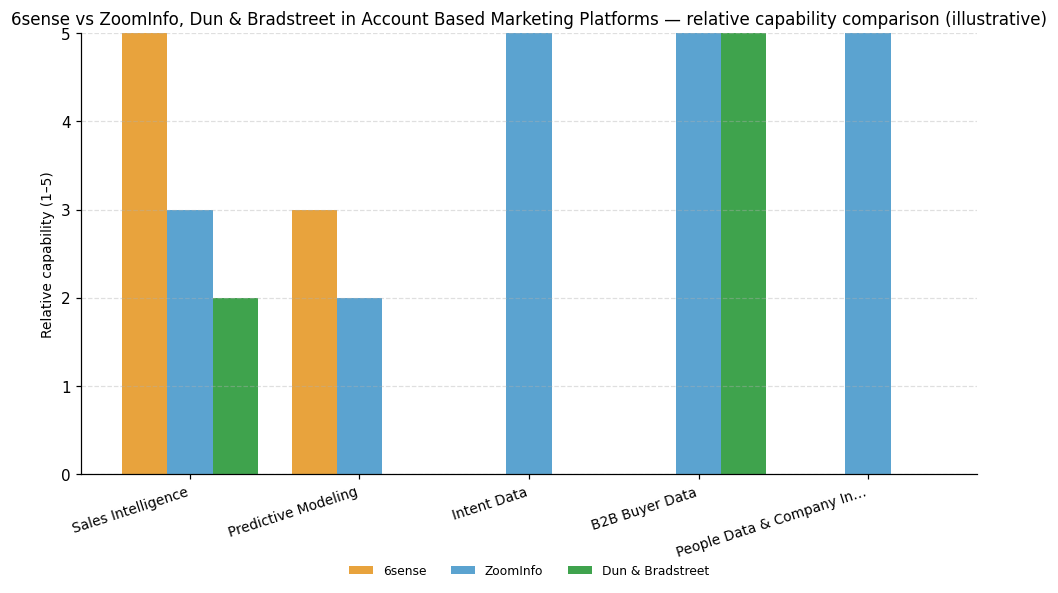
| Capability | 6sense | ZoomInfo | Dun & Bradstreet |
|---|---|---|---|
| Sales Intelligence | 5 | 3 | 2 |
| Predictive Modeling | 3 | 2 | — |
| Intent Data | — | 5 | — |
| B2B Buyer Data | — | 5 | 5 |
| People Data & Company Info APIs | — | 5 | — |
6sense®
Sales Intelligence: Supports multiple alert delivery methods and alert categories with AI-driven next best actions for contacts, including explanations of the signals that triggered each suggested action.
ZoomInfo
Intent Data: Platform is focused mainly on proprietary company, contact and intent data, rated strong and identified as a primary platform differentiator.; B2B Buyer Data: Platform is focused mainly on proprietary company, contact and intent data, with account data and firmographics identified as a primary platform differentiator, rated strong.; People Data & Company Info APIs: Integrates broadly with CRM, marketing automation, sales engagement platforms, social advertising applications, and third-party ad exchanges, rated strong.
Dun & Bradstreet
B2B Buyer Data: Integration with D&B Data Cloud provides marketers access to extensive third-party firmographic and business data, underpinned by the company's heritage in business data, rated strong.
Intent Data Providers For B2B
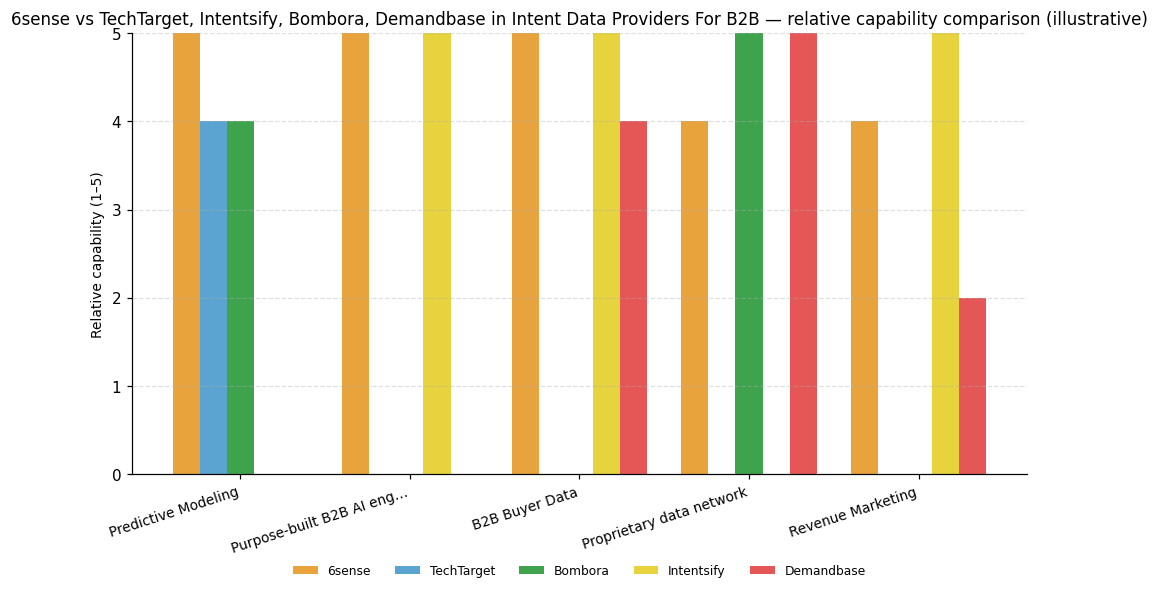
| Capability | 6sense | TechTarget | Intentsify | Bombora | Demandbase |
|---|---|---|---|---|---|
| Predictive Modeling | 5 | 4 | — | 4 | — |
| Purpose-built B2B AI engine | 5 (6AI) | — | 5 | — | — |
| B2B Buyer Data | 5 | — | 5 | — | 4 |
| Proprietary data network | 4 (Signalverse) | — | — | 5 | 5 |
| Revenue Marketing | 4 | — | 5 | — | 2 |
6sense
Predictive Modeling: Detailed buying cycle analysis tailored to each client offering allows precision targeting.; Purpose-built B2B AI engine: Top noise filtering capability cited as powering outstanding intent reporting and insight generation.; B2B Buyer Data: Identified as top identity resolution capability that powers intent reporting and insight generation.; Proprietary data network: High volume of signals across a wide range of keywords, though Demandbase is noted as collecting one of the largest signal volumes in the evaluation.; Revenue Marketing: Outstanding insight generation powered by top identity resolution and noise filtering, though Intentsify's bespoke modeling and R&D investment are the standout differentiators.
TechTarget
Predictive Modeling: Strong buying cycle analysis cited as part of TechTarget's leadership in intent insights, though not the primary differentiator.
Intentsify
Purpose-built B2B AI engine: Noise filtering earned top scores among Leaders competing on analytics.; B2B Buyer Data: Accuracy and identity resolution earned top scores among Leaders competing on analytics, reinforced by the Orbit identity graph.; Revenue Marketing: Insight generation is a standout capability driven by analytics, bespoke modeling, and R&D investment.
Bombora
Predictive Modeling: Strong buying cycle analysis is a key differentiator, though 6sense's tailored per-client approach is the standout.; Proprietary data network: Co-op size increased by approximately 20% and topic coverage by 13% over the past 18 months, with signal scaling as a recent focus.
Demandbase
B2B Buyer Data: Offers highly accurate identity resolution capabilities to match large signal volumes to accounts, though not called out as a top differentiator.; Proprietary data network: Collects one of the largest signal volumes in the evaluation, relying primarily on bidstream.
B2B Revenue Marketing Platforms
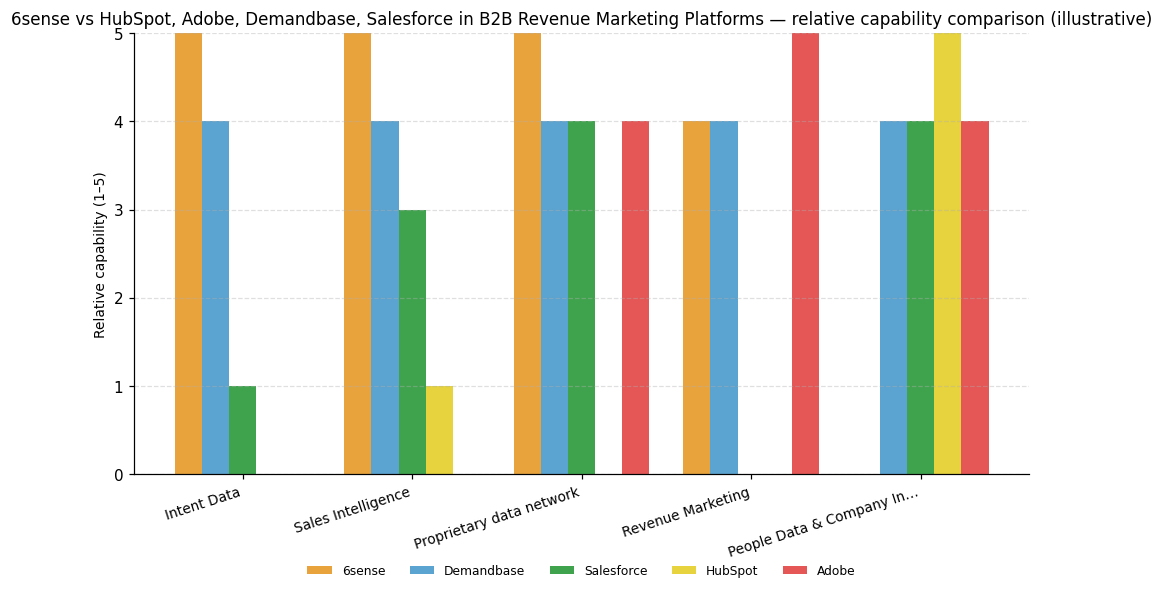
| Capability | 6sense | HubSpot | Adobe | Demandbase | Salesforce |
|---|---|---|---|---|---|
| Intent Data | 5 | — | — | 4 | 1 |
| Sales Intelligence | 5 | 1 | — | 4 | 3 |
| Proprietary data network | 5 (Signalverse) | — | 4 | 4 | 4 |
| Revenue Marketing | 4 | — | 5 | 4 | — |
| People Data & Company Info APIs | — | 5 | 4 | 4 | 4 |
6sense
Intent Data: Uses proprietary intent data within its embedded CDP to identify accounts demonstrating purchase intent, rated consistently strong in this capability.; Sales Intelligence: Uses an embedded custom CDP and proprietary data for AI and predictive analytics to identify buying intent and prioritize accounts, rated consistently high in this capability.; Proprietary data network: Uses an embedded custom CDP with proprietary data to unify buyer data and identify buying intent, rated strong in this capability.; Revenue Marketing: Differentiates on deep engagement across channels, rated strong in omnichannel orchestration.
HubSpot
People Data & Company Info APIs: Offers extensive integrations with other vendors as a noted strength, rated strong in this capability.
Adobe
Proprietary data network: Tight integration with Adobe Real-Time CDP consolidates customer data from numerous sources into unified profiles enabling real-time personalization, though full capability requires purchasing a second product.; Revenue Marketing: Stands out for multichannel support across email, web, and full customer lifecycle, rated strong in omnichannel orchestration.; People Data & Company Info APIs: Rated strong for integration across the Adobe ecosystem and with third-party tools, though full capability may require multiple Adobe products.
Demandbase
Intent Data: Rated strong for multilanguage intent data as part of its ABM-focused platform capabilities.; Sales Intelligence: Rated strong for predictive analytics and AI-driven insights as part of its ABM-focused platform.; Proprietary data network: Supports advanced account modeling and data unification relevant for large enterprise revenue marketing strategies, rated strong in this capability.; Revenue Marketing: Relevant for large enterprises requiring advanced ad targeting and multichannel revenue marketing strategies, rated strong in omnichannel orchestration.; People Data & Company Info APIs: Rated strong for application integrations as part of its ABM-focused platform capabilities.
Salesforce
Proprietary data network: Salesforce Data Cloud aggregates data from multiple sources to create unified customer profiles, though full CDP capability requires activating a second product.; People Data & Company Info APIs: Rated strong for CRM integration and third-party connectivity, with customers commending its strong integration capabilities.


Connect 6sense Revenue AI with your stack: integrations and partner ecosystem
6sense Revenue AI™ supports 28 native integrations and 22 integration partnerships across 42 partner categories. The spread is wide, running from A/B Testing & Website Personalization to AI-Powered Conversational Sales & Marketing Automation to Account-Based Marketing platforms. That range means the partner ecosystem covers many distinct disciplines rather than clustering tightly in one area.
6sense® Revenue AI™ connects across CRM, marketing automation, sales tools, and data lakes, with API connectors extending reach to non-native systems as well. The vendor describes system-agnostic APIs that deliver data to your CRM, MAP, data lake, and more. Integrations are expansive and, as one source notes, with the additional API connectors can be applied to non native connections easily enough. On the ABM side, the platform integrates with your CRM and marketing and sales automation tools so that data can easily be activated across platforms. For its Data Preparation capability, 6sense Revenue AI addresses field mapping to target systems, data type compatibility, required field completion, and format compatibility with CRM and MAP systems before data moves downstream.
| Partner category | Integration partners | Native count | Flow direction |
|---|---|---|---|
| A/B Testing & Website Personalization | kameleoon.com | 1 | Unknown |
| AI-Powered Conversational Sales & Marketing Automation | conversica.com | 1 | Unknown |
| Account-Based Marketing (ABM) / Personalized Content Experiences | folloze.com | 0 | Unknown |
| B2B Marketing Analytics & Attribution | hockeystack.com | 0 | Unknown |
| B2B Marketing Attribution & Funnel Analytics | fullcircleinsights.com | 0 | Unknown |
| B2B Paid Media / Demand Generation Automation | metadata.io | 0 | Unknown |
| B2B intent data / media | Informa TechTarget | 1 | Upstream |
| B2B intent data provider | Bombora | 1 | Upstream |
| B2B software review / intent data | G2, PeerSpot, TrustRadius | 1 | Upstream |
| Branded Merchandise / Swag Management | printfection.com | 0 | Unknown |
| Business messaging / collaboration | Slack | 1 | Downstream |
| CRM | Salesforce | 1 | Bidirectional |
| CRM / Sales Pipeline Management | pipedrive.com | 1 | Unknown |
| CRM / marketing automation | HubSpot | 1 | Bidirectional |
| Cloud storage | Amazon S3 | 1 | Downstream |
| Content Engagement & Lead Conversion Platform | hushly.com | 0 | Unknown |
| Content Intelligence / Buyer Engagement | pathfactory.com | 0 | Unknown |
| Conversational Marketing / Pipeline Generation Platform | qualified.com | 0 | Unknown |
| Conversational Sales / Live Chat & Human Engagement | marketlinc.com | 1 | Unknown |
| Corporate Gifting & Direct Mail Platform | alyce.com | 0 | Unknown |
| Data warehouse / cloud data platform | Snowflake | 1 | Bidirectional |
| Demand Generation / B2B Lead Management Platform | integrate.com | 1 | Unknown |
| Demand Intelligence / Technographic Data | demandmatrix.com | 1 | Unknown |
| Digital Experience Analytics | contentsquare.com | 1 | Unknown |
| Digital advertising | Google Ads | 1 | Downstream |
| Direct Mail & Gifting Platform | postal.com, reachdesk.com, sendoso.com | 1 | Unknown |
| E-commerce Operations / Inventory & Order Management | channelape.com | 1 | Unknown |
| Identity & Access Management (IAM) / Single Sign-On | okta.com | 1 | Unknown |
| Industry Research & Sales Intelligence | verticaliq.com | 0 | Unknown |
| Marketing automation | Marketo, Oracle Eloqua, Pardot | 3 | Bidirectional |
| Professional social network / digital advertising | 1 | Bidirectional | |
| Research / analyst / peer review (Gartner Peer Insights) | Gartner | 0 | Upstream |
| Revenue Operations / Lead-to-Account Matching & Routing | leandata.com | 1 | Unknown |
| SaaS Spend Management / Software License Optimization | cleanshelf.com | 0 | Unknown |
| Sales Enablement / Training | salesassembly.com | 0 | Unknown |
| Sales Engagement / Cadence Automation | salesvue.com | 1 | Unknown |
| Sales engagement platform | Outreach, Salesloft | 1 | Bidirectional |
| Social media / digital advertising | Meta | 1 | Downstream |
| Unknown | crooze.com | 1 | Unknown |
| Website Personalization & Conversion Optimization | intellimize.com, reactful.com | 0 | Unknown |
| Website Personalization & Revenue Attribution | trendemon.com | 0 | Unknown |
| Website personalization | Mutiny | 0 | Downstream |


What's new in 6sense Revenue AI
6sense Revenue AI™ has been active recently, logging 4 product updates over the last 9 months. The platform has also earned 7 awards in the last 24 months across its Account Based Marketing Platforms, B2B Revenue Marketing Platforms, and Intent Data Providers For B2B categories.
6sense® Achieves ISO/IEC 27001:2022 Certification, Completes SOC 2 Type 2 Report Expansion, and Attains TRUSTe GDPR Validation
6sense Revenue AI™ has picked up three certifications covering security and privacy: ISO/IEC 27001:2022 certification, a SOC 2 Type 2 report expansion and annual examination, and TRUSTe GDPR validation. The company describes these achievements as representing its commitment to ensuring and maintaining trust pertaining to customer privacy and security.
Read more →6sense Introduces RevvyAI, Turning the Platform Into an AI-Powered GTM Command Center
6sense Revenue AI has launched RevvyAI, a new layer built into the platform that brings together conversational interfaces, specialized agents, and persona-based workspaces — the vendor describes this combination as turning the platform into an AI-powered go-to-market command center. The update touches ad spend optimization, sales intelligence, and workflow streamlining across revenue operations. Teams get dedicated workspaces shaped around their roles, along with greater visibility and control over how their GTM activities run day to day.
Read more →6sense Launches AI Email Agents, Names Chris Ball as New CEO
6sense Revenue AI simultaneously launched AI Email Agents and appointed a new CEO. The AI Email Agents automate the full email lifecycle, bringing personalized, scalable outreach directly into the platform. On the leadership side, Chris Ball takes over as CEO, succeeding Jason Zintak. Ball comes to the role with experience at Instructure, Adobe, and SAP, with a stated focus on innovation and global expansion.
Read more →Recent awards for 6sense Revenue AI
6sense Revenue AI has received 7 awards in the last 24 months, covering growth rankings and analyst recognition. The recognized categories include Account Based Marketing Platforms, B2B Revenue Marketing Platforms, and Intent Data Providers For B2B.
- 6sense Named a Leader in Independent Evaluation of Revenue Marketing Platforms for B2B (2026-01-29) →
- Financial Times The Americas' Fastest Growing Companies 2025 (2025-12-31) →
- 6sense Named Among the Fastest-Growing Companies in North America on the 2025 Deloitte Technology Fast 500 (2025-11-24) →
- 6sense Named a Leader in the 2025 Gartner Magic Quadrant for Account-Based Marketing Platforms for Fifth Consecutive Year (2025-11-18) →
- 6sense Named to 2025 Inc. 5000 List of Fastest-Growing Private Companies for Fifth Consecutive Year (2025-08-21) →
- Leader in The Forrester Wave: Intent Data Providers For B2B, Q1 2025 (2025-03-31) →
- 6sense Named a Fastest-Growing Company in North America on the 2024 Deloitte Technology Fast 500 for the Third Consecutive Year (2024-11-21) →
6sense Receives Frost & Sullivan's 2026 Global Company of the Year Recognition for Shaping the Future of Revenue Intelligence
6sense received Frost & Sullivan's 2026 Global Company of the Year recognition for its leadership in GTM orchestration and revenue intelligence platforms. The award highlights 6sense's innovation, strategy execution, and customer impact, showcasing its ability to transform fragmented buyer signals into actionable revenue intelligence.
6sense Brings Intelligence Directly Into AI Agents and Entire GTM Stack with Latest Product Releases
6sense has introduced four major product innovations, integrating its intelligence engine into AI agents like Claude and ChatGPT, and enhancing advertising workflows. The updates include the 6sense MCP Server, Trusted People Intelligence, new APIs for programmatic access, and Advertising Intelligence for live context, aiming to streamline GTM operations with real-time, actionable insights.
6sense Wins Frost & Sullivan's Global Company of the Year in GTM ...
Frost & Sullivan awarded 6sense the 2026 Global Company of the Year for GTM Orchestration and Revenue Intelligence. The award recognizes 6sense's predictive models and strengths in operational transparency and GTM execution. Key differentiators include RevvyAI, Intelligent Workflows, and Signalverseâ„¢ expansion.
6sense Insights, Inc. Profile
HQ Location
450 Mission Street, Suite 201 San Francisco, CA, 94107
Employees
101-250
Social


Financials
SERIES E