


GoodData: Analytics and Business Intelligence Platforms overview — capabilities, features, use cases and value by role
GoodData® is an Analytics and Business Intelligence platform that enables organizations to model, analyze, and visualize data in support of informed decision-making. It delivers AI-enabled, agentic, and embedded analytics, all built on a governed semantic foundation.
Top capabilities of GoodData
Embedded Analytics
Read detailsGoodData's Embedded Analytics capability lets software teams integrate dashboards, visualizations, and AI Assistant directly into any application through React SDK, Web Components, or iFrame, with support for white labeling, multitenancy, and deployment in GoodData Cloud or self-hosted environments. One customer put it plainly: "GoodData had the embedded analytics distribution platform we needed to accomplish that. Using their platform allowed us to focus on our customers' needs rather than building a BI solution from scratch." Another noted that "Being an embedded analytics tool by design, the pricing model and security assurance were some of the things we most liked about GoodData."
Data Visualization
Read detailsGoodData's Data Visualization capability brings interactive dashboards to end users through drag-and-drop chart building, filtering, and drill-down exploration. It supports out-of-the-box visualization types alongside custom charts from external libraries — including D3, Chart.js, FusionCharts, and Google Charts — with theming, embedding, and white-label options. Customers point to more types of data visualization as a practical strength. They also highlight speed in displaying large data and an attractive interface as standout qualities.
Analytics as Code
Read detailsAnalytics as Code handles the full range of analytics work — from BI and custom data apps to data pipelines and environment administration. Teams use it to apply software-engineering practices such as version control, CI/CD, modular reusability, and declarative APIs and SDKs. It supports Analytics as Code which helps software engineering teams follow a code-first approach to analytics, while still allowing seamless movement between UI-based and code-based development.
AI Assistant
Read detailsGoodData's AI Assistant grounds conversational analytics in a governed semantic layer, keeping responses free of hallucinations. It delivers natural-language summaries, key driver analysis, anomaly detection, rankings, and trend insights. The assistant connects to both structured and unstructured data, understands business logic and language, and can trigger automations through integrations with Slack, Teams, and CRMs via APIs and MCP.
Analytics Lake
Read detailsGoodData's Analytics Lake functions as a composable data service layer purpose-built for analytics. It delivers data isolation, scalability, and high-speed analytics through FlexMart — granular multi-tenant in-memory data marts. Flexible real-time and batch processing combine with an open lakehouse stack built on DuckDB, Iceberg, and Arrow. The layer integrates raw data lake and structured data warehouse sources to support advanced analytics, BI, and ML workflows.
Headless BI
Read detailsGoodData's Headless BI capability separates the analytical backend from the presentation layer, so any data tool or application can pull consistent, real-time metrics through open REST APIs, Python SDKs, and a PostgreSQL interface. 100% declarative API coverage and open source SDKs give developers full access to that layer. A single source of reusable metrics keeps BI tools, ML models, and applications synchronized with one another.
Query Acceleration
Read detailsGoodData's FlexQuery cuts what your organization pays for cloud data warehouse compute, delivering an average 55% reduction in BI's contribution to data warehouse spend. It is an in-memory, metadata-driven analytics layer built on open standards: Apache Arrow, Iceberg, and DuckDB. FlexQuery runs underneath every GoodData environment. It combines caching, aggregate-awareness, pre-aggregation, and real-time data updates to speed up queries and keep warehouse costs in check.
Agent Builder
Read detailsGoodData's Agent Builder gives teams a governed environment for building autonomous agents across the full development lifecycle — from tool definition and planning through execution rules and observability. Versioning, testing, and composability are built into the development process rather than bolted on afterward. Agent Builder supports MCP and A2A standards alongside a VSCode extension and rich SDKs.
AI Automation
Read detailsGoodData's AI Automation capability lets any MCP-compatible AI agent build, run, and automate analytics end-to-end — covering semantic modeling, metrics development, data queries, visualization creation, and alert scheduling — enabling teams to build analytics and explore data 100x faster without manual BI backlogs or UI work.
Agentic Analytics
Read detailsGoodData's Agentic Analytics capability is built for teams that need to embed AI agents directly into products and processes at enterprise scale. It supports four distinct agent types: intelligent agents, LLM-powered assistants, context-aware copilots, and automated autopilots. The underlying platform is composable and developer-friendly, with multitenancy and MCP server support alongside SDKs. A governed semantic layer sits at the core of the platform, designed specifically to prevent hallucinations.
Context Management
Read detailsGoodData's Context Management capability centers on a single semantic model where metrics, dimensions, and business logic are defined once and shared across AI agents, dashboards, and APIs — keeping every consumer working from the same governed definitions. Enterprise-grade controls manage data access and agent behavior, grounding AI responses in verified data with full traceability and auditability.
AI-Driven Business Intelligence
Read detailsGoodData's AI-Driven Business Intelligence capability centralizes data models, applies analytics-as-code principles, and delivers AI-infused dashboards and interactive visualizations at scale across self-service reporting, embedded analytics, agentic AI, and a composable front end that supports multitenancy and governed natural-language querying.
Data and BI Automation
Read detailsGoodData's Data and BI Automation capability handles intelligent data workflows through AI-driven anomaly detection, forecast-based alerting, threshold recommendations, and narrative summaries. Scheduled exports and triggered alerts push insights across email, Slack, webhooks, and cloud storage.
Top features of GoodData
Forecasting
Read detailsGoodData's Forecasting feature lets users incorporate a forecast into new or existing visualizations directly within dashboards to gain a snapshot of future predicted trends.
Single sign-on (SSO)
Read detailsGoodData builds Single Sign-On into its embedded analytics platform, so users authenticate once and reach their analytics without managing separate credentials.
Anomaly Detection Triggers
Read detailsGoodData's Anomaly Detection Triggers automatically spot unexpected data changes and surface outliers and unexpected shifts that need investigation, triggering alerts before issues arise.
Rich SDKs and APIs
Read detailsGoodData's open APIs and declarative SDKs make it possible to embed analytics across any surface. The SDKs cover React, Python, and JavaScript. They connect to code repositories and third-party apps.
FlexConnect custom data connection
Read detailsFlexConnect gives GoodData teams a way to build custom self-service integrations to any data source — including niche and homegrown systems, not just standard ones. The approach relies on familiar SQL and API standards, so teams can avoid complex integration projects.
Key driver analysis
Read detailsGoodData's key driver analysis tool is built for one job: finding and comparing what actually causes the trends users see in their data, so teams can trace which factors move their key performance indicators and business outcomes.
FlexQuery analytics cache
Read detailsGoodData's FlexQuery analytics cache cuts data warehouse costs by storing query results and applying aggregate-awareness technology to reduce how many queries reach the warehouse, and how complex those queries are. The reported outcome is a 55% average reduction in BI's contribution to data warehouse spend.
MCP server, protocol support, and IDE extensions
Read detailsGoodData Agent Builder packages an MCP server and a VSCode extension together. These tools let developers sync tools and context, delivering 10x faster agent build and deploy cycles. MCP and A2A protocol support connects agents and systems using open standards, eliminating glue code.
Data Blending
Read detailsGoodData's Data Blending feature pulls together data from multiple sources directly inside reports, so teams can run broader analysis without moving data or running ETL processes.
SQL interface
Read detailsFlexQuery puts a SQL interface in front of distributed data, so analytics and BI engineers can query, manipulate, and materialize datasets on the fly using standard SQL statements.
Visualization creation
Read detailsGoodData's AI Automation handles the creation of visualizations directly within analytics workflows via MCP. It generates charts and dashboards automatically, without requiring manual UI interaction.
Embedding options (React SDK, Web Components, iFrame)
Read detailsGoodData supports three embedding methods — React SDK for full frontend customization in React apps, Web Components for framework-agnostic embedding in any modern browser, and iFrame for quick dashboard embedding via a copy-paste HTML snippet.
CI/CD, versioning, and testing
Read detailsGoodData supports CI/CD pipelines, version control, and automated testing within its embedded analytics platform, allowing developers to apply software engineering best practices to analytics build and deployment workflows.
Apache Arrow columnar in-memory engine
Read detailsFlexQuery runs its analytics engine on Apache Arrow, an open-source in-memory columnar storage format built for speed rather than storage. Apache Arrow is designed to handle and process large data volumes efficiently. The focus is on live, high-speed analytics — not on holding data at rest.
Drag-and-drop visualization builder
Read detailsGoodData's Visualization Builder puts drag-and-drop chart and dashboard creation in the hands of users who don't write code. Real-time previews show results as they build.
Flexible Layouts
Read detailsGoodData's Flexible Layouts feature keeps dashboards adaptable — users can stack, resize, customize, and switch visualizations on the fly without rebuilding anything from scratch.
Scheduling and Alerting
Read detailsGoodData's Scheduling and Alerting feature keeps users informed through data insights by automating report delivery and triggering alerts when key metric thresholds are crossed, removing the need for manual report runs.
Natural-language AI query interface
Read detailsGoodData's conversational analytics interface runs on natural language — users ask questions, explore data, and build content in plain English rather than writing queries. Every answer is grounded in the underlying semantic layer. Query privacy stays protected because AI interactions work through metadata only, never touching the raw data itself.
Prebuilt pipeline blueprints library
Read detailsGoodData offers a library of ready-to-use pipeline blueprints hosted on GoodData's GitHub. The library blends no-code/UI, low-code, and all-code options within an interoperable infrastructure that integrates with multiple languages and tools.
Forecast-Based Alerts
Read detailsGoodData's Forecast-Based Alerts notify users about predicted trends and risk thresholds before those trends materialize, so teams can act on what's coming rather than what's already happened.
Threshold Recommendations
Read detailsGoodData's Threshold Recommendations feature analyzes historical data patterns to surface optimal alert thresholds automatically, sparing data teams the manual configuration work they would otherwise do themselves.
Semantic model generation and modification
Read detailsGoodData's AI Automation hands semantic model work to AI agents, which generate and modify the model directly inside development workflows — cutting through the manual BI backlog at software speed using MCP-compatible agents.
Metric development
Read detailsGoodData's AI Automation brings AI agents directly into analytics workflows, using MCP to create and update metric definitions without manual BI backlog work.
Logical data model (LDM) creation
Read detailsGoodData's AI Automation cuts out manual UI work by letting AI agents build logical data models directly inside development workflows via MCP.
Data querying
Read detailsGoodData's AI Automation connects AI agents directly to the analytics stack through MCP, so they can run data queries programmatically as part of automated workflows — no manual intervention required.
Automation creation
Read detailsGoodData's AI Automation puts alert creation, scheduling, and workflow management in the hands of AI agents that work directly inside the analytics stack via MCP — as the vendor puts it, a capability unavailable in competing tools.
Code and analysis execution
Read detailsGoodData's AI Automation enables AI agents to execute code and analysis directly within development workflows via MCP, running computations and analytical tasks at software speed without capacity limits.
Automated Decision Support Agents
Read detailsGoodData Professional Services builds Automated Decision Support Agents that flag what matters most and recommend actions, embedding AI-powered decision-making logic directly into customer workflows.
Intelligent Workflow Automation
Read detailsGoodData Professional Services delivers Intelligent Workflow Automation through autopilots that detect changes, summarize trends, and create reports automatically, helping teams work faster and smarter.
Co-development of new features
Read detailsGoodData Professional Services puts its own engineers directly inside customer teams to build custom capabilities together. Forward-deployed engineers work alongside customers in agile sprints. The engagement follows a continuous delivery model, so new features are developed and shipped in a continuous cycle rather than in a single handoff.
Long-term Roadmapping
Read detailsForward-deployed engineers from GoodData Professional Services work directly with customers on long-term roadmapping and initiative planning to sustain strategic direction for analytics products.
Embedded run-time transformation and federation logic
Read detailsGoodData's FlexConnect supports embedding advanced transformations, data federation, or ML tasks directly within the data source connection itself, enabling real-time data insights and a streamlined analytics workflow.
Private/on-environment data processing
Read detailsGoodData's AI processing is built around a containment-first design: all data stays within the user's own environment, and queries rely on metadata-only access patterns so that data never leaves during AI operations.
White-label and brand customization
Read detailsWhite-labeled analytics in GoodData means embedded dashboards can look and feel like your own product. Users can tailor those dashboards with custom color palettes, fonts, and logos. Visual elements such as buttons and tooltips are customizable too.
All-code, low-code, and no-code UI options
Read detailsGoodData meets analysts, developers, and product owners where they are, with all-code, low-code, and no-code UI modes that let each person build and manage analytics at their own technical level.
Inherited permissions and cascading content changes
Read detailsGoodData's trusted analytics feature supports inherited permissions and cascading content changes, so administrators can apply updates in one environment and have them roll out automatically across all tenants.
Accessibility compliance
Read detailsGoodData designs its embedded dashboards and visualizations to meet accessibility standards, keeping the analytics experience inclusive for all end users.
Pre- and post-processing transformations
Read detailsGoodData's FlexQuery sits between your raw data and your analytics layer, handling pre- and post-processing transformations on data ingested in batch or real-time. It reshapes that data before and after in-memory computation. The result is analytics that run fast and stay cost-effective.
Batch data ingestion
Read detailsGoodData's FlexQuery handles two data patterns at once: batch ingestion loads data on a schedule for in-memory processing, keeping analytics cost-effective, while real-time streaming runs in parallel.
Centralized automation audit dashboard
Read detailsGoodData centralizes the monitoring and auditing of all automation activity into a single dashboard, giving administrators the control and compliance visibility needed across enterprise-scale automated workflows.
API and SDK workflow management
Read detailsGoodData puts API and SDK access at the center of its automation story, letting developers build workflow logic directly into applications or internal tools. White-label options are also available for teams that need to present the tooling under their own brand.
Centralized versioned asset storage
Read detailsGoodData's Analytics as Code treats every analytics object and configuration as versioned code stored in a central location, so assets stay fully auditable and compliant with corporate or regulatory requirements.
Rollback capability
Read detailsGoodData's Analytics as Code keeps production environments clean by giving developers and analysts a rollback capability — so when something breaks, they can revert analytics assets to a previous version.
Data lineage tracing
Read detailsGoodData's Analytics as Code lets analysts trace data lineage through a shared, versioned codebase, making it straightforward to understand business metrics, follow how data flows, and catch errors before they reach production.
Agile iteration workflows
Read detailsGoodData's Analytics as Code is built for teams that already work in Agile — it applies those same familiar methods to analytics development, which speeds up how quickly data products reach the people who need them.
Interoperable multi-language and multi-tool infrastructure
Read detailsGoodData's Analytics as Code is designed around interoperable infrastructure, so teams can work in familiar development environments without getting locked into a single vendor. It connects with multiple programming languages and tools.
SQL and API connectivity
Read detailsGoodData's FlexConnect handles SQL and API connectivity to virtually any system or data source, including niche or homegrown solutions. It uses familiar SQL and API standards, removing the need for complex integration projects.
Structured data ingestion (metrics, dashboards, KPIs, tables)
Read detailsGoodData's AI assistant works from a governed analytical context built on structured data — specifically metrics, dashboards, KPIs, and tables. That foundation keeps AI outputs grounded in trusted business data.
Unstructured content ingestion (docs, PDFs, notes, logs)
Read detailsGoodData's AI assistant works with more than just tables and databases — it also ingests unstructured content such as documents, PDFs, notes, and logs. That content gets pulled into GoodData's governed analytical context, so AI outputs are grounded in both structured and unstructured business information.
Business-logic interpretation (definitions, formulas, hierarchies)
Read detailsGoodData's AI assistant roots every answer in the organization's own business logic by working through the semantic layer. It draws on metric definitions, formulas, and hierarchies to interpret questions, which keeps responses accurate and governed.
White-labeled embeddable assistant
Read detailsGoodData's AI assistant works as a white-labeled component that embeds directly inside third-party applications, surfacing AI-native analytics under the customer's own brand.
Scheduled reports automation
Read detailsGoodData's AI assistant handles the conversational setup of scheduled reports, so users can automate report delivery by interacting directly with the AI rather than navigating separate configuration screens.
Trigger definition from data changes, thresholds, or schedules
Read detailsGoodData ties data changes, thresholds, and schedules together as the starting points for automated workflows, then chains alerts, reports, and actions into connected analytics pipelines.
Filter and condition application on delivery
Read detailsGoodData routes targeted insights to the right recipients by applying filter and condition logic directly within delivery workflows.
Multi-channel delivery (email, Slack, webhooks, cloud storage)
Read detailsGoodData automates the distribution of reports and alerts across email, Slack, webhooks, and cloud storage. Exports are available in PDF, XLSX, CSV, and PNG formats.
Multi-format export support (PDF, XLSX, CSV, PNG)
Read detailsGoodData's data automation handles report exports across PDF, XLSX, CSV, and PNG formats, giving end users flexibility in how they receive and consume automated report deliveries.
Role- and filter-based delivery personalization
Read detailsGoodData's data automation scopes exported reports and alerts to each recipient individually, using user roles and filters to match content to their context.
Dashboard- and visualization-level filters
Read detailsGoodData's dynamic dashboards allow end-users to filter data at both the dashboard level and the individual visualization level. This means a team member can slice the same dashboard from different angles without anyone having to rebuild it from scratch.
Drill-down into visualizations
Read detailsGoodData's dynamic dashboards are built around a drill-down capability that lets end users click into any visualization to examine the underlying data in greater detail, supporting deeper analytical exploration.
On-demand data refresh
Read detailsEnd users can refresh their data on demand in GoodData, pulling the freshest figures with a single click so that dashboards and visualizations stay current.
Copy-paste web embed
Read detailsGoodData supports a copy-paste embedding option that instantly displays interactive dashboards on any web page without deep integration, letting end users explore and interact with the charts directly.
Top use cases for GoodData
Monetize data as a product or service
Read detailsGoodData lets SaaS companies and data product owners embed analytics directly into their applications and sell those analytics as a product. The embedded layer can include metrics, visualizations, and dashboards. Those offerings can then be packaged into tiered or subscription-based models. On the technical side, GoodData uses multitenant architecture to handle scale. Embedding itself is supported through React SDK, Web Components, and iFrame. Code-first CI/CD pipelines handle building and maintaining data products over time.
Embed analytics into customer-facing products
Read detailsGoodData gives software builders and product teams a way to embed self-service, AI-powered analytics directly into their own applications or web portals. The embedding options are React SDK, Web Components, or iFrame. What users see inside the host application includes dashboards, visualizations, and an AI Assistant — all without leaving that application. The analytics layer is fully branded and white-labeled. A single admin environment manages the whole thing across a multitenant customer base.
Modernize and migrate legacy BI to AI-ready analytics
Read detailsGoodData's phased, AI-assisted migration workflow compresses what typically takes months into days or weeks, moving fragmented legacy BI systems into a governed, analytics foundation ready for AI use. The process starts by exporting legacy content into a version-controlled environment, then auto-converts logic and metrics before building a clean logical data model. From there, it deploys to GoodData with stepwise user migration, so teams move over incrementally rather than all at once. The end result is a semantic foundation that grounds agents, dashboards, APIs, and automated workflows on consistent, centrally governed business logic.
Accelerate custom analytics solution delivery with expert services
Read detailsOrganizations can engage GoodData's forward-deployed engineers across end-to-end setup, custom data modeling, UX/product design, agentic solution development, and ongoing agile delivery. The result is a tailored, governed analytics and AI-powered decision-making solution that launches faster than building in-house, at lower cost and without internal development delays.
Deliver self-service analytics to business users at scale
Read detailsBusiness users and data teams use GoodData's drag-and-drop visualization builder, AI chat assistant, scheduled alerts, and embedded analytics to explore data and build dashboards independently. No engineering support is required. A single governed semantic layer pushes consistent analytics to every department, role, and customer-facing product, scaled to thousands of tenants through multitenancy.
Automate analytics delivery and alerting workflows
Read detailsGoodData supports trigger-based workflows that automatically deliver targeted analytics insights without manual intervention. Product teams, RevOps, finance, and data engineering teams configure threshold alerts, scheduled exports, anomaly detection, and AI-powered scheduling to push the right data to the right people. Delivery channels include email, Slack, webhooks, and cloud storage. The result is real-time KPI visibility, reduced alert fatigue, and enterprise-scale audit and compliance controls across all stakeholders.
Govern a unified semantic layer across all analytics consumers
Read detailsGoodData centralizes business logic, metrics, and dimensions in a single semantic model that every downstream consumer draws from. Define that model once, and dashboards, APIs, AI agents, and embedded applications all receive consistent, governed, and traceable outputs. Enterprise-grade access controls sit on top of that model. AI grounding rules do the same, keeping agents operating within defined boundaries. The result is production-ready analytics and AI with full auditability across prompts, inputs, outputs, and costs.
Accelerate analytics development with AI and code-first workflows
Read detailsGoodData's AI automation layer puts the full analytics stack in the hands of both analytics engineers and MCP-compatible AI agents. Any agent can invoke that stack exactly as a human expert would, but without capacity limits. The result is analytics development that runs at software speed, with no BI backlogs and no manual UI work. Tasks cover the whole workflow. Agents can develop metrics, build logical data models, query data, generate visualizations, and create automations.
Run high-performance multi-tenant analytics at low cost
Read detailsGoodData's Analytics Lake is built for data platform and engineering teams that need to run analytics across thousands of tenants without the overhead of a full-scale data warehouse. The platform keeps each tenant's data isolated through per-tenant in-memory data marts, handled by FlexMart. Real-time and batch processing run alongside each other. Custom self-service integrations come in through FlexConnect. Under the hood, Analytics Lake is built on DuckDB, Iceberg, and Arrow. That foundation means no vendor lock-in and straightforward integration with the data lakes and warehouses a team already has in place.
Value delivered by role with GoodData
Vice President of Products
Read detailsGoodData delivers embedded analytics that product teams use as a direct revenue driver. At Zendesk, Advanced Analytics became the number-one reason customers upgraded, contributing to premium tier growth among the highest-paying customers. Companies like Mindflash have used GoodData to move up-market and more than double revenue, while giving their customers self-service access to insights previously dependent on internal teams.
Business Analyst
Read detailsGoodData lets Business Analysts share insights on the spot — in the meeting room, not days later. The platform supports building KPIs and segment analyses, such as a 180-day retention rate 20% above the overall average. Analysts also reclaim 4–5 hours per month that previously went to manual data pulls.
Data Platform and Engineering Teams
Read detailsGoodData is built for Data Platform and Engineering Teams who need to programmatically create and manage analytics workflows at scale. Its APIs and SDKs make it possible to operate across thousands of pipelines and analytics environments without manual overhead. The headless BI architecture keeps frontend applications insulated from backend infrastructure changes. That means engineers can update data structures or migrate warehouses without breaking end-user metrics. This design is particularly relevant where analytics resources are stretched thin — in one customer's words: "a lot of our customers either don't have analytics teams or they'll have very slim analytics teams without their own staff of data engineers".
Chief Technology Officer
Read detailsGoodData gives CTOs a way to embed analytics with full control over interactivity, customization, and programmatic behavior through its React SDK. That depth of flexibility means complex implementations can finish in under six months. Customers can also handle their own data modeling without depending on the vendor. The BI partnership model removes the need to build analytics infrastructure in-house while still allowing CTOs to exceed customer expectations.
Director of Business Intelligence
Read detailsGoodData is the tool BI leaders reach for when they need to build customized dashboards and reports for sales pitches. Those dashboards help teams impress prospects and keep up with changing customer needs. In one BI leader's words: "It's our secret weapon when we go into sales pitches. I can honestly say, partnering with GoodData is one of the best choices I've made as a BI leader."
Senior Director of Analytics
Read detailsSenior Directors of Analytics use GoodData to embed contact center performance measurement directly into their product, scaling to 70+ clients over five years through cost-effective workspace management while positioning the platform as a competitive differentiator for non-analytical business users.
Vice President of Engineering
Read detailsEmbedding GoodData serves as a key market differentiator for Vice Presidents of Engineering. It enables customers to self-serve data visualizations and insights without depending on internal analytics or customer success teams. The platform has proven to be the deciding factor in sales cycles, and its flexibility and customization make it the only solution that delivers both high flexibility and high customization to the market.
Chief Product Officer
Read detailsGoodData is built for Chief Product Officers who want to embed analytics directly into their product — covering custom dashboards, global scale, and a secure, unified analytics foundation built to support advanced AI use cases.
Director of Data Engineering
Read detailsMulti-tenant data products built on GoodData get two things from the platform: strict data isolation between competing customers and enforced authentication across all of them. That combination makes GoodData a secure distribution channel for Directors of Data Engineering who need to scale complex data products without letting one customer's data bleed into another's. A five-year partnership model with GoodData's professional services team supports rapid growth for data-intensive businesses, covering both the product itself and the expanding customer base behind it.
Platform Product Manager
Read detailsPlatform Product Managers turn to GoodData for enterprise-grade data separation and security, client-by-client data siloing, fast rollout support, and a drag-and-drop KPI builder that lets end clients run their own analyses and reduces the support load on the product team.
Analytics and Insight Solutions Director
Read detailsAnalytics and Insight Solutions Directors partnering with GoodData unlock growth that would otherwise not be possible, with the platform enabling them to build commercial analytics products that save corporate analysts 2–3 days per week and give managers autonomous access to scorecards and performance data.
Head of Learning Technology
Read detailsGoodData allows Heads of Learning Technology to bring learning analytics to market quickly by building on an existing platform rather than starting from scratch. The platform integrates with current LMS investments rather than replacing them, which keeps costs down for educational institutions. Building on what's already in place, GoodData produces a single integrated product that surfaces information to learners when and where they need it.
CEO
Read detailsCEOs and co-founders use GoodData to automate and monetize data in unique ways, building differentiated products at 3x the previous speed through subscription-based model innovation. The platform's metrics layer pushes business logic directly into the platform, so end users can customize independently without manual intervention — freeing leadership to focus on strategic growth rather than operational data management.
Co-Founder and CIO
Read detailsCo-founders and CIOs building data-driven products use GoodData to rapidly deploy and customize an analytics platform for each customer, reaching market without building analytics infrastructure from scratch — including shifting customers away from slow survey-based decision-making toward real-time data analytics.
Vice President of Data and Analytics Engineering
Read detailsGoodData supports Vice Presidents of Data and Analytics Engineering in enhancing their organization's analytics capabilities. The platform delivers data tools and visualization capabilities to end customers such as colleges and universities, helping them make data-driven decisions. It also enables more junior team members to contribute to dashboard development, freeing senior experts to focus on data substance and quality rather than technical implementation.
Director of Business Analytics
Read detailsGoodData moves organizations away from gut-feel decisions and toward data-driven ones — and it does this by pulling together data that departments previously couldn't see or connect. The platform brings visibility to teams that had limited insight into the impact of their work. It connects data from new sources and new teams into a single unified view. That unified view is what makes holistic cross-departmental analysis possible where it wasn't before.
CMO
Read detailsGoodData supports CMOs with marketing performance dashboards that cover the full spectrum of a global marketing organization, from field marketing to marketing operations. The platform enables marketing leaders to demonstrate direct revenue impact from marketing investments and to allocate budget more effectively across teams.
Brand Partners
Read detailsBrand partners using GoodData gain around-the-clock self-service access to data on purchases, customers, and brand performance. That access surfaces opportunities such as high view counts paired with low conversion rates. Partners can act on those signals without waiting for reports, growing sales on the platform while end customers benefit from a wider, better-optimized product selection.
Director of Platform Architecture and DevOps
Read detailsEngineering teams get a familiar React-based development environment and near-instantaneous visualization performance through GoodData's architecture. Directors of Platform Architecture and DevOps use GoodData's professional services to define secure, scalable workspace structures and engineering best practices. Complex implementations compress into structured engagements through this model.
Developers
Read detailsDevelopers access GoodData context through APIs and workflows to embed, automate, and evolve analytics and AI behavior inside their own applications. The React SDK and semantic layer make white-labeled analytics experiences feel fully native — as one team noted, the result looks so native that users would not know the analytics come from an external source.
Product Teams and SaaS Builders
Read detailsProduct Teams and SaaS Builders can embed alerting, scheduling, and automated data workflows directly into customer-facing applications. GoodData handles the underlying analytics framework, so teams ship enterprise-grade capabilities without building one from scratch. Multitenancy, semantic modeling, and white-label options support scaling across customers, while self-service AI-fueled analytics integration targets a best-in-class user experience.
Ops and Business Teams
Read detailsGoodData puts live KPI monitoring directly in the hands of Revenue Operations, Finance, and Customer Experience teams — no manual reports, no waiting on analytics or IT staff. Self-service dashboards give these teams immediate access to the numbers they need to act on exceptions as they happen.
Marketing Director
Read detailsMarketing Directors use GoodData to connect data and transform it into dashboards for critical analysis without needing an engineering team, enabling faster and more independent decision-making, while the platform gives marketing leaders the visual 'wow factor' needed to engage stakeholders and demonstrate the direct revenue impact of marketing collateral.
Reporting and Analytics Team
Read detailsReporting and analytics teams using GoodData reclaim eight full days per month by enabling business users to self-serve their own reports, removing the bottleneck on the analytics team and eliminating time spent on manual data cleaning and preparation.
AI Product Lead
Read detailsAI Product Leads use GoodData's analytics infrastructure to power AI-driven features focused on understanding consumer needs and matching them with the right products. The semantic layer and dbt integration provide the analytics foundation for building and scaling those capabilities. This supports clients' goals of building deeper and more meaningful customer relationships.
COO
Read detailsGoodData puts operational analytics directly in the hands of suppliers, distributors, and clients — not just internal teams. With that access, organizations can drive revenue, proactively manage SLA performance, and flag service issues before clients ever pick up the phone. COOs also use it to show prospects, in concrete terms, how their operations are exceeding expectations.
Compliance Teams
Read detailsCompliance Teams benefit from GoodData-powered embedded analytics integrated directly into their everyday workflow, enabling them to be more proactive in identifying and addressing problem areas rather than reacting after the fact. Rapid customer onboarding through Life Cycle Management completes end to end in just a few hours, so compliance analytics can be deployed to new clients at scale.
HR Programme Manager
Read detailsHR Programme Managers working with GoodData-powered analytics gain visibility into workforce trends, such as the shift toward part-time and flexible contracts and its bottom-line impact. Role-based data access means HR leaders see organization-wide trends while individual managers see only their relevant data, supporting both strategic oversight and local accountability.
Analytics Engineer
Read detailsGoodData extends engineering practices — version control, CI/CD, and automated testing — beyond the data pipeline all the way to BI and end users. Analytics Engineers treat analytics with the same rigor as application code. The platform's analytics-as-code approach supports building and scaling solutions from modular components, reducing manual overhead and creating a reusable analytics layer.
Data Analyst
Read detailsData Analysts on GoodData build and scale analytics solutions from modular, low-code components, using pre-built logical data models and drag-and-drop tooling to create reports and dashboards without starting from scratch each time, saving time and creating trust across the organization.
Product Owner
Read detailsGoodData puts analytics iteration directly in product owners' hands, no engineering ticket required. Through a no-code approach, product owners can update dashboards and adjust KPI configurations on their own schedule. That independence keeps analytics delivery in step with product development cycles.
Analytics and Business Intelligence Engineers
Read detailsAnalytics and Business Intelligence Engineers use GoodData's FlexQuery to federate, transform, and enrich data from a single unified layer, covering dashboards, custom applications, and AI/ML pipelines without duplicating data transformation logic.
What customers say about GoodData: ratings, outcomes and feedback
GoodData® customers' day-to-day experience with the platform spans two dimensions: what they find valuable in regular use and where they see room for improvement. Both dimensions are covered below.
What works well
Customers working with GoodData describe experiences that span embedded analytics, long-term platform commitment, and rapid deployment. One customer explains how they went beyond internal reporting: in their words, "Not only have we brought in a full 360 customer view into GoodData, but we've also exposed that within our product". That kind of outward-facing use — surfacing analytics inside a customer-facing product — shows up alongside straightforward cost-and-speed calculus. A long-running customer puts it plainly: "I like to weigh a BI tools analytics capabilities and speed to market against cost. And for us, this makes GoodData the best choice. The fact that we've been using the platform for almost 15 years is a testament to that." Speed of implementation also comes up: one team notes they were able to launch in less than 90 days and iterate rapidly from there. On the data freshness side, customers report being able to refresh the analytics every 24 hours or more frequently, depending on what their workflows require.
Where customers see room for improvement
GoodData draws recurring criticism in a few specific areas: metric creation, visualization variety, custom dimensions, data model complexity, and data ingestion for individual customers. Creating metrics feels cumbersome to many users. The range of chart and graph types is limited, and customers want more visualization options. GoodData is described as quite inflexible when users need custom dimensions or ranges. The Logical Data Model can become difficult to manage once many data sources are introduced, with circular references emerging as a particular pain point. A practical data pipeline concern also surfaces: - Per customer 3rd party data. It is challenging to pull in extra data for an individual customer via automated process. This limits how easily teams can enrich per-customer analytics with outside data on an automated basis. Display behavior adds another friction point. In one customer's words, even 10000 characters get trimmed and often do not get displayed on mouse-hover. Thus it impacts the customer experience — meaning lengthy annotations or descriptions may simply disappear from view. Speed when displaying large datasets is another area customers flag for improvement.
Gooddata Analytics Customer wins, Case studies
DACH Enterprises
GoodData.AI Cuts BI Migration From 18 Months to Weeks for DACH Enterprises, Opening ...
Frequently Asked Questions (FAQ)
What buyers ask before choosing Gooddata Analytics
Integrations What CRM integrations are available for GoodData Analytics?
GoodData Analytics offers seamless integration with various CRM platforms to enhance data-driven decision-making. Notably, it integrates with Salesforce, allowing users to leverage customer data for deeper insights and analytics. This integration enables businesses to create customized dashboards and reports that reflect real-time CRM data, facilitating better forecasting and pattern recognition. Additionally, GoodData supports other CRM systems, providing flexibility for organizations to connect their existing tools. By utilizing these integrations, businesses can empower their teams with self-service BI capabilities, ensuring that stakeholders have access to the metrics and visualizations they need to drive growth and improve customer relationships.
Integrations How does GoodData Analytics connect with Salesforce and HubSpot?
GoodData Analytics connects with Salesforce and HubSpot through its robust API-first architecture, allowing seamless integration of data from these platforms into its analytics environment. By leveraging GoodData's capabilities, businesses can create comprehensive dashboards and visualizations that combine customer relationship management (CRM) data from Salesforce and marketing insights from HubSpot. This integration enables users to gain deeper insights into customer behavior, track marketing campaign performance, and make data-driven decisions. Additionally, GoodData supports role-based access controls and self-service analytics, empowering teams to explore data without needing extensive technical expertise. Overall, this connectivity enhances the value of both Salesforce and HubSpot by providing actionable insights that drive business growth and improve customer engagement.
Integrations How does GoodData Analytics connect to Salesforce?
GoodData Analytics connects to Salesforce through its robust integration capabilities, allowing businesses to leverage their Salesforce data for enhanced analytics and reporting. By utilizing GoodData's API-first architecture, users can seamlessly pull data from Salesforce into the GoodData platform, enabling the creation of customized dashboards and visualizations that provide deeper insights into sales performance and customer behavior. This integration supports real-time data updates, ensuring that analytics reflect the most current information available in Salesforce. Additionally, GoodData's low-code/no-code features make it accessible for users with varying technical expertise, allowing teams to create self-service BI solutions that empower stakeholders to make data-driven decisions efficiently. Overall, this connection enhances the value of Salesforce data by transforming it into actionable insights through GoodData's powerful analytics tools.
Integrations What are the setup steps for integrating GoodData Analytics with Snowflake?
To integrate GoodData Analytics with Snowflake, start by ensuring you have access to both platforms. First, set up your Snowflake account and create a database where your data will reside. Next, log into GoodData and navigate to the integration section, where you can connect to your Snowflake instance using the provided API credentials. Once connected, configure the data model in GoodData to align with your Snowflake schema, allowing for seamless data queries. After the data model is set, you can begin creating dashboards and visualizations using GoodData’s analytics tools. Finally, ensure that you monitor and manage access permissions to maintain data security and governance. For detailed guidance, consider scheduling a demo with a GoodData representative to see the integration in action.
Integrations Can GoodData Analytics integrate with Marketo and Pardot?
Yes, GoodData Analytics can integrate seamlessly with both Marketo and Pardot, enhancing your marketing automation capabilities. This integration allows you to leverage GoodData's powerful analytics features to gain deeper insights into your marketing campaigns and customer interactions. By connecting GoodData with Marketo, you can analyze lead data, track campaign performance, and visualize metrics in real-time, enabling data-driven decision-making. Similarly, integrating with Pardot allows for the analysis of marketing automation efforts, helping you to optimize lead nurturing and conversion strategies. These integrations support a comprehensive view of your marketing efforts, ultimately driving better ROI and more effective marketing strategies.
Integrations Can GoodData Analytics sync data with Marketo and what is the sync behavior?
Yes, GoodData Analytics can sync data with Marketo, allowing businesses to leverage their marketing automation data for deeper insights and analytics. The sync behavior typically involves the integration of data from Marketo into the GoodData platform, where it can be analyzed alongside other data sources. This integration enables users to create comprehensive dashboards and reports that reflect marketing performance metrics, lead generation, and customer engagement. The synchronization process is designed to be seamless, ensuring that data is updated regularly to provide real-time insights. By utilizing GoodData's API-first architecture, businesses can automate data flows and maintain accurate, up-to-date analytics that support informed decision-making and strategic planning.
Integrations What are the setup steps for integrating GoodData Analytics with Slack?
To integrate GoodData Analytics with Slack, start by ensuring you have the necessary permissions and access to both platforms. First, navigate to the GoodData platform and locate the integration settings. From there, select Slack as your desired integration option. You will need to authenticate your Slack account, allowing GoodData to send notifications and updates directly to your Slack channels. Next, configure the specific analytics reports or dashboards you want to share within Slack, setting up alerts or scheduled messages as needed. Finally, test the integration by sending a sample report to ensure everything is functioning correctly. This integration enhances collaboration by providing real-time insights directly within your team's communication platform.
Integrations What API access options does GoodData Analytics provide for custom integrations?
GoodData Analytics offers robust API access options that facilitate custom integrations, allowing developers to seamlessly connect their applications with GoodData's analytics capabilities. The platform provides open APIs and declarative SDKs, enabling users to embed analytics features such as dashboards, reports, and data visualizations directly into their applications. This flexibility supports various programming environments, including React, Python, and JavaScript, catering to different development needs. Additionally, GoodData's API-first architecture allows for automation of deployment, testing, and other manual tasks, enhancing efficiency. By leveraging these APIs, businesses can create tailored analytics solutions that align with their specific requirements, ensuring a cohesive user experience while maintaining control over data access and management.
Integrations How does data flow between GoodData Analytics and Snowflake?
Data flows between GoodData Analytics and Snowflake through an optimized direct-query integration that allows for seamless access to data stored in Snowflake without the need for data duplication or movement. This integration enables GoodData to execute real-time analytics directly on Snowflake data, ensuring that users receive consistent and up-to-date insights. By leveraging Snowflake's scalable architecture for data storage and GoodData's capabilities for analytics, dashboards, and visualizations, organizations can eliminate data silos and empower knowledge workers to become data citizens. This streamlined data flow not only enhances performance but also facilitates the development of data-driven revenue streams, maximizing the value derived from both platforms.
Integrations Are there any limitations on data flow between GoodData Analytics and LinkedIn Ads?
GoodData Analytics offers integration with LinkedIn Ads, allowing users to analyze and visualize their advertising data effectively. However, there may be limitations regarding the types of data that can be imported and the frequency of data updates. Typically, the integration allows for the extraction of campaign performance metrics, but users should verify if specific data points, such as audience insights or detailed engagement metrics, are supported. Additionally, the data flow may be subject to LinkedIn's API rate limits, which can affect how often data can be pulled into GoodData. To ensure optimal performance and compliance, it's advisable to consult GoodData's documentation or support for the latest details on integration capabilities and any potential restrictions.
Integrations Are there any limitations when integrating GoodData Analytics with HubSpot?
When integrating GoodData Analytics with HubSpot, users may encounter some limitations primarily related to data synchronization and customization capabilities. While GoodData offers robust analytics and visualization tools, the integration may require careful configuration to ensure that data flows seamlessly between the two platforms. Users might face challenges in real-time data updates, as there could be delays in syncing HubSpot data with GoodData dashboards. Additionally, while GoodData supports various SDKs and low-code/no-code options for embedding analytics, the extent of customization available may depend on the specific use case and the complexity of the data being analyzed. It's essential to assess these factors and possibly consult with GoodData representatives to optimize the integration for your business needs.
Features What does the scheduled export feature in GoodData do?
The scheduled export feature in GoodData allows users to automate the delivery of dashboards and reports in various formats, including PDF, XLSX, CSV, and PNG. This functionality enables businesses to send the right data to the right stakeholders at the right time, enhancing decision-making processes. Users can set up exports based on specific schedules or trigger them through events, such as data changes or threshold breaches. Additionally, the feature supports multi-channel delivery options, including email, Slack, webhooks, and cloud storage solutions like S3, ensuring that insights are accessible wherever needed. By personalizing exports based on user roles and filters, GoodData ensures that recipients receive relevant information tailored to their specific needs, thereby improving operational efficiency and data-driven decision-making.
Features What does the scheduled export feature do in GoodData?
The scheduled export feature in GoodData allows users to automate the delivery of dashboards and reports in various formats, including PDF, XLSX, PNG, and CSV. This functionality enables businesses to send the right data to the right stakeholders at the right time, enhancing decision-making processes. Users can set up exports to occur at specific intervals or trigger them based on certain events, such as data changes or threshold breaches. Additionally, the feature supports multi-channel delivery options, including email, webhooks, and cloud storage solutions like S3, ensuring that insights are accessible wherever needed. By personalizing exports based on user roles and filters, GoodData ensures that recipients receive relevant information tailored to their specific needs, thereby maximizing the value of the data shared.
Features How do I set up event-based alerts in GoodData?
To set up event-based alerts in GoodData, start by accessing the GoodData platform and navigating to the dashboard where you want to implement alerts. Use the built-in alert configuration options to define the specific conditions that will trigger the alerts, such as threshold breaches, data changes, or predicted trends. You can customize the alert settings to specify the recipients and the delivery method, which can include email, webhooks, or integration with other tools like Slack or Salesforce. Once configured, monitor the alerts through the centralized dashboard to ensure they are functioning as intended. This setup allows you to proactively respond to significant changes in your data, enhancing your decision-making process and ensuring timely actions based on real-time insights.
Features What are the options for multi-channel delivery in GoodData?
GoodData offers a variety of multi-channel delivery options to ensure that insights and reports reach users effectively. You can schedule exports of dashboards and reports in multiple formats, including PDF, XLSX, PNG, and CSV, allowing for flexibility in how data is shared. Additionally, event-based alerts can be triggered by threshold breaches, data changes, or predicted trends, ensuring timely notifications. These insights can be delivered through various channels such as email, webhooks, and cloud storage solutions like Amazon S3. Furthermore, GoodData supports embedding analytics directly into applications, providing a seamless experience for users. This multi-channel approach enhances accessibility and ensures that stakeholders receive the information they need in their preferred format and medium.
Features What are the options for multi-channel delivery of reports in GoodData?
GoodData offers several options for multi-channel delivery of reports, ensuring that insights reach users through their preferred methods. Users can schedule exports of dashboards and reports in various formats, including PDF, XLSX, PNG, and CSV. Additionally, reports can be delivered via email, webhooks, or cloud storage solutions like Amazon S3. This flexibility allows organizations to embed reports directly into applications or integrate them into existing workflows. By leveraging these multi-channel delivery options, businesses can ensure that stakeholders receive timely and relevant insights, enhancing decision-making processes and improving overall operational efficiency.
Features How can I customize dashboards in GoodData for different user roles?
Customizing dashboards in GoodData for different user roles can be achieved through its robust role-based access controls and white labeling features. You can tailor the dashboard experience by adjusting color palettes, fonts, and logos to align with your brand while ensuring that each user role has access to the appropriate data and visualizations. GoodData allows you to create dynamic dashboards that can be personalized based on user permissions, enabling specific metrics and filters to be displayed according to the needs of different roles. Additionally, you can utilize the drag-and-drop UI to modify visualizations easily, ensuring that users can drill down into the data relevant to their responsibilities. This level of customization not only enhances user engagement but also ensures that each role has the insights necessary for informed decision-making.
Features How can I customize dashboards for different user roles in GoodData?
To customize dashboards for different user roles in GoodData, you can leverage the platform's role-based access controls, which allow you to manage permissions effectively. Start by defining user roles based on their specific needs and access levels. Once roles are established, you can create tailored dashboards that align with the metrics and visualizations relevant to each role. GoodData's drag-and-drop UI enables you to easily adjust visual elements, such as filters and metrics, ensuring that each user group receives insights pertinent to their responsibilities. Additionally, you can utilize the platform's white labeling features to further personalize the dashboards, incorporating brand elements that resonate with different user segments. This approach not only enhances user experience but also ensures that each role has access to the most relevant data for informed decision-making.
Features What is the process for automating data workflows in GoodData?
Automating data workflows in GoodData involves leveraging its Intelligent Data Automation framework, which is designed to enhance operational analytics through AI-driven automation. The process begins by defining the specific data workflows you want to automate, such as scheduling exports or triggering alerts. Users can utilize GoodData's built-in features to set up these workflows, ensuring they deliver insights at the right time and place. Integration with tools like Slack and Salesforce allows for seamless communication and data sharing across platforms. Additionally, GoodData provides role-based access controls and centralized monitoring to manage permissions and audit automation activities effectively. By following these steps, organizations can streamline their data processes, improve responsiveness, and enhance decision-making capabilities.
Features What is the process for embedding analytics into applications using GoodData?
Embedding analytics into applications using GoodData involves several key steps to ensure a seamless integration. First, identify the specific analytics capabilities you want to embed, such as dashboards or reports. Next, utilize GoodData's open APIs and declarative SDKs, which support various programming languages like React, Python, and JavaScript, to connect your application to GoodData's analytics platform. Depending on your needs, you can choose from different embedding types that offer varying levels of flexibility and ease of use. Implement role-based access controls to manage permissions securely, and customize the visual elements of your dashboards to align with your brand for a white-labeled experience. Finally, monitor and audit the integration through GoodData's centralized dashboard to ensure performance and compliance.
Features How do I use the self-service insights feature in GoodData?
To use the self-service insights feature in GoodData, start by accessing the platform and navigating to the dashboard section. Here, you can utilize the intuitive interface to create custom dashboards tailored to your specific needs. Leverage the filtering options to refine your data visualizations, allowing you to focus on the metrics that matter most to your business. You can also explore various data visualizations and metrics available within the platform to gain deeper insights. Additionally, the self-service capabilities empower you to generate reports and analyze trends without needing extensive technical knowledge, making it easier for you and your team to derive actionable insights from your data. For further assistance, consider utilizing the GoodData AI Assistant, which can help streamline your data discovery process.
Features How do I automate data workflows in GoodData for real-time analytics?
To automate data workflows in GoodData for real-time analytics, you can leverage its Intelligent Data Automation framework, which allows you to create intelligent data workflows that automatically schedule exports, trigger alerts, and deliver insights. Start by defining the specific data workflows you want to automate, then utilize the platform's built-in tools to set up scheduled exports and event-based alerts tailored to your business needs. You can manage access and permissions through role-based controls to ensure secure automation. Additionally, integrate with platforms like Slack and Salesforce for multi-channel delivery of insights. Monitor and audit all automation activities from a centralized dashboard to maintain oversight and ensure operational responsiveness. This approach enhances your analytics capabilities, providing timely and actionable insights to drive decision-making.
ROI & pricing What measurable business outcomes can I expect from using GoodData Analytics?
Using GoodData Analytics can lead to several measurable business outcomes that significantly enhance your marketing and operational strategies. By leveraging AI-fueled analytics tools, you can track marketing channels effectively, boost campaign results, and accelerate user acquisition, directly tying your marketing initiatives to ROI. The platform enables franchise managers to centralize data, creating standardized scorecards that benchmark performance across locations, which can incentivize improvements and drive revenue growth. Additionally, GoodData's self-service BI capabilities empower users to access rich data visualizations and dashboards, facilitating informed decision-making. With predictive analytics, you can forecast demand and optimize pricing strategies in real time, ultimately maximizing revenue and improving customer satisfaction. Overall, GoodData Analytics transforms data into actionable insights, driving growth and efficiency across your organization.
ROI & pricing What are the measurable business benefits of using GoodData Analytics?
GoodData Analytics offers several measurable business benefits that can significantly enhance decision-making and operational efficiency. By providing self-service business intelligence (BI), it empowers users to access and analyze data through customizable dashboards and visualizations, leading to quicker insights and informed decisions. The platform's embedded analytics capabilities allow businesses to integrate rich data visualizations seamlessly into their existing applications, improving user engagement and satisfaction. Additionally, GoodData's AI-assisted tools facilitate faster data discovery and pattern recognition, enabling organizations to forecast trends and identify anomalies effectively. These features collectively drive growth by optimizing marketing campaigns, enhancing ROI, and ultimately supporting strategic initiatives that align with business objectives.
ROI & pricing How does GoodData Analytics improve ROI for businesses?
GoodData Analytics improves ROI for businesses by providing actionable insights that drive data-informed decision-making across various functions. Its embedded analytics capabilities allow organizations to integrate rich data visualizations and self-service BI directly into their platforms, enabling users to access critical metrics and dashboards without needing deep technical expertise. This empowers teams to identify trends, optimize marketing campaigns, and enhance operational efficiency, ultimately leading to better resource allocation and increased revenue. Additionally, GoodData's API-first architecture and non-user based licensing model facilitate scalability and cost-effectiveness, allowing businesses to achieve greater ROI as they grow. By leveraging AI-powered analytics and automated workflows, companies can accelerate their journey to insights, ensuring that every decision is backed by reliable data.
ROI & pricing How can GoodData Analytics improve ROI for my business?
GoodData Analytics can significantly improve ROI for your business by providing powerful self-service business intelligence (BI) tools that empower users to make data-driven decisions. With features like embedded analytics, customizable dashboards, and rich data visualizations, stakeholders can easily access and interpret critical metrics, leading to enhanced operational efficiency and informed strategic planning. By centralizing data from various sources, including franchise locations, GoodData enables businesses to benchmark performance and identify areas for improvement, ultimately driving revenue growth. Additionally, the platform's forecasting capabilities allow companies to anticipate market trends and optimize supply chain management, enhancing negotiating power with suppliers. Overall, leveraging GoodData Analytics fosters a culture of data-driven decision-making, which can lead to increased productivity and profitability across the organization.
ROI & pricing What are the different pricing plans available for GoodData Analytics?
GoodData Analytics offers flexible and scalable pricing plans designed to meet various analytics needs. The primary plan is the Professional plan, which features per-workspace pricing that includes a platform fee plus the number of workspaces. This plan allows for unlimited users and data, making it ideal for businesses looking to scale as they grow. Additionally, it provides comprehensive analytics features and business intelligence capabilities, along with full embedding functionality for seamless integration into existing platforms. GoodData also offers a 30-day free trial, allowing potential users to explore the platform's capabilities before committing to a paid plan. By evaluating these options, businesses can choose the plan that best aligns with their analytics requirements.
ROI & pricing What pricing plans does GoodData Analytics offer and what do they include?
GoodData Analytics offers flexible and scalable pricing plans designed to meet various analytics needs. The primary plan is the Professional plan, which features per-workspace pricing that includes a platform fee plus the number of workspaces. This plan allows for unlimited users and data, enabling businesses to scale as they grow. It also provides comprehensive analytics features and business intelligence capabilities, along with full embedding functionality for seamless integration into existing platforms. Additionally, GoodData offers a 30-day free trial, allowing potential users to explore the platform's capabilities before committing to a plan. By choosing the right plan, businesses can effectively build their analytics, data products, and embedded agents tailored to their specific requirements.
ROI & pricing What is the total cost of ownership for implementing GoodData Analytics?
The total cost of ownership (TCO) for implementing GoodData Analytics includes several components that businesses should consider. First, there is the initial platform fee, which varies based on the chosen pricing plan, such as the Professional plan that offers per-workspace pricing. Additionally, costs may arise from the number of workspaces needed, as well as any potential expenses related to embedding analytics features and BI capabilities. Ongoing costs can include maintenance, support, and any necessary training for users to effectively utilize the platform. GoodData also offers a 30-day free trial, allowing businesses to evaluate the platform before committing financially. By assessing these factors, organizations can better understand the long-term investment required for successful implementation and utilization of GoodData Analytics.
ROI & pricing How can GoodData Analytics help in achieving cost savings for my company?
GoodData Analytics can significantly contribute to cost savings for your company by enabling data-driven decision-making and optimizing operational efficiencies. By centralizing data from various sources, GoodData allows organizations to create standardized scorecards that benchmark performance across departments or franchise locations, identifying areas for improvement and reducing waste. The self-service analytics capabilities empower employees to access insights without relying on IT, streamlining processes and minimizing delays. Additionally, the platform's forecasting and pattern-finding features help anticipate demand and optimize supply chain management, leading to better negotiation power with suppliers and reduced inventory costs. Overall, GoodData's rich data visualizations and embedded analytics facilitate informed decisions that drive efficiency and cost reduction across the organization.
ROI & pricing How quickly can I expect to see value from GoodData Analytics after implementation?
The time it takes to see value from GoodData Analytics after implementation can vary based on your specific business needs and the complexity of your data environment. However, GoodData employs a collaborative, customer-centric delivery model that focuses on fast deployment and measurable outcomes. By tailoring engagements to your business goals and utilizing agile methodologies, many customers report experiencing significant insights and value within weeks of implementation. Additionally, the platform's self-service analytics capabilities empower users to quickly generate dashboards and metrics, further accelerating the time to value. To maximize your results, it’s advisable to schedule a demonstration with a GoodData representative, who can provide tailored guidance on how to leverage the platform effectively for your organization.
ROI & pricing How quickly can I see value from GoodData Analytics after implementation?
The time it takes to see value from GoodData Analytics after implementation can vary based on your specific business needs and the complexity of your data environment. However, GoodData employs a collaborative, customer-centric delivery model that focuses on fast deployment and measurable outcomes. Many users report that they can start leveraging insights within days of implementation, thanks to GoodData's agile methodologies and self-service analytics capabilities. By integrating analytics into your platform and utilizing features like dashboards, metrics, and forecasting tools, you can quickly empower your teams to make data-driven decisions. Additionally, the availability of resources such as technical guides and sample integrations can further accelerate your journey to realizing the benefits of GoodData Analytics.
ROI & pricing What cost savings can GoodData Analytics provide for my organization?
GoodData Analytics can provide significant cost savings for your organization by optimizing data management and enhancing decision-making processes. By centralizing data from various sources, such as franchise locations, GoodData enables standardized scorecards that benchmark performance, allowing for targeted improvements and operational efficiencies. This self-service analytics capability empowers managers to access insights without relying heavily on IT, reducing labor costs associated with data analysis. Additionally, the platform's forecasting and pattern-finding features help organizations anticipate demand and optimize supply chains, leading to better negotiation power with suppliers and reduced inventory costs. Overall, GoodData's collaborative and agile approach to analytics not only streamlines operations but also drives revenue growth, ultimately contributing to substantial cost savings.
Capabilities What analytics capabilities does GoodData offer for healthcare organizations?
GoodData offers a comprehensive suite of analytics capabilities tailored for healthcare organizations, designed to enhance operational efficiency and improve patient care. Its end-to-end data platform enables seamless data integration and management, allowing healthcare providers to deploy a composable business intelligence solution. Key features include AI-driven predictive and prescriptive analytics, which analyze large datasets to identify patterns and improve outcomes over time. Additionally, GoodData supports multi-tenant governance, ensuring secure management of patient data across multiple clinics or providers. The platform also facilitates operational efficiency through automation and KPI tracking, ultimately helping organizations reduce costs while boosting care quality. With built-in HIPAA compliance, GoodData ensures that sensitive healthcare data is protected through robust security measures, including data encryption and access controls.
Capabilities Can GoodData support multi-tenancy for multiple clients or business units?
Yes, GoodData can effectively support multi-tenancy for multiple clients or business units through its robust architecture designed for enterprise-scale automation. With features like multi-tenant workspace isolation, GoodData ensures that each client or business unit operates within its own secure environment, allowing for tailored analytics and dashboards without compromising data integrity. This capability is complemented by role-based access controls, enabling administrators to manage permissions and access levels for different users seamlessly. Additionally, the platform's centralized dashboard allows for monitoring and auditing of all automation activities, ensuring compliance and security across all tenants. This makes GoodData an ideal choice for organizations looking to provide customized analytics solutions to various stakeholders while maintaining a high level of trust and security.
Capabilities Does GoodData provide AI predictive and prescriptive analytics features?
Yes, GoodData provides AI predictive and prescriptive analytics features through its advanced analytics capabilities. The platform includes forecasting and pattern-finding tools that allow users to gain insights into future trends and identify anomalies within their data. This functionality is enhanced by the GoodData AI Assistant, which leverages AI to facilitate fast data discovery and analysis, enabling users to ask questions in plain language and receive actionable insights. By integrating these predictive and prescriptive analytics features, GoodData empowers businesses to make informed decisions based on data-driven forecasts, ultimately driving growth and improving operational efficiency. This combination of capabilities ensures that organizations can not only understand past performance but also anticipate future outcomes effectively.
Capabilities Does GoodData provide customizable dashboards and reporting tools?
Yes, GoodData provides highly customizable dashboards and reporting tools that allow users to tailor their data visualizations to meet specific business needs. With its drag-and-drop user interface, users can easily change metrics, dimensions, and visualization types from a variety of out-of-the-box options. Additionally, GoodData supports extensive customization, enabling businesses to adjust color palettes, fonts, logos, and other visual elements for a seamless, white-labeled experience. Users can also add filters to entire dashboards or individual visualizations, facilitating deeper data exploration. This level of customization not only enhances user engagement but also empowers organizations to deliver self-service insights, ultimately driving better decision-making and growth.
Capabilities Can GoodData help streamline compliance risk management and regulatory document preparation?
Yes, GoodData can significantly streamline compliance risk management and the preparation of regulatory documents. The platform minimizes errors and reduces the time required for compliance by automating the preparation and submission processes. With advanced data analytics and visualization capabilities, GoodData provides insights into regulatory risks associated with global supply chains, enabling organizations to proactively address compliance challenges. Its collaborative, customer-centric delivery model ensures that engagements are tailored to specific business goals, enhancing efficiency and governance. Additionally, GoodData's built-in compliance guardrails and transparent, auditable AI support organizations in maintaining regulatory standards, making it an effective solution for managing compliance risk in a fast-paced business environment.
Capabilities Is GoodData's analytics platform HIPAA-compliant?
Yes, GoodData's analytics platform is fully HIPAA-compliant, ensuring that organizations handling electronic Protected Health Information (ePHI) can utilize our services securely. Our platform incorporates essential security features such as end-to-end data encryption, robust access controls, and comprehensive audit trails, which are critical for maintaining compliance with HIPAA regulations. Additionally, GoodData offers flexible deployment options, allowing users to choose between cloud-based or on-premise environments, catering to various organizational needs. This commitment to security not only protects sensitive health data but also enhances trust among clients and stakeholders in the healthcare sector, making GoodData an ideal choice for healthcare analytics.
Capabilities Is GoodData's platform HIPAA-compliant and secure for handling sensitive data?
Yes, GoodData's platform is fully HIPAA-compliant, ensuring that it meets the stringent requirements for handling sensitive health data. The GoodData Cloud analytics solution incorporates robust security features, including end-to-end data encryption, access controls, and comprehensive audit trails, which are essential for safeguarding electronic Protected Health Information (ePHI). Additionally, the platform supports both cloud and on-premise deployment options, allowing organizations to choose the environment that best fits their needs. With a focus on multi-tenancy, GoodData enables secure data isolation and governance for multiple healthcare organizations or clients, ensuring that patient data remains protected while facilitating efficient data management and analytics. This combination of compliance and security makes GoodData an ideal choice for healthcare and medtech companies looking to enhance operational efficiency while minimizing compliance risks.
Capabilities Can GoodData handle large datasets for predictive and prescriptive analytics?
Yes, GoodData is well-equipped to handle large datasets for both predictive and prescriptive analytics. The platform's robust architecture allows for the integration of extensive data sources, enabling users to perform complex analyses without compromising performance. With features like self-service BI, users can easily filter and visualize large volumes of data, gaining insights into trends and patterns. Additionally, GoodData's forecasting capabilities provide a snapshot of future predicted trends, which is essential for making informed business decisions. The platform's ability to centralize data from various sources ensures that organizations can leverage comprehensive datasets for deeper insights, ultimately driving growth and optimizing operations.
Capabilities Does GoodData offer customizable dashboards and reporting tools for data visualization?
Yes, GoodData offers highly customizable dashboards and reporting tools for data visualization, allowing users to tailor their analytics experience to meet specific business needs. With a drag-and-drop interface, users can easily modify metrics, dimensions, and visualization types, as well as apply filters to individual visualizations or entire dashboards. Additionally, GoodData supports white labeling, enabling businesses to adjust color palettes, fonts, and logos for a seamless brand experience. The platform also features dashboard plugins that enhance customization capabilities without requiring support from GoodData, empowering users to create personalized dashboards that drive insights and decision-making. This level of flexibility ensures that organizations can effectively visualize their data and derive actionable insights tailored to their unique requirements.
Capabilities What security measures does GoodData implement to ensure data protection?
GoodData implements a comprehensive set of security measures to ensure data protection, focusing on a secure-by-design approach through DevSecOps practices. Data is encrypted both at rest and in transit, adhering to compliance standards such as SOC 2 Type II, ISO 27002, and HIPAA. The platform employs strong multitenancy controls, allowing for secure enterprise-scale automation and role-based access management. Additionally, GoodData's architecture incorporates high availability (HA) and is monitored 24/7 to maintain platform resilience and availability, ensuring that any potential issues are promptly addressed. Customers can also audit and monitor all automation activities from a centralized dashboard, enhancing transparency and control over their data security.
Use cases How can SDRs use GoodData to improve lead tracking and conversion rates?
Sales Development Representatives (SDRs) can leverage GoodData to enhance lead tracking and conversion rates by utilizing its advanced analytics capabilities to gain actionable insights into lead behavior and engagement. By integrating GoodData with existing CRM systems, SDRs can visualize data from multiple sources, allowing them to identify trends and patterns in lead interactions. This enables SDRs to prioritize high-potential leads and tailor their outreach strategies effectively. Additionally, GoodData's self-service dashboards empower SDRs to monitor key performance indicators in real-time, facilitating data-driven decision-making. With features like role-based access controls and automated reporting, SDRs can ensure that they are consistently aligned with their team's goals, ultimately driving higher conversion rates and improving overall sales performance.
Use cases How can SDRs use GoodData to track and optimize their lead generation campaigns?
Sales Development Representatives (SDRs) can leverage GoodData to track and optimize their lead generation campaigns by utilizing its robust analytics and reporting capabilities. By integrating GoodData with their existing CRM systems, such as Salesforce or HubSpot, SDRs can gain real-time insights into campaign performance, lead conversion rates, and engagement metrics. This allows them to identify which channels and strategies are most effective, enabling data-driven decisions to refine their outreach efforts. Additionally, GoodData's self-service dashboards empower SDRs to visualize data trends and share findings with their teams, fostering collaboration and continuous improvement. By automating reporting and monitoring key performance indicators (KPIs), SDRs can focus more on strategic activities that drive lead generation success.
Use cases What are the best practices for marketers to optimize campaign performance using GoodData analytics?
To optimize campaign performance using GoodData analytics, marketers should start by leveraging the platform's AI-fueled analytics tools to track and analyze key performance indicators (KPIs) across various channels. Establish clear objectives for each campaign and utilize GoodData's customizable dashboards to visualize data in real-time, allowing for quick adjustments based on performance insights. Implement self-service analytics to empower team members to explore data independently, fostering a culture of data-driven decision-making. Additionally, marketers should regularly conduct A/B testing to refine strategies and use predictive analytics to forecast trends and customer behavior, ensuring campaigns are aligned with market demands. Finally, integrating GoodData with other tools like ClickHouse can enhance data management and streamline reporting processes, ultimately driving better campaign results and maximizing ROI.
Use cases What are the best practices for marketers to implement GoodData analytics in their campaign strategies?
To effectively implement GoodData analytics in your campaign strategies, marketers should start by clearly defining their goals and key performance indicators (KPIs) to ensure alignment with business objectives. Utilize GoodData’s AI-fueled analytics tools to track and analyze various marketing channels, allowing for data-driven decision-making. Regularly create and review customized dashboards that visualize campaign performance, enabling quick identification of trends and areas for improvement. Leverage the self-service BI capabilities to empower team members with access to insights, fostering a culture of data-driven marketing. Additionally, integrate GoodData with platforms like ClickHouse for enhanced data management and ensure secure access through role-based controls. Finally, continuously monitor and adjust campaigns based on insights gained, tying marketing initiatives directly to ROI for optimal results.
Use cases In what scenarios should RevOps teams leverage GoodData for data-driven decision making?
RevOps teams should leverage GoodData for data-driven decision-making in scenarios where they need to centralize and analyze data from multiple sources to drive operational efficiency and revenue growth. For instance, when managing a franchise network, GoodData enables teams to create standardized scorecards that benchmark performance across locations, facilitating informed decision-making. Additionally, in situations requiring real-time insights, such as forecasting demand or optimizing supply chains, GoodData's self-service analytics capabilities empower teams to access and visualize data without heavy reliance on IT. Furthermore, as organizations transition to AI-assisted decision-making, GoodData provides a governed layer of business logic that ensures consistency and reliability in analytics, making it an ideal choice for RevOps teams aiming to enhance collaboration and accelerate growth through data-driven strategies.
Use cases In what scenarios should RevOps teams leverage GoodData to improve operational efficiency?
RevOps teams should leverage GoodData in scenarios where they need to centralize and analyze data from multiple sources to enhance operational efficiency. For instance, when managing a franchise network, GoodData enables teams to create standardized scorecards that benchmark performance across locations, allowing for targeted improvements. Additionally, by distributing demand forecasts to suppliers, RevOps can optimize the supply chain and strengthen negotiating power. GoodData's self-service analytics capabilities empower individual managers to access insights without relying on IT, thus boosting productivity across the organization. Furthermore, as businesses transition to AI-assisted decision-making, GoodData provides a governed layer of business logic that ensures consistency and reliability in analytics, making it an essential tool for RevOps teams aiming to streamline operations and drive growth.
Use cases How can sales leaders implement GoodData to enhance their team's performance and profitability?
Sales leaders can implement GoodData to enhance their team's performance and profitability by leveraging its advanced sales analytics software, which provides actionable intelligence through real-time insights and predictive analytics. To start, leaders should schedule a demonstration with a GoodData representative to explore the platform's capabilities tailored to their specific needs. Once onboarded, they can utilize GoodData's rich data visualizations and customizable dashboards to empower their sales teams with self-service analytics, enabling them to make informed decisions quickly. Additionally, integrating GoodData with existing tools like ClickHouse can centralize data and streamline operations, allowing sales leaders to benchmark performance and identify growth opportunities effectively. By fostering a data-driven culture, sales teams can optimize their strategies and drive revenue growth.
Use cases How can sales leaders utilize GoodData to gain real-time insights into their team's performance?
Sales leaders can utilize GoodData to gain real-time insights into their team's performance by leveraging its advanced sales analytics software, which provides actionable intelligence through data-driven insights. By integrating GoodData with their existing systems, sales leaders can access visualizations, predictive analytics, and advanced alerts that highlight key performance indicators and trends. This enables them to monitor sales activities, identify areas for improvement, and make informed decisions quickly. Additionally, the self-service analytics capabilities empower team members to explore data independently, fostering a culture of accountability and continuous improvement. By centralizing data and creating standardized scorecards, sales leaders can benchmark performance across the team, ultimately driving revenue growth and enhancing overall productivity.
Use cases What workflows can customer service teams adopt with GoodData to boost customer satisfaction?
Customer service teams can adopt several workflows with GoodData to significantly boost customer satisfaction. By leveraging GoodData's AI Assistant, teams can automate decision support, enabling proactive engagement with customers based on data-driven insights. This includes tracking response times and resolution metrics to identify areas for improvement. Additionally, the platform allows for the creation of self-service dashboards, empowering agents to access real-time data and insights without needing deep technical knowledge. Role-based access controls ensure that team members can securely collaborate while maintaining data integrity. Furthermore, GoodData's intelligent workflow automation can detect changes in customer behavior, summarize trends, and generate reports automatically, allowing teams to focus on delivering exceptional customer experiences. Overall, these workflows enhance efficiency, responsiveness, and the overall quality of customer interactions.
Use cases What specific workflows can customer service teams enhance using GoodData's analytics tools?
GoodData's analytics tools empower customer service teams to enhance various workflows by providing actionable insights that streamline operations and improve customer satisfaction. Teams can analyze response times and resolution metrics to identify bottlenecks, allowing for the optimization of processes and reduction of service desk backlogs. Additionally, by leveraging AI-powered predictions, teams can forecast customer attrition and understand the reasons behind churn, enabling proactive engagement strategies. GoodData also facilitates the identification of workforce gaps, allowing for better scheduling of staff to ensure adequate coverage during peak times. Overall, these analytics capabilities help customer service teams anticipate customer needs, improve performance, and deliver a superior customer experience.
Use cases How did Redbubble successfully integrate GoodData into their operations for improved analytics?
Redbubble successfully integrated GoodData into their operations by unifying six disparate data sources within just two weeks, enabling self-service analytics across various departments, including operations, sales, marketing, legal, and finance. This swift integration allowed Redbubble to enhance marketing performance, boost customer satisfaction, and improve retention rates. By automating copyright tracking and quickly resolving shipping issues, the company empowered over 25% of its workforce to make data-driven business decisions using GoodData's platform. The collaborative analytics capabilities of GoodData further facilitated the dissemination of insights throughout the organization, making each team member more productive and informed in their roles. This strategic implementation of GoodData not only streamlined their analytics processes but also contributed significantly to their overall business growth.
Use cases How do organizations in the healthcare industry benefit from using GoodData for data-driven decision making?
Organizations in the healthcare industry benefit significantly from using GoodData for data-driven decision-making by leveraging its HIPAA-compliant, AI-fueled analytics solutions that enhance operational efficiency and improve patient care. GoodData enables healthcare providers to gain actionable insights from their data, which can lead to better clinical outcomes and streamlined operations. The platform supports multi-tenancy, allowing organizations to securely manage multiple clinics or business units while maintaining data integrity. Additionally, GoodData's collaborative, customer-centric delivery model ensures fast deployment and measurable outcomes tailored to specific business goals. By transitioning from traditional dashboard-driven analytics to AI-assisted decision-making, healthcare organizations can modernize their operations, ensuring consistency and reliability in their analytics as they scale, ultimately fostering a culture of informed decision-making across their systems.
Alternatives How does GoodData Analytics compare to Qlik in terms of features?
GoodData Analytics and Qlik both offer robust business intelligence solutions, but they differ in several key features. GoodData emphasizes embedded analytics with rich customization options, allowing users to integrate analytics seamlessly into their platforms, while also providing self-service BI capabilities for filtering and visualizing data. It supports various SDKs, including React, Python, and JavaScript, and offers role-based access controls for secure data management. In contrast, Qlik is known for its associative data model, which allows users to explore data freely and discover insights without predefined queries. While GoodData focuses on automation and centralized monitoring, Qlik excels in data visualization and interactive dashboards. Ultimately, the choice between GoodData and Qlik will depend on specific business needs, such as the importance of embedded analytics versus data exploration capabilities.
Alternatives Domo vs GoodData Analytics: Which platform offers better analytics capabilities?
When comparing Domo and GoodData Analytics in terms of analytics capabilities, both platforms offer robust features tailored to different business needs. GoodData Analytics excels with its customizable dashboards, self-service BI, and strong integration capabilities, allowing users to embed analytics seamlessly into their applications. It also provides advanced data visualization tools and supports multi-tenancy, making it suitable for organizations managing multiple clients or departments. On the other hand, Domo is known for its user-friendly interface and extensive data connectors, which facilitate quick data integration and real-time insights. While Domo may appeal to users seeking ease of use and rapid deployment, GoodData Analytics stands out for its flexibility and depth in analytics customization, making it a strong choice for businesses looking for tailored solutions. Ultimately, the best choice depends on specific organizational requirements and user preferences.
Alternatives Domo vs GoodData Analytics: Which tool offers better analytics capabilities?
When comparing Domo and GoodData Analytics in terms of analytics capabilities, both tools offer robust features but cater to different user needs. Domo excels with its user-friendly interface and extensive data visualization options, making it ideal for businesses seeking quick insights and collaboration across teams. It also integrates well with various data sources, enhancing its versatility. On the other hand, GoodData Analytics focuses on providing a powerful analytics platform that emphasizes embedded analytics and customizable dashboards, which can be tailored to specific business requirements. GoodData's strength lies in its ability to handle complex data models and deliver deep insights through advanced analytics. Ultimately, the choice between Domo and GoodData Analytics depends on your organization's specific analytics needs, user experience preferences, and integration requirements.
Alternatives GoodData Analytics vs Sisense: What unique strengths does each tool have?
GoodData Analytics and Sisense each offer unique strengths tailored to different business needs. GoodData Analytics excels in providing end-to-end, AI-assisted analytics that can be seamlessly embedded into software products, making it ideal for organizations looking to enhance user experiences with rich data visualizations and self-service BI capabilities. Its API-first architecture and non-user-based licensing model also allow for greater ROI and scalability. On the other hand, Sisense is known for its robust data integration capabilities and powerful analytics engine, which enables users to handle large datasets efficiently and create complex visualizations. Sisense's focus on simplifying data preparation and its ability to deliver insights quickly make it a strong choice for businesses that prioritize speed and ease of use in their analytics processes. Ultimately, the choice between GoodData and Sisense will depend on specific organizational requirements and goals.
Alternatives GoodData Analytics vs Sisense: What unique strengths does each platform have?
GoodData Analytics and Sisense each offer unique strengths tailored to different business needs. GoodData Analytics excels in providing customizable dashboards and robust reporting tools, making it ideal for organizations seeking to enhance business intelligence through easy integration of various data sources. Its architecture is designed for scalable analytics, allowing users to create rich visualizations and foster data-driven decision-making. On the other hand, Sisense is known for its powerful data processing capabilities, enabling users to handle large datasets efficiently and perform complex analytics. Sisense also offers a strong focus on embedded analytics, allowing businesses to seamlessly integrate analytics into their applications. Ultimately, the choice between GoodData and Sisense depends on whether a company prioritizes customizable reporting and user-friendly dashboards or advanced data processing and embedding capabilities.
Alternatives What are the best alternatives to GoodData Analytics for business intelligence?
When considering alternatives to GoodData Analytics for business intelligence, several notable options stand out. Power BI is a popular choice, known for its robust data visualization capabilities and seamless integration with Microsoft products. Tableau offers advanced analytics and a user-friendly interface, making it suitable for organizations that prioritize visual storytelling. Qlik provides associative data modeling, allowing users to explore data freely, while Domo focuses on real-time data insights and collaboration features. Looker, now part of Google Cloud, emphasizes data exploration and embedded analytics, catering to businesses looking for a cloud-based solution. Lastly, Sisense is recognized for its ability to handle large datasets and provide powerful analytics through its unique architecture. Each of these platforms has its strengths, so the best choice will depend on your specific business needs and existing technology stack.
Who uses GoodData: customer base, geography, and verticals
Among the 55 customers we looked at, adoption is concentrated in the SMB segment, led by Information Technology, with North America and EMEA as the dominant regions. Representative customers include Aklamio, Allocadia, Andavi, Atheer, Aviation Week, BizzTreat, and BlackHyve. GoodData® targets a broad range of industries, with Software, Healthcare, Finance, and Retail among the named verticals.
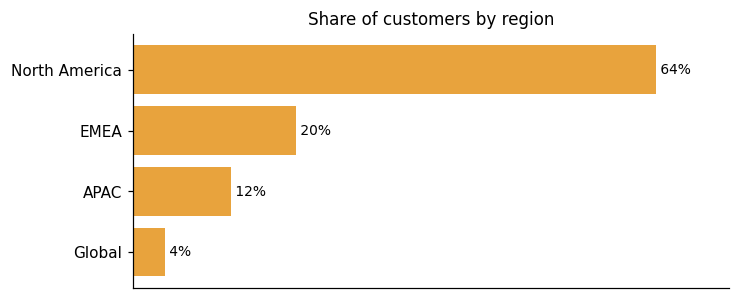
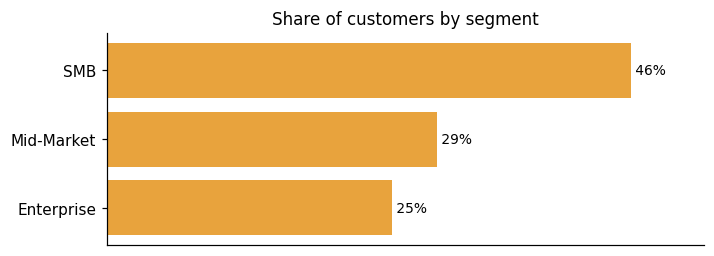
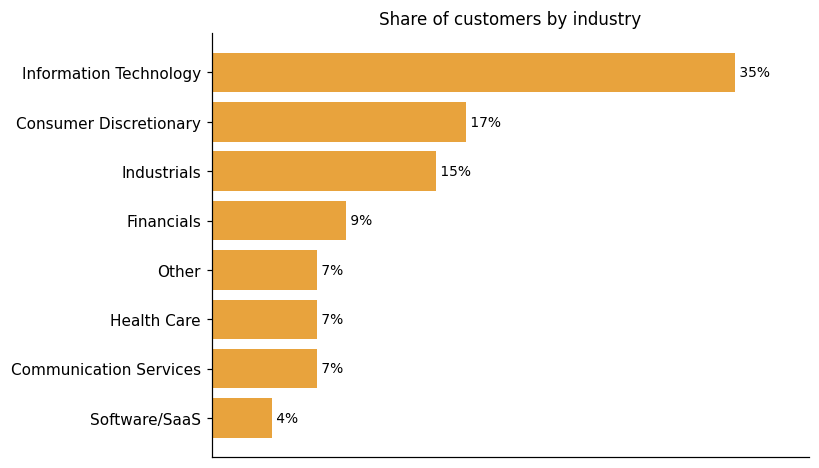
Representative customers: Aklamio, Allocadia, Andavi, Atheer, Aviation Week, BizzTreat, BlackHyve
How GoodData uses AI in practice
GoodData® applies AI across several product layers: a conversational AI Assistant, agentic analytics, AI-driven automation, and MCP-based agent orchestration. The platform's core capabilities — dashboards, semantic modeling, and data delivery — predate AI, but the current differentiation and strategic direction are substantially AI-driven. Removing AI would leave a functional BI product. The AI layers, however, are central to what GoodData is today. Users can build their own charts and dashboards through a drag-and-drop interface. An AI chat assistant is built into that same workflow to speed up insight discovery. On the embedded side, GoodData is positioned as one AI platform for building embedded agents. The vendor describes the agentic analytics capability as enabling autonomous agent workflows, positioning it as a distinct strategic direction for the platform.
Generative AI
Read detailsGoodData's Generative AI capability spans natural-language question answering, narrative summary generation, and automated creation of semantic models and visualizations through both conversational and code-based interfaces. The AI Assistant handles these tasks by drawing on large language models. The agentic analytics layer does the same — though "agentic" reflects the vendor's own characterization of that layer's autonomy, not independently verified behavior. Both components are grounded in a governed semantic layer, which GoodData uses to prevent hallucinations in AI-generated outputs.
Agentic AI
Read detailsGoodData's Agent Builder and AI Automation capabilities let teams build, orchestrate, and deploy agents that plan, reason on live business data, execute multi-step analytics workflows, and integrate with external systems. Defined tools, guardrails, and a semantic layer govern how those agents operate. The vendor describes these agents as autonomous — capable of carrying out multi-step work without human intervention at each step.
Anomaly / Pattern Detection
Read detailsGoodData bundles anomaly detection, forecasting, and proactive alerting into a single automated layer. The anomaly detection component spots unexpected shifts in data as they occur. When a shift is detected, the system triggers an alert automatically rather than waiting for a user to notice the change. GoodData also recommends optimal alert thresholds, which cuts down on both manual monitoring and alert fatigue.
Predictive ML
Read detailsGoodData uses predictive modeling for two distinct purposes: anticipating business changes and optimizing system performance. On the business side, GoodData generates forecast-based alerts that notify users of anticipated metric changes before those changes actually occur. On the technical side, GoodData is developing AI-driven intelligent pre-caching that predicts which data to cache in order to optimize query performance.
GoodData pricing and value: quote-based costs, ROI and fit
GoodData® delivers documented ROI across a range of customer situations, with 21 ROI results reported by 15 different customers. Shift Technology has saved millions for insurance companies with analytics. Fourth realized a 117% ROI after adding analytics through GoodData. Technomic achieved 7x cost savings with GoodData. One customer notes that GoodData consolidates all structured and unstructured data from every possible source, and that manual, labor-intensive inputs have been replaced with AI-powered automation. GoodData's pricing does not publish specific figures. Both the Professional and Enterprise tiers appear on the pricing page and route to "Contact us," with no self-serve checkout. The two pricing models available are per-workspace pricing and custom use-case-based pricing.
ROI evidence from 15 customers
Time-to-value: what implementations take
- We had a tight deadline and needed to get to market very quickly with our first MVP—6 weeks. GoodData was able to get us up and running within our time frame.
- 8-week implementation and quick time to market
- Fourth's annual ROI from implementing GoodData's platform is 117 percent, with a payback period of 2.4 years.
- Customer deployments in as little as five days
- Two-week self-service implementation after requirements defined
- Professional Services played a critical role in the implementation. Over our 80-hour engagement, they helped define secure, scalable workspace structures, develop engineering best practices, and align visual logic with business concepts. The cooperation was really great!
Who it fits: value by company size
GoodData's pricing structure spans a Professional tier, an Enterprise tier, and a custom-pricing path. Professional covers analytics features and BI capabilities, full embedding functionality, and multi-tenancy and branding. Enterprise adds Agent Builder and AI Lake capabilities, an AI Assistant, and SLA support with dedicated customer success. A separate option offers custom use-case-based pricing with enterprise-grade security and compliance. Teams that need embedding or multi-tenant deployments find a defined home in Professional. Organizations requiring AI tooling or formal support commitments move to Enterprise. The custom path exists for scenarios that fall outside either standard tier. One customer reported that GoodData saved $25K per month in sales headcount while increasing conversion by 15%, which gives some sense of the scale of use case the platform is built around. Buyers at smaller companies or those without a clear embedding or analytics-at-scale use case should weigh whether the tier structure aligns with their actual needs before committing.
Both the Professional and Enterprise tiers are presented on the pricing page but no specific price points are published; both route to "Contact us" with no self-serve checkout or stated figures.
Professional
Choose Professional if you need: Analytics features and BI capabilities Full embedding functionality Multi-tenancy and branding
Enterprise
Benefit from everything in Professional, plus: Access to Agent Builder and AI Lake capabilities AI Assistant (50 queries/month per workspace) SLA support and dedicated customer success
Plans as published by the vendor on Pricing | GoodData.
GoodData enterprise readiness: security, compliance, migration, and support
GoodData®'s enterprise readiness spans four dimensions: security, compliance, migration, and customer support. These are the practical areas covered for buyers evaluating GoodData as an Analytics and Business Intelligence Platforms solution.
Security controls and assurance
GoodData holds both ISO 27001 and has been SOC 2 Type II certified since 2013, with regular third-party audits covering Security, Availability, and Confidentiality principles. Security is built into the development lifecycle through DevSecOps practices that include secure design, SAST, and DAST. Data is protected encrypted at rest and in transit, and customers can apply multitenancy controls to isolate their data. Operational security runs around the clock — 24x7x365 monitoring, logging, strict production access controls, and managed physical security are all part of the standard posture. Regular vulnerability scans, patch management with defined SLAs, and penetration testing round out the program.
Compliance and data protection
GoodData holds ISO 27001 certification and a SOC 2 Type II attestation. On the regulatory side, GoodData complies with HIPAA for health data protection and will sign a BAA with customers; the SOC 2 report includes a mapping of controls against HIPAA requirements. Accessibility is addressed through WCAG 2.1 AA compliance. For organizations that need to meet FedRAMP requirements, GoodData offers a self-hosted deployment option that maintains full control and security over the analytics environment.
Migration from competing platforms
GoodData's BI modernization approach cuts migration from months down to days or weeks by automating the bulk of the work. The core problem GoodData is solving is that legacy BI is hard to maintain, slow to change, and increasingly fragile — and that migration has historically been seen as slow, expensive, and risky. GoodData addresses this by automating 80% of the work. Teams don't have to cut over all at once. GoodData supports phased rollouts, so organizations can migrate specific datasets, reports, or business units incrementally while keeping parallel systems running. Throughout that process, business users won't experience disruption. Each step in the migration includes automated testing, human oversight checkpoints, and rollback capabilities, which keeps teams in control at every stage.
Customer support experience
GoodData's support posture is built around a 99.5% SLA and 24×7 coverage, with on-duty personnel monitoring the platform around the clock. Customers report that the team is responsive and accessible. One customer notes that the GoodData team felt truly exceptional even when joining a project mid-stream with limited context. Another describes same-day answers to problems as a hallmark of the support experience. Customers also point to fantastic support staff as a reason to recommend GoodData for reporting. For its Professional Services capability, rapid onboarding and value delivery is available either managed by the customer or by GoodData directly.
GoodData vs. Google, Microsoft, Oracle and other platforms
Analytics and Business Intelligence platforms give organizations a way to model, analyze, and visualize data from multiple sources, supporting decision-making through dashboards, reports, interactive visualizations, and data preparation. GoodData competes in this category with a clear focus on embedded and headless analytics. Its core capability lets software teams integrate self-service, AI-fueled analytics directly into any application via APIs and SDKs. That includes dashboards, visualizations, and an AI Assistant. The AI Assistant delivers conversational, context-aware analytics with natural-language summaries and question-answering grounded in the semantic layer. A governed semantic layer and headless BI architecture decouple the analytical backend from the presentation layer, so consistent, reusable metrics can be consumed by any data tool or application. On the visualization side, GoodData supports dynamic, interactive dashboards with drag-and-drop chart building, filtering, drill-down, and both out-of-the-box and custom chart types. The comparison table below shows where GoodData, Google, Microsoft, and Oracle differ most. It is a differentiation view, not a full feature-by-feature comparison, and should be read accordingly. The facts available speak to where GoodData leads on embedded analytics, context management, and AI-assisted querying. Where the evidence points to gaps relative to Google, Microsoft, and Oracle, it is in breadth of platform ecosystem, depth of enterprise data preparation tooling, and the scale of end-to-end data integration those larger vendors provide.
Analytics and Business Intelligence Platforms
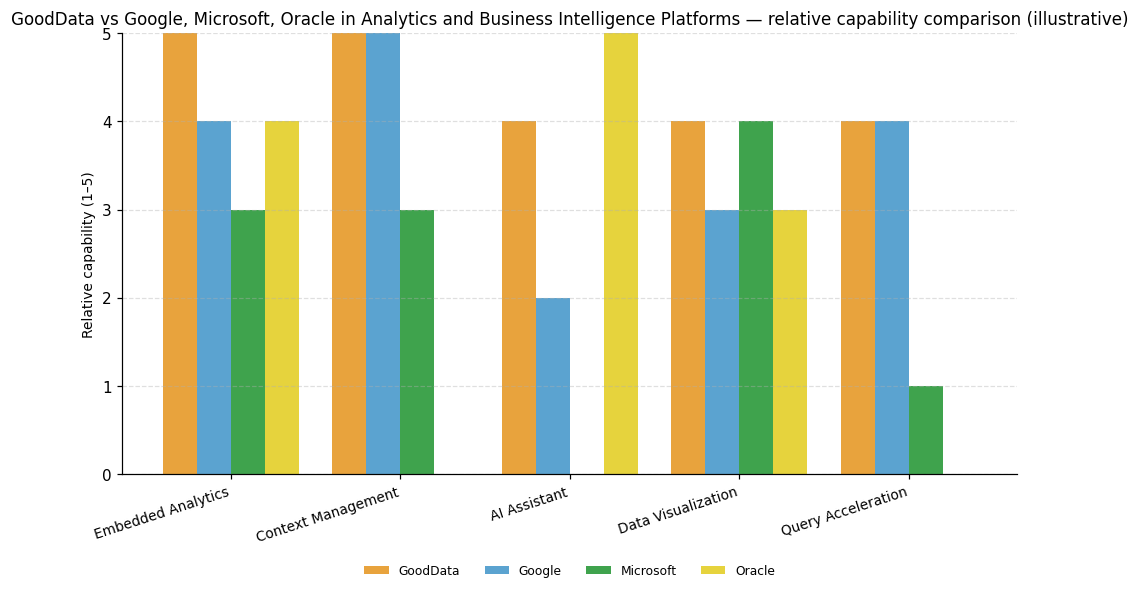
| Capability | GoodData | Microsoft | Oracle | |
|---|---|---|---|---|
| Embedded Analytics | 5 | 4 | 3 | 4 |
| Context Management | 5 | 5 | 3 | — |
| AI Assistant | 4 | 2 | — | 5 |
| Data Visualization | 4 | 3 | 4 | 3 |
| Query Acceleration | 4 | 4 | 1 | — |
GoodData®
Embedded Analytics: Core product capability explicitly enables software teams to integrate self-service AI-fueled analytics including dashboards, visualizations, and AI Assistant directly into any application via APIs and SDKs.; Context Management: Headless BI and governed semantic layer decouple the analytical backend from the presentation layer, enabling consistent, reusable metrics consumed by any data tool or application.; AI Assistant: AI Assistant provides conversational, context-aware analytics with natural-language summaries and question-answering grounded in the semantic layer.; Data Visualization: Product evidence describes dynamic, interactive dashboards with drag-and-drop chart building, filtering, drill-down, and both out-of-the-box and custom chart support.; Query Acceleration: FlexQuery provides query performance monitoring, caching, aggregate-awareness, and cost control for cloud data warehouse usage, and Analytics Lake delivers granular multi-tenant isolation and scalability.
Embedded Analytics: Embedded analytics features allow integration of interactive visualizations and data experiences directly into any application for both users and developers.; Context Management: API-first open semantic layer acts as a single source of truth for data accuracy, consistency, and governance, enabling deep integration with other platforms and custom applications.; Query Acceleration: Supports multiple development, testing, and production instances with comprehensive APIs enabling content movement across environments.
Microsoft
Data Visualization: Dominant market presence makes internal skills, external consultants, and training material readily available, supporting strong visualization adoption.
Oracle
Embedded Analytics: Analytics content is embedded in business application workflows to support data-driven decisions, rated strong relative to peers.; AI Assistant: Oracle Analytics AI Assistant enables natural language queries for insights, complex visualizations, and dashboard assembly, rated strong relative to peers.


Connect GoodData with your stack: integrations and partner ecosystem
GoodData® supports 17 native integrations and 2 integration partnerships, spread across 14 partner categories. Those categories range from cloud data platforms and data warehouses to cloud platforms and serverless analytics databases, covering a wide span of partner types.
GoodData's integration story spans open APIs, declarative SDKs, multiple embedding types, and real-time data access. For embedding, multiple embedding types are available: iFrame for basic embedding of dashboards and charts, web components for embedding directly into web applications, and SDKs and APIs for advanced, customizable integration. Developers can also connect to code repositories and 3rd-party apps through open APIs and declarative SDKs. On the headless BI side, 100% declarative API coverage and open source SDKs give developers full access to interact with and consume data. Integration options include REST APIs, Python, or GoodData.UI React library. Data accessed through these interfaces is real-time.
| Partner category | Integration partners | Native count | Flow direction |
|---|---|---|---|
| cloud data platform / data warehouse | Snowflake | 1 | Upstream |
| cloud data warehouse / serverless analytics database | MotherDuck | 1 | Upstream |
| cloud platform | Amazon Web Services, Microsoft Azure | 0 | Upstream |
| code repository / developer collaboration platform | GitHub | 1 | Upstream |
| columnar database / OLAP database | ClickHouse | 1 | Upstream |
| data product lifecycle management / DataOps | Witboost | 1 | Bidirectional |
| data transformation / analytics engineering | dbt Cloud | 1 | Upstream |
| data visualization library | Chart.js, D3.js, FusionCharts, Google Charts | 4 | Downstream |
| enterprise information management / database | OpenText | 1 | Upstream |
| in-process analytical database | DuckDB | 1 | Upstream |
| natural language generation / AI narrative analytics | Arria | 1 | Downstream |
| open table format / data lakehouse | Apache Iceberg | 1 | Upstream |
| open-source columnar in-memory data format / analytics engine | Apache Arrow | 1 | Upstream |
| team messaging / collaboration platform | Microsoft Teams, Slack | 2 | Downstream |


What's new in GoodData
GoodData® has delivered 6 product updates to its Analytics and Business Intelligence Platform over the last 9 months. The platform has also earned 2 awards in the last 24 months.
Context Management Powers Production-Ready AI Analytics at Enterprise Scale
GoodData has launched Context Management, a governed contextual layer that gives AI analytics a single access point to structured and unstructured data, business knowledge, policies, and instructions. The layer keeps AI operating within defined boundaries, connecting all of those inputs in one place. It is built for production-ready enterprise analytics and agents rather than isolated, experimental deployments.
Read more →GoodData Brings Faster BI Modernization to Make Analytics AI-Ready
GoodData's latest update introduces an AI-driven approach to BI modernization, aimed at helping organizations migrate away from legacy BI tools without losing the reporting workflows they depend on. The core of the approach is a governed semantic layer that separates business logic from dashboards, keeping that logic consistent and centrally managed rather than embedded in individual reports.
Read more →GoodData Announces Launch of MCP Server to Let AI Execute Analytics End-to-End
GoodData has publicly launched its MCP Server, enabling AI agents and large language models to connect directly to GoodData and execute analytics across the full lifecycle using the Model Context Protocol. The result is 10–50x faster time to value.
Read more →Recent awards for GoodData
GoodData has received two awards in the last 24 months, both analyst recognition in the Analytics and Business Intelligence Platforms category.
- 2025 Gartner Magic Quadrant for Analytics and BI Platforms (2025-06-18) →
- 2024 Gartner Magic Quadrant for Analytics and BI Platforms (2024-06-24) →
Migrate from GoodData Legacy to GoodData Cloud | GoodData.AI
GoodData.AI introduces the gooddata-legacy2cloud toolkit, an open-source Python package that automates the migration from GoodData Legacy to GoodData Cloud. The toolkit facilitates the transition by handling complex tasks such as remapping object identifiers and converting Pixel Perfect Reports, enabling a self-service migration process without requiring professional services.
Migrate from GoodData Legacy to GoodData Cloud
GoodData introduces the gooddata-legacy2cloud toolkit, an open-source Python package designed to automate the migration from GoodData Legacy to GoodData Cloud. The toolkit simplifies the transition with features like object identifier mapping, MAQL metric translation, and Pixel Perfect Report conversion. It supports various migration scenarios, including single workspace and parent/child workspace hierarchies, enhancing the self-service experience without requiring professional services.
Migrate from Tableau to GoodData Cloud
GoodData.AI introduces an open-source toolkit for migrating Tableau content to GoodData Cloud. The toolkit offers a structured, workbook-by-workbook approach, providing scripts for extraction, deployment, and validation. It emphasizes the need for business involvement in parity validation and supports a phased migration model to ensure accuracy and manageability.
GoodData Corporation Profile
HQ Location
660 3rd St San Francisco, CA 94107
Employees
251-500
Social


Financials
PRIVATE