


Map Business Online Overview
MapBusinessOnline enhances business intelligence through its mapping software, offering tools for territory management, logistics planning, and market analysis. This platform provides insightful maps that help businesses visualize data effectively, which is crucial for strategic decision-making. Companies can manage sales territories, optimize delivery routes, and conduct detailed market analysis to identify growth opportunities. A surprising detail is its ability to transform complex datasets into easy-to-understand visual formats, which aids in uncovering hidden patterns and trends. This capability supports daily operations by allowing businesses to make informed decisions swiftly.
Use Cases
Customers recommend Competitive Intelligence, Collaboration, Market Research, as the business use cases that they have been most satisfied with while using Map Business Online.
Business Priorities
Enter New Markets Internationally Or Locally and Increase Sales & Revenue are the most popular business priorities that customers and associates have achieved using Map Business Online.
Map Business Online Use-Cases and Business Priorities: Customer Satisfaction Data
Map Business Online works with different mediums / channels such as Offline. On Premises. Point Of Sale etc.
Map Business Online's features include Calculator, Recording, and Personalization. and Map Business Online support capabilities include Email Support, Phone Support, Chat Support, etc. also Map Business Online analytics capabilities include Analytics, and Custom Reports.
Reviews
"I use it daily to visualize customers and sales territories, and to plan sales trips. It’s so intuitive." - Jeanne G
Peer review evidence (same sources as the product rating summary)
"...Business listings enhance market analysis by suggesting new business targets by industry segment and geography...." 70% of Map Business Online Users Create Customer Visualizations for Sales Planning
"...multi-stop optimized routing with time windows, market analysis, large format printing, and a variety of ways to share maps or conduct collaborative editing...." Peer review
"...The Complete Mapping Software for Business Intelligence Market Area Research with Business Listings. ..." The Complete Mapping Software for Business Intelligence
Map Business Online, Phocas, Yurbi, Holistics, OpenText Analytics, etc., all belong to a category of solutions that help Business Intelligence. Each of them excels in different abilities. Therefore, determining the best platform for your business will depend on your specific needs and requirements.
MapBusinessOnline is a mapping software for business intelligence offering insightful maps and territory management. Logistics planning and market analysis tools are also provided.
Popular Business Setting
for Map Business Online
Top Industries
- Marketing and Advertising
- Construction
- Retail
Popular in
- Small Business
- Mid Market
- Large Enterprise
Map Business Online is popular in Marketing And Advertising, Construction, and Retail and is widely used by Small Business, Mid Market, and Large Enterprise.
Map Business Online Customer wins, Customer success stories, Case studies
How efficiently Does Map Business Online manage your Competitive Intelligence?
How efficiently Does Map Business Online manage your Collaboration?
How can Map Business Online enhance your Market Research process?
What benefits does Map Business Online offer for Helpdesk Management?
| CUSTOMERS | TESTIMONIALS |
|---|---|

|
I use it daily to visualize customers and sales territories, and to plan sales trips. It’s so intuitive. Testimonial By Jeanne G |
|
|
This software has been tremendously helpful in mapping out my company’s sales territories map. I have researched many other products, but no one came close to the ease of use of data customization options MapBusinessOnline provides. Also, their maps are extremely accurate and pleasing to the eye. S...ales projections and territory expansions can be easily mapped out with this software. Most importantly, they provide free training and a vast number of video guides that have been extremely helpful. It is apparent that this company cares about their product and their customers. Really happy with it |
|
|
I just might possibly be in love with this service! This is the perfect program for my business. Testimonial By Deborah S |
| CUSTOMERS | TESTIMONIALS |
|---|---|
|
Jeanne G Life Brokerage sales Director Mutual of Omaha |
I use it daily to visualize customers and sales territories, and to plan sales trips. It’s so intuitive. Testimonial By Jeanne G |
|
KC Cooley Credit Manager Crediauto Financial |
This software has been tremendously helpful in mapping out my company’s sales territories map. I have researched many other products, but no one came close to the ease of use of data customization options MapBusinessOnline provides. Also, their maps are extremely accurate and pleasing to the eye. S...ales projections and territory expansions can be easily mapped out with this software. Most importantly, they provide free training and a vast number of video guides that have been extremely helpful. It is apparent that this company cares about their product and their customers. Really happy with it |
|
Deborah S |
I just might possibly be in love with this service! This is the perfect program for my business. Testimonial By Deborah S |
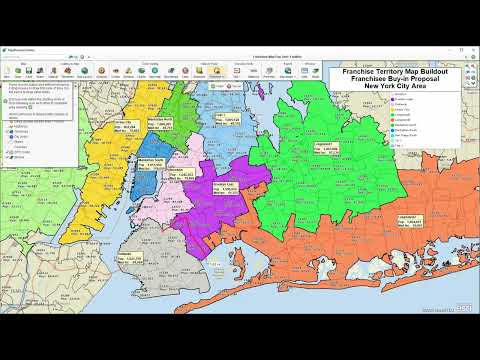
Balancing Territories Using Map Business Online
Frequently Asked Questions (FAQ)
What buyers ask before choosing Map Business Online
Integrations What CRM integrations are available with Map Business Online?
MapBusinessOnline (MBO) offers a robust SDK that allows users to integrate their corporate CRM or accounting systems with the mapping software. This integration capability enables businesses to enhance their mapping functionalities by connecting MBO with existing customer relationship management tools, streamlining data flow and improving operational efficiency. While specific CRM integrations are not explicitly listed in the provided context, the flexibility of the SDK suggests that popular CRMs like Salesforce and HubSpot could potentially be integrated, depending on the user's programming skills. This integration allows businesses to visualize customer data geographically, optimize sales territories, and enhance decision-making processes, ultimately driving better business outcomes. For more detailed information on specific integrations, contacting MBO support may provide additional insights.
Integrations How does Map Business Online connect to Salesforce and HubSpot?
MapBusinessOnline connects to Salesforce and HubSpot through its Software Development Kit (SDK), which allows businesses to integrate their corporate CRM systems with MapBusinessOnline's mapping capabilities. This integration enables users to visualize customer data, sales territories, and market analysis directly within their CRM platforms, enhancing decision-making and operational efficiency. By importing data from Salesforce or HubSpot into MapBusinessOnline, users can create insightful maps that highlight customer locations, sales performance, and demographic information. This seamless connection not only streamlines workflows but also empowers sales and marketing teams to collaborate effectively, making it easier to strategize and optimize their outreach efforts. For businesses looking to leverage geographic data alongside their CRM insights, this integration offers significant value.
Integrations What are the setup steps for integrating Map Business Online with other software tools?
To integrate MapBusinessOnline with other software tools, start by accessing the MapBusinessOnline SDK, which provides the necessary developer tools for integration. First, ensure you have the required programming skills to utilize the SDK effectively. Next, identify the specific CRM or accounting system you wish to integrate, such as Salesforce or HubSpot, and review their API documentation for compatibility. After that, use the SDK to create a connection between MapBusinessOnline and your chosen software, allowing for data synchronization and enhanced functionality. Finally, test the integration thoroughly to ensure that data flows seamlessly between the platforms, enabling you to leverage mapping capabilities alongside your existing business tools. For additional support, consider reaching out to MapBusinessOnline's customer service for guidance during the integration process.
Integrations Can I access the Map Business Online API for custom integrations?
Yes, you can access the MapBusinessOnline (MBO) API for custom integrations, provided you have the necessary programming skills. The API allows you to develop applications that can interact with MBO, enabling you to integrate it with your corporate CRM or accounting systems. However, access to the API may be subject to certain conditions, and the licensor may impose additional fees for its use. This capability is particularly beneficial for businesses looking to enhance their operational efficiency by automating data flows between MBO and other software solutions. If you're interested in utilizing the API, it's advisable to contact MapBusinessOnline for specific details regarding access and any associated costs.
Integrations What is the data flow between Map Business Online and external systems?
The data flow between MapBusinessOnline and external systems primarily involves the integration of data from various sources into the MapBusinessOnline platform for enhanced mapping and analysis. Users can import data from Excel spreadsheets, which allows them to visualize customers, prospects, and competitors on interactive maps. Additionally, the MapBusinessOnline SDK enables developers to integrate corporate CRM or accounting systems, facilitating seamless data exchange and ensuring that users can leverage their existing data within the mapping software. This integration supports real-time updates and collaborative efforts across teams, enhancing decision-making and operational efficiency. Overall, the data flow is designed to empower businesses to utilize their data effectively while maintaining security and privacy.
Integrations Are there any limitations to the integrations offered by Map Business Online?
MapBusinessOnline (MBO) offers a robust set of integration capabilities, particularly through its Software Development Kit (SDK), which allows businesses to connect their corporate CRM or accounting systems with the mapping software. However, there are some limitations to consider. Access to the SDK and API may be subject to additional fees, and the licensor retains the discretion to withhold or prohibit access. This means that while MBO can integrate with various systems, the extent of integration may depend on the specific needs of the business and any associated costs. Additionally, users may require certain programming skills to fully leverage the SDK for custom integrations. Overall, while MBO provides valuable integration options, businesses should evaluate their specific requirements and potential costs before proceeding.
Features What does the territory management feature do in MapBusinessOnline?
The territory management feature in MapBusinessOnline allows businesses to create, manage, and justify their sales territories effectively. Users can easily establish territories based on various geographic parameters such as ZIP codes, counties, or states, and even draw custom, free-form territories to suit specific needs. This feature enables teams to visualize their market areas, making it simpler to add or subtract regions as necessary. By leveraging rich demographic and geographic data, businesses can analyze market potential and optimize their sales strategies. Ultimately, this functionality enhances collaboration among sales, marketing, and operations teams, ensuring that everyone has access to up-to-date and insightful maps that drive informed decision-making.
Features How do I create and manage sales territories using MapBusinessOnline?
To create and manage sales territories using MapBusinessOnline, start by logging into your account and accessing the mapping interface. You can import your data directly from spreadsheets or create territories from scratch. Use the drawing tools to define your sales areas based on ZIP codes, counties, or states, or opt for free-form drawing to customize your territories. Once your territories are established, you can easily add or subtract areas as needed, ensuring your sales strategy remains flexible and responsive. Additionally, leverage the rich demographic and geographic data included at no extra cost to enhance your territory analysis. This functionality allows for effective visualization and management of your sales territories, ultimately supporting better decision-making and resource allocation.
Features What functionality does the mapping software provide for visualizing customer data?
MapBusinessOnline offers robust functionality for visualizing customer data, enabling businesses to transform spreadsheets into clear, decision-ready maps. Users can visualize customers, prospects, and competitors using various features such as color coding, heat maps, symbols, and charts, which help in identifying customer density and market trends. The software allows for the creation and management of sales territories based on ZIP codes, enhancing territory management and sales planning. Additionally, users can share interactive maps across teams, facilitating collaboration and improving communication within the sales force. By integrating demographic and geographic datasets, MapBusinessOnline enriches the visual representation of customer data, making it easier for teams to analyze and strategize effectively.
Features How can I enhance my maps with demographic and geographic datasets in MapBusinessOnline?
To enhance your maps with demographic and geographic datasets in MapBusinessOnline, start by importing your existing data, such as an Excel spreadsheet, into the platform. Once your data is uploaded, you can access a rich collection of commercial-grade datasets included at no additional cost, sourced from reputable agencies like the US Census Bureau. Utilize the software's features to aggregate demographic data by radius, polygon, or drive time, allowing you to visualize insights into your existing markets or explore potential new ones. You can also apply various map layers, such as ZIP codes, counties, and city limits, to create detailed and informative visualizations. This capability not only enriches your maps but also empowers your sales, marketing, and operations teams to make data-driven decisions effectively.
Features What are the steps to turn a spreadsheet into a map in MapBusinessOnline?
To turn a spreadsheet into a map using MapBusinessOnline, start by logging into your account on the platform. Once logged in, navigate to the "Import Data" section and select the option to upload your Excel spreadsheet. Ensure your data includes relevant geographic identifiers, such as ZIP codes or addresses, as these will be used to plot your data accurately on the map. After uploading, MapBusinessOnline will prompt you to map the columns in your spreadsheet to the appropriate geographic fields. Once the data is mapped, you can customize your map using features like color coding, heat maps, and symbols to visualize your information effectively. Finally, save your map and share it with your team for collaborative analysis and decision-making.
Features How do I use the heat map feature to analyze market data in MapBusinessOnline?
To use the heat map feature in MapBusinessOnline for analyzing market data, start by importing your business data, such as customer locations or sales figures, from an Excel spreadsheet or other supported data sources. Once your data is uploaded, navigate to the mapping tools and select the heat map option. You can then customize the heat map by choosing the data points you want to visualize, adjusting the color gradients to represent different data ranges, and applying filters based on geographic areas like ZIP codes or counties. This visual representation will help you identify customer density and market trends, enabling you to make informed decisions about sales strategies and territory management. Finally, share your heat maps with your team for collaborative analysis and planning.
ROI & pricing What measurable business outcomes can I expect from using MapBusinessOnline?
Using MapBusinessOnline can lead to several measurable business outcomes that enhance operational efficiency and strategic decision-making. By leveraging its powerful mapping and analytics capabilities, businesses can optimize territory management, resulting in improved sales performance and better resource allocation. The software's ability to visualize data geographically allows teams to identify market opportunities and demographic trends, leading to more informed marketing strategies and targeted outreach. Additionally, the collaboration features enable seamless sharing of maps and insights across teams, fostering better communication and alignment. Users have reported increased productivity as employees can easily access and utilize maps for daily operations, ultimately contributing to business growth and expansion. Overall, MapBusinessOnline empowers organizations to make data-driven decisions that can significantly impact their bottom line.
ROI & pricing How does MapBusinessOnline contribute to cost savings for businesses?
MapBusinessOnline contributes to cost savings for businesses by providing an all-in-one mapping solution that enhances operational efficiency and decision-making. By utilizing features such as territory management, route planning, and market analysis, businesses can optimize their logistics and resource allocation, reducing unnecessary travel and improving sales coverage. The software's ability to integrate rich demographic and business listing datasets at no additional cost allows companies to make informed decisions without incurring extra expenses for data acquisition. Additionally, the user-friendly interface eliminates the need for specialized GIS expertise, reducing training costs and enabling teams to collaborate effectively. Overall, by streamlining processes and providing valuable insights, MapBusinessOnline helps businesses minimize costs while maximizing productivity and growth potential.
ROI & pricing What are the different pricing plans available for MapBusinessOnline?
MapBusinessOnline offers a variety of pricing plans designed to cater to different business needs and sizes. While specific pricing details are not provided in the context, the plans typically include options for individual users, small teams, and larger enterprises, allowing businesses to choose a plan that aligns with their mapping and analytical requirements. Each plan includes access to features such as territory management, market analysis, and rich data collection, which enhances the mapping experience. Additionally, MapBusinessOnline provides a free trial option, enabling potential users to explore the software's capabilities before committing to a subscription. For the most accurate and up-to-date pricing information, it is recommended to visit the MapBusinessOnline website or contact their support team directly.
ROI & pricing What is the total cost of ownership for using MapBusinessOnline over time?
The total cost of ownership (TCO) for using MapBusinessOnline over time includes several factors such as subscription fees, potential training costs, and any additional data or feature upgrades. MapBusinessOnline offers a subscription-based pricing model, which provides access to its all-in-one mapping solution, including territory management, market analysis, and logistics optimization. The subscription fee is typically lower than traditional GIS software, making it a cost-effective choice for businesses. Additionally, the platform includes rich data collection at no extra cost, enhancing the value of the subscription. Since MapBusinessOnline is designed for business users without requiring GIS expertise, training costs are minimized. Overall, the TCO is competitive, especially when considering the comprehensive features and ease of use that MapBusinessOnline provides for sales, marketing, and operations teams.
ROI & pricing How quickly can I see a return on investment after implementing MapBusinessOnline?
The return on investment (ROI) after implementing MapBusinessOnline can vary based on your specific business needs and how effectively you utilize the software. Many users report seeing benefits within a few weeks, particularly in terms of improved sales territory management and enhanced decision-making through powerful analytics. By streamlining operations and optimizing logistics, businesses can reduce costs and increase efficiency, leading to quicker revenue generation. Additionally, the ability to visualize data and share maps across teams fosters collaboration, which can further accelerate results. To maximize your ROI, it’s advisable to take advantage of the training resources and customer support offered by MapBusinessOnline, ensuring that your team is fully equipped to leverage the software's capabilities effectively.
ROI & pricing What factors should I consider when evaluating the pricing of MapBusinessOnline?
When evaluating the pricing of MapBusinessOnline, consider several key factors to ensure it meets your business needs. First, assess the features included in the pricing tiers, such as territory management, market analysis, and logistics optimization, which are essential for your operations. Additionally, evaluate the value of the rich data collection offered at no extra cost, including demographic and business listing datasets, as this can significantly enhance your mapping capabilities. Consider the ease of use for your team, especially if they lack GIS expertise, as well as the cloud-based access that allows for collaboration across devices. Finally, review customer support options and any potential costs for additional integrations or SDK usage, which may impact your overall budget.
Capabilities What mapping features does MapBusinessOnline offer for territory management?
MapBusinessOnline offers a comprehensive suite of mapping features specifically designed for effective territory management. Users can create and manage sales territories easily by importing data from spreadsheets or drawing custom boundaries based on ZIP codes, counties, or states. The software allows for the visualization of territories with demographic data, enabling businesses to analyze market potential and justify territory decisions. Additionally, MapBusinessOnline supports collaboration by allowing teams to work from shared maps, enhancing communication and strategic planning. Users can also filter map views to display selected regions, aggregate demographic data by various metrics, and utilize heat maps and symbols for better insights. This all-in-one solution empowers sales, marketing, and operations teams to optimize their territory management processes efficiently.
Capabilities Can MapBusinessOnline create heat maps and visualizations from spreadsheet data?
Yes, MapBusinessOnline can create heat maps and visualizations directly from spreadsheet data. The software allows users to import data from various sources, including Excel spreadsheets, and turn that information into clear, decision-ready maps. With features like color coding, heat maps, and symbols, businesses can effectively visualize customer density, market trends, and competitive landscapes. This capability is particularly valuable for sales, marketing, and operations teams, as it enhances data analysis and decision-making processes. By utilizing these visual tools, organizations can better understand their geographic data, optimize routes, and manage territories more efficiently, ultimately leading to improved business strategies and outcomes.
Capabilities Does MapBusinessOnline support collaboration among teams using shared maps?
Yes, MapBusinessOnline supports collaboration among teams through its shared map functionality, allowing users to work together seamlessly. This feature enables teams to create, edit, and view maps collectively, fostering communication and coordination across sales, marketing, and operations departments. Users can share interactive maps with non-license holders for viewing, which enhances collaboration with stakeholders who may not have direct access to the software. By empowering teams to visualize data and insights together, MapBusinessOnline facilitates better decision-making and strategic planning. This collaborative approach is particularly beneficial for organizations with multiple layers of teams, ensuring that everyone is aligned and informed about territory management, market analysis, and logistics optimization.
Capabilities Can I enhance my maps with demographic and geographic datasets in MapBusinessOnline?
Yes, you can enhance your maps with demographic and geographic datasets in MapBusinessOnline. The software provides a rich collection of commercial-grade data at no additional cost, allowing you to incorporate valuable demographic, geographic, and business listing datasets directly into your maps. This feature is particularly beneficial for businesses looking to gain insights into their markets, as it enables users to visualize customer demographics, analyze market potential, and make informed decisions based on comprehensive data. By leveraging these datasets, you can create more insightful and targeted maps that support your sales, marketing, and operational strategies, ultimately enhancing your business intelligence capabilities.
Capabilities Is MapBusinessOnline compliant with industry-specific security standards?
Yes, MapBusinessOnline is compliant with industry-specific security standards as it utilizes Microsoft Azure's robust security framework, which adheres to both international and industry-specific compliance requirements. The platform undergoes rigorous third-party audits to ensure that it meets these standards. Additionally, all data imported into MapBusinessOnline is encrypted both in transit and at rest, ensuring that sensitive information remains secure. While users are advised to avoid importing critical personal data such as credit cards or passwords, the platform's strong access controls and privacy-first practices further enhance data confidentiality. This commitment to security makes MapBusinessOnline a reliable choice for businesses looking to manage and analyze their geographic data while maintaining compliance with necessary security standards.
Capabilities Does MapBusinessOnline provide tools for logistics planning and market analysis?
Yes, MapBusinessOnline provides comprehensive tools for both logistics planning and market analysis, making it an all-in-one mapping solution for businesses. The software allows users to visualize their data geographically, which is essential for effective logistics management. You can create optimized routing for customer visits, perform proximity and distance analysis, and manage sales territories efficiently. Additionally, MapBusinessOnline offers market analysis features that enable businesses to build targeted lead lists, analyze competitors, and segment data by various demographic variables. This functionality helps organizations make informed decisions about market opportunities and resource allocation, ultimately enhancing operational efficiency and strategic planning.
Use cases How can SDRs use MapBusinessOnline to optimize their territory management?
Sales Development Representatives (SDRs) can leverage MapBusinessOnline to optimize their territory management by utilizing its robust mapping and demographic analysis features. SDRs can create and manage sales territories based on ZIP codes, counties, or states, allowing them to visualize their market areas effectively. By filtering map views to display specific regions, they can focus their outreach efforts on targeted demographics, enhancing their efficiency. Additionally, the platform enables SDRs to aggregate demographic data by radius or drive time, providing insights into existing markets and potential opportunities. With the ability to collaborate on shared maps, SDRs can align their strategies with sales and marketing teams, ensuring a cohesive approach to territory management. Overall, MapBusinessOnline empowers SDRs to make data-driven decisions that enhance their sales effectiveness and drive business growth.
Use cases What are the best use cases for marketers utilizing MapBusinessOnline for market analysis?
Marketers can leverage MapBusinessOnline for various impactful use cases in market analysis. One of the primary applications is territory management, where businesses can visualize and optimize sales territories to ensure efficient resource allocation and coverage. Additionally, marketers can utilize the rich demographic and geographic datasets included with MapBusinessOnline to identify target markets, analyze customer distribution, and uncover market trends. This data-driven approach enables marketers to make informed decisions about campaign strategies and geographic focus. Furthermore, the platform's ability to create custom maps allows for effective visualization of market opportunities and competitive landscapes, facilitating better collaboration among teams. Overall, MapBusinessOnline empowers marketers to enhance their strategic planning and execution through insightful mapping and analysis.
Use cases In what scenarios should RevOps teams implement MapBusinessOnline for logistics planning?
RevOps teams should implement MapBusinessOnline for logistics planning in scenarios where they need to optimize routes, manage territories, and analyze market data effectively. For instance, when launching new products or entering new markets, MapBusinessOnline can provide insightful maps that visualize demographic and geographic data, helping teams identify optimal distribution points and customer locations. Additionally, if a company is experiencing inefficiencies in its supply chain or delivery processes, the software's logistics optimization features can streamline operations by allowing teams to plan routes that minimize travel time and costs. Furthermore, the ability to collaborate on shared maps enhances communication among sales, marketing, and operations teams, ensuring everyone is aligned on logistics strategies. Overall, MapBusinessOnline serves as a comprehensive tool that empowers RevOps teams to make data-driven decisions in logistics planning.
Use cases How can sales leaders leverage MapBusinessOnline to visualize and compare sales territories effectively?
Sales leaders can leverage MapBusinessOnline to visualize and compare sales territories effectively by utilizing its intuitive mapping tools that allow for the creation and management of territories based on ZIP codes, counties, or custom shapes. By importing data from spreadsheets, leaders can visualize customer density, sales performance, and market potential using color-coded maps and heat maps. This visual representation helps in identifying overlaps, gaps, and opportunities within territories, enabling informed decision-making. Additionally, the platform facilitates collaboration by allowing teams to share editable maps, ensuring everyone is aligned on territory strategies. With features like route planning and market analysis, MapBusinessOnline empowers sales leaders to optimize their territory management and enhance overall sales effectiveness.
Use cases What workflows can agricultural consulting firms adopt with MapBusinessOnline for creating crop-production maps?
Agricultural consulting firms can adopt several workflows with MapBusinessOnline to create effective crop-production maps. First, they can import data from spreadsheets containing crop yield information, soil types, and regional climate data to visualize trends and patterns. Utilizing the software's territory management features, firms can delineate specific agricultural zones based on ZIP codes or custom boundaries, allowing for targeted analysis. The rich demographic and geographic datasets included at no additional cost enhance these maps, providing insights into market conditions and potential growth areas. Additionally, the ability to share interactive maps with clients and stakeholders fosters collaboration and informed decision-making. Overall, MapBusinessOnline streamlines the mapping process, enabling agricultural consultants to deliver client-ready USDA crop-production maps efficiently without the need for expensive GIS tools or specialists.
Use cases When is it most beneficial for teams to use MapBusinessOnline for demographic data aggregation and analysis?
Teams find it most beneficial to use MapBusinessOnline for demographic data aggregation and analysis during strategic planning sessions, market research initiatives, and territory management activities. By leveraging the platform's ability to visualize demographic data from sources like the US Census Bureau, teams can create insightful maps that highlight key population characteristics, geographic trends, and business opportunities. This is particularly useful when assessing potential markets, optimizing sales territories, or tailoring marketing strategies to specific demographics. Additionally, the collaborative features of MapBusinessOnline allow multiple team members to work together on shared maps, enhancing communication and decision-making. Overall, utilizing MapBusinessOnline for demographic analysis empowers teams to make data-driven decisions that can lead to improved business outcomes.
Alternatives What are the best alternatives to Map Business Online for business mapping?
When considering alternatives to MapBusinessOnline for business mapping, two notable options are ArcGIS and Google Maps Platform. ArcGIS offers advanced geographic information system (GIS) capabilities, making it suitable for organizations that require in-depth spatial analysis and mapping features, though it may come with a steeper learning curve and higher costs. On the other hand, Google Maps Platform provides robust mapping services with easy integration into applications, ideal for businesses looking for straightforward mapping solutions, but it may lack some specialized features found in dedicated business mapping software like MapBusinessOnline. Each alternative has its strengths, so the best choice depends on your specific business needs, budget, and the complexity of mapping tasks you intend to perform.
Alternatives How does Map Business Online compare to ArcGIS for territory management?
MapBusinessOnline and ArcGIS both offer robust territory management capabilities, but they cater to different user needs and expertise levels. MapBusinessOnline is designed for business users, particularly sales, marketing, and operations teams, providing an all-in-one mapping solution that is easy to use without requiring GIS expertise. It allows users to create and manage sales territories from spreadsheets or by drawing free-form areas, making it accessible for those who need quick, actionable insights. In contrast, ArcGIS is a more advanced GIS platform that offers extensive analytical tools and capabilities, which may be better suited for organizations with dedicated GIS professionals. While ArcGIS provides deeper spatial analysis and customization options, MapBusinessOnline excels in user-friendliness and integration of commercial-grade datasets, making it ideal for businesses looking for straightforward territory management solutions.
Alternatives What are the key differences between Map Business Online and Google Maps for business intelligence?
MapBusinessOnline and Google Maps serve different purposes in the realm of business intelligence. MapBusinessOnline is specifically designed for business users, offering features like territory management, market analysis, and logistics optimization, all within a single platform. It allows users to visualize data from spreadsheets, create custom maps, and enhance them with rich demographic and business datasets, making it ideal for sales, marketing, and operations teams. In contrast, Google Maps is primarily a navigation tool that provides basic mapping services and location data but lacks the specialized business analytics and territory management features found in MapBusinessOnline. While Google Maps excels in real-time navigation and location searches, MapBusinessOnline offers a more comprehensive solution tailored to the needs of businesses looking to analyze and visualize their data geographically.
Alternatives Is Map Business Online a better choice than MapInfo for market analysis?
When comparing MapBusinessOnline and MapInfo for market analysis, both tools offer unique advantages. MapBusinessOnline is designed specifically for business users, providing an all-in-one mapping solution that includes territory management, market analysis, and logistics optimization, all without requiring GIS expertise. It also features rich data collection at no additional cost, making it accessible for sales, marketing, and operations teams. In contrast, MapInfo is a more advanced GIS tool that offers extensive analytical capabilities, which may be better suited for users with GIS experience looking for in-depth spatial analysis. Ultimately, the choice depends on your team's expertise and specific needs; if ease of use and integrated business features are priorities, MapBusinessOnline may be the better option, while MapInfo could be preferable for complex analytical tasks.
Alternatives What features make Map Business Online stand out compared to QGIS?
MapBusinessOnline stands out compared to QGIS primarily due to its user-friendly design tailored for business users, particularly in sales, marketing, and operations, without requiring GIS expertise. While QGIS is a powerful open-source GIS tool with extensive customization options, it can be complex and may require a steeper learning curve. MapBusinessOnline offers an all-in-one mapping solution that includes features like territory management, market analysis, and logistics optimization, all accessible via a cloud-based platform. Additionally, it provides rich demographic and business listing datasets at no extra cost, enabling users to create insightful maps quickly. The ability to easily share interactive maps and collaborate across teams further enhances its appeal for businesses looking for efficient mapping solutions.
Alternatives Why should I choose Map Business Online over Maptive for visualizing business data?
Choosing MapBusinessOnline over Maptive for visualizing business data can be advantageous due to its all-in-one mapping capabilities that include territory management, market analysis, and logistics optimization, all within a single solution. MapBusinessOnline is designed specifically for business users, making it user-friendly for sales, marketing, and operations teams without requiring GIS expertise. Additionally, it offers rich data collection at no extra cost, enhancing your maps with commercial-grade demographic and business datasets. While Maptive also provides mapping solutions, MapBusinessOnline's cloud-based service allows for easy access from any computer, and its quarterly updates ensure you have the latest features. Furthermore, MapBusinessOnline supports collaboration by enabling teams to work from shared maps, which can significantly improve productivity and decision-making.
Map Business Online Competitors


Map Business Online Features
- Low
- Medium
- High
| FEATURE | RATINGS AND REVIEWS |
|---|---|
| Analytics | Read Reviews (136) |
| Custom Reports | Read Reviews (100) |
| CAPABILITIES | RATINGS AND REVIEWS |
|---|---|
| Analytics | Read Reviews (136) |
| Custom Reports | Read Reviews (100) |
Software Failure Risk Guidance
?for Map Business Online
Overall Risk Meter
Top Failure Risks for Map Business Online
SpatialTEQ Profile
Company Name
SpatialTEQ
Company Website
https://www.mapbusinessonline.com/HQ Location
Cornish, ME, US
Employees
51-100
Social


Financials
PRIVATE

