


Fulcrum overview: capabilities, features, use cases, and value by role
Fulcrum is a field process and data collection platform with AI.
Top capabilities of Fulcrum
Mobile Field Data Collection App Building
Read detailsFulcrum lets field teams build location-rich GIS data collection apps through a visual drag-and-drop interface — no spreadsheets or custom code required — with support for advanced geospatial geometries, offline operation, and non-proprietary JavaScript for unique requirements, with one customer reporting that this efficiency saves 30% in labor, which we're then able to pass along to our clients.
Offline Field Operations
Read detailsFulcrum gives field teams full access to GIS data, layers, basemaps, and geometries with no cellular or WiFi signal required, syncing data automatically once connectivity returns. That offline capability holds up across a range of demanding environments. offline capability has been especially valuable in remote and restricted environments and secure sites that prohibit SIM card use. In agricultural settings, inspectors gathered orchard inspection data even in areas without signal, with automatic sync ensuring nothing was missed. As Redzone Software puts it, "in terms of speed and reliability and being able to work offline, Fulcrum has everything".
Field Data Analytics & Reporting
Read detailsFulcrum brings field data analysis to office teams without requiring SQL knowledge or GIS training. The core of this capability is **Insights**, a natural-language query tool that returns textual answers, charts, and maps on demand. Customizable reporting tools and real-time data sharing via web services round out the analytics picture, helping teams slash data management hours by 30%.
AI-Powered Voice Data Entry
Read detailsFulcrum's Audio FastFill converts spoken observations into structured data fields, covering text, numbers, checkboxes, and conditional entry hands-free. No extra setup, training, or downloads are required. Field tasks can be completed 20% faster by cutting manual data entry. Partner Engineering and Science, Inc. (Partner ESI) describes what that shift looks like in practice: "Before, I was getting descriptions that were three words long because it can be a hassle to type everything out. With Audio FastFill, inspectors can speak normally, and I'm getting paragraphs."
app templates
Read detailsFulcrum covers the core data-collection workflows that agriculture teams actually run in the field. Pre-built templates are available for agricultural surveys, field inspection reports, pest monitoring logs, pesticide application records, crop scouting, and irrigation control. Teams can use any of these as a starting point, or build a fully custom solution on the same platform.
Automatic Geospatial Data Recording
Read detailsFulcrum handles location data automatically, end to end, across field operations. Every photo is automatically geotagged. Video and audio captures include location tracks. Fulcrum also connects to high-accuracy GPS units, which removes the need for manual location entry and improves both accuracy and reliability.
Vector Geometry Capture
Read detailsFulcrum equips field teams to capture points, lines, and polygons representing physical assets and geospatial features directly within mobile apps, feeding that vector data into GIS systems.
Geospatial Data Integration and Export
Read detailsFulcrum keeps geospatial data in sync between field teams and existing GIS mapping products, moving it in both directions in real time. It exchanges data using GeoJSON, KML, and Esri Feature Services. Field results export in formats including Geodatabase, Shapefile, SpatiaLite, SQLite, PostgreSQL, KML, and GeoJSON.
AI-based photo data extraction
Read detailsFulcrum's Photo FastFill uses AI-based image analysis to pull details out of photos and map them automatically into the correct form fields, extending AI data capture beyond voice to visual inputs.
Incident Reporting app
Read detailsFulcrum's Incident Reporting app captures railroad-related incidents — including auto/pedestrian accidents, citizen complaints, and structure malfunctions — through a web-based entry tool backed by the Fulcrum API. It supports integrated dispatch and incident remediation tracking, field photo documentation, and action step lineage, and has been used to catalog over 15,000 asset and construction photographs across an inventory of over 600 railroad crossings.
Esri ArcGIS Integration
Read detailsFulcrum's ArcGIS integration runs on Esri's SDK and covers the full data-sharing loop in both directions. As an Esri Member, Fulcrum supports direct viewing of ArcGIS Feature Service Layers with in-app authentication. Fulcrum data can also be shared back as Feature Service Layers. The two-way sync handles points, lines, and polygons across ArcGIS solutions.
Automated face blurring in field photos
Read detailsFulcrum handles subject privacy automatically by applying AI-powered face blurring to photo fields during field data collection. No specialized setup is required, and no active connection is needed for it to work.
AI-guided hands-free fieldwork
Read detailsFulcrum is developing an agentic AI layer designed to make field inspections more autonomous and accurate. The AI can guide inspections in real time, flag missing information as work happens, and prompt crews on next steps. Visual context is part of that picture too — the system is built to bring imagery into active work rather than treating it as a separate reference step. The stated goal is fewer interruptions for crews and better accuracy on the job.
data collection and workflow automation
Read detailsFulcrum handles field data collection through customizable app templates and workflow automation tools. Conditional logic keeps forms adaptable to what's happening on the ground. Automated notifications and repeatable sections help field processes stay consistent across teams and tasks.
Efficient environmental monitoring
Read detailsFulcrum supports environmental teams in building and editing apps that streamline inspection processes. Built-in compliance software features handle permit requirements and regulatory reports, keeping workflows aligned with evolving environmental standards. Video and photo documentation provides irrefutable evidence of site conditions, and teams using Fulcrum report time savings of between two and five hours per day, per employee.
native iOS and Android apps
Read detailsField teams using Fulcrum can collect geotagged photos, videos, and audio directly from native iOS and Android apps. Every record gets a geolocation and timestamp automatically, without any manual entry. Contextual media tagging then places all captured media in the correct project context.
standardized mobile data collection
Read detailsFulcrum is a single platform for field data collection and process management. It supports adaptable workflows through repeatable sections and conditional logic. Standardized dropdowns and classification sets keep data consistent, while connected processes and databases act as reusable modules across use cases.
web-based entry tool supported by the Fulcrum API
Read detailsFulcrum's API is the foundation for building custom web-based applications that carry field data collection into office workflows. Those applications can handle integrated dispatch, incident remediation tracking, real-time data visibility, and custom dashboards. Enterprise customers can use this capability to build bespoke program management solutions on top of Fulcrum data. The scale that's possible is illustrated by one customer, who has constructed over 30 individual apps comprised of over 30,000 data points and over 40,000 photographs.
Top features of Fulcrum
mobile interface
Read detailsFulcrum replaces paper forms with a mobile interface for field data collection. Field teams can capture data, adjust asset locations on maps, and sync records gathered offline. As Brown and Caldwell puts it, Fulcrum delivered a 30 percent reduction in data QA and management time.
Barcode & QR code scanning
Read detailsFulcrum includes barcode and QR code scanning as a standard data capture mechanism on the Professional plan and above, letting field teams scan codes directly within mobile data collection apps.
No-code Fulcrum app builder
Read detailsFulcrum's No-code app builder lets anyone replace paper forms, spreadsheets, and fillable PDFs with custom mobile apps for iPhone, Android, and tablets — built through a drag-and-drop interface, with no coding required, and deployable in minutes.
Drag-and-drop app builder with conditional logic and repeatable sections
Read detailsFulcrum gives operations teams a drag-and-drop way to build geospatial field data collection apps — no spreadsheets, no custom code required. Forms support conditional logic and repeatable sections. Teams can modify and redeploy apps while crews are already in the field, without risking data loss.
High-accuracy GPS unit connectivity
Read detailsFulcrum connects to high-accuracy GPS units to sharpen the precision of geospatial data captured in the field. Automatic geotagging and GIS audit trails work alongside that connection to verify location data.
Video capture with location and direction data
Read detailsFulcrum enables field teams to capture video with full location and direction data, providing a precise record of every inspection including exactly where the camera was positioned and what it was looking at.
KML and KMZ file import as map layers
Read detailsFulcrum accepts KML and KMZ files as map layers, so field teams can overlay existing geographic data directly on their working maps without leaving the platform.
API for reading, creating, or updating GIS layers
Read detailsFulcrum's API connects field data directly to office GIS systems, supporting read, create, and update operations on layers in formats including GeoJSON, KML, and Feature Service Layers.
Import/Export in Standard GIS Formats
Read detailsFulcrum supports import and export of geospatial data in standard formats including Geodatabase, Shapefile, SpatiaLite, SQLite, PostgreSQL, KML, and GeoJSON. Field results can be pulled directly into preferred mapping tools or exported for immediate use in office platforms.
Digital elevation model (DEM) support
Read detailsFulcrum supports field teams by layering field observations onto satellite imagery and digital elevation models (DEMs), giving every data point full geographic context — including terrain shape and height derived from the DEM data.
Classification Sets & Standardized Dropdowns
Read detailsFulcrum supports standardized dropdowns and classification sets within field data collection forms, enforcing consistent data entry across teams by connecting processes and databases into reusable modules across use cases.
Customizable Offline Basemaps
Read detailsFulcrum keeps field teams productive in remote areas even when there is no cellular or WiFi signal. It does this through customizable basemaps that keep data, layers, and geometries accessible offline. Pre-loaded spatial data layers make that possible.
Direct Feature Service Layer Viewing
Read detailsFulcrum connects field crews to ArcGIS Feature Service Layers directly inside the app. Authentication happens in real time, in-app, and securely, so crews can view and update existing feature services without leaving the field environment.
Automated Workflow Validations & Notifications
Read detailsFulcrum automates workflows, validations, and notifications through an event-driven architecture that triggers instant alerts or workflow changes based on the specific location or attributes of a captured record, including custom extensions whenever a user changes geometry or saves a record.
App Cloning for New Projects
Read detailsFulcrum makes reuse practical: field teams can clone and adjust existing processes and apps for new projects rather than rebuilding workflows from scratch.
Custom Report Templates
Read detailsFulcrum's reporting capability puts customized report generation in the hands of both field and office teams, with no specialized training required. The tools are designed to be intuitive, and a robust reporting engine handles the heavy lifting behind the scenes. Teams can shape output directly from captured field data.
Groups, Roles & Projects Management
Read detailsFulcrum supports organizations of all sizes through enterprise-class groups, roles, and projects management, enabling administrators to organize field teams, control access, and manage projects within a single platform.
Custom AI model support (user-installed, device-local)
Read detailsFulcrum's offline AI capability comes from its support for user-installed custom models that run locally on a device. This means AI-powered workflow automation keeps working even when there is no internet connection available.
validations via data events
Read detailsFulcrum enforces data quality by automating workflow validations that trigger the moment specific field data is entered. When a data collection event occurs, Fulcrum can fire automated notifications and validations in direct response. This keeps data consistent without requiring manual review at every step.
Top use cases for Fulcrum
Inspect and document field assets
Read detailsFulcrum gives field teams a verifiable, location-stamped record of every asset inspection — no manual re-entry required. The platform captures geotagged photos and video that include both location and direction data, and pairs them with high-accuracy GPS readings. Automatic geotagging and location tracking build an audit trail as inspectors work. GIS data sync then moves that documentation directly into office systems.
Analyze and report on field data in natural language
Read detailsFulcrum Insights brings plain-language querying to field data, letting office teams ask questions and get back lists, charts, maps, and summaries without SQL expertise or GIS training. The workflow replaces manual record-digging and report-building. AI turns natural-language questions into visualized answers drawn directly from operational data.
Accelerate field data capture with AI-assisted entry
Read detailsFulcrum equips field crews with AI-powered capture tools that reduce manual data entry during fieldwork. Audio FastFill lets crews speak naturally to populate form fields, while Photo FastFill (currently in progress) extends that capability to image-based extraction. Both approaches map observations to the correct fields in real time. The result is less typing, less screen time, and hands-free operation even when crews are gloved or on the move.
Standardize and govern field operations across the enterprise
Read detailsFulcrum replaces fragmented, bolt-on field tools with a single standardized platform for enterprise operations leaders and CIOs. The platform handles form standardization, location-enabled app deployment, and geostamped audit trails in one place. Role and project management, SSO/SCIM integration, and SOC 2 Type 2 compliance are also built in. Consistent data collection is enforced through conditional logic and classification sets applied uniformly across all field teams. The result is governed, auditable field operations at scale.
Sync field data with enterprise GIS and mapping systems
Read detailsFulcrum connects field operations teams and GIS managers to enterprise GIS platforms such as ArcGIS through two-way synchronization. Data flows in real time using standard formats including GeoJSON, KML, and Esri Feature Services. The workflow also supports Geodatabase, Shapefile, and SpatiaLite, removing the need for manual export steps between field observations and systems of record.
Build and deploy custom field data collection apps
Read detailsFulcrum puts location-aware data collection apps in the hands of operations teams and GIS managers — built through a visual drag-and-drop interface, no spreadsheets or custom code required. The apps support advanced geospatial geometries, conditional logic, and repeatable sections. Changes push to field crews in real time, so teams can adapt quickly to new projects without risking data loss or leaning on constant GIS team support.
Protect privacy in field photo documentation
Read detailsFulcrum's AI-powered face blurring automatically detects and obscures faces in photos captured during inspections, site assessments, and other field workflows. Manual editing to meet privacy requirements is no longer necessary. The capability also works offline, so it remains available in remote environments without connectivity.
Conduct field surveys in remote or offline environments
Read detailsFulcrum keeps field survey teams collecting geospatial data even when there is no cellular signal. Customizable basemaps, GIS layers, and geometries stay accessible offline on a team's preferred basemap. Point, line, and polygon data are captured with full accuracy. Once connectivity is restored, that data syncs automatically to office systems, preserving integrity across remote utility, construction, and environmental projects.
Value delivered by role with Fulcrum
inspectors
Read detailsFulcrum helps field inspection teams replace manual data entry and error-prone paperwork with GPS-tagged photos, structured observations, and automatic report generation — so fieldwork and reporting finish together. The throughput gains are concrete: inspections soared from three to twenty per day with Fulcrum. Audio FastFill lets inspectors speak naturally to produce detailed professional observations instead of terse three-word notes. Data integrity is built into the workflow too. As TREKK Design Group, LLC puts it, "The inspectors can't even leave the job site without getting all the data in Fulcrum the way we want it to be." DIEHLUX, LLC puts it simply: "Our inspectors and field staff love Fulcrum because it makes their jobs so much easier."
field teams
Read detailsFulcrum is a mobile data-collection platform built specifically for field teams — replacing a patchwork of tools with one standardized app that works offline, geotags entries automatically, and syncs everything once a connection is restored. Forms adapt to each project without IT involvement. GPS integration and voice-driven entry through Audio FastFill reduce the typing and screen time workers deal with mid-task. Deployment is fast. In less than a day, one team built custom apps directly from FEMA worksheets and got them into field staff's hands. Remote coordinators don't have to wait for a report to see what's happening. In one customer's words, "field teams on the phone talking to us whilst the data they are discussing is popping up on our screen back at base."
project managers
Read detailsFulcrum gives project managers real-time visibility into field activity, letting them monitor progress, review data, and act on current conditions rather than waiting for end-of-day reports. Record assignment helps coordinate large distributed teams, and standardized templates mean new programs can be piloted and integrated without extensive development time.
engineers
Read detailsFulcrum cuts the administrative burden that pulls engineers away from skilled fieldwork: conditional formatting, sketch tools, and a single unified app replace the fragmented mix of paper maps, clipboards, and disconnected tools that previously created massive bottlenecks. Per-pole inspection time drops to 30–45 seconds, and Fulcrum delivers a 30% reduction in data QA and management time overall. Report writing shrinks dramatically too — as Carrington Risk Consulting puts it, "Traditionally in the property risk control industry, if a field engineer is allotted 8 hours to do a survey, they get 16 hours to write the report. Now report writing is almost taken from two-thirds to zero. It's actually a 66% time savings."
managers
Read detailsFulcrum brings real-time remote oversight to field operations, letting managers approve records, run quality control, and track incident locations through color-coded map markers without being on-site. Structured reporting significantly reduced the lag associated with addressing issues, and managers can review reports instantly, allowing for quality control before inspectors left the site. For larger deployments, Fulcrum's record assignment feature helped coordinate a 50+ member team across the reservations.
field technicians
Read detailsFulcrum shifts field technicians away from office work and back to the field. As Celerity puts it, "Our field technicians are spending less and less time in the office. They spend it more on field tasks, rather than office tasks." Offline-capable apps with imported maps let crews capture data, photos, and asset locations without internet access. Supervisors cut route planning from half a day to minutes. Fulcrum's intuitive platform reduced training time, so new technicians get up to speed quickly. Standardized data collection keeps results consistent whether the work is done by employees or subcontractors.
field crews
Read detailsFulcrum equips field crews with agentic AI support, customizable digital forms, offline mapping, and GPS integration so they can log data, document hazards, and update records in real time even in remote or low-connectivity environments — and the platform is fast to adopt: within minutes of installing Fulcrum, the IDA crew was collecting field data and geo-tagging records with no steep learning curve. Crews that previously relied on paper-based workflows report dramatically higher throughput and immediate data availability for head-office decision-making.
researchers
Read detailsFulcrum supports field data collection by letting researchers tag samples at the point of isolation, reducing mix-ups and error rates. Data captured this way downloads in a format ready for immediate integration and analysis, with no paper transcription or reformatting required. Collections that previously took three to five minutes now take a minute and a half or less. researchers cut field data collection times in half and collected the largest sample sets ever recorded.
GIS team
Read detailsFulcrum turns everyday field staff into reliable sources of structured geospatial data that feeds directly into GIS systems. App changes go live and sync in the field in minutes. As Desert Channels Queensland puts it, "I logged into Fulcrum through my iPad browser, made changes to the app in two minutes, sent her a reply to resync her Fulcrum and, within five minutes, everything was done and dusted. That is a measure of the true greatness of Fulcrum." Fulcrum supports direct ArcGIS Feature Service Layer integration, including sync of points, lines, and polygons. For some teams it has become a core component of GIS services rather than a standalone collection tool.
CEO
Read detailsFulcrum cuts administrative overhead and supports growth without proportional headcount increases, according to executives at service firms who use it. One CEO reported a 66% reduction in report-writing time. Another credited the platform with enabling territory growth without significantly increasing headcount. Executives can make form changes in seconds without involving IT. Field reliability keeps clients returning.
office teams
Read detailsFulcrum connects office teams to live field data without waiting for end-of-day reports. Decision-makers can review hydrant locations, photos, and inventory completion through a user-friendly interface that surfaces all of that information in one place. Fulcrum Insights extends this further, letting office teams ask natural-language questions and receive answers from operational data as lists, charts, maps, and summaries.
quality managers
Read detailsFulcrum puts digital quality reporting in the hands of every worker on the assembly floor, not just a small group. As Halton Company puts it, "It allowed us to go from maybe 4 to 7 employees who can interact digitally and in real-time with the quality team, to the entire production department". Mobile devices make that scale possible by putting ownership of the quality process directly with the people doing the work. Inspection photos and operator-level data make it easier to catch issues and identify where training is needed. The platform is designed to be simple enough for frontline workers while staying flexible enough to grow quality culture across the whole organization.
Architectural Historian and Preservation Planner
Read detailsFor architectural historians and preservation planners, Fulcrum eliminates hours of manual document formatting — survey documents that once took at least two hours per form to fill, format, and quality-check are now auto-generated, saving hundreds of labor hours. A drag-and-drop app builder lets practitioners customize data collection and hide unnecessary fields, keeping fieldwork focused. Responsive support handles intricate custom reporting needs, freeing practitioners to concentrate on the substantive work of historic documentation.
enumerators
Read detailsFulcrum supports field enumerators working across short- and long-term projects, including in remote areas, through custom base maps and geolocation scripts that remove the need for traditional geolocation tools. Staff can adjust data collection forms to meet changing client needs without deep technical knowledge, and training is fast enough that teams in difficult environments become productive almost immediately. Standardized digital capture replaces paper-based workflows, so supervisors can access collected data in real time rather than waiting for transcription.
Vice President of Safety
Read detailsFulcrum supports safety leaders with a proactive, data-driven approach that spans compliance monitoring across job sites, incident reduction, and EMR improvement through real-time field data and structured workflows. Regional leaders can zero in on any location to track completed daily task analyses or observation cards, while directors have seen record-keeping efficiency improve by 55–75% per inspection alongside faster response times through automated workflows. The platform's user-friendly interface broadens safety program participation by making the tools accessible to veteran workers less comfortable with technology.
outreach workers
Read detailsFulcrum cuts out end-of-day data entry by letting outreach workers record client names, locations, and specific needs on the spot during interactions. Those notes sync in real time, so everyone on the team sees the same information immediately. Colleagues covering the same area can coordinate without waiting. House of Hope has used this approach to capture client counts more accurately and keep records consistent across employees and interns.
supervisors
Read detailsFulcrum supports supervisors with real-time visibility into technician productivity and field progress, standardized data across all teams, and route planning that used to take at least half a day but can now be completed in minutes — letting issues be caught before they require costly follow-up.
operations teams
Read detailsFulcrum targets operations teams that need to deploy mobile data-collection apps without developer involvement, using drag-and-drop form building with conditional requirements and repeatable sections. AI-powered Audio FastFill reduces manual entry so crews can stay focused and complete tasks faster. Running field operations on a single platform eliminates the fragmentation of multiple bolt-on apps and gives operations leaders consistent visibility across all field activities. GeoForce has used Fulcrum since 2016 for utility pole inspections and other field operations, serving nearly 100 utilities and utility co-op clients.
Innovation Specialist
Read detailsFulcrum is a unified data collection and mapping platform aimed at Innovation Specialists who need to replace legacy inspection workflows with something built for detailed asset mapping and precise data collection. It integrates with Esri and 3D imaging tools. That combination supports improved reporting accuracy across the whole workflow.
dispatchers
Read detailsFulcrum lets dispatchers associate each meter or asset with a specific address, so field technicians see all relevant assets for a location the moment they are assigned a job — cutting ambiguity and back-and-forth. Real-time inspection progress tracking allows dynamic coordination of technician assignments, and standardized data collection ensures consistent records across all teams regardless of who completed the work.
CIOs and digital transformation leaders
Read detailsFulcrum is a location-enabled Field Process and Data Collection Platform that replaces fragmented field operations tools with a single system. Field teams can customize it without IT involvement. Enterprise-grade oversight and integration with existing systems remain intact.
field documentation teams
Read detailsFulcrum brings field documentation teams AI-powered tools — Audio FastFill for voice-driven data capture, Insights for natural-language answers and visualizations, and AI face blurring for privacy protection in field photos — that reduce manual entry burden and protect sensitive data, enabling richer, more complete documentation during active fieldwork rather than after the fact.
What customers say about Fulcrum: ratings, outcomes and feedback
Fulcrum's customer experience, as reflected in day-to-day use, spans what customers value about the product and where they see room for improvement. These two dimensions cover both positive aspects of routine use and areas customers identify as candidates for change.
What works well
TREKK Design Group, LLC describes keeping dense field data in Fulcrum while using another platform for higher-level views. As TREKK Design Group, LLC puts it, "If you try to create an Esri application with, say, 173 fields of data, everything slows down. We think of it as all our detail work living in Fulcrum, with Esri giving us the summary, high-level perspective." Visibility into inspection volume is another theme customers raise. Santa Barbara County Fire Department says, "Before we knew the addresses, but we didn't necessarily know that station X had 20 inspections and station Y had 4,000 inspections, and they had no hope of finishing them all." When a client's system lost 80 service records mid-project, Diverse Pipeline Services found the answer already in Fulcrum, avoiding the need to re-excavate completed work in winter conditions. Southern California Edison points to Fulcrum as the place they turn for anything that needs to be set up quickly or that falls outside their current work management system, since adopting the platform in 2020.
Where customers see room for improvement
Fulcrum has a handful of recurring friction points that customers flag across onboarding, daily use, and project wrap-up. The most consistent complaint involves exported photo files: as one Enterprise customer puts it, photo file names are downloaded with what seem to be a random conglomeration of characters. That makes post-export file management messier than it needs to be. Performance is another note — Enterprise users report that the load time between windows when using the Fulcrum website is a bit slow. Beyond speed, advanced features are not extremely intuitive for less technical audiences, which can slow adoption for non-technical team members. There is also an account-management quirk: to discontinue an account, administrators must first reassign all records belonging to that user to someone else, adding extra steps to what might otherwise be a simple offboarding task.
Fulcrum App Customer wins, Case studies
Frequently Asked Questions (FAQ)
What buyers ask before choosing Fulcrum App
Integrations What CRM integrations are available for the Fulcrum App?
The Fulcrum App offers several CRM integrations to enhance data management and streamline workflows. Specifically, it integrates with Salesforce, HubSpot, Dynamics 365, Marketo, Pardot, Salesloft, and Outreach. These integrations allow businesses to synchronize field data collection with their CRM systems, ensuring that information captured in the field is automatically updated in their customer relationship management platforms. This seamless connection helps improve data accuracy, reduces manual entry errors, and enhances overall productivity by allowing teams to focus on actionable insights rather than administrative tasks. By leveraging these integrations, organizations can optimize their field operations and maintain a cohesive data ecosystem.
Integrations How does the Fulcrum App connect to Salesforce and what are the setup steps?
The Fulcrum App connects to Salesforce through its comprehensive integration services, allowing data captured in the field to be sent directly to Salesforce for streamlined data management. To set up this integration, first, ensure you have a Fulcrum account and access to your Salesforce instance. Next, navigate to the Fulcrum dashboard and locate the integration settings. From there, you can configure the Salesforce connection by entering your Salesforce credentials and selecting the specific objects you want to sync with Fulcrum. After establishing the connection, you can map Fulcrum fields to Salesforce fields to ensure data flows correctly. Finally, test the integration by capturing data in Fulcrum and verifying that it appears in Salesforce as expected. This setup enhances data accuracy and efficiency in managing field operations.
Integrations How does the Fulcrum App connect to Salesforce and HubSpot?
The Fulcrum App connects seamlessly to Salesforce and HubSpot, enabling organizations to streamline their data management processes. By integrating with Salesforce, users can automatically send field data captured through Fulcrum directly into their Salesforce CRM, ensuring that sales and service teams have real-time access to critical information. Similarly, the integration with HubSpot allows for the synchronization of data between Fulcrum and HubSpot's marketing and sales tools, enhancing lead tracking and customer engagement efforts. This connectivity not only improves operational efficiency but also ensures that teams can make informed decisions based on up-to-date data, ultimately driving better business outcomes.
Integrations Can I integrate the Fulcrum App with HubSpot and what is the sync behavior?
Yes, you can integrate the Fulcrum App with HubSpot, allowing for seamless data synchronization between the two platforms. This integration enables you to capture field data in Fulcrum and automatically sync it with your HubSpot CRM, enhancing your ability to manage customer relationships and streamline workflows. The sync behavior typically involves real-time updates, meaning that any data collected in Fulcrum, such as customer interactions or field observations, can be reflected in HubSpot without manual entry. This not only reduces the risk of errors but also ensures that your sales and marketing teams have access to the most current information, ultimately improving operational efficiency and decision-making.
Integrations What are the setup steps for integrating Fulcrum with Marketo?
To integrate Fulcrum with Marketo, start by ensuring you have administrative access to both platforms. First, log into your Fulcrum account and navigate to the API settings to generate an API key, which will be necessary for the integration. Next, in Marketo, go to the Admin section and select "LaunchPoint" to create a new service, where you will input the Fulcrum API details. After setting up the service, configure the webhook in Fulcrum to send data to Marketo by specifying the endpoint URL provided by Marketo. Finally, test the integration by submitting a form in Fulcrum and verifying that the data appears correctly in Marketo. This seamless integration allows for efficient data flow between the two platforms, enhancing your marketing automation efforts.
Integrations What API access options does the Fulcrum App provide for data integration?
Fulcrum provides robust API access options that facilitate seamless data integration between field and office systems. With its two-way API, users can automate data collection processes, replacing manual work with standardized workflows. This integration allows for real-time data synchronization, enabling organizations to connect Fulcrum with various enterprise systems, including GIS and back-office platforms. Additionally, the API supports custom integrations, allowing businesses to tailor their data management solutions to specific operational needs. By leveraging Fulcrum's API capabilities, organizations can enhance their data accessibility and streamline their workflows, ultimately improving efficiency and responsiveness in field operations.
Integrations Can I access the Fulcrum App API for custom integrations?
Yes, you can access the Fulcrum App API for custom integrations, which allows you to connect Fulcrum with other enterprise systems and applications seamlessly. The API enables you to automate data collection, manage workflows, and enhance your existing processes by integrating with platforms like Salesforce, HubSpot, or other data management tools. This flexibility ensures that data captured in the field can be sent directly to your preferred systems, improving efficiency and accuracy in your operations. By leveraging the Fulcrum API, organizations can create tailored solutions that meet their specific needs, ultimately leading to better data management and streamlined workflows.
Integrations Are there any limitations on data flow between Fulcrum and Marketo?
Fulcrum integrates with Marketo to enhance data flow between field data collection and marketing automation, but there are some limitations to consider. While the integration allows for seamless data transfer, users may encounter restrictions related to the types of data that can be synced, such as specific fields or data formats that may not align perfectly between the two platforms. Additionally, the frequency of data updates can be limited, potentially affecting real-time marketing efforts. It's essential for businesses to evaluate their specific data needs and workflows to ensure that the integration meets their operational requirements. For a more tailored solution, consulting with Fulcrum's support team can help address any unique challenges or limitations you may face in your data flow between Fulcrum and Marketo.
Integrations What is the data flow between Fulcrum and Dynamics 365?
The data flow between Fulcrum and Dynamics 365 involves seamless integration that enhances data management and operational efficiency. Fulcrum serves as a field data collection and process management platform, allowing users to gather and manage data in real-time from various field operations. This data can then be synchronized with Dynamics 365, enabling businesses to leverage customer relationship management (CRM) capabilities alongside field data insights. The integration allows for automatic updates of records, ensuring that both platforms reflect the most current information, which aids in decision-making and improves responsiveness to operational demands. By connecting Fulcrum with Dynamics 365, organizations can streamline workflows, reduce data entry errors, and enhance overall productivity, making it a valuable solution for businesses looking to optimize their data processes.
Integrations How can I configure the Fulcrum App to work with Dynamics 365?
To configure the Fulcrum App to work with Dynamics 365, you can utilize Fulcrum's comprehensive integration services, which allow for seamless data flow between the two platforms. Start by accessing the Fulcrum API documentation to understand the endpoints and data formats required for integration. Next, set up a connection between Fulcrum and Dynamics 365 by using webhooks or API calls to send data captured in the field directly to your Dynamics 365 instance. This can include syncing records, updating customer information, or managing workflows. Additionally, ensure that you define the specific data fields in both systems to maintain consistency. For further assistance, consider reaching out to Fulcrum's support team, who can provide tailored guidance based on your unique business requirements.
Integrations Are there any limitations to the Fulcrum App's integration with Pardot?
While Fulcrum offers robust integration capabilities, including with marketing automation platforms like Pardot, there are some limitations to consider. The integration primarily focuses on data synchronization, which means that while you can transfer data between Fulcrum and Pardot, the depth of integration may not support all advanced features of Pardot, such as complex automation workflows or real-time data updates. Users may find that certain custom fields or specific data types in Fulcrum do not seamlessly map to Pardot, requiring additional configuration or manual intervention. However, the integration still provides significant value by enabling streamlined data collection and marketing efforts, making it easier to manage leads and campaigns effectively. For businesses looking for a more comprehensive integration, exploring additional middleware solutions or APIs may be beneficial.
Features What does the Audio FastFill feature do?
The Audio FastFill feature, developed by Fulcrum, is an innovative voice-powered AI tool designed to enhance field data collection by allowing users to dictate information directly into forms. This feature addresses the challenges faced by inspectors who find typing cumbersome on mobile devices, enabling them to provide richer and more actionable data inputs without the need for lengthy descriptions or acronyms. Unlike standard talk-to-text solutions, Audio FastFill can analyze a continuous audio file and accurately populate the corresponding fields in real-time. This capability not only streamlines the data entry process but also improves overall productivity and data quality, making it particularly beneficial for teams that require efficient and precise data capture in the field.
Features How do I use the Insights feature to get real-time answers from my field data?
To use the Insights feature in Fulcrum for real-time answers from your field data, start by accessing the Fulcrum platform and navigating to the Insights tool. You can then input your queries using natural language, which allows you to ask questions about your data without needing technical expertise. For example, you might ask about specific trends, compliance statuses, or risk assessments related to your projects. The AI-powered Insights will analyze the existing field data and provide instant responses, enabling you to quickly identify risks and trends. This capability enhances decision-making and ensures that your office teams can act on data-driven insights efficiently, ultimately improving project delivery and compliance in high-stakes industries like utilities and environmental engineering.
Features What is the purpose of the photo blurring feature in Fulcrum?
The photo blurring feature in Fulcrum serves the critical purpose of enhancing privacy and compliance during data collection in the field. By automatically blurring identifiable features in images, such as faces or license plates, this tool helps organizations adhere to privacy regulations and protect sensitive information while still capturing essential visual context for inspections or documentation. This feature is particularly valuable in industries where data privacy is paramount, allowing teams to focus on their tasks without compromising the confidentiality of individuals or proprietary information. Ultimately, the photo blurring capability not only safeguards privacy but also fosters trust with clients and stakeholders, ensuring that data collection processes remain ethical and responsible.
Features How can I automate workflows in Fulcrum using custom AI models?
To automate workflows in Fulcrum using custom AI models, you can leverage the platform's built-in features designed for efficiency and flexibility. Start by identifying the specific workflows you want to automate, such as data collection or reporting processes. Utilize Fulcrum's drag-and-drop tools to create customizable workflows that integrate your AI models. You can implement features like Audio FastFill for voice-driven data entry or Insights for querying field data using natural language. Additionally, Fulcrum supports offline environments, allowing your teams to maintain productivity even without internet access. By combining these capabilities, you can streamline operations, reduce manual bottlenecks, and enhance data accuracy, ultimately driving greater efficiency in your field data collection processes.
Features How can I create custom workflows using the drag-and-drop form builder?
To create custom workflows using Fulcrum's intuitive drag-and-drop form builder, start by logging into your Fulcrum account and selecting the option to create a new app. You can then choose from various templates or start from scratch. The drag-and-drop interface allows you to easily add fields such as text boxes, choice fields, and images by simply dragging them onto your form layout. Once your fields are in place, you can customize their properties to suit your specific needs, such as setting validation rules or defining default values. After designing your form, you can establish workflows by linking different forms and setting up conditional logic to guide users through the data collection process. Finally, deploy your app instantly to mobile devices, enabling your team to start collecting data efficiently in the field.
Features What are standardized dropdowns and how do they work in Fulcrum?
Standardized dropdowns in Fulcrum are predefined lists of options that users can select from when filling out forms, ensuring consistency and accuracy in data collection. These dropdowns help eliminate manual entry errors and streamline the data input process by providing users with a controlled set of choices tailored to specific workflows. In Fulcrum, you can easily create and customize these dropdowns using the no-code app builder, allowing organizations to standardize responses across various field operations. This feature enhances data quality and facilitates better analysis by ensuring that all collected data adheres to the same format, making it easier to integrate with enterprise systems like GIS and back-office platforms. By implementing standardized dropdowns, businesses can improve operational efficiency and maintain high data integrity throughout their field data collection processes.
Features What are the steps to automate workflows in Fulcrum, even in offline environments?
To automate workflows in Fulcrum, even in offline environments, start by defining your specific workflow requirements and identifying the data fields you need. Next, utilize Fulcrum’s customizable validation rules to ensure data quality and accuracy during collection. You can then create standardized dropdowns and conditional logic to streamline data entry processes. Implement automated notifications and triggers using Fulcrum's flexible data event engine to keep your team informed of any changes or actions required. Once your workflow is set up, test it in offline mode to ensure it functions as intended, allowing field workers to manage maps and records without an internet connection. Finally, when reconnected, Fulcrum will automatically sync all data, ensuring seamless integration with your cloud records. This approach enhances efficiency and maintains operational continuity in any environment.
Features How do I create a custom mobile app using the no-code Fulcrum app builder?
Creating a custom mobile app using the no-code Fulcrum app builder is a straightforward process that anyone can accomplish without technical expertise. Start by logging into your Fulcrum account and accessing the drag-and-drop form builder. From there, you can easily create your app by selecting the desired fields, such as text boxes, choice fields, and media capture options, and arranging them according to your workflow needs. Customize the app layout and logic to fit specific use cases, such as asset management or environmental monitoring. Once your app is designed, you can deploy it instantly to iOS and Android devices, allowing your field teams to start capturing data right away. Additionally, you can modify the app on the fly to adapt to changing requirements, ensuring your workflows remain efficient and effective.
Features How do I set up standardized dropdowns and conditional logic in my Fulcrum app?
To set up standardized dropdowns and conditional logic in your Fulcrum app, start by accessing the intuitive drag-and-drop form builder within the Fulcrum platform. Create a new field by selecting the dropdown option, then input your desired choices to establish standardized responses. For conditional logic, navigate to the field settings and enable the conditional logic feature, allowing you to specify which fields should appear based on user selections. This ensures that only relevant questions are presented, streamlining the data collection process. Once you’ve configured your fields, save your changes and deploy the app to see the updates in action. This setup not only enhances data accuracy but also improves user experience by guiding respondents through the form based on their previous answers.
ROI & pricing What measurable business value can I expect from using the Fulcrum App?
Using the Fulcrum App can deliver significant measurable business value by streamlining data collection and management processes, ultimately saving time and reducing operational costs. Users have reported that for every hour spent in the field, they save approximately 20 minutes back in the office, translating to increased productivity. The no-code platform allows for rapid app creation and deployment, enabling organizations to adapt quickly to changing needs without extensive development time. Additionally, Fulcrum enhances data accuracy and facilitates easy sharing of information with stakeholders, which can improve customer satisfaction and decision-making. Overall, the cost-benefit analysis shows that the investment in Fulcrum licenses pays for itself through time savings and improved efficiency, making it a valuable tool for businesses looking to optimize their operations.
ROI & pricing What measurable business benefits can I expect from using the Fulcrum App?
Using the Fulcrum App can yield significant measurable business benefits, primarily through enhanced efficiency and time savings. Users have reported that for every hour spent in the field, they save approximately 20 minutes back in the office, translating to increased productivity. The ability to create and modify databases easily allows organizations to adapt to changing data needs, which can lead to better decision-making and streamlined operations. Additionally, Fulcrum facilitates seamless data sharing with customers, enhancing transparency and satisfaction. The cost-benefit analysis shows that the investment in Fulcrum licenses and custom integrations often pays for itself through these time savings and operational improvements, making it a valuable tool for businesses looking to optimize their field data management processes.
ROI & pricing How does Fulcrum App contribute to cost savings and increased revenue for businesses?
Fulcrum App contributes to cost savings and increased revenue for businesses by streamlining data collection and management processes, which significantly reduces time spent on administrative tasks. Users have reported saving approximately 20 minutes in the office for every hour spent in the field, translating to enhanced productivity and efficiency. The no-code platform allows teams to quickly build and modify custom mobile apps tailored to their specific needs, eliminating the costs associated with outdated tools like paper forms and spreadsheets. Additionally, Fulcrum's ability to easily share and export data fosters better communication with customers, enhancing service delivery and satisfaction. This combination of time savings, improved workflows, and customer engagement ultimately leads to increased revenue opportunities for businesses leveraging the Fulcrum App.
ROI & pricing How does the Fulcrum App contribute to cost savings and increased revenue for businesses?
The Fulcrum App contributes to cost savings and increased revenue for businesses by streamlining data collection and management processes, which significantly reduces the time and resources spent on outdated methods like paper forms and spreadsheets. With its intuitive no-code app builder, organizations can quickly create custom mobile applications tailored to their specific needs, enabling faster deployment and easier modifications. This efficiency translates into substantial time savings, as highlighted by users who report that the cost of Fulcrum licenses is offset by the reduction in operational headaches and maintenance associated with previous mobile solutions. Additionally, the ability to gather richer data through crowdsourcing enhances decision-making and operational effectiveness, ultimately driving revenue growth by improving service delivery and customer satisfaction.
ROI & pricing What are the different pricing plans available for the Fulcrum App, and how do they fit various business needs?
Fulcrum offers a range of pricing plans designed to accommodate various business needs, ensuring flexibility and scalability as organizations grow. The plans include a Professional tier, which provides reliable offline data collection and advanced tools suitable for teams starting their field operations. Additionally, Fulcrum's enterprise licensing model is highly customizable, allowing organizations to tailor user experiences and pricing based on specific roles and usage patterns, moving away from traditional per-user pricing. This adaptability makes Fulcrum suitable for organizations of all sizes, from small teams to large-scale global deployments, ensuring that each plan aligns with the unique requirements of different businesses while maintaining a focus on productivity and efficiency.
ROI & pricing What is the estimated time-to-value when implementing the Fulcrum App in my organization?
The estimated time-to-value when implementing the Fulcrum App in your organization can be quite rapid, as many users report significant efficiency gains shortly after deployment. For instance, one user noted that for every hour spent in the field, they save approximately 20 minutes back in the office, highlighting the immediate impact on productivity. Additionally, the ease of data sharing and the ability to quickly adapt workflows contribute to a swift realization of benefits. While the exact timeframe can vary based on your organization's specific needs and existing processes, many find that the time savings and operational improvements quickly offset the initial investment in Fulcrum licenses and integration efforts, making it a refreshing change from previous solutions. Overall, organizations can expect to see tangible results in a matter of weeks, enhancing their field data management processes effectively.
ROI & pricing How quickly can I expect to see a return on investment after implementing the Fulcrum App?
The return on investment (ROI) after implementing the Fulcrum App can be seen quite rapidly, often within a few weeks of deployment. Users like Adam have reported that the time savings alone can offset the costs of Fulcrum licenses, with estimates suggesting that for every hour spent in the field, teams save about 20 minutes back in the office. This efficiency translates into significant productivity gains, allowing organizations to focus on core tasks rather than administrative burdens. Additionally, the ease of data sharing and the ability to customize workflows contribute to enhanced collaboration and faster decision-making, further accelerating ROI. Overall, many users find that the initial investment in Fulcrum pays for itself through improved operational efficiency and streamlined processes.
ROI & pricing How can the Fulcrum App improve ROI through enhanced field operations and data management?
The Fulcrum App can significantly improve ROI by enhancing field operations and data management through its streamlined, mobile-first platform designed for real-time data collection and process management. By replacing traditional methods like spreadsheets with tailored mobile forms, Fulcrum allows field teams to input, access, and share data instantly, reducing delays and errors. This efficiency leads to faster decision-making and improved responsiveness to operational demands. Additionally, Fulcrum's AI-powered automation eliminates inefficiencies, saving time and reducing costs associated with manual data handling. The platform also supports compliance with environmental standards through built-in features for inspections and documentation, further mitigating risks and potential fines. Overall, these capabilities drive productivity, enhance data accuracy, and ultimately contribute to a higher return on investment for businesses leveraging Fulcrum in their field operations.
ROI & pricing What implementation costs should I consider when adopting the Fulcrum App for my organization?
When adopting the Fulcrum App for your organization, several implementation costs should be considered to ensure a smooth transition. First, evaluate the licensing fees, which can vary based on the number of users and the level of customization required for your enterprise needs. Additionally, factor in potential costs for training your team to effectively use the platform, as Fulcrum's intuitive drag-and-drop interface may still require some onboarding. If you plan to integrate Fulcrum with existing systems, such as Salesforce or other data management tools, consider any associated integration costs. Lastly, account for ongoing maintenance and support, which can help maximize the app's efficiency and address any issues that arise post-implementation. Overall, while there are costs involved, many organizations find that the time savings and improved data management capabilities justify the investment.
ROI & pricing What is the total cost of ownership for the Fulcrum App over time?
The total cost of ownership (TCO) for the Fulcrum App over time includes several factors such as the initial licensing fees, ongoing subscription costs, and any additional expenses related to custom integrations or managed services. While specific pricing details may vary based on the organization's needs, users like Adam have noted that the cost-benefit of Fulcrum is favorable, particularly when considering time savings and reduced maintenance headaches compared to previous mobile apps. Fulcrum's pricing structure also allows for additional storage at $2.20 per month for every 20 GB, which can be factored into the TCO. Ultimately, many users find that the investment in Fulcrum pays for itself through increased productivity and streamlined data management, making it a valuable long-term solution for businesses.
Capabilities What advanced security features does the Fulcrum App offer?
The Fulcrum App offers a range of advanced security features designed to protect sensitive data and ensure compliance with industry standards. Key security measures include data encryption, which safeguards information both in transit and at rest, and single sign-on (SSO) capabilities that streamline user access while enhancing security. Additionally, Fulcrum supports SCIM-based user provisioning, allowing for efficient and secure management of user identities across platforms. The app also maintains compliance with SOC 2 Type 2 standards, ensuring that it meets rigorous security and privacy requirements. These features collectively enhance the overall security posture of organizations using Fulcrum, making it a reliable choice for businesses that prioritize data protection and regulatory compliance.
Capabilities What advanced security features does Fulcrum offer for enterprise users?
Fulcrum offers a robust suite of advanced security features tailored for enterprise users, ensuring the protection of sensitive data and compliance with industry standards. Key features include data encryption, which safeguards information both at rest and in transit, and Single Sign-On (SSO) capabilities that streamline user access while enhancing security. Additionally, Fulcrum employs SCIM-based user provisioning to manage user identities efficiently, reducing the risk of unauthorized access. The platform also adheres to rigorous compliance standards, such as SOC 2 Type 2, which demonstrates its commitment to maintaining high security and operational integrity. These features collectively help organizations eliminate security gaps and mitigate risks associated with shadow IT, providing a secure environment for enterprise operations.
Capabilities Can Fulcrum’s enterprise platform support offline data collection?
Yes, Fulcrum’s enterprise platform is specifically designed to support offline data collection, making it an ideal solution for field teams operating in remote areas without cellular or WiFi access. Users can access customizable basemaps and spatial data layers, allowing them to capture geospatially accurate data in real-time, even when disconnected from the internet. Once the device reconnects to a network, Fulcrum automatically syncs the collected data with the cloud, ensuring that all information is up-to-date and accessible. This capability not only enhances operational efficiency but also allows organizations to maintain productivity in challenging environments, ultimately leading to improved decision-making and streamlined workflows.
Capabilities Can Fulcrum support offline data collection in field operations?
Yes, Fulcrum fully supports offline data collection for field operations, making it an ideal solution for teams working in remote areas without cellular or WiFi access. The platform allows field teams to access customizable basemaps and spatial data layers, ensuring they can capture geospatially accurate data in real-time, even when disconnected from the internet. Once the device reconnects to a network, Fulcrum automatically syncs the collected records and updates the mobile app with any new data from the cloud. This capability not only enhances operational efficiency by eliminating downtime but also ensures that data integrity is maintained throughout the data collection process, allowing organizations to streamline their workflows effectively.
Capabilities Does Fulcrum provide customizable enterprise licensing options?
Yes, Fulcrum provides highly customizable enterprise licensing options tailored to meet the specific needs of your organization. Unlike traditional per-user pricing models, Fulcrum's enterprise licensing allows organizations to adjust user experiences and pricing based on the distinct roles and usage patterns within their teams. This flexibility supports large-scale deployments and ensures that all users have access to the platform without the delays associated with procurement cycles. By adopting Fulcrum's customizable enterprise licensing, organizations can enhance operational efficiency, streamline workflows, and maintain predictable costs, ultimately driving productivity and innovation across their workforce.
Capabilities Does Fulcrum provide customizable licensing options for different organizational needs?
Yes, Fulcrum offers highly customizable licensing options tailored to meet the diverse needs of different organizations. The Fulcrum enterprise licensing model allows businesses to adjust user experiences and pricing structures based on specific roles and usage patterns within their teams. This flexibility moves away from traditional per-user pricing, enabling organizations to create a licensing framework that aligns with their operational requirements and budget constraints. By customizing the licensing, companies can ensure that all team members have the necessary access and tools without incurring unnecessary costs, ultimately enhancing productivity and streamlining workflows across the organization.
Capabilities How does Fulcrum ensure compliance with industry standards like SOC 2 Type 2?
Fulcrum ensures compliance with industry standards like SOC 2 Type 2 by implementing a robust set of security and operational protocols designed to protect customer data and maintain high service reliability. This includes advanced security features such as data encryption, single sign-on, and SCIM-based user provisioning, which collectively safeguard sensitive information. Additionally, all Fulcrum staff undergo background checks and sign non-disclosure agreements to further enhance security. The platform operates on Amazon Web Services (AWS), leveraging its secure infrastructure while maintaining full control over development, operation, and administration without outsourcing. Regular monitoring of the Fulcrum infrastructure for suspicious activities also plays a critical role in compliance, ensuring that the platform adheres to the stringent requirements set forth by SOC 2 Type 2 standards. For more detailed documentation, users can visit Fulcrum's Trust Center.
Capabilities Can Fulcrum automate workflows in offline environments?
Yes, Fulcrum can automate workflows in offline environments, making it an ideal solution for field teams operating in remote areas without internet access. The platform allows users to create custom AI models that facilitate workflow automation even when disconnected from the network. This capability ensures that field workers can continue to capture data and manage tasks seamlessly, utilizing features like standardized dropdowns, conditional logic, and automated notifications. Once the device reconnects to the internet, Fulcrum automatically syncs all collected data, ensuring that records are up-to-date and accessible. This offline functionality not only enhances operational efficiency but also maintains data integrity and consistency, allowing organizations to streamline their field operations effectively.
Capabilities Can Fulcrum's platform handle large-scale deployments across global teams?
Yes, Fulcrum's platform is specifically designed to handle large-scale deployments across global teams. Its enterprise-grade architecture ensures high availability and consistent performance, which is crucial for organizations operating in multiple locations. This capability allows teams to maintain active operations without interruptions, regardless of their geographical distribution. Additionally, Fulcrum's customizable enterprise licensing enables organizations to tailor user experiences and pricing to meet the specific needs of diverse teams, ensuring that all users can effectively engage with the platform. By streamlining field data collection and process management, Fulcrum enhances operational efficiency and responsiveness, making it an ideal solution for organizations looking to optimize their workflows on a global scale.
Capabilities What AI-powered features are available in the Fulcrum App for data collection?
Fulcrum offers several AI-powered features designed to enhance data collection and streamline field operations. One of the standout capabilities is Insights, which allows users to query field data using natural language, providing instant summaries, charts, and visual breakdowns without requiring technical expertise. Additionally, Audio FastFill enables hands-free data capture through intelligent voice dictation, allowing field teams to fill out multiple fields simultaneously. Photo FastFill further enhances data collection by analyzing images to extract relevant information automatically. These features not only improve data accessibility and quality but also drive productivity by reducing manual effort and ensuring real-time compliance checks, making Fulcrum a powerful tool for industries such as utilities and environmental engineering.
Capabilities What AI-powered features does Fulcrum include to enhance productivity?
Fulcrum offers several AI-powered features designed to enhance productivity across various industries, including utilities and environmental sectors. One of the standout features is Audio FastFill, an intelligent voice dictation tool that allows users to capture data hands-free, significantly reducing manual entry time. Additionally, the Insights feature enables users to ask plain-language questions and receive real-time answers directly from their field data, improving data accessibility and decision-making. Fulcrum also includes photo blurring technology to ensure subject privacy in images, which is crucial for compliance and ethical considerations. These AI capabilities streamline workflows, reduce operational costs, and help teams complete tasks more efficiently, ultimately driving greater productivity in field operations.
Use cases How can SDRs use Fulcrum to streamline field data collection during customer outreach?
Sales Development Representatives (SDRs) can leverage Fulcrum to streamline field data collection during customer outreach by utilizing its robust, SaaS-based platform designed for efficient data management. By digitizing the data collection process, SDRs can quickly capture and share reliable information about customer interactions and outreach activities, eliminating the inefficiencies associated with paper-based methods. Fulcrum allows SDRs to standardize data gathering, ensuring consistency and accuracy in the information collected. Additionally, the platform's integration capabilities with tools like GIS can enhance location-based insights, helping SDRs tailor their outreach strategies effectively. By using Fulcrum, SDRs can improve their responsiveness and operational efficiency, ultimately leading to more successful customer engagements and streamlined workflows.
Use cases How can SDRs use the Fulcrum app to streamline data collection in the field?
Sales Development Representatives (SDRs) can leverage the Fulcrum app to streamline data collection in the field by utilizing its customizable mobile workflows designed for efficient data capture. By creating tailored apps through Fulcrum's intuitive drag-and-drop interface, SDRs can standardize their data collection processes, ensuring consistency and accuracy across various field activities. The app allows SDRs to gather essential information in real-time, eliminating the delays associated with paper-based methods. Additionally, data collected can be seamlessly integrated with existing enterprise systems, such as GIS and back-office platforms, enhancing the overall operational efficiency. This capability not only improves responsiveness but also enables SDRs to focus on their core tasks, ultimately driving better engagement and results in their field operations.
Use cases What are the best practices for marketers to implement Fulcrum in their campaign data tracking workflows?
To effectively implement Fulcrum in your campaign data tracking workflows, marketers should start by defining clear objectives for data collection, ensuring alignment with overall campaign goals. Next, customize mobile forms within Fulcrum to capture relevant metrics, such as engagement rates and conversion data, tailored to specific campaign needs. Train your team on using Fulcrum’s features to standardize data entry and streamline processes, which enhances accuracy and efficiency. Integrate Fulcrum with existing enterprise systems, such as GIS or CRM platforms, to facilitate seamless data sharing and analysis. Regularly review and analyze the collected data to identify trends and insights, allowing for real-time adjustments to campaigns. Lastly, maintain open communication with stakeholders to ensure that the data collected meets their needs and supports informed decision-making.
Use cases What are the best practices for marketers to implement Fulcrum in their field operations?
To effectively implement Fulcrum in field operations, marketers should start by clearly defining their data collection goals and the specific workflows they aim to streamline. Next, they should leverage Fulcrum's customizable mobile apps to create standardized digital workflows that align with their operational needs. Training field teams on how to use these apps is crucial; ensure they understand how to capture data accurately and efficiently. Additionally, integrating Fulcrum with existing enterprise systems, such as GIS and back-office platforms, can enhance data accessibility and reporting capabilities. Regularly reviewing and optimizing workflows based on feedback and performance metrics will help maintain operational efficiency. Finally, consider scheduling a consultation with Fulcrum experts to tailor the platform to your unique requirements and maximize its potential in your marketing strategy.
Use cases In what scenarios should RevOps teams consider using Fulcrum for process automation and data management?
RevOps teams should consider using Fulcrum for process automation and data management in scenarios where they need to streamline complex workflows, enhance operational efficiency, and improve data accuracy in field operations. Fulcrum's platform is particularly beneficial for organizations that require standardized data collection processes, such as those in telecommunications, engineering, and construction. It allows teams to automate workflows, even in offline environments, and integrate data seamlessly with enterprise systems like GIS and back-office platforms. Additionally, Fulcrum's ability to customize mobile forms tailored to specific workflows can significantly reduce reliance on spreadsheets and manual data entry, making it an ideal solution for RevOps teams looking to optimize their data management practices and boost productivity across their operations.
Use cases In what scenarios should RevOps teams consider using Fulcrum for data management?
RevOps teams should consider using Fulcrum for data management in scenarios where they need to streamline complex workflows and enhance operational efficiency, particularly in field data collection and process management. For instance, if your team is facing challenges in adapting to fast-paced operational demands or requires quick deployment of data collection tools, Fulcrum offers an out-of-the-box solution that can be set up rapidly. Additionally, teams that need to share real-time data with customers or stakeholders will benefit from Fulcrum's robust data export capabilities, which facilitate seamless communication and transparency. By leveraging Fulcrum, RevOps teams can save significant time—such as the reported 20 minutes saved for every hour spent in the field—ultimately improving responsiveness and decision-making processes.
Use cases How can sales leaders leverage Fulcrum to enhance real-time monitoring of field operations and improve team communication?
Sales leaders can leverage Fulcrum to enhance real-time monitoring of field operations by utilizing its robust capabilities for tracking and managing on-site activities. With Fulcrum, sales leaders can empower project managers to monitor field operations in real-time, ensuring inspection accuracy and compliance. This platform allows for the identification of areas needing additional attention, optimizing resource allocation, and facilitating improved communication between field teams and office management. By integrating Fulcrum's data collection tools, sales leaders can streamline workflows, reduce inefficiencies, and enhance decision-making processes. Additionally, the ability to share real-time data with customers fosters transparency and builds trust, ultimately leading to better customer relationships and increased sales effectiveness.
Use cases How can sales leaders leverage Fulcrum to improve communication between field teams and office management?
Sales leaders can leverage Fulcrum to enhance communication between field teams and office management by utilizing its robust field data collection and process management capabilities. With Fulcrum, field teams can easily capture and share real-time data, such as project updates and repair statuses, directly from the field. This immediate access to information allows office management to stay informed and make timely decisions, reducing the lag often associated with traditional reporting methods. Additionally, Fulcrum's multiple data export options enable seamless sharing of insights with customers and stakeholders, fostering transparency and collaboration. By streamlining workflows and improving data accuracy, Fulcrum empowers sales leaders to drive efficiency and responsiveness, ultimately enhancing overall operational performance.
Use cases What specific use cases demonstrate the effectiveness of Fulcrum in environmental monitoring for field teams?
Fulcrum is highly effective in environmental monitoring for field teams through various specific use cases that enhance operational efficiency and compliance. For instance, it streamlines the inspection processes for environmental compliance by allowing teams to create and edit custom apps tailored to specific regulatory requirements, such as permit management and reporting. Additionally, Fulcrum facilitates real-time data collection and communication, enabling field teams to document site conditions with video and photo evidence, which is crucial for compliance verification. The platform also integrates seamlessly with GIS, allowing for spatially-based record management that improves data accuracy and accessibility. These capabilities collectively help organizations manage complex workflows, reduce manual data entry, and ensure adherence to evolving environmental standards, ultimately leading to improved productivity and compliance outcomes.
Use cases What workflows can benefit from the real-time monitoring capabilities of the Fulcrum app?
The real-time monitoring capabilities of the Fulcrum app can significantly enhance various workflows, particularly in fields such as environmental monitoring, safety compliance, and asset management. For instance, project managers can utilize Fulcrum to oversee inspection processes, ensuring that compliance with regulatory standards is maintained while verifying the accuracy of field data. This capability allows for immediate identification of areas needing attention, optimizing resource allocation, and improving communication between field teams and office management. Additionally, workflows involving site inspections can benefit from real-time updates, enabling teams to document conditions with video and photo evidence, thus streamlining reporting and compliance efforts. Overall, any workflow that requires timely data collection and oversight can leverage Fulcrum's real-time monitoring to boost operational efficiency and responsiveness.
Use cases How can organizations simplify workforce training and onboarding using Fulcrum's no-code app builder?
Organizations can simplify workforce training and onboarding using Fulcrum's no-code app builder by creating customized training applications tailored to their specific needs. With its intuitive drag-and-drop interface, teams can quickly design forms and workflows that guide new employees through essential training modules, ensuring consistency and clarity in the onboarding process. This allows organizations to deploy training materials instantly and modify them as needed without requiring technical expertise. Additionally, Fulcrum's ability to integrate with existing systems means that data collected during training can be seamlessly transferred to enterprise platforms for tracking and reporting purposes. By leveraging Fulcrum, organizations can enhance the efficiency of their onboarding processes, reduce the time it takes for new hires to become productive, and ultimately improve overall workforce readiness.
Use cases How does Fulcrum simplify the onboarding process for new field workers in various industries?
Fulcrum simplifies the onboarding process for new field workers across various industries by providing a user-friendly platform that replaces traditional methods like spreadsheets with mobile forms tailored to specific workflows. This allows new employees to quickly access and input data in real-time, enhancing their understanding of operational procedures from day one. The platform's customizable data collection processes ensure that new workers can easily adapt to the specific requirements of their roles, while AI-powered automation reduces inefficiencies, allowing them to focus on their tasks rather than administrative burdens. Additionally, Fulcrum's seamless integration with enterprise systems, such as GIS and back-office platforms, ensures that new field workers have immediate access to the information they need, fostering a smoother transition and quicker productivity.
Alternatives What are the key differences between Jotform and Fulcrum App?
Jotform and Fulcrum App serve different purposes in the realm of data collection and management. Jotform is primarily a form-building tool that allows users to create online forms for various purposes, such as surveys and registrations, with a focus on ease of use and customization. In contrast, Fulcrum App is designed specifically for field data collection, enabling users to build custom mobile apps that facilitate real-time data capture in the field, particularly for industries like asset management and environmental monitoring. While Jotform excels in creating forms quickly, Fulcrum offers advanced features like specialized workflows, GIS integration, and offline capabilities, making it more suitable for organizations that require robust data collection and management solutions in dynamic environments.
Alternatives SurveyMonkey vs Fulcrum App: Which is better for data collection?
When comparing SurveyMonkey and Fulcrum App for data collection, it's essential to consider their core functionalities and intended use cases. SurveyMonkey excels in creating online surveys and gathering feedback, making it ideal for market research and customer satisfaction assessments. It offers a user-friendly interface and robust analytics tools. In contrast, Fulcrum App specializes in mobile data collection, particularly for fieldwork, allowing users to create custom forms that can include complex logic, GPS data, and multimedia attachments. This makes Fulcrum particularly valuable for industries like construction, environmental monitoring, and field service management, where real-time data capture is crucial. Ultimately, the choice between the two depends on whether your primary need is for survey-based feedback or comprehensive field data collection.
Alternatives How does Typeform compare to Fulcrum App in terms of user experience?
Typeform and Fulcrum App both offer user-friendly interfaces, but they cater to different needs, which influences their user experience. Typeform is primarily designed for creating engaging surveys and forms with a focus on aesthetics and interactivity, making it ideal for collecting feedback and data in a visually appealing manner. In contrast, Fulcrum App emphasizes functionality for field data collection and management, allowing users to build custom mobile apps with a drag-and-drop form builder, which is particularly beneficial for asset management and compliance tasks. While Typeform excels in creating conversational forms, Fulcrum provides a more robust solution for organizations needing to gather and manage data efficiently in real-time. Ultimately, the choice between the two depends on whether the priority is on design and engagement (Typeform) or on comprehensive data collection and workflow management (Fulcrum).
Alternatives How does Fulcrum App compare to Typeform in terms of user experience?
When comparing Fulcrum App to Typeform in terms of user experience, both platforms offer distinct advantages tailored to different needs. Fulcrum App is designed for mobile data collection, featuring a no-code, drag-and-drop interface that allows users to create custom apps quickly, making it ideal for field data collection and specialized workflows. Its user-friendly design enables team members with varying technical skills to navigate and contribute effectively. In contrast, Typeform excels in creating engaging surveys and forms with a focus on aesthetics and user interaction, providing a conversational experience that can enhance response rates. While Fulcrum is better suited for operational tasks and data management, Typeform shines in survey design and user engagement, making the choice dependent on whether the primary need is data collection or survey engagement.
Alternatives What makes Device Magic a better choice than Fulcrum App for field data collection?
Device Magic may be considered a better choice than Fulcrum App for field data collection depending on specific business needs and preferences. Device Magic offers a user-friendly interface that simplifies the creation of mobile forms, making it accessible for teams with varying technical expertise. It also provides robust offline capabilities, allowing field workers to collect data without an internet connection, which can be crucial in remote areas. Additionally, Device Magic integrates seamlessly with various third-party applications, enhancing its versatility in existing workflows. However, Fulcrum App excels in its advanced GIS integration and customizable reporting features, which may be more beneficial for organizations requiring detailed data analysis and visualization. Ultimately, the choice between Device Magic and Fulcrum App should be based on the specific requirements of your field data collection processes.
Alternatives What are the key differences between Fulcrum App and Kizeo Forms?
The key differences between Fulcrum App and Kizeo Forms lie in their core functionalities and user experience. Fulcrum App is designed as a no-code platform that allows users to build custom mobile apps for data collection, focusing on specialized workflows for various industries such as asset management and environmental monitoring. Its intuitive drag-and-drop form builder enables quick deployment and real-time modifications. In contrast, Kizeo Forms emphasizes flexibility in creating forms and collecting data, offering a range of templates and customization options. While both platforms facilitate mobile data collection, Fulcrum App is more geared towards creating tailored applications for specific operational needs, whereas Kizeo Forms provides a broader approach to form creation and data management. Ultimately, the choice between the two will depend on whether a business prioritizes custom app development or versatile form capabilities.
Alternatives In what ways does FastField outperform Fulcrum App for mobile form solutions?
FastField offers several advantages over the Fulcrum App for mobile form solutions, particularly in its user interface and ease of use. FastField is known for its intuitive design, which allows users to create forms quickly without extensive training, making it ideal for teams that require immediate deployment. Additionally, FastField provides robust offline capabilities, ensuring that data can be collected in remote areas without internet access, which is crucial for field operations. The platform also features advanced reporting tools that allow for real-time data analysis and visualization, enhancing decision-making processes. While Fulcrum offers a no-code app builder and customizable workflows, FastField's focus on user experience and offline functionality may make it a more appealing choice for organizations prioritizing simplicity and immediate usability in their mobile form solutions.
Alternatives Is Jotform a better alternative to Fulcrum App for mobile data collection?
When comparing Jotform and Fulcrum App for mobile data collection, both platforms offer unique advantages tailored to different user needs. Jotform is known for its user-friendly interface and extensive template library, making it ideal for users who require quick form creation without much customization. It excels in survey and form creation, allowing for easy data collection across various industries. On the other hand, Fulcrum App provides a no-code platform specifically designed for field data collection, enabling users to build custom mobile apps with specialized workflows for tasks like asset management and safety compliance. Fulcrum's drag-and-drop form builder allows for more tailored solutions, particularly in complex data collection scenarios. Ultimately, the choice between Jotform and Fulcrum App depends on whether you prioritize ease of use and templates (Jotform) or customization and specialized workflows (Fulcrum).
Alternatives What are the best alternatives to Fulcrum App for no-code app building?
When considering alternatives to the Fulcrum App for no-code app building, several options stand out. Jotform offers a user-friendly interface for creating forms and applications without coding, making it suitable for various data collection needs. Typeform is another competitor, known for its engaging and interactive forms that enhance user experience. Device Magic provides robust mobile forms specifically designed for field operations, while FastField focuses on customizable forms for data collection in the field. ProntoForms is also a strong contender, offering features tailored for mobile data collection and workflow automation. Each of these platforms has unique strengths, so the best choice will depend on your specific requirements, such as ease of use, integration capabilities, and the types of workflows you need to support.
Alternatives Fulcrum App vs Device Magic: Which tool offers more flexibility for field teams?
When comparing Fulcrum App and Device Magic in terms of flexibility for field teams, both tools offer unique advantages. Fulcrum provides a no-code app builder that allows users to create custom mobile applications tailored to specific workflows, such as asset management and safety compliance, enabling quick modifications and instant deployment. Its native iOS and Android apps facilitate the capture of geotagged data, enhancing data accuracy and contextual relevance. On the other hand, Device Magic also offers customizable forms and workflows but may have limitations in terms of app-building flexibility compared to Fulcrum's drag-and-drop interface. Ultimately, Fulcrum's emphasis on real-time data collection and seamless integration positions it as a more flexible option for teams needing to adapt quickly to changing field conditions.
Alternatives How does ProntoForms stack up against Fulcrum App for field service management?
When comparing ProntoForms and Fulcrum App for field service management, both platforms offer unique strengths tailored to different operational needs. ProntoForms excels in its user-friendly mobile forms and extensive integration capabilities, making it suitable for organizations that prioritize quick deployment and seamless connectivity with existing systems. On the other hand, Fulcrum App stands out with its no-code app builder, allowing users to create custom mobile applications rapidly, which can be particularly beneficial for businesses needing tailored workflows and specialized data collection processes. Additionally, Fulcrum offers robust GIS integration and a customizable report generator, enhancing data organization and analysis. Ultimately, the choice between ProntoForms and Fulcrum App will depend on specific business requirements, such as the need for customization versus ease of use and integration capabilities.
Alternatives What makes Fulcrum App stand out compared to ProntoForms?
Fulcrum App stands out compared to ProntoForms primarily due to its no-code, drag-and-drop interface that allows users to build custom mobile apps quickly and intuitively, without requiring any coding skills. This feature empowers teams to create specialized workflows for various applications such as asset management and safety compliance in just minutes, enabling instant deployment and easy modifications. While ProntoForms offers robust mobile form capabilities, Fulcrum's flexibility and user-friendly design cater to a broader range of industries and use cases, making it accessible for users with varying technical expertise. Additionally, Fulcrum's focus on enhancing team collaboration through its in-app help features further differentiates it, ensuring that all team members can contribute effectively to projects.
Who uses Fulcrum: customer base, geography, and industries
Among the 43 customers we looked at, adoption is concentrated in North America, which accounts for 31 of them, with APAC (5), EMEA (4), and Global (3) making up the rest. Where the segment is known, SMB customers are the largest group at 17, followed by Enterprise and Mid-Market at 9 each. Construction & Engineering, Research & Consulting Services, and Government are the leading industries in this set. Representative customers include Architectural Resources Group (ARG), Brown and Caldwell, Century Engineering, the City of Wyoming Michigan, and the Delaware Department of Transportation. Fulcrum itself markets to Electric utilities, Engineering and construction, Environmental, Telecommunication, Water utilities, Agriculture, Insurance and risk management, Manufacturing, Oil and gas, State and local government, Transportation, Agriculture, State and local government | Field data collection.
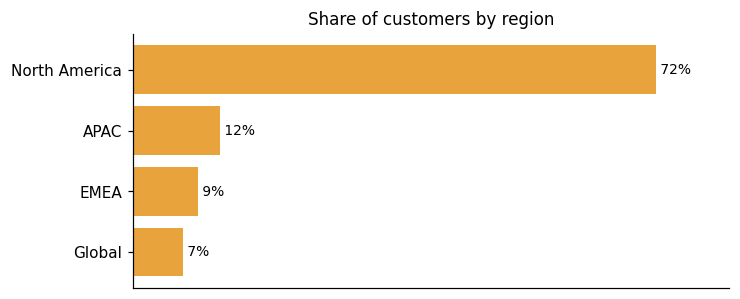
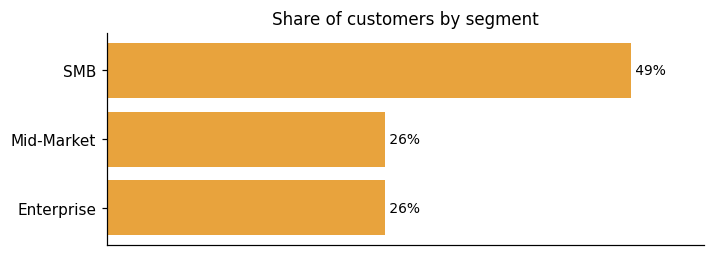
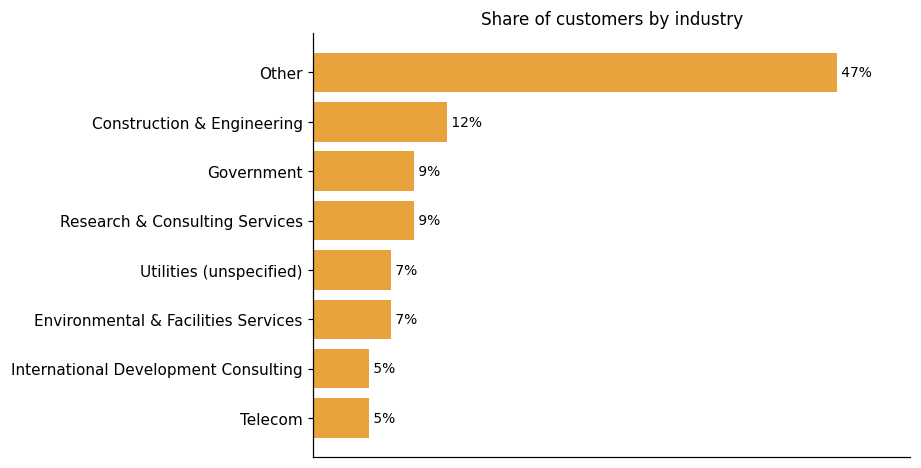
Representative customers: Architectural Resources Group (ARG), Brown and Caldwell, Carrington Risk Consulting, Celerity, Century Engineering, City of Wyoming, Michigan, Delaware Department of Transportation
How Fulcrum uses AI in practice
Fulcrum combines AI-powered features with standalone mobile forms, offline data capture, and workflow management. On the AI side, the product covers voice-driven data entry, natural-language analytics, photo analysis, and automated face blurring. Audio FastFill is the clearest illustration of that voice capability: it uses AI to turn spoken observations into structured data, so field workers can log information without stopping to type. The result is concrete — teams can complete field tasks 20% faster by reducing manual data entry.
Generative AI
Read detailsFulcrum brings generative AI into field work through two separate tools, one for data capture and one for analysis. Audio FastFill takes spoken observations from field workers and converts them into structured form entries automatically. Fulcrum Insights lets users ask questions about field data in plain language and returns visualizations, charts, and maps in response.
Predictive ML
Read detailsFulcrum applies machine learning models to visual inputs across two areas. The first is automatic face detection and blurring in field photos, which handles privacy compliance without manual intervention. The second is Photo FastFill, currently in progress, which will extract structured data from images.
Agentic AI
Read detailsFulcrum is working toward an agentic AI capability designed to support field inspections in real time. The vendor describes it as an autonomous assistant that proactively guides workers during active fieldwork. In that framing, it flags missing information, prompts next steps, and provides visual context — all without waiting for a user to ask. This capability is positioned as something Fulcrum is actively building toward, not a feature that is currently shipping.
Fulcrum pricing and value: plans, costs and ROI
pricing state: Self-serve Professional and Elite tiers are published at $55 US/user license/month (monthly) and $43 US/user license/month (annual) for Professional, and $39 US/user license/month for Elite; Enterprise tier is sales-gated ("Let's talk | Contact Sales" / "Get a quote!").
ROI evidence from 19 customers
- Managed Services
- Fulcrum's Managed Services packages help you optimize your ROI with ongoing operational support from our team of specialists.
- Automate the real-time fuel for your office systems
- Leverage Fulcrum APIs to sync field intelligence directly into your existing GIS or ERP solutions, eliminating the errors and delays of manual re-entry.
Time-to-value: what implementations take
- reducing setup time by 98% — from 10–12 hours to just 10–15 minutes
- reducing setup time by 98%— from 10–12 hours to just 10–15 minutes
- Inspection setup time was slashed by an incredible 98%. Work that previously took 10 to 12 hours was now completed in just 10-15 minutes.
- A single inspection setup took 10 to 12 hours of prep time, while a full job cycle for one request could last up to a month.
Who it fits: value by company size
Fulcrum offers a perfect fit for your field operations through a tiered subscription structure. The Professional tier is built for teams that want reliable, offline data collection and advanced tools from the start. A higher tier is available for teams that need to unlock advanced automation, key AI features, and security features alongside deeper data management and system integration. The subscription model is designed to grow with your business, offering the features you need at a price that makes sense.
Self-serve Professional and Elite tiers are published at $55 US/user license/month (monthly) and $43 US/user license/month (annual) for Professional, and $39 US/user license/month for Elite; Enterprise tier is sales-gated ("Let's talk | Contact Sales" / "Get a quote!").
Professional
Start strong with reliable, offline data collection and advanced tools designed to grow with your team.
Elite
Unlock advanced automation, key AI features, and security features for teams that require advanced data management and system integration.
Enterprise
Transform your organization with customized, large-scale solutions and dedicated support.
Plans as published by the vendor on Pricing | Fulcrum.
Fulcrum enterprise readiness: security, compliance, migration, and support
Fulcrum's enterprise readiness covers security, compliance, migration, and customer support.
Security controls and assurance
Fulcrum holds SOC 2 Type 2 attestation and is actively pursuing ISO 27001 certification. That combination covers the procurement gates most enterprise security teams check first. The encryption posture is layered. All data in transit is protected by 256-bit SSL (TLS). Data records, media, signatures, and other attachments stored in Fulcrum are encrypted at rest using AES-256, with certain customer account information carrying an additional layer of encryption beyond that. The platform runs on AWS — specifically EC2, S3, and VPC — and Fulcrum's instances are segmented into separate networks within that environment to control data flows. All instances, including non-public ones, are hardened through automated configuration management. On the endpoint side, company-owned machines are covered by MDM with daily malware signature updates. For its Enterprise Administration & Security capability, Fulcrum supports SSO and SCIM-based provisioning to bring user access under corporate standards — controls that matter to teams managing large field workforces.
Compliance and data protection
Fulcrum's compliance posture centers on consolidating field activity into a defensible, enterprise-wide history of compliance that bolt-on tools can't capture. On the standards side, built-in data quality controls support customer practices aligned with ISO 9001, and Fulcrum also supports initiatives aligned with ISO 14001 and GRI Standards for environmental and sustainability reporting. On data governance, Fulcrum maintains a formal data retention and disposal policy, evaluated on an annual basis. One documented limitation is on the privacy side: Fulcrum currently does not presently have the capability to recognize opt-out preference signals, though the policy commits to honoring them once that capability is developed.
Migration from competing platforms
Fulcrum's migration story is shaped by structured deployment roles and scalable growth. typical deployments include two defined roles. An app administrator handles basic spreadsheet-level tasks. A business administrator takes responsibility for user management and data analysis. This division gives teams a clear starting point when moving onto the platform. Scale is well documented. One customer journey shows transitioning from a handful of users to an enterprise-level subscription, reaching over 100 active users, 300 operational apps, and more than 130,000 records. That trajectory illustrates how Fulcrum can absorb significant growth without a platform change. Support during migration is available in two modes: teams can be trained for self-sufficiency, or they can lean on professional and managed services for ongoing requirements. One offboarding consideration is worth noting: subscriptions can be canceled at any time, but data is removed from the system upon cancellation, so exporting before closing an account is necessary.
Customer support experience
Fulcrum's enterprise support centers on priority support channels, giving enterprise customers dedicated email, chat, and phone lines. Customers can also partner with implementation specialists to support successful deployment and ongoing results. The Enterprise tier includes a tailored Enterprise License Agreement alongside these support options.
Fulcrum alternatives and competitive landscape



Connect Fulcrum with your stack: integrations and partner ecosystem
Fulcrum supports 9 native integrations and 108 integration partnerships spanning 75 partner categories. That breadth covers a wide range of partner types, from CRM and CRM/Marketing Automation to Cloud Data Warehouse.
Fulcrum connects field and office systems in real time through a two-way API, replacing manual hand-offs with standardized data collection. The API works in both directions, so data flows from the field into back-office systems and back again without manual re-entry. Remote sensor data can also feed directly into Fulcrum forms. Pressure readings, temperature data, and weather information reach those forms through webhooks or other remote calls. For teams moving data between GIS and other platforms, Fulcrum supports import and export in standard formats, including shapefiles, KML, and GeoJSON.
| Partner category | Integration partners | Native count | Flow direction |
|---|---|---|---|
| CRM | Salesforce, Copper, Insightly, Pipedrive, Streak | 0 | Downstream, Unknown |
| CRM/Marketing Automation | HubSpot | 0 | Unknown |
| Cloud Data Warehouse | Snowflake | 1 | Downstream |
| Marketing Automation | Marketo, SharpSpring | 0 | Unknown |
| Team Messaging / Collaboration | Slack | 0 | Downstream |
| Accounting Software | Bkper, QuickBooks, Xero | 0 | Downstream, Unknown |
| Appointment Scheduling | Acuity Scheduling | 0 | Unknown |
| Business Analytics | Dasheroo | 0 | Unknown |
| Business Intelligence / Data Visualization | Google Looker Studio, Tableau | 1 | Downstream |
| Business Intelligence/Dashboards | Cyfe, Geckoboard, Klipfolio | 0 | Unknown |
| Business Software Suite | Zoho | 0 | Unknown |
| CCTV Inspection Software | T4 Spatial | 1 | Bidirectional |
| Cloud Content Management / File Storage | Egnyte | 1 | Downstream |
| Cloud Database | Microsoft Azure Cosmos DB | 1 | Downstream |
| Cloud Infrastructure | Amazon Web Services, DigitalOcean | 0 | Unknown, Upstream |
| Cloud Storage | Dropbox, Inc | 0 | Unknown |
| Collaboration/Workflow Platform | Podio | 0 | Unknown |
| Communications API | Twilio | 0 | Unknown |
| Construction Project Management | Procore | 1 | Bidirectional |
| Contact Management | Contacts+ | 0 | Unknown |
| Contingent Workforce Management | Beeline | 0 | Unknown |
| Contractor Management Software | ISN | 1 | Bidirectional |
| Customer Support/Ticketing | Freshdesk, HappyFox, Zendesk | 0 | Unknown |
| Data Analytics | Bedrock Data | 0 | Unknown |
| Data Quality | DataValidation | 0 | Unknown |
| Database | MySQL, PostgreSQL Global Development Group | 0 | Unknown |
| Database/No-Code Platform | Airtable | 0 | Unknown |
| Document Automation | Docupilot, WebMerge | 0 | Unknown |
| Document Processing | Docparser | 0 | Unknown |
| Drone Software | DroneDeploy | 0 | Unknown |
| E-Commerce Platform | Magento, Shopify | 0 | Unknown |
| E-Signature | DocuSign | 0 | Unknown |
| Email API | Mailgun Technologies Inc, SendGrid | 0 | Unknown |
| Email Marketing | AWeber, Campaign Monitor, Drip, Mailchimp, Sarbacane's | 0 | Unknown |
| Email Verification | NeverBounce | 0 | Unknown |
| Enterprise Asset Management | IBM Maximo | 1 | Bidirectional |
| Field Service Management | ServiceM8 | 0 | Unknown |
| Form Builder | Formstack, JotForm, Wufoo | 0 | Unknown |
| GIS / Geospatial Software | Esri | 0 | Bidirectional |
| GIS / Open Source Mapping | QGIS | 1 | Bidirectional |
| IT Service Management | Autotask, Freshservice | 0 | Unknown |
| Identity/SSO | Okta | 0 | Unknown |
| Incident Management | PagerDuty, xMatters | 0 | Unknown |
| Integration Platform | tray.io | 0 | Unknown |
| Mobile Data Collection | DataScope | 0 | Unknown |
| Mobile Forms | GoCanvas, GoFormz | 0 | Unknown |
| Monitoring/Observability | Datadog | 0 | Unknown |
| No-Code Database Platform | Knack, Quickbase | 0 | Unknown |
| Note-Taking/Knowledge Management | Evernote Corporation | 0 | Unknown |
| Other | Mojo, Office 365 login, Orbica, SQL SERVER MASTERS | 0 | Unknown |
| PDF Editing | PDFfiller | 0 | Unknown |
| Payment Processing | Stripe | 0 | Unknown |
| Photo/Documentation Software | CompanyCam Inc | 0 | Unknown |
| Process Intelligence | Tonkean | 0 | Unknown |
| Project Management | Asana, Basecamp, ClickUp, MeisterTask, Redmine, Trello, monday.com | 0 | Unknown |
| Project Management/Collaboration | Smartsheet | 0 | Unknown |
| Push Notifications | Pushbullet, Pushover, Roost | 0 | Unknown |
| Remote Access/Virtualization | Citrix Systems | 0 | Unknown |
| SMS Marketing | TextMagic | 0 | Unknown |
| SMS/Email Marketing | ClickSend | 0 | Unknown |
| SMS/Messaging | Beepsend | 0 | Unknown |
| Safety/Compliance Software | SafetyCulture | 0 | Unknown |
| Secure File Sharing | ShareFile | 0 | Unknown |
| Social Media | 0 | Unknown | |
| Spatial Analytics / Mapping Platform | CARTO | 0 | Downstream |
| Speech Recognition/Transcription | SpeechTrans | 0 | Unknown |
| Spreadsheet / Productivity | Google Sheets | 0 | Downstream |
| Survey Software | SurveyMethods | 0 | Unknown |
| Task Management | todoist | 0 | Unknown |
| Team Communication | Glip, Rocket.Chat | 0 | Unknown |
| Time Tracking | Harvest, Monitask, RescueTime | 0 | Unknown |
| URL Shortening | Rebrandly | 0 | Unknown |
| Version Control/Developer Platform | GitHub | 0 | Unknown |
| Video Messaging | BombBomb | 0 | Unknown |
| Workflow Automation / iPaaS | Microsoft Power Automate, Zapier | 0 | Bidirectional |
| Workflow Management | Aero Workflow | 0 | Unknown |
What's new in Fulcrum
Fulcrum has had one product update and one partnership or integration announcement over the past nine months, with no awards recorded in the last two years.
Fulcrum Launches AI-Based Insights to Turn Field Data Into Instant Intelligence for Critical Infrastructure
Fulcrum has introduced Insights, a new AI-based capability built into the platform. It lets business leaders, operations managers, and other non-technical users ask plain-language questions to get actionable intelligence from field-collected data. The vendor describes this as extending Fulcrum's "Agentic AI vision" to data consumers, particularly office-based teams who need to make sense of information gathered in the field.
Read more →Fulcrum and KPMG Announce Collaboration to Transform Utility Field Operations and Strengthen Operational Resiliency
Fulcrum and KPMG LLP are collaborating to help utilities improve operational resiliency and field procedural rigor. KPMG brings U.S. audit, tax, and advisory expertise in the energy sector. Fulcrum contributes field-first innovation. Together, the two aim to ensure every onsite task supports long-term utility resiliency.
Read more →With Fulcrum MCP connector and AI Toolkit, workflows once too hard to build are now within reach
Fulcrum has introduced the MCP connector and AI Toolkit, enabling rapid development of complex workflows for field operations. These tools allow users to build workflows without needing technical expertise, integrating seamlessly with existing Fulcrum systems. The AI-driven solutions enhance field data collection and workflow automation, reducing reliance on IT for security and integration tasks.
Fulcrum Announces MCP & AI Toolkit That Let Field Teams Create Fully-Featured, End-to-End Digital Workflows Through AI
Fulcrum has launched an MCP server and AI Toolkit for its Field Operations Management platform, enabling field teams to create comprehensive digital workflows. This integration allows organizations to replace fragmented apps and paper processes, enhancing efficiency and data quality. The platform supports complex field requirements like GIS data and lidar integration, providing a robust foundation for AI-assisted workflows.
Fulcrum workflow automations - the handoff that runs itself
Fulcrum introduces workflow automation features to streamline field operations. The platform automates routine tasks, integrates with tools like Zapier and Power Automate, and supports real-time data sharing via APIs. These enhancements reduce manual data handling, improve project efficiency, and ensure timely issue resolution.
Spatial Networks, Inc. Profile
Company Name
Spatial Networks, Inc.
Company Website
//fulcrumapp.comHQ Location
360 Central Avenue, Suite 200, Saint Petersburg, Florida 33701, US
Social


