


Brushfire overview: capabilities, features, use cases, and value by role
Brushfire is an all-in-one event management platform covering ticketing, registration, virtual events, and event apps.
Top capabilities of Brushfire
Event Registration & Attendee Management
Read detailsBrushfire manages the full registration lifecycle — unlimited ticket and registrant types, conditional registration forms, attendee management, email communication, and reporting and analytics — covering both simple and complex event configurations, though one customer notes the inability to take certain options (like access codes) off of the page. It has been confused multiple times for promo codes.
Event Apps
Read detailsBrushfire's Event Apps capability gives attendees a custom mobile app built around schedules, push notifications, a ticket wallet, and chat. As Bridging the Gap Ministry puts it, "they really appreciated the ease of the app and knowing where things were and being able to find, you know, a schedule really quickly not having the extra bulk of carrying around a schedule".
Virtual Event Hosting & Streaming
Read detailsBrushfire handles the infrastructure side of virtual events so organizers can focus on the stream itself. The platform accepts whatever streaming source the organizer brings and wraps it in a branded online environment. Reliability, chat, and notes come built in. So do integrated donations and device-optimized viewing. Custom branding ties the whole experience together visually.
Live Audience Engagement
Read detailsBrushfire supports real-time attendee interaction during virtual events through built-in chat, notes, donations, interactions, and reactions. Carey Nieuwhof Communications found exactly what they needed there, saying "What we needed was right in Brushfire's wheelhouse. We needed a reliable platform and wanted the interactive chat." One limitation worth noting: as one customer puts it, "Chat will refresh between sessions. It would be better if it can carry over to other sessions in the same channel within the same day."
omni-channel payment solution
Read detailsBrushfire, in partnership with Square, delivers an industry-first omni-channel payment solution that unifies e-commerce, in-person, and m-commerce ticket sales simultaneously across the USA, Canada, the UK, and Australia — with organizers able to benefit from credit card fee savings through Brushfire-negotiated Square rates.
Assigned Seat Ticketing
Read detailsBrushfire's Assigned Seat Ticketing capability lets event organizers offer reserved seating arrangements across venues such as theatres, banquet tables, buses, and camp cabins, giving attendees a theatre-like ticketing experience.
Email Marketing
Read detailsBrushfire's email marketing software is built into the platform, so event organizers can reach attendees without switching tools. Connecting an existing email service is also an option, for organizers who prefer to work within their current setup.
Top features of Brushfire
QR code ticketing
Read detailsBrushfire supports digital QR code ticketing that lets attendees purchase and scan tickets from any mobile device, removing the need for paper tickets at event check-in.
Access Codes
Read detailsBrushfire's Access Codes feature restricts ticket purchases or content visibility to attendees who enter a valid code, making it possible to run private or invite-only events within the same ticketing and registration suite that handles promo codes and conditional forms.
Customizable Event Pages
Read detailsBrushfire's Customizable Event Pages gives organizers full control over the public-facing design and branding of their event, covering the entire attendee purchase and registration experience as part of the Ticketing & Registration offering, trusted across more than 30,000 events each year.
Custom Report Builder
Read detailsBrushfire's Custom Report Builder puts attendee registrations, ticket purchases, and demographic information into one flexible tool — event organizers can work from pre-built reports or build custom ones around the data they care about most.
Custom Branding
Read detailsBrushfire's Custom Branding runs across every attendee-facing surface — event pages, targeted emails, e-tickets, and the virtual event viewer. Organizers apply their own visual identity at each of those touchpoints. The feature is user-configurable within both Brushfire's virtual events and ticketing and registration offerings.
Timed Entry Ticketing
Read detailsBrushfire handles timed entry ticketing as a distinct mode within its platform. Organizers can sell tickets tied to specific entry time slots, managing capacity across scheduled admission windows. The platform also supports daily ticketing and attraction ticketing alongside this mode.
Notification Emails
Read detailsBrushfire's Notification Emails capability targets registered Brushfire users, delivering event notifications automatically through the platform's permission and authentication controls. Event organizers configure recipients directly on the Main Details tab of Event Configuration.
Breakout Sessions & Classes
Read detailsBreakout Sessions & Classes is Brushfire's built-in tool for organizing separate session tracks or class offerings within the platform, working alongside attendee authentication and paywall controls as a distinct mechanism for managing access and content.
Fee Pass-Through or Absorption Options
Read detailsBrushfire's Fee Pass-Through or Absorption Options hands event organizers full control over how service fees are handled. Organizers can pass fees on to attendees, set a custom fee amount, or absorb the fees entirely. The feature requires no startup costs and no annual fees.
Top use cases for Brushfire
Host and monetize virtual events
Read detailsBrushfire handles the full stack of a virtual event — not just the stream itself, but everything wrapped around it. Organizers bring their own livestream source and plug it into Brushfire's platform. From there, Brushfire adds registration and attendee authentication on top of that stream. It also handles paywalls and content control, so you can gate access however the event requires. Integrated donations are built in. Custom branding, chat, and breakout sessions round out the attendee-facing experience. The result is a monetized, branded online event that runs end-to-end inside one platform.
Collect donations alongside event registrations
Read detailsBrushfire lets nonprofit and event organizers collect donations directly within the event experience, combining registration management with a built-in giving mechanism so attendees can contribute without leaving the platform.
Keep attendees informed and engaged throughout an event
Read detailsBrushfire's custom attendee event app puts event information in participants' hands across every stage of an event, on any device. The app delivers a real-time newsfeed so participants stay current as events unfold. Schedules are personalized and tagged, and speaker and partner bios are built in. Organizers can also send curated push notifications to reach attendees directly.
Run in-person ticketed events end-to-end
Read detailsBrushfire handles every stage of a ticketed in-person event, from page setup through door check-in, inside one platform. Event organizers can build customizable event pages with unlimited ticket types and conditional registration forms. The free Mobile Check-in App handles attendee check-in on the day. Seating assignments and reporting live in the same place, so nothing moves between tools.
Gate and control access to event content
Read detailsBrushfire's virtual events platform puts event organizers in control of who can access what. Attendee authentication, paywall settings, and content control options all work together to restrict specific sessions or materials to authorized viewers. Content can be locked or unlocked depending on who should see it.
Measure and optimize event performance
Read detailsBrushfire puts reporting directly in event organizers' hands, combining a library of pre-built reports with the ability to build custom ones for tracking key metrics and informing decisions on future events.
Offload attendee sales and on-site operations
Read detailsFor organizers who need staffing support, Brushfire offers a dedicated sales and support line where agents answer attendee questions and sell tickets on the organizer's behalf. On-site, Brushfire's event operations experts handle in-person check-in scanning, ticket sales, and name badge printing. Both services run for an additional per-attendee fee, offloading execution to Brushfire's own team.
Value delivered by role with Brushfire
Event Staff
Read detailsBrushfire gives event staff reliable systems on the day of the event, backed by live support, while automation reduces call volumes and administrative workload so staff can shift from ticket sales to higher-value guest-facing roles.
Volunteers
Read detailsBrushfire cuts volunteer training time to proficiency in 24–48 hours through check-in and ticket sales tools designed to be picked up quickly. Automated financial reporting handles tracking work that would otherwise fall to staff, keeping volunteers focused on the attendee experience.
Operations Manager
Read detailsBrushfire makes geographic demand visible and keeps operations lean — drawing on online event data to surface growth opportunities, while a POS system modeled on familiar tools like Square keeps staffing flexible and onboarding fast. The result is a streamlined set of operational processes that lets managers concentrate on scaling their programs rather than managing logistics.
Event Organizers
Read detailsBrushfire puts event organizers in direct control of attendee flow through real-time reporting and the freedom to make on-the-fly updates and edits independently, without waiting on outside help as situations unfold.
Chief Executive Officer
Read detailsBrushfire is a ticketing and event platform built for cost-effectiveness and scalability, with responsive support that resolves issues quickly and protects an organization's reputation.
Head of Information Technology
Read detailsBrushfire serves Heads of IT with a platform built to be simple and fast for online customers while remaining equally straightforward for box office staff handling ticket printing and sales, backed by dedicated account management and responsive support that keeps the right people available when issues arise.
Manager of Events & Programming
Read detailsBrushfire offers Managers of Events & Programming a fully customizable platform that supports any event format. It moves beyond virtual-only limitations to handle in-person, hybrid, and specialized events as needed. Programming teams get a single platform that adapts to their vision without requiring compromises on event design.
Assistant Athletic Director
Read detailsBrushfire serves scholastic athletics programs with a personalized ticketing platform built around the specific demands of those events. Richardson Independent School District (RISD) notes that the personalization we get with our ticketing platform has enabled us to better satisfy our attendees. Athletic departments gain responsive, customized support and confidence that their particular requests will be met.
Community Services Superintendent
Read detailsBrushfire is a platform partner for community event teams — one that pivots quickly on requests, delivers industry-standard advice, and responds faster than other online service portals, helping municipal teams execute events with confidence and minimal friction.
Director of Business Development
Read detailsBrushfire puts concrete attendee figures in the hands of Directors of Business Development, turning event attendance data into a ready-to-present sponsorship asset that demonstrates audience reach and engagement to sponsors and supporters.
Founder & Executive Director
Read detailsReliable capacity controls sit at the core of what Brushfire delivers to Founders and Executive Directors — preventing overselling and protecting both the organization's reputation and the attendee experience at every event.
Guest Services Manager
Read detailsBrushfire's support team works alongside Guest Services Managers as an extension of their own staff, which takes pressure off internal teams and helps events run more smoothly.
Membership Coordinator
Read detailsBrushfire is a modern ticketing platform that replaces single-person box office operations with a scalable, multi-channel infrastructure for sales and check-in — putting Membership Coordinators in a position to serve far more attendees efficiently.
Associate Director of Events
Read detailsBrushfire puts event information directly in attendees' hands through a mobile-first platform, reducing coordination demands on staff. As one customer puts it, all of the information that our guests needed was truly in the palm of their hand.
Marketing & Finance Director
Read detailsBrushfire is built for large-scale digital events, serving Marketing and Finance Directors who need both audience engagement and operational dependability in one platform. Live chat and other interactive features handle the engagement side. The platform is designed to sit where marketing reach and financial accountability meet — which is precisely the territory those roles own.
Events Director
Read detailsBrushfire functions as a responsive implementation partner for Events Directors, adapting to new event formats and different venue configurations. As XO Marriage puts it, the Brushfire team has been really supportive in helping us set up new things that we wanted to try or adjust. That hands-on involvement lets Events Directors experiment without sacrificing execution quality.
Executive Assistant
Read detailsExecutive Assistants can replace expensive legacy check-in vendors with Brushfire, capturing cost savings such as $4,000 avoided from dropping a prior gala check-in vendor, while rapidly onboarding volunteers to support large-scale events.
Founder
Read detailsBrushfire builds its training support directly into the day-to-day workflow of founding teams, using instant email responses and step-by-step video guidance to keep staff onboarding and ongoing use self-sufficient.
Media Portfolio Manager
Read detailsBrushfire's on-site team support takes event execution details off the plate of Media Portfolio Managers, leaving internal staff free to focus on higher-level programming and media responsibilities.
Operations Director
Read detailsBrushfire is a ticketing platform built around reliability and ease of use — qualities that Operations Directors can translate directly into operational excellence for their teams.
Events Coordinator
Read detailsBrushfire serves events coordinators with a platform that attendees and staff alike find intuitive and easy to navigate, driving strong satisfaction at conferences and large gatherings. The support model fosters a partnership feel rather than a vendor relationship, giving coordinators confidence that logistics are handled. The result is a seamless event experience that coordinators can stand behind with pride.
Event Manager
Read detailsBrushfire brings all event information into one accessible place, handling event management workflows across nearly 200 events and freeing event managers from repetitive attendee questions.
Lead Pastor
Read detailsBrushfire supports Lead Pastors with a ticketing and registration experience designed to serve both church members and outside guests without added friction, while the platform's support relationships run deep enough that pastors cite them as a personal reason to stay.
Registration Coordinator
Read detailsBrushfire equips Registration Coordinators with a platform capable of handling all aspects of attendee registration and support for massive events single-handedly. Behind that platform sits a Brushfire team that provides genuine human support and collaborative problem-solving, so coordinators feel supported rather than left to manage complexity alone.
Festival Director
Read detailsBrushfire handles both ticketing and live streaming in one platform, so Festival Directors avoid the complexity of coordinating multiple vendors across hybrid or virtual festival formats — and accountability for the full attendee journey stays in one place.
Ticket Coordinator
Read detailsBrushfire functions as an embedded team partner for Ticket Coordinators, absorbing the complexities of large-scale production and working through challenges at every level to ensure expectations are exceeded.
Creative and Digital Director
Read detailsBrushfire handles attendee check-in so that Creative and Digital Directors can stay focused on designing the broader event experience rather than managing entry logistics.
What customers say about Brushfire: ratings, outcomes and feedback
Brushfire customers speak to two aspects of their experience with the platform: what they value in day-to-day use, and where they see room for improvement. Both dimensions reflect how customers interact with Brushfire in practice.
What works well
Children's Fairyland captures where things started: "Our box office was literally a shoe, and it was only one person selling tickets. Up until 1999, we had a single-file line and one box office person." Dark Hour Haunted House reflects a different kind of experience after moving to Brushfire. As they put it, "This is the best ticketing experience we've had in the 7 years I've been here!" Customers also report smooth outcomes for large, logistically complex events. The Dallas Sports Commission notes that the U-18 Softball World Cup was delivered without a hitch, with players, coaches, and spectators all getting through without trouble. Gideons International describes registration that is faster with fewer drop-offs, cleaner data, and quicker check-in as districts move onto a unified platform.
Where customers see room for improvement
Brushfire customers flag a handful of recurring friction points, centered on admin usability, data integration, and a few missing registration features. The admin interface is a consistent sticking point. Customers describe the user interface to be more confusing than it needs to be, and several report that navigating the dashboard felt counterintuitive, leaving them lost while trying to track down certain settings. The admin pieces are not super intuitive, which makes self-service troubleshooting harder than it should be. On the integration side, the absence of a native Rock RMS sync is a named gap, with one customer calling it their main complaint. Data pipeline work falls on engineering teams instead. Mid-Market customers report that they have to dedicate engineering resources to pull data through the API. That data then has to be manually formatted into a SQL database. A built-in connection would remove that development overhead entirely. Registration structure is another area with room to grow. One customer puts it plainly: "I wish that Brushfire had a way to capture the individual contact information for each person attending per team but still only charge them per team." That gap affects organizations running team-based events where per-person contact capture matters alongside group pricing. Support quality softens some of these concerns — customers note the customer service team is quick and helps fix the problem — but the underlying usability and integration limitations remain product-level issues independent of support.
Brushfire Customer wins, Case studies
New Tampa Women's Athletic Foundation (NTWAF) - Non Profit Organization Management - Small
Frequently Asked Questions (FAQ)
What buyers ask before choosing Brushfire
Integrations What CRM integrations are available with Brushfire?
Brushfire offers several CRM integrations to enhance your event management experience. Notably, it integrates seamlessly with Salesforce and Keap, allowing you to synchronize attendee data and streamline your marketing efforts. These integrations enable you to manage customer relationships more effectively by automating data transfer between Brushfire and your CRM, ensuring that your team has access to up-to-date information. Additionally, Brushfire's robust REST HTTP API allows developers to create custom integrations tailored to your specific needs, further expanding your CRM capabilities. By leveraging these integrations, organizations can improve their event management processes and enhance overall attendee engagement.
Integrations How does Brushfire connect to Salesforce and HubSpot?
Brushfire connects to Salesforce and HubSpot through seamless integrations that enhance event management and customer relationship management. For Salesforce, users can sync attendee data, manage registrations, and track event performance directly within their Salesforce environment, allowing for streamlined communication and reporting. Similarly, the HubSpot integration enables users to capture leads from events and automate marketing efforts, ensuring that all attendee interactions are tracked and nurtured effectively. To set up these integrations, users can follow the straightforward steps provided in Brushfire's documentation, which guides them through connecting their accounts and configuring settings to maximize the benefits of both platforms. This connectivity not only improves operational efficiency but also enhances the overall attendee experience by ensuring that all data is centralized and actionable.
Integrations What are the setup steps for integrating Brushfire with MailChimp?
To integrate Brushfire with MailChimp, start by logging into your Brushfire account and navigating to the integrations section. From there, select MailChimp and follow the prompts to connect your MailChimp account by entering your API key, which you can find in your MailChimp account settings. Once connected, you can choose the specific lists in MailChimp where you want to sync your Brushfire attendee data. Make sure to map the relevant fields, such as email addresses and names, to ensure accurate data transfer. After completing the setup, test the integration by sending a sample attendee to MailChimp to confirm that the data syncs correctly. This integration allows you to streamline your email marketing efforts, making it easier to communicate with event attendees.
Integrations Can I use the Brushfire API to create custom integrations?
Yes, you can use the Brushfire API to create custom integrations tailored to your organization's specific needs. Brushfire offers a robust REST HTTP API that allows developers to build integrations on top of its key features, enabling seamless connectivity with various applications and services. This flexibility means you can integrate Brushfire with tools like Salesforce, HubSpot, and Zendesk, or even create unique solutions that enhance your event management processes. Additionally, Brushfire's API is designed to support the development of mobile applications, ensuring that your custom integrations can leverage the same high availability and performance as Brushfire's own offerings. For detailed guidance on utilizing the API, you can refer to the documentation provided by Brushfire.
Integrations What is the data flow between Brushfire and Planning Center Online?
The data flow between Brushfire and Planning Center Online involves seamless integration that allows event organizers to manage registrations and attendee information efficiently. When an event is created in Brushfire, relevant data such as attendee registrations, ticket purchases, and event details can be synchronized with Planning Center Online. This integration ensures that any updates made in Brushfire, such as changes to attendee lists or event specifics, are automatically reflected in Planning Center Online, facilitating real-time data accuracy. Additionally, this flow supports enhanced communication and coordination between teams, allowing for better event management and attendee experience. By leveraging this integration, organizations can streamline their event processes and maintain a centralized database for all event-related information.
Integrations Are there any limitations to the integrations available with Brushfire?
While Brushfire offers a robust set of integrations with popular platforms such as Salesforce, HubSpot, MailChimp, and Stripe, there may be some limitations depending on the specific integration and its functionality. For instance, certain integrations might not support all features available in Brushfire, or they may require additional configuration to work seamlessly. Additionally, while Brushfire provides a REST HTTP API for custom integrations, the complexity of building these integrations can vary based on your development resources and expertise. It's essential to consult our documentation for detailed information on each integration's capabilities and any potential restrictions. If you have specific needs or questions, our support team is available to assist you in navigating these limitations effectively.
Features What does the RobustTicketing feature do?
The Robust Ticketing feature offered by Brushfire is designed to streamline the ticketing process for events of all sizes, enhancing both the attendee experience and event management efficiency. This feature allows organizations to sell tickets online seamlessly, manage check-ins efficiently, and access real-time reporting, which helps in tracking sales and attendance. By utilizing Robust Ticketing, event organizers can customize ticket types, set pricing tiers, and offer add-ons to boost revenue. This flexibility not only simplifies the ticket purchasing process for attendees but also provides valuable insights for organizers to optimize future events. Overall, Robust Ticketing empowers organizations to enhance visitor satisfaction while maximizing their revenue potential.
Features How do I set up FlexibleRegistrations for my event?
To set up FlexibleRegistrations for your event using Brushfire, start by logging into your Brushfire account and navigating to the event dashboard. Click on "Create Event" and select the "FlexibleRegistration" option. You can then customize your registration form by adding fields that suit your event's needs, such as attendee information, ticket types, and payment options. Once your form is set up, configure the event details, including date, time, and location. After that, review your settings and publish the event to make it live. Brushfire's user-friendly interface allows you to manage registrations efficiently, ensuring a smooth experience for both you and your attendees. If you need further assistance, consider booking a consultation with a Brushfire specialist for personalized guidance.
Features What functionalities are included in Brushfire's event apps?
Brushfire's event apps are designed to enhance attendee engagement and streamline event management. Key functionalities include seamless registration processes for various events such as conferences, camps, and classes, all managed through a user-friendly interface. The app consolidates multiple events into one platform, allowing attendees to access and register for all experiences in one place. Additionally, the app is available on both iOS and Android, ensuring accessibility for all users. It integrates with Brushfire's comprehensive event management dashboard, which houses event details and schedules, making it easy for organizers to manage their events and for attendees to stay informed. Overall, Brushfire's event apps provide a cohesive and efficient solution for both event planners and participants.
Features How can I customize the ticketing options using Brushfire?
Customizing ticketing options using Brushfire is straightforward and designed to enhance your event's flexibility and attendee experience. To begin, log into your Brushfire account and navigate to the event you wish to customize. From there, you can set up various ticket types, including general admission, VIP, or early bird tickets, and define pricing tiers for each. Additionally, Brushfire allows you to create add-ons, such as merchandise or food packages, which can be offered during the ticket purchase process to boost revenue. You can also customize your event's registration page with your branding, ensuring a cohesive look and feel. For more complex needs, such as assigned seating or multiple performances, Brushfire provides tools to manage these features effectively, making it easier for you to tailor the ticketing experience to your specific requirements.
Features What steps do I need to follow to create a virtual event with Brushfire?
To create a virtual event with Brushfire, start by logging into your Brushfire account and navigating to the Event Creator. Select the option to create a new event and choose the virtual event format. Fill in essential details such as the event name, date, and time, and customize your registration options to suit your audience. Next, integrate any necessary tools or platforms, such as Zoom or YouTube, to facilitate the virtual experience. Once your event is set up, promote it through Brushfire's marketing tools to generate buzz and boost sign-ups. Finally, monitor registrations and prepare for the event day by ensuring all technical aspects are in place for a seamless experience. By following these steps, you can efficiently manage your virtual event and enhance attendee engagement.
Features How do I access and utilize the dashboards for event management in Brushfire?
To access and utilize the dashboards for event management in Brushfire, first log into your Brushfire account. Once logged in, navigate to the dashboard where you will find various tools and features designed to streamline your event management process. From the dashboard, you can create new events, manage registrations, and access analytics to track attendee engagement and ticket sales. Utilize the Voting/Polling Module and Lead Capture features available in your dashboard to enhance attendee interaction and gather valuable insights. For additional support, Brushfire offers a Help Center with articles and video walkthroughs to guide you through the functionalities of the dashboard, ensuring you can maximize its potential for your events.
ROI & pricing What measurable business outcomes can I expect from using Brushfire?
Using Brushfire as your all-in-one event management platform can lead to several measurable business outcomes. Customers have reported increased efficiency in event registration processes, allowing them to create dynamic registrations in just minutes, which can significantly reduce administrative overhead. Additionally, organizations like Carey Nieuwhof Communications successfully managed virtual events with over 17,000 attendees, showcasing Brushfire's ability to scale and handle large audiences effectively. The platform also enhances attendee experiences, which can lead to higher satisfaction rates and repeat attendance. Furthermore, case studies indicate that events managed through Brushfire, such as the KC Oktoberfest, experience smoother operations and shorter wait times, ultimately contributing to increased revenue and improved brand reputation. Overall, leveraging Brushfire can result in streamlined operations, enhanced attendee engagement, and measurable growth in event success.
ROI & pricing How does Brushfire improve ROI for event management organizations?
Brushfire enhances ROI for event management organizations by streamlining the event registration process and providing comprehensive tools that simplify planning and execution. With Brushfire, organizations can create dynamic event registrations in just minutes, allowing for quick setup and efficient management of various events, from conferences to classes. The platform's ability to handle large crowds and multiple events simultaneously ensures that resources are utilized effectively, reducing operational costs. Additionally, Brushfire's improved attendee experience, including features for in-person payments and ticketing, fosters higher engagement and satisfaction, leading to increased attendance and revenue. By minimizing manual processes and maximizing efficiency, Brushfire ultimately helps organizations achieve a better return on their event investments.
ROI & pricing What are the pricing plans available for Brushfire, and what do they include?
Brushfire offers simple and flexible pricing plans designed to accommodate various event needs through a Pay-As-You-Go model, ensuring no startup costs or annual fees. Their standard rates cater to organizations with fewer than 10,000 paid attendees annually or those generating less than $750,000 in event revenue. The pricing structure is tailored based on the number of events, attendees, and gross revenue, allowing for customization to fit specific requirements. For larger organizations, Brushfire considers these factors to create suitable pricing packages. If you're interested in selling daily tickets or timed entry admissions, special pricing options are also available. For detailed information and to discuss your specific needs, contacting Brushfire directly is recommended.
ROI & pricing How can Brushfire help reduce costs and increase revenue for my events?
Brushfire can significantly reduce costs and increase revenue for your events through its all-in-one event management platform, which streamlines the registration process and minimizes administrative overhead. By allowing you to create dynamic event registrations in just minutes, Brushfire saves time and resources that can be redirected towards enhancing your event experience. Additionally, its robust ticketing features enable you to sell daily tickets or timed entry admissions, optimizing your pricing strategy to maximize attendance and revenue. With reliable customer support and resources to help you increase ticket sales, Brushfire empowers you to effectively manage large events, ensuring that you can accommodate over 2,500 attendees while keeping costs manageable. This comprehensive approach not only enhances operational efficiency but also drives higher profitability for your events.
ROI & pricing What is the typical time-to-value when implementing Brushfire for event registration?
The typical time-to-value when implementing Brushfire for event registration is remarkably swift, often allowing users to create and manage events within minutes. Brushfire's all-in-one event management platform is designed for ease of use, enabling organizations to set up dynamic event registrations quickly, whether for conferences, camps, or classes. Users report that the intuitive interface and comprehensive tools streamline the registration process, significantly reducing the time spent on event logistics. Additionally, Brushfire offers robust customer support, ensuring that any questions or challenges are addressed promptly, further enhancing the speed at which users can realize the benefits of the platform. Overall, organizations can expect to see tangible results and improved attendee experiences shortly after implementation.
ROI & pricing What is the total cost of ownership for using Brushfire over time?
The total cost of ownership for using Brushfire over time includes various factors such as Pay-as-You-Go fees based on the number of attendees and average ticket prices, with no startup costs or annual fees. For instance, if you estimate an event with 10 attendees at an average ticket price of $16.65, the estimated Brushfire cost would be around $165. Additionally, you can choose to pass on these fees to attendees or cover them yourself, which can affect your overall expenses. It's important to consider the potential savings in time and resources that Brushfire offers through its all-in-one event management platform, which can enhance attendee satisfaction and boost revenue, ultimately providing significant value over time.
Capabilities Can Brushfire handle ticketing for large-scale events?
Yes, Brushfire is specifically designed to handle ticketing for large-scale events, accommodating more than 2,500 attendees with ease. Its robust platform allows event organizers to manage various ticketing needs, including assigned seating, multiple performances, and daily ticketing options. With Brushfire, you can create dynamic event registrations in just minutes, ensuring a seamless experience for both organizers and attendees. The platform supports both online and in-person ticket sales, making it versatile for different event types, from concerts to festivals. Additionally, Brushfire offers features like real-time reporting and efficient check-in processes, which enhance visitor satisfaction and streamline event management. If you're planning a large event, Brushfire is equipped to meet your ticketing requirements effectively.
Capabilities Does Brushfire support customizable registration forms?
Yes, Brushfire supports highly customizable registration forms, allowing you to gather as much or as little information as you need from attendees. You can create forms that range from simple to detailed, tailoring them to fit the specific requirements of your event. This flexibility includes options for unlimited ticket and registrant types, conditional forms, and the ability to incorporate promo codes. Additionally, Brushfire enables you to assign attendees to specific groups, seating arrangements, or teams through drag-and-drop functionality or auto-assignment. This level of customization not only enhances the attendee experience but also streamlines the registration process, making it easier for event organizers to manage their events effectively.
Capabilities Can Brushfire facilitate virtual events alongside in-person gatherings?
Yes, Brushfire can effectively facilitate virtual events alongside in-person gatherings, making it an ideal solution for hybrid events. This capability allows organizations to connect with attendees regardless of their location, enhancing engagement and participation. With Brushfire's all-in-one event management platform, you can create dynamic event registrations, manage ticketing, and provide a seamless experience for both in-person and virtual attendees. This flexibility not only boosts sign-ups but also helps generate excitement and buzz around your events. Whether you're planning an internal all-hands meeting, a customer meetup, or a large industry conference, Brushfire ensures that you can deliver a memorable experience that caters to diverse audience needs, ultimately driving higher attendance and satisfaction.
Capabilities Does Brushfire provide tools for managing event workflows across multiple teams?
Yes, Brushfire provides comprehensive tools for managing event workflows across multiple teams, making it an ideal solution for organizations that require coordinated efforts in event planning. With its centralized event management capabilities, Brushfire streamlines processes and enhances communication among various teams, allowing for efficient collaboration on tasks such as registration, ticketing, and attendee management. The platform's automated features help reduce manual processes, enabling teams to focus on delivering exceptional attendee experiences. Additionally, Brushfire's responsive customer support ensures that teams can maximize the platform's functionalities, facilitating a seamless workflow that accommodates the complexities of multi-location events and large-scale gatherings. This makes Brushfire a valuable asset for organizations looking to optimize their event management efforts across diverse teams.
Capabilities Can Brushfire ensure compliance with data security regulations for event management?
Yes, Brushfire can help ensure compliance with data security regulations for event management through its robust security features and data management practices. The platform offers a Data Viewer permission level, allowing teams to securely access necessary data while protecting sensitive information. Additionally, Brushfire provides real-time support during events, ensuring that any data-related issues can be addressed promptly without disrupting the event workflow. By implementing these measures, Brushfire not only enhances the attendee experience but also aligns with compliance requirements, making it a reliable choice for organizations concerned about data security in their event management processes. For organizations looking to scale internationally, Brushfire's commitment to data protection is crucial in navigating various regulatory landscapes.
Capabilities Does Brushfire offer performance analytics for event organizers?
Yes, Brushfire offers performance analytics for event organizers, providing valuable insights into event registration and attendee engagement. With Brushfire's end-to-end event management platform, organizers can track key metrics such as ticket sales, attendee demographics, and check-in rates, enabling them to assess the success of their events effectively. This data-driven approach allows event planners to make informed decisions, optimize future events, and enhance the overall attendee experience. Additionally, Brushfire's Data Viewer permission level ensures that team members can securely access the necessary data while maintaining data protection. By leveraging these analytics, event organizers can identify trends, improve marketing strategies, and ultimately drive better outcomes for their events.
Use cases How can SDRs use Brushfire to streamline event registration and ticketing processes?
Sales Development Representatives (SDRs) can leverage Brushfire to streamline event registration and ticketing processes by utilizing its user-friendly platform to create dynamic event registrations in just minutes. With Brushfire, SDRs can efficiently manage attendee registrations for various events, such as conferences and classes, while automating tasks that traditionally require manual input. This includes setting automatic capacity limits and providing built-in support services, which significantly reduces the number of inquiries SDRs need to handle. Additionally, Brushfire’s Data Viewer permission level allows SDRs to securely share insights and data with their teams, ensuring everyone has access to the necessary information without compromising data security. By adopting Brushfire, SDRs can enhance their operational efficiency, improve the attendee experience, and ultimately drive better event outcomes.
Use cases What are the best practices for marketers to enhance virtual event engagement using Brushfire?
To enhance virtual event engagement using Brushfire, marketers should focus on several best practices. First, create dynamic event registrations that are user-friendly and quick, allowing attendees to sign up effortlessly. Next, leverage pre-event communication to build excitement and set clear expectations, which can significantly reduce stress on the event day. Incorporate interactive elements during the event, such as live polls, Q&A sessions, and breakout discussions, to foster participation and keep attendees engaged. Additionally, utilize Brushfire's analytics tools to track attendee behavior and feedback, enabling continuous improvement for future events. Finally, post-event follow-ups are crucial; send thank-you emails and surveys to gather insights and maintain connections with attendees, ensuring they feel valued and are more likely to participate in future events.
Use cases In what scenarios should RevOps teams implement Brushfire for multi-site event management?
RevOps teams should consider implementing Brushfire for multi-site event management in scenarios where they need to coordinate large-scale events across multiple locations, such as conferences, festivals, or training sessions. Brushfire's all-in-one event management platform excels in handling complex logistics, including assigned seating, daily ticketing, and managing over 2,500 attendees. It allows for dynamic event registrations, making it easy to create and manage events quickly. Additionally, Brushfire's robust customer support ensures that RevOps teams can effectively address any challenges that arise during the planning and execution phases. By leveraging Brushfire, teams can streamline their operations, enhance the attendee experience, and maintain a personal touch across various sites, ultimately driving better engagement and satisfaction.
Use cases How can sales leaders leverage Brushfire to improve attendee insights and networking opportunities at events?
Sales leaders can leverage Brushfire to enhance attendee insights and networking opportunities by utilizing features like Brushfire Lead Capture, which allows exhibitors to scan attendee QR codes to collect valuable contact information and notes. This functionality transforms traditional business card exchanges into organized, actionable data, enabling sales teams to follow up with potential leads effectively. Additionally, Brushfire's dynamic event registration tools facilitate the management of large-scale events, ensuring that sales leaders can track attendee engagement and preferences. By analyzing this data, sales leaders can tailor their outreach strategies, foster meaningful connections, and ultimately drive revenue growth. Overall, Brushfire provides a comprehensive platform that not only streamlines event management but also enhances networking potential, making it an invaluable tool for sales leaders aiming to maximize their event ROI.
Use cases What workflows can organizations adopt with Brushfire to ensure smooth operations during large-scale events?
Organizations can adopt several workflows with Brushfire to ensure smooth operations during large-scale events. First, they can utilize Brushfire's dynamic event registration tools to streamline attendee sign-ups, allowing for quick processing and management of large crowds. Implementing assigned seating features helps in organizing attendees effectively, while daily ticketing options can accommodate multiple performances seamlessly. Additionally, organizations can leverage Brushfire's case studies to learn from successful events, like KC Oktoberfest, which highlights best practices in crowd management and operational efficiency. By integrating real-time communication tools and feedback mechanisms, event organizers can address issues promptly, ensuring a positive attendee experience. Overall, Brushfire's comprehensive event management solutions empower organizations to execute large-scale events with confidence and precision.
Use cases How does Brushfire support teams in managing sponsorships effectively during virtual and in-person events?
Brushfire supports teams in managing sponsorships effectively during both virtual and in-person events through its comprehensive event planning and management platform, which includes robust tools for sponsorship integration. Users can easily create sponsorship packages, track commitments, and manage deliverables, ensuring that sponsors receive the visibility and engagement they expect. The platform allows for customizable branding opportunities, enabling sponsors to showcase their logos and messages prominently. Additionally, Brushfire's award-winning customer support team is available to assist with any questions or challenges that may arise, providing real-time solutions and guidance. This combination of technology and human-centered support helps organizations maximize their sponsorship potential, enhancing the overall event experience for both sponsors and attendees.
Alternatives What are the key differences between Brushfire and Aventri?
Brushfire and Aventri are both event management platforms, but they cater to different needs and functionalities. Brushfire excels in creating dynamic event registrations, making it particularly suitable for managing various types of events like conferences, camps, and classes with an emphasis on user-friendly interfaces and attendee experience. It offers features such as interactive ticketing and visual organization tools, which enhance the registration process. On the other hand, Aventri is more focused on comprehensive event planning and analytics, providing robust tools for event marketing, attendee engagement, and post-event reporting. While Brushfire is ideal for organizations looking for straightforward registration solutions, Aventri is better suited for those needing extensive planning and data analysis capabilities. Ultimately, the choice between the two depends on the specific requirements of your event management strategy.
Alternatives How does Brushfire compare to Eventzilla in terms of features?
Brushfire and Eventzilla are both robust event management platforms, but they cater to slightly different needs. Brushfire excels in creating dynamic event registrations, offering tools for managing large crowds, assigned seating, and multiple performances, making it ideal for complex events with over 2,500 attendees. It emphasizes customer support and ease of use, allowing users to set up events quickly. In contrast, Eventzilla focuses on providing a straightforward ticketing solution with features like customizable registration forms and promotional tools, which may appeal to smaller events or those seeking a simpler interface. Ultimately, the choice between Brushfire and Eventzilla depends on the specific requirements of your event, such as scale and complexity, as well as the level of support you desire.
Alternatives What makes TicketSpice a better alternative to Brushfire?
TicketSpice offers several advantages that may make it a better alternative to Brushfire for certain users. One of its standout features is the highly customizable ticketing options, allowing event organizers to tailor their ticket sales to fit specific needs, including unique pricing structures and promotional codes. Additionally, TicketSpice provides a user-friendly interface that simplifies the event registration process, making it accessible for both organizers and attendees. It also integrates seamlessly with various platforms, such as Mailchimp and Zapier, enhancing marketing capabilities and automation. While Brushfire excels in providing an all-in-one event management solution with robust features, TicketSpice may appeal more to those seeking flexibility and customization in their ticketing approach. Ultimately, the choice between the two will depend on the specific requirements and preferences of the event organizer.
Alternatives Brushfire vs Eventbee: which event management software is more user-friendly?
When comparing Brushfire and Eventbee in terms of user-friendliness, both platforms offer distinct advantages. Brushfire is known for its intuitive interface that allows event planners to create dynamic event registrations quickly, making it particularly appealing for users who may not have extensive technical skills. Customers often praise Brushfire for its responsive customer support, which enhances the overall user experience. On the other hand, Eventbee also provides a straightforward setup process and is recognized for its affordability, which can be attractive for smaller organizations or those with budget constraints. Ultimately, the choice between Brushfire and Eventbee may depend on specific user needs, such as the complexity of events being managed and the level of customer support desired.
Alternatives What are the best alternatives to Brushfire for event registration?
When considering alternatives to Brushfire for event registration, several platforms stand out for their unique features and capabilities. Eventbrite is a popular choice, offering a user-friendly interface and extensive promotional tools, making it ideal for a wide range of events. Cvent is another robust option, particularly suited for larger organizations that require comprehensive event management solutions, including venue selection and attendee engagement tools. For those seeking a more budget-friendly solution, Ticket Tailor provides straightforward ticketing options without service fees, making it appealing for smaller events. Additionally, Whova offers excellent networking features and attendee engagement tools, enhancing the overall event experience. Each of these alternatives has its strengths, so the best choice will depend on your specific event needs and budget.
Alternatives How does Brushfire stack up against TicketSpice for large events?
When comparing Brushfire and TicketSpice for managing large events, both platforms offer robust features tailored to different needs. Brushfire excels with its all-in-one event management capabilities, allowing for quick setup of complex events with assigned seating, multiple performances, and daily ticketing, making it ideal for events with over 2,500 attendees. Its strong customer support and automated tools enhance the attendee experience and streamline registration processes. On the other hand, TicketSpice is known for its customizable ticketing options and user-friendly interface, which can be advantageous for organizers seeking flexibility. Ultimately, the choice between Brushfire and TicketSpice will depend on specific event requirements, such as the need for comprehensive management tools versus customizable ticketing solutions.
Who uses Brushfire: customer base, geography, and industries
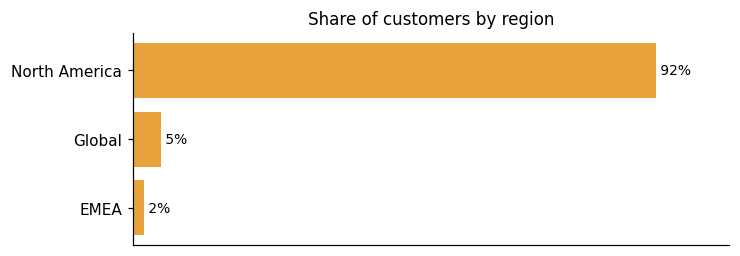
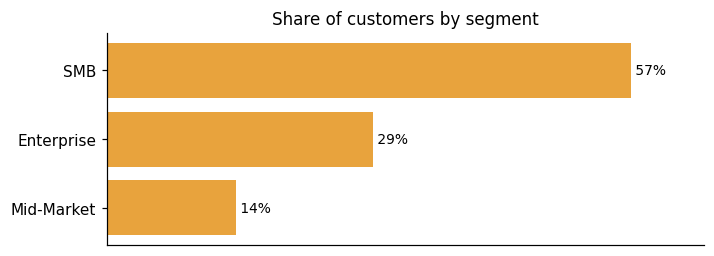
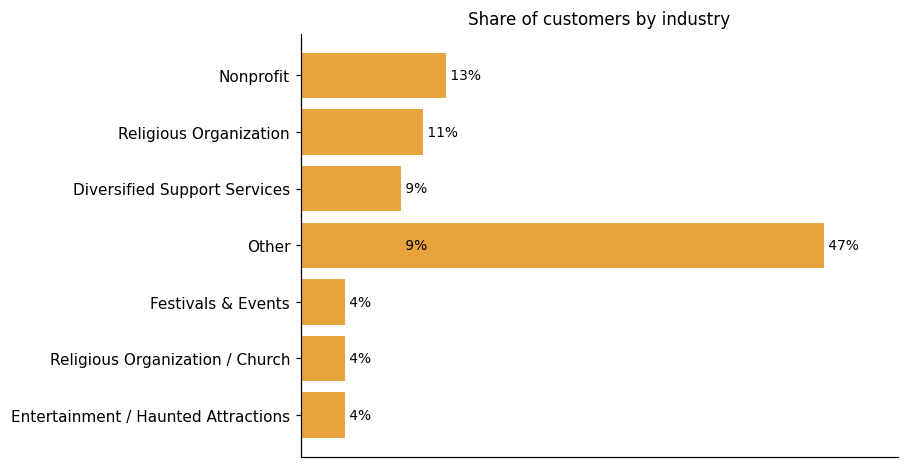
Among the 47 customers we looked at, Brushfire adoption is concentrated in North America, which accounts for 37 of the 40 customers where region is known. Where the industry is known, nonprofits and religious organizations make up the leading share, with customers like Alive Music Festival, Bridging the Gap Ministry, and Adventure Farm Aurora representing the range of organizations using the platform. Where the segment is known, SMB customers are the largest group, followed by Enterprise and Mid-Market.
Representative customers: 1-10 employees, 11-50 employees, 201-500 employees, 51-200 employees, Adventure Farm Aurora, Alive Music Festival, Bridging the Gap Ministry
How Brushfire uses AI in practice
Brushfire pricing and value: plans, costs and ROI
Brushfire offers transparent pricing alongside documented cost savings from real customers. The product follows two pricing models: Pay-As-You-Go and custom pricing for larger or more complex needs. The Pay-As-You-Go calculator publishes specific estimates, such as $165.00 for a standard event, $1 for Virtual Events, and $1 for Attendee Support. Organizations with daily tickets, timed entry, or on-site support requirements are routed to sales for custom pricing. The value evidence comes from customers across multiple contexts. One organization saved approximately $4,000 compared to a prior check-in vendor. NTWAF reduced costs from $1,400 to $750 per girl, making participation more accessible. A third customer reports saving guests hundreds of dollars every time they come to Alive, just by switching to Brushfire. Beyond direct cost savings, customers also report implementation benefits: a tailored approach not only resulted in significant time savings for DYM but also mitigated complexities in their process.
ROI evidence from 6 customers
Time-to-value: what implementations take
- You could literally go from no knowledge to hosting an event in 1 week!
Who it fits: value by company size
Brushfire's standard rates apply to organizations with fewer than 10,000 paid attendees per year or annual event revenues below $750,000. Beyond those thresholds, pricing for larger organizations is determined through a conversation that weighs event count, attendee volume, gross payment volume, and history with Brushfire. Customers running church team events and similar recurring formats do use the platform. One customer shared that "Thanks to Brushfire, we no longer have people show up for a show upset because we oversold ten seats." On the other side, customers have flagged that pricing can feel less competitive for mid-sized organizations, and that the absence of native flexible payment plans creates a barrier for some attendees who cannot pay the full cost upfront.
Some specific fee estimates are published (e.g. Pay-as-You-Go calculator showing $165.00 estimated cost, $1 for Virtual Events, $1 for Attendee Support), while larger organizations and special cases (daily tickets, timed entry, on-site support) are routed to contact sales for custom pricing.
Brushfire enterprise readiness: security, compliance, migration, and support
Brushfire addresses enterprise readiness across four areas: security, compliance, migration, and customer support.
Security controls and assurance
Brushfire's security posture is built on proven, secure infrastructure that handles the full transaction lifecycle. Every ticket exchange runs through secure payment processing, automatic confirmations, real-time updates, and comprehensive transaction logging. On the fraud side, Brushfire gives organizers access to intelligent fraud controls. Payment acceptance has also grown to include digital wallet payments (Apple Pay, Google Pay, etc.).
Compliance and data protection
Brushfire has aligned its platform with the FTC's Junk Fee Ban for live event tickets. The platform has fully implemented all necessary system changes so that standard ticket pricing displays automatically show the all-inclusive price with fees incorporated into the total. There is a meaningful boundary to keep in mind, though. The automated compliance covers only standard pricing fields. Customers remain responsible for any manually entered pricing information in customizable areas, such as event descriptions and details pages. Confirmation emails, marketing emails, and reminder emails fall into that same category. Any custom text field where a price appears requires a manual review to ensure it reflects the final cost. The same obligation extends beyond Brushfire entirely. All price mentions must reflect the final, all-inclusive cost across any marketing materials the organizer produces outside the platform.
Migration from competing platforms
Brushfire puts attendee migration in the hands of the event team itself, rather than requiring someone else to handle it. Teams can import attendees using our simple Import Tool directly, without waiting on outside help. A newer addition to that workflow, the Order Email column, lets teams group attendees into shared orders straight from a spreadsheet. At larger scale, all 38 districts are onboarding to a unified platform, with faster registration, cleaner data, and quicker check-in as reported outcomes. One limitation has been noted: in one customer's words, in the past development has been slow to roll out features, the design of the website could be better as well.
Support and success
Brushfire's support spans three distinct areas: a self-serve and human-staffed channel for event organizers, a dedicated attendee-facing channel, and optional hands-on services for in-person events. For organizers, Brushfire provides award-winning support from real people, accessible through a Help Center with articles and video walkthroughs, email support, and the option to schedule a 20-minute call with the support team. Attendees have separate support channels to retrieve tickets or contact event organizers directly. Beyond these channels, Brushfire offers an Attendee Sales & Support Services add-on — a fully staffed sales and support line that handles attendee questions and sells tickets on an organizer's behalf, available to any account for an additional $1.00 per attendee. Brushfire also provides on-site event operations, with experts available to assist with in-person execution including staffing, check-in scanning, and on-demand name badge printing. The results that organizers report are consistent with this range of support. As A Taste of Southlake puts it, Growth in ticket sales year-over-year since implementing Brushfire. Adventure Farm Aurora says, Adventure Farm Aurora transformed its ticketing system, offering an enhanced customer experience and streamlined operations. One organizer goes further, noting the fact that you scale with us, combined with the level of support you provide, as an event creator and promotor, I don't know why anyone would use another company, especially in the faith space.
Brushfire alternatives and competitive landscape
Brushfire's position in Event Marketing & Management Software spans registration configurability, mobile event apps, omni-channel ticketing commerce, and reserved seating with on-site check-in support. Event marketing and management software covers platforms that handle the full lifecycle of events — from registration through post-event analytics — across virtual, in-person, and hybrid formats, connecting with CRM, marketing automation, and related systems along the way. On registration, Brushfire supports unlimited ticket and registrant types with conditional registration forms, giving organizers meaningful control over the registration flow. Its Event Apps capability delivers a custom mobile app per event, complete with schedules, push notifications, a ticket wallet, and chat functionality. The omni-channel payment solution enables ticket sales via e-commerce across multiple countries, and assigned seat ticketing covers reserved seating for theatres, banquet tables, buses, and camp cabins — with on-site staffing and equipment for check-in and name badge printing also described. Where Brushfire trails the broader category is in email and digital marketing. Evidence covers email communication to attendees as part of registration management, but no social campaign tooling or broader digital promotion capability is described — an area where other platforms in this category go further.
Event Marketing & Management Software
Brushfire
Event Registration & Attendee Management: Supports unlimited ticket and registrant types with conditional registration forms, indicating meaningful configurability in the registration flow.; Event Apps: Event Apps capability delivers a custom mobile app per event with schedules, push notifications, ticket wallet, and chat functionality.; omni-channel payment solution: Omni-channel payment solution enables ticket sales via e-commerce across multiple countries, and branded virtual environments indicate event web presence with integrated commerce.; Assigned Seat Ticketing: Assigned seat ticketing supports reserved seating for theatres, banquet tables, buses, and camp cabins, and on-site staffing and equipment for check-in and name badge printing are described.

Connect Brushfire with your stack: integrations and partner ecosystem
Brushfire supports 18 native integrations across 11 partner categories, including CRM, Advertising Analytics, and Church Management System.
Brushfire's integration story spans a REST HTTP API for custom development, connectors to a wide range of business tools, and a public API for virtual events. The REST HTTP API gives developers access to Brushfire's core features — the same API that powers Brushfire's own mobile applications. It supports tasks ranging from synchronizing data with existing systems to reserving attendees and processing transactions. That said, some customers note the practical cost: one customer reports that they have to dedicate engineering resources to pull data through their API and then manually format it into our SQL database, which is worth factoring into implementation planning. On the pre-built connector side, Brushfire integrates with Email & Marketing Tools, Church Management Systems (ChMS), Customer Relationship Management (CRM), Social Media Platforms, Customer Service, Electronic Signature Software, and other third-party tools. These connections let teams send attendee data back to their databases and create records for first-time contacts. For virtual events specifically, Brushfire offers a public API for our virtual events to allow our customers the flexibility to use the API to create channels and content within channels. For its omni-channel payment solution capability, Brushfire worked with Square to build a solution allowing event organizers in the USA, Canada, the UK, and Australia to sell tickets for their events via e-commerce, in person, and m-commerce platforms simultaneously.
| Partner category | Integration partners | Native count | Flow direction |
|---|---|---|---|
| CRM | HubSpot, Salesforce, Keap | 3 | Bidirectional |
| Advertising Analytics | Meta Pixel | 1 | Downstream |
| Church Management System | Church Community Builder, FellowshipOne, Planning Center | 3 | Bidirectional |
| Customer Service | Zendesk | 1 | Bidirectional |
| Electronic Signature | DocuSign | 1 | Upstream |
| Email Marketing | Constant Contact, Mailchimp | 2 | Downstream |
| Integration Platform | Zapier | 0 | Bidirectional |
| Payment Processing | CyberSource, Square, Stripe | 3 | Upstream |
| Video Hosting | Vimeo, YouTube | 2 | Unknown |
| Video Streaming | Resi | 1 | Unknown |
| Web Analytics | Google Analytics | 1 | Downstream |
What's new in Brushfire
Brushfire has shipped 2 product updates in the last 9 months. No awards have been recorded for the product in the last 24 months.
March Product Update: Introducing Refund Guarantee!
Brushfire's March update covers three things: how orders are grouped during imports, a refund guarantee feature, and support services. A new optional Order Email column in the import process lets organizers cluster attendees into shared orders. The Spot Guarantee refund feature was already live before this update; Brushfire is simply surfacing it for users who may have missed it. The update also highlights Brushfire's support team offerings, which cover both on-site and attendee support services.
Read more →February Product Update: Introducing Refund Guarantee!
Brushfire's Refund Guarantee feature, powered by Spot, shifts refund responsibility away from event organizers entirely. Attendees opt in at checkout and receive Cancel For Any Reason coverage if their plans change. Once the feature is active, the event team no longer handles refund requests at all.
Read more →Brushfire Product Updates
Brushfire introduces enhanced report security with the new Data Viewer permission level, allowing teams secure access to necessary data while protecting event information.
Brushfire Product Updates
Brushfire introduces enhanced report security with a new Data Viewer permission level, allowing teams to securely access necessary data while protecting event information.
Brushfire March Product Update: Introducing Refund Guarantee!
Brushfire introduces a new feature in its attendee import process, allowing users to group attendees under a shared order using the "Order Email" column. This update streamlines data management and improves communication by sending order-level emails. Additionally, Brushfire's Spot Guarantee offers a refund option covering 80% of ticket prices, enhancing attendee confidence and potential revenue opportunities.
Brushfire, LLC Profile
Company Name
Brushfire, LLC
Company Website
https://www.brushfire.com/HQ Location
Fort Worth, Texas US
Social


