


Piktochart Overview
Piktochart AI enables teams to craft visually compelling infographics, reports, and presentations swiftly, eliminating the need for design expertise. Businesses leverage this tool to enhance their visual communication, benefiting from AI-crafted visuals that align with brand aesthetics. The platform's intuitive interface supports collaborative efforts within a unified workspace, allowing multiple stakeholders to contribute seamlessly. Users can explore a variety of community-generated designs for inspiration. This approach not only accelerates content creation but also ensures brand consistency across all visual materials. With Piktochart AI, teams can focus on delivering impactful messages through polished visuals, elevating their communication strategies effectively.
Use Cases
Customers recommend Engaging And Following Up, Social Media Management, Content Management, as the business use cases that they have been most satisfied with while using Piktochart.
Business Priorities
Build Brand Awareness and Acquire Customers are the most popular business priorities that customers and associates have achieved using Piktochart.
Piktochart Use-Cases and Business Priorities: Customer Satisfaction Data
Piktochart works with different mediums / channels such as Social Media.
Piktochart's features include Templates, Dashboard, Personalization, etc. and Piktochart support capabilities include 24/7 Support, Email Support, Phone Support, etc. also Piktochart analytics capabilities include Analytics, and Custom Reports.
Reviews
"When you think about software that’s free and online that allows you to create infographics, there’s not a lot. I mean, now there’s a couple of sites but back then, it was really just Google Slides, which you can’t make a good-looking infographic on... a Google slide. You can’t. The format doesn’t work." - Jamie Barkin
Peer review evidence (same sources as the product rating summary)
"..., I have to find new and creative ways to engage our employees and effectively communicate across a large organization...." Free Online Graph Maker
"...You can use one of these sites to create graphics for a blog post or for sharing on social media, or logos and other branding material...." Useful Tools for Bloggers
"...Upload an existing video or record a new one Creating video content for LinkedIn, Facebook, Instagram, or Twitter is simple with the social media video maker from Piktochart...." Repurpose Videos on Social Media | Piktochart Video
Piktochart, Renderforest Video, Walls.io, Statusbrew, Cincopa, etc., all belong to a category of solutions that help Presentation Software. Each of them excels in different abilities. Therefore, determining the best platform for your business will depend on your specific needs and requirements.
Piktochart is an infographic maker trusted by 11 million users. It allows creation of professional infographics, flyers, posters, and more, with no design experience needed.
Popular Business Setting
for Piktochart
Top Industries
- Education
- Hospital & Health Care
- Financial Services
Popular in
- Small Business
- Enterprise
- Mid Market
Piktochart is popular in Education, Hospital & Health Care, and Financial Services and is widely used by Small Business, Enterprise, and Mid Market.
Piktochart Customer wins, Customer success stories, Case studies
How can Piktochart optimize your Engaging And Following Up Workflow?
How can Piktochart optimize your Content Management Workflow?
How can Piktochart enhance your Communication Management process?
How does Piktochart address your Collaboration Challenges?
24 buyers and buying teams have used Cuspera to assess how well Piktochart solved their Presentation Software needs. Cuspera uses 3714 insights from these buyers along with peer reviews, customer case studies, testimonials, expert blogs and vendor provided installation data to help you assess the fit for your specific Presentation Software needs.
| CUSTOMERS | TESTIMONIALS |
|---|---|

|
When you think about software that’s free and online that allows you to create infographics, there’s not a lot. I mean, now there’s a couple of sites but back then, it was really just Google Slides, which you can’t make a good-looking infographic on a Google slide. You can’t. The format doesn’t wor...k. |

|
Being able to use Piktochart and create various graphs or infographics that the reader can use to understand what we’ve analyzed is really useful. Testimonial By Jesse Stringer |

|
What I found was so helpful was having the ability for someone like me who is not a graphic designer. Maybe I would consider myself somewhat creative, but not necessarily having those technical skills. And what I was really drawn to immediately was this ability to take my ideas and do that with pre...tty limited technical skills. |
| CUSTOMERS | TESTIMONIALS |
|---|---|
|
Jamie Barkin English and AP Literature teacher Wheaton High School |
When you think about software that’s free and online that allows you to create infographics, there’s not a lot. I mean, now there’s a couple of sites but back then, it was really just Google Slides, which you can’t make a good-looking infographic on a Google slide. You can’t. The format doesn’t wor...k. |
|
Jesse Stringer a research analyst Alaska Department of Corrections |
Being able to use Piktochart and create various graphs or infographics that the reader can use to understand what we’ve analyzed is really useful. Testimonial By Jesse Stringer |
|
Dr. Aaron Fischer Psychology and Psychiatry Professor University of Utah |
What I found was so helpful was having the ability for someone like me who is not a graphic designer. Maybe I would consider myself somewhat creative, but not necessarily having those technical skills. And what I was really drawn to immediately was this ability to take my ideas and do that with pre...tty limited technical skills. |
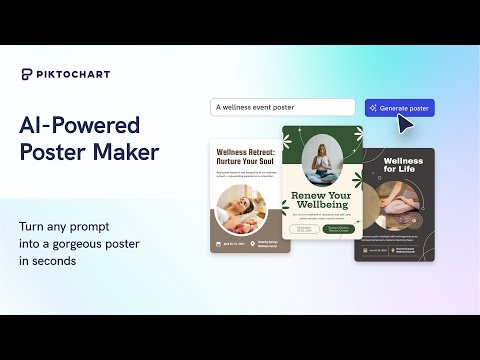
AI Poster Generator that turns a prompt to poster in 10 seconds
Frequently Asked Questions (FAQ)
What buyers ask before choosing Piktochart
What is Piktochart?
Piktochart is an all-in-one graphic design maker for creating stunning infographics, presentations, reports, social media graphics, and posters. Piktochart helps to easily turn any text- or data-heavy content into a visual story that the internal and external audience will love. It is used by Marketing, Finance, and HR professionals with the facility to share the brand assets and templates with their teams from a centralized location.
Piktochart provides a library of templates for the creation of infographics, presentations and print material such as reports and flyers, with the facility to design interactive charts, animated icons, images, and videos and edit texts with a drag-and-drop editor.
It enables sharing directly with social media accounts or password-protected sharing with clients. Piktochart provides a Piktochart for Teams module that enables bringing together all the brand assets and visual work into one location enabling collaboration with team members.
What is Piktochart used for?
What are the top features of Piktochart?
Who uses Piktochart?
What are Piktochart alternatives?
Where is Piktochart located?

Peers used Piktochart for engaging and following up and social media management
Piktochart Competitors


Piktochart Features
- Low
- Medium
- High
| FEATURE | RATINGS AND REVIEWS |
|---|---|
| AI Powered | Read Reviews (1) |
| Analytics | Read Reviews (39) |
| Custom Reports | Read Reviews (1802) |
| CAPABILITIES | RATINGS AND REVIEWS |
|---|---|
| AI Powered | Read Reviews (1) |
| Analytics | Read Reviews (39) |
| Custom Reports | Read Reviews (1802) |
Piktochart Integrations
Piktochart integrates with a wide range of software applications through its robust data import and export capabilities.


Software Failure Risk Guidance
?for Piktochart
Overall Risk Meter
Top Failure Risks for Piktochart
Piktochart Sdn. Bhd. News
Product Update: Nano Banana Pro Now Available in Pikto AI
Piktochart has integrated Google's Nano Banana Pro, an advanced AI image generation model, into Pikto AI. This upgrade enhances image generation with features like legible text, consistent subjects, and professional results. Users can upload reference images to guide AI outputs, improving brand consistency and design quality. Nano Banana Pro is accessible via Piktochart's various platforms, offering flexibility for diverse workflows.
Product Update: Sora 2 Pro AI Video Generator Now Live on Pikto AI
Piktochart has launched the Sora 2 Pro AI Video Generator on its Pikto AI platform. This new tool, based on OpenAI's technology, allows users to create 8-second, high-resolution AI videos without geographic restrictions or subscription requirements. The Sora 2 Pro offers a significant upgrade with 1024p resolution, accessible globally via a pay-as-you-go model.
Piktochart Launches Pikto AI Studio: Eight AI Image Tools in One Unified Platform
Piktochart has launched Pikto AI Studio, a comprehensive platform featuring six AI-powered image tools designed to streamline visual content creation. The suite includes tools for generating, modifying, and enhancing images, enabling users to manage the entire visual workflow without needing multiple software subscriptions. Pikto AI Studio is available to all users and offers a free trial with 60 AI credits.
June 2025 Update: Less Clicking, More Creating
Piktochart's June 2025 update enhances user experience by integrating the Pikto AI generator directly into the main application, allowing seamless AI-powered visual creation without switching tabs. The update also upgrades the Preserve Content feature, enabling automatic preservation and editing of charts from uploaded documents, streamlining the process of turning reports into infographics.
Piktochart Sdn. Bhd. Profile
HQ Location
Piktochart Sdn Bhd 1-21-01, Suntech @ Penang Cybercity (1817) Lintang Mayang Pasir 3, 11950 Bayan Baru, Penang, Malaysia.
Employees
11-50
Social


Financials
SEED


What solutions does Piktochart provide for Social Media Management?