


x360 Platform overview: capabilities, features, use cases, and value by role
x360 Platform is an all-in-one platform from Axcient™ that addresses business continuity and disaster recovery (BCDR) for MSPs. It brings together security and BCDR capabilities on a unified platform to reduce downtime, strengthen security, and protect against ransomware attacks.
Top capabilities of x360 Platform
x360Recover
Read detailsx360Recover is Axcient's backup and disaster recovery engine within the x360 Platform, built for MSPs across Windows, VMware, Linux, MacOS, public cloud, and IaaS environments. It combines AirGap anti-ransomware technology, AutoVerify automated backup testing, Virtual Office self-managed DR, and Chain-Free backup technology for long-term retention compliance. Recovery outcomes can be decisive: what would have taken one team two to three months to recover took only 17 calendar days. Progressive Computing calls it a 100% victory. MSPs also report commercial upside: one partner grew margins by 200% by migrating clients to x360Recover.
Powered by: Protect Everything™
Disaster Recovery
Read detailsx360Recover delivers disaster recovery for MSPs through Chain-Free image-based backup, AirGap anti-ransomware technology, AutoVerify automated backup integrity testing, and Virtual Office self-managed DR with runbooks, targeting a 15-minute RPO and less than 1-hour RTO to keep client operations running through critical data loss events. Deployment options include hardware-free D2C, BYOD, and BYOC, with Local Cache acceleration available alongside SOC 2 certification and HIPAA/GDPR compliance support. Where to Start, Inc. Technology Solutions (WTS) says, "Axcient is willing to do what many other backup and BDR vendors won't: mitigate and share risk with their partners. These compliance guarantees allow us to continue to operate in the medical vertical and command higher margins." Techevolution notes a contrast with other vendors, saying, "I would be dealing with a BDR issue, but then in the same conversation, I would be pitched a new RMM (remote monitoring and management) tool, or some new network management tool."
x360Recover Direct-to-Cloud
Read detailsx360Recover Direct-to-Cloud (D2C) backs up endpoints, servers, and Azure data straight to the Axcient Cloud — no local appliance required — using Chain-Free backup, AirGap anti-ransomware technology, AutoVerify integrity testing, Virtual Office, Local Cache recovery acceleration, and optional Geo+ geo-redundant storage to keep MSP clients running after a failure. As Absolute Technology Solutions puts it, "x360 Recover Direct-to-Cloud lets us be more competitive from a backup perspective with respect to downtime." The appliance-free model also simplifies remote coverage — Direct-to-Cloud is just so much easier than having to wait until they get into the office and then back up to the device, back up to the appliance — and Virtual Office can be spun up in 15-20 minutes when recovery speed matters most.
Powered by: Protect Everything™
x360Sync
Read detailsx360Sync is a secure file sync and share platform built for MSPs managing SMB clients. It keeps documents moving between devices and the cloud in real time, with always-on backup for both PCs and Macs. Snapshot point-in-time restores handle ransomware rollback. Thin Client provides local Windows file access without heavy storage overhead. Secure Share ties access control to login credentials. File server enablement brings the same sync to on-premises servers. One deployment reduced the need for paperwork, and that clinic realized its ROI on x360Sync in less than 30 days.
x360Cloud
Read detailsx360Cloud, part of the x360 Platform, backs up Microsoft 365 and Google Workspace data — covering Exchange Mail, Calendar, Contacts, OneDrive, SharePoint, Teams, Gmail, and Google Drive — to the encrypted Axcient Cloud, with a 99.99% backup SLA and 99.999% durability and availability. SmartSearch enables full-text search across 100 million objects in under 5 seconds, while AirGap provides anti-ransomware deletion protection, and the solution also includes PST Export, pooled flat-fee storage, and compliance support for HIPAA and GDPR.
BDR Appliances
Read detailsAxcient BDR Appliances bring purpose-built hardware to the x360 Platform, spanning four tiers — Pico, Eco Series, Mini Gen, and Rack Series — to fit businesses of all sizes, each unit pre-configured for x360Recover and purchasable on-demand through the x360Portal. NSR Business Solutions puts it plainly: "today, when something happens, we can fire up a client's whole environment on one of our BDR appliances in 30 minutes – that's the gold standard." MSPs adopting these turn-key appliances have seen a 300% reduction in BDR appliance-related support tickets, and units are available with up to 54 TB of usable storage, with lower-storage models expandable as needs grow.
x360Recover Direct-to-Cloud for Microsoft Azure
Read detailsx360Recover Direct-to-Cloud for Microsoft Azure lets MSPs back up Azure VMs directly to the Axcient Cloud through a hardware-free agent, with anticipated speeds of 300 GB/hour uploading as unmanaged disks. AirGap anti-ransomware technology and AutoVerify backup integrity testing protect and validate those backups. Virtual Office with client-specific Runbooks, Local Cache recovery acceleration via Azure fileshare, and a near-instant RTO over an IPsec bridge round out the recovery capabilities on the x360 Platform.
Remote Workforce Enablement
Read detailsAxcient's Remote Workforce Enablement capability covers endpoint backup, anti-ransomware protection, and anytime-anywhere data access through three products: x360Recover D2C for hardware-free BCDR, x360Cloud for Microsoft 365 and Google Workspace backup, and x360Sync for secure file sync and share. The combination targets the security exposure of remote workers on unprotected networks, where 85% of MSPs report ransomware attacks against their SMB clients. None of the products require VPNs to function.
Hybrid Cloud BCDR
Read detailsThe x360 Platform gives MSPs a single solution for data protection across public cloud environments (Azure, AWS, Google), private cloud, colocated data centers, and on-premises infrastructure. It supports appliance, private cloud, and Axcient Cloud deployment models. Underlying the platform are Chain-Free backup technology, full virtualization, and Geo+ geographic redundancy. Data centers are SOC 2 Type II certified and include Silent Data Corruption Protection.
Top features of x360 Platform
x360Recover AutoVerify Feature
Read detailsx360Recover's AutoVerify feature automatically virtualizes recent backup recovery points daily, running checks for bootability, operating system health, data corruption, and file system and application integrity — and captures a screenshot to confirm recoverability. As Osprey I.T. Consulting puts it, "AutoVerify is a really big help because now I can do it virtually in the cloud, and it's 10x easier." XFER adds that "AutoVerify gives you visual verification of the backup, so you know it will boot. If there's an error, we're alerted and can fix it before it becomes an issue."
x360 AirGap Feature
Read detailsAirGap is included by default across all x360 Platform solutions and separates backup deletion requests from the actual backup mechanics to prevent ransomware and accidental data loss. Independent third-party testing confirms that client data stays safe even after a security breach. When deletion does occur, data can be restored in as little as 15 minutes. As XFER puts it, "We didn't have to have that hard data loss conversation every MSP hates."
x360Recover Virtual Office Feature
Read detailsx360Recover Virtual Office gives MSPs a way to run failed production servers temporarily inside the Axcient Cloud. When infrastructure goes down, Virtual Office recreates a Virtual Office inside the Axcient data center using matching existing server configurations. Users can connect securely via VPN, Site-to-Site OpenVPN, or port forwarding. Data is encrypted both in transit and at rest, and the datacenters hold SOC II Type II certification.
Local Cache Backup Storage Feature
Read detailsLocal Cache is an optional, fully independent Direct-to-Cloud feature for x360Recover that pairs with an inexpensive local USB or NAS device to maintain a local datastore of backup block data, cutting recovery and failback times after data loss or disaster. As Office Technology Center puts it, the configuration includes local cache settings alongside scheduling and retention controls.
x360Recover Geo Redundant Backups
Read detailsx360Recover Geo+ protects backup data by automatically replicating it across geographically separate Axcient data centers inside the US, guarding against natural disasters and cyberattacks. It works with both Direct-to-Cloud and appliance-based deployments. Activation is selective per client, which keeps unnecessary data off customer networks and limits bandwidth use.
x360Recover for macOS
Read detailsx360Recover for macOS brings Axcient's business continuity and disaster recovery capabilities to Mac devices, allowing MSPs to protect macOS endpoints alongside Windows and Linux — driven by a 35% increase in demand to secure macOS devices and their business data.
Chain-Free BCDR
Read detailsAxcient's patented Chain-Free backup sits at the foundation of the x360 Platform, replacing legacy chain-based backup dependencies with a proprietary architecture designed to save MSP partners time, money, and operational headaches across its business continuity and disaster recovery solutions.
Incremental Vault Recovery
Read detailsIncremental Vault Recovery extends x360Recover's standard vault recovery to enable seamless manual incremental failback to an appliance with minimal downtime. It supports failback from cloud virtualization, D2C-to-appliance transitions, and migration from third-party BDR appliances. When an appliance is lost, damaged, or when deployment modes shift, teams can migrate in just 15 minutes without losing any data.
x360Recover for Linux
Read detailsx360Recover for Linux extends the x360 Platform's image-based backup and recovery capabilities to Linux-based end-user desktops, laptops, client servers, and workstations, with the agent available to all partners through the x360 portal.
Top use cases for x360 Platform
Deploy purpose-built BDR appliances for rapid on-site recovery
Read detailsMSPs use the x360 Platform to deploy Axcient's purpose-built BDR appliances — from the entry-level Pico to the enterprise Rack Series — integrated with x360Recover to achieve sub-1-hour RTO through near-instant virtualization and AirGap immutable backups, with hardware ordered on-demand via x360Portal and backed by 24/7/365 support.
Deliver business continuity and disaster recovery for SMB clients
Read detailsMSPs use x360Recover within the x360 Platform to deliver backup and disaster recovery for SMB clients, combining deployment options — Direct-to-Cloud, appliance-based, BYOD, or hybrid — with chain-free backup, AirGap anti-ransomware, AutoVerify integrity testing, and Virtual Office virtualization across Windows, VMware, Linux, macOS, public cloud, and IaaS environments, targeting a 15-minute RPO and sub-1-hour RTO regardless of client budget or compliance demands.
Enable secure cloud file access and collaboration for SMB teams
Read detailsx360Sync gives MSPs a way to move their clients off on-premises file servers and into the cloud — and then keep those files protected once they're there. The migration side is straightforward: x360Sync handles moving or synchronizing existing file servers to the cloud. After that, SMB employees can access, sync, and share files securely from any device, with no VPN required. Protection is built into the platform rather than bolted on. Chain-free BDR and AirGap anti-deletion guard against data loss. Snapshot point-in-time restores let teams roll back to a known-good state. MFA enforcement adds an authentication layer across the board. Together these features support HIPAA and GDPR compliance requirements. The outcomes are reduced legacy file-server risk, improved productivity, and a lower total cost of ownership for MSPs and their clients.
Back up and restore Microsoft 365 and Google Workspace data
Read detailsx360Cloud automatically discovers, backs up, searches, and restores critical client data across Microsoft 365 (Exchange, OneDrive, SharePoint, Teams) and Google Workspace (Gmail, Calendar, Drives, Sites), with AirGap anti-deletion protection, SmartSearch full-text search across 100 million objects in under 5 seconds, and PST Export for emergency recovery — all managed under a single vendor to support business continuity and regulatory compliance with HIPAA, GDPR, and SOC 2.
Meet cybersecurity insurance and compliance requirements for SMB clients
Read detailsx360Recover positions MSPs to demonstrate a documented, multi-layer disaster recovery posture. It combines Chain-Free backup, AirGap anti-ransomware, and AutoVerify automated testing into a single platform. Virtual Office with automated runbooks rounds out that stack by proving both backup integrity and recovery readiness. Together, those capabilities satisfy cybersecurity insurance prerequisites and regulatory compliance requirements including SOC 2, HIPAA, and GDPR. That coverage extends to regulated verticals such as healthcare and legal.
Protect remote and dispersed workforces without appliances
Read detailsThe x360 Platform lets MSPs deliver hardware-free business continuity and disaster recovery under a single provider, covering remote endpoints, desktops, laptops, servers, and Azure workloads across dispersed workforces. No local appliances are required. Deployment happens silently through RMM tools. Features like chain-free backup, AirGap, AutoVerify, and Local Cache work together to support rapid recovery from ransomware, cyberattacks, accidental deletion, or natural disaster. The result is simplified management, lower costs, and improved margins.
Protect and recover client data hosted in Microsoft Azure
Read detailsx360 Platform supports MSPs in backing up, virtualizing, and recovering client Azure VM and file-share data to the Axcient Cloud through x360Recover Direct-to-Cloud for Microsoft Azure, bypassing native Azure Backup's single-point-of-failure risk. AutoVerify handles integrity testing automatically. Virtual Office pairs with client-specific Runbooks to enable near-instant RTO. AirGap provides anti-ransomware protection, and Local Cache acceleration keeps recovery fast. Together these capabilities help MSPs satisfy the 3-2-1 backup rule and meet business continuity SLAs.
Consolidate BCDR across hybrid and multi-cloud environments
Read detailsThe x360 Platform consolidates backup, business continuity, and disaster recovery into a single platform that covers on-premises servers, public clouds (Azure, AWS, Google), colocated data centers, and hybrid workforces. That consolidation does two practical things: it simplifies management and removes vendor sprawl. Consistent recoverability follows, regardless of where client data lives. The underlying technology stack combines Chain-Free backup, AirGap immutability, and Geo+ geographic redundancy. Fast virtualization in the Axcient Cloud rounds out the stack.
Value delivered by role with x360 Platform
Managed Service Providers
Read detailsThe x360 Platform consolidates BCDR across local, hybrid, and direct-to-cloud environments into a single solution, covering Windows, VMware, Linux, MacOS, and public cloud — unifying onboarding, training, billing, and restores under one provider while reducing support tickets by up to 300% and helping partners report 35–50% gross margin on the stack. Central Technology Solutions (CTS) speaks to the support quality the model enables: "With an MSP-only vendor like Axcient, support is more channel-focused, and I definitely appreciate that. You get a higher level of support which is nice." SOC 2 certification alongside HIPAA and GDPR compliance support lets MSPs serve regulated verticals. When recovery works as intended, it changes client conversations entirely — as XFER puts it, "We didn't have to have that hard data loss conversation every MSP dreads."
Chief Executive Officer
Read detailsAxcient's x360 Platform is a BCDR platform built specifically for MSP CEOs and founders, priced to support measurable margin growth. Partners report gross margins of 35–50%. Consolidating onto Axcient reduces vendor sprawl and billing complexity, which frees teams from low-value tasks and lets them spend more time on customer-facing work. Compliance guarantees and risk-sharing from Axcient help MSP leaders meet client SLAs in regulated verticals like healthcare. Those same features support higher margins and open doors to new markets.
Chief Operating Officer
Read detailsThe x360 Platform lets MSP COOs consolidate vendors and run data protection alongside security as a single sales motion, with recovery times that can shrink a months-long ransomware incident to 17 calendar days. Technicians work from familiar interfaces, which keeps training straightforward and reduces operational complexity.
MSP technicians and help desk teams
Read detailsStandardizing on the x360 Platform gives MSP technicians and help desk teams a single portal, shared screens, and consistent workflows that cut training time and ease cross-training as the team grows. Automated features handle routine tickets, freeing engineers for higher-value work. As Cygnus Systems puts it, "Every one of our engineers is certified on x360 Recover, which is a differentiator within the selling environment and enables us to fix stuff faster for our clients." That same consistency pays off commercially: Cygnus Systems says, "The numbers speak for themselves, which goes straight to gross profit. It's a drastic move of the needle from a business perspective, and it's pretty phenomenal what we've been able to achieve with Axcient in terms of lowering the cost of the solution itself and reducing the amount of time our engineers have to spend on tickets."
Vice President of Sales and Marketing
Read detailsFor VP of Sales and Marketing leaders at MSPs, x360 Platform moves the needle on gross profit by eliminating the soft-dollar costs—such as engineer hours and ticket resolution time—that eroded margins under previous vendors. With every engineer certified on x360 Recover, sales teams gain a product knowledge advantage that supports more intelligent selling, easier objection handling, and faster deal closure. One MSP reported saving $12,000 per month after switching to x360Recover.
Director of Cyber Security
Read detailsDirectors of Cyber Security at MSPs get a channel-focused vendor relationship through the x360 Platform, built exclusively for the MSP channel, with unbeatable pricing and capabilities that outperform competitors like Datto. The x360 Recover Direct-to-Cloud option opens a hardware-free BCDR path for budget-conscious clients, expanding the addressable market without sacrificing protection quality.
Project Team Manager for Technology Services
Read detailsProject Team Managers for Technology Services at MSPs gain a flexible, easy-to-sell BCDR product through the x360 Platform. Its simple pricing model replaces complex multi-vendor arrangements that previously required separate onsite and offsite storage solutions. Direct-to-Cloud deployment completes in under 30 minutes without any need to assess the customer's storage environment. Consolidating onto Axcient boosted one MSP's margin by approximately 10% by eliminating licensing costs that had previously eroded profitability.
Accounting
Read detailsThe x360 Platform consolidates vendor agreements, contracts, and billing cycles into a single system for MSP accounting teams. As Revolution Group puts it, "Accounting isn't worried about working with four or five different vendors with different agreements and different contracts. Now we just have one contract for about 95% of our customer base." That consolidation saves the equivalent of two hours of accountant time per billing cycle compared to managing a multi-vendor arrangement.
Chief Information Officer
Read detailsThe x360 Platform modernizes BCDR for MSP CIOs by replacing slow legacy hardware with fast, virtualized recovery, cutting time spent on support tickets by up to 75%. Appliance-based and direct-to-cloud deployment options let MSPs match diverse client infrastructure needs while keeping business continuity commitments.
Chief Information Security Officer
Read detailsx360 Platform solves a specific problem for CISOs at MSPs: legacy solutions that cannot handle total cost of ownership, liability management, and security together — particularly in disaster-prone regions. Axcient's direct-to-cloud disaster recovery enables near-instant business availability, so CISOs can be confident that all clients spin up rapidly in a crisis. The platform also addresses security and compliance requirements that competing products could not satisfy at comparable cost.
Vice President of Operations
Read detailsThe x360 Platform helps VP of Operations leaders at MSPs build a standardized, scalable BCDR stack that reduces the number of vendor relationships and product expertise requirements. By standardizing on Axcient, one MSP quadrupled in size in under three years. Technicians can bring up a client's entire environment on a BDR appliance in 30 minutes, and the simplified stack makes cross-training fast and effective.
Director of Business Development
Read detailsFor Directors of Business Development at MSPs, the x360 Platform addresses chronic reliability problems such as failed backups and missed snapshots. Axcient's fixed monthly rate with infinite backup storage removes unpredictable cost overruns. Predictable pricing simplifies packaging BCDR into managed services agreements, and eliminating backup failures reduces the support ticket burden that undermines client trust and MSP profitability.
Senior Network Consultant
Read detailsThe x360 Platform cuts recovery time for critical end users by letting Senior Network Consultants at MSPs virtualize workstations and servers directly off the appliance. This replaces slow nightly backup cycles with more frequent protection. The result is rapid recovery when it matters most — for executives and others who cannot afford downtime.
MSP owner
Read detailsx360 Recover Direct-to-Cloud is a business continuity solution built around Direct-to-Cloud capabilities for MSP owners. Near-instant recovery is built in, and a backup server stays ready to deploy at all times. Those two features become concrete selling points for competitive differentiation. One MSP owner reported 200% margin growth as a result.
sales representatives
Read detailsVendor consolidation on the x360 Platform reduces what MSP sales representatives need to manage from 25 templates down to just three sales templates. Fewer templates mean deeper product knowledge, which makes it easier to handle objections and close business with a single, coherent BCDR story.
remote workers
Read detailsx360 Platform's x360Sync keeps remote workers connected to their files securely from any device, with no VPN or remote desktop connection required. File sync and share runs in the cloud, so access isn't tied to a specific machine or network. PCs and Macs are covered by compliant BDR, protecting endpoint devices across distributed workforces. That combination addresses both the productivity and the security and compliance standards that MSPs and their clients need to maintain.
Vice President
Read detailsThe x360 Platform supports Vice Presidents at MSPs by standardizing the Axcient stack across the entire team, reducing technician stress and training burden through consistent interfaces and workflows. Vendor consolidation keeps teams focused on core BCDR delivery by eliminating cross-selling of unrelated tools during support interactions. One MSP tripled in size in two years after standardizing on Axcient, pointing to the platform's role in enabling scalable operations.
President
Read detailsMSP Presidents running the x360 Platform get more than software — they get a partner-centric relationship with Axcient that includes hands-on support at every step. That support gives Presidents the confidence to deliver on client promises even in crisis scenarios. One concrete example: spinning up a client's server on an Axcient appliance to keep normal operations running for three weeks during a server failure. That kind of reliability becomes the foundation for finding new ways to grow the business on the x360 Platform.
Executive Vice President of Operations
Read detailsx360 Platform is built for MSP operations leaders who want to consolidate vendors, cut overhead, and lean on strong support. The platform combines world-class sales and technical support with competitive pricing and a unified product stack. That consolidation reduces the burden of managing multiple vendors. One MSP reported saving $12,000 per month after standardizing on x360Recover.
Co-founder
Read detailsCo-founders at MSPs use Axcient's Marketing Portal (AMP) alongside the x360 Platform to quickly educate clients and sell new services such as Microsoft 365 backup, moving from identified client need to closed business without building marketing infrastructure from scratch.
Technology Architect
Read detailsAxcient's x360 Platform replaces chain-based backup systems with a modern BCDR architecture that cuts recovery times and reduces the manual work technicians spend managing backup infrastructure. Traditional chain-based systems required traversing every link in the chain to complete a restore, which slowed recovery and burdened technicians with tedious reseeding processes. Axcient eliminates that reseeding requirement entirely. The payoff for MSPs is faster, more reliable restores and a better recovery experience for their clients.
internal IT persons
Read detailsAxcient's x360Sync (formerly Anchor) puts cloud file services in the hands of internal IT staff at client organizations — without requiring them to build or maintain their own file infrastructure. That removes the operational burden from those teams while keeping productivity and data access intact. The whole setup runs under MSP-managed, Axcient-backed protection.
What customers say about x360 Platform: ratings, outcomes and feedback
x360 Platform customer experience, as Axcient™'s customers report it, covers two distinct angles: what users value in day-to-day use and where they see room for improvement. These two perspectives reflect the range of feedback customers have shared about working with the platform.
What works well
Central Technology Solutions (CTS) put x360 Recover to work during a critical server migration. As CTS puts it, "x360 Recover was pretty much wholly responsible for running one of the client's most important pieces of software while we built the new server. It worked great, and it performed perfectly." The same team highlights the value of flexible deployment options for cost-sensitive clients. CTS says, "With x360 Recover D2C, we have an option for budget-conscious clients who don't want to pay the equipment cost. To be able to provide them with hardware-free BCDR is extremely valuable." Other customers report gaining 24/7/365 support with responsive communication through the platform. Partners have also seen operational efficiency and profits greatly improved by adopting the full x360 Platform.
Where customers see room for improvement
x360 Platform customers raise improvement requests spanning backup granularity, recovery speed, configuration options, reporting, and several operational gaps. One area that comes up is deployment flexibility: as one SMB puts it, "I'd like more opportunity to preconfigure settings so I can automatically deploy D2C(via script)". On the Microsoft 365 side, customers want more exhaustive Microsoft 365 backup granularity and time-based retention, and one SMB notes, "We'd like to see the Microsoft 365 product on Canadian soil." Recovery speed is another recurring theme, with customers asking for faster cloud download options beyond FTP. Reporting is seen as improving but not yet complete. Customers also want skilled technicians to skip tier-1 support on some issues. Other requests include malware detection on backups, NAS support, more control over nightly auto-verify on local appliances, a better application for recovering files and images, easier invoice explanation, additional training on best practices, and a smoother onsite BDR setup process when converting existing clients.
Axcient x360Sync Customer wins, Case studies
Frequently Asked Questions (FAQ)
What buyers ask before choosing Axcient x360Sync
Integrations What CRM integrations are available for Axcient x360Sync?
Axcient x360Sync offers several CRM integrations designed to enhance workflow efficiency and data management. Specifically, it integrates seamlessly with popular CRM platforms, allowing users to synchronize customer information and streamline processes. This integration helps reduce the time spent on tracking events and managing billing tasks, ultimately minimizing human error. By connecting with CRM systems, Axcient x360Sync enables businesses to maintain accurate records and improve collaboration among teams. Additionally, the integration supports remote work by providing secure access to essential customer data, which is particularly valuable in today's increasingly digital work environment. For detailed technical specifications and setup instructions, users can refer to the Axcient Knowledgebase.
Integrations How does Axcient x360Sync connect with Salesforce and HubSpot?
Axcient x360Sync integrates with Salesforce and HubSpot to enhance customer relationship management and streamline workflows. By connecting x360Sync with Salesforce, users can manage important customer information more efficiently, reducing the time spent on tracking events and managing billing tasks, which minimizes human error. Similarly, integrating with HubSpot allows for seamless data synchronization, enabling marketing and sales teams to access up-to-date customer records and insights. This integration not only improves collaboration across departments but also enhances the overall customer experience by ensuring that all teams have access to the same information. For detailed technical specifications and setup instructions, users can refer to the Axcient Knowledgebase.
Integrations What are the setup steps for integrating Axcient x360Sync with Marketo?
To integrate Axcient x360Sync with Marketo, start by ensuring you have administrative access to both platforms. First, log into your Axcient x360Sync account and navigate to the integration settings. Here, you will find the option to connect with Marketo; select it and follow the prompts to authenticate your Marketo account. You will need to provide your Marketo API credentials, which can be obtained from your Marketo admin panel under the API section. Once authenticated, configure the data synchronization settings to determine what information you want to share between x360Sync and Marketo, such as leads or customer data. Finally, test the integration to ensure data flows correctly between the two platforms, and monitor for any errors or issues that may arise during the initial sync.
Integrations What are the setup steps for integrating Axcient x360Sync with marketing automation platforms?
To integrate Axcient x360Sync with marketing automation platforms, start by ensuring you have access to the x360Sync integration options, particularly if you are using ConnectWise as your PSA platform. First, log into your x360Sync account and navigate to the integration settings. From there, select the marketing automation platform you wish to connect with and follow the provided prompts to authorize the integration. This typically involves entering API keys or authentication tokens from your marketing platform. Once connected, configure the data synchronization settings to determine what customer information and events you want to track and manage. Finally, test the integration to ensure that data flows correctly between Axcient x360Sync and your marketing automation platform, allowing for streamlined marketing efforts and improved efficiency in managing customer interactions.
Integrations Is there API access for Axcient x360Sync, and how does it work?
Yes, Axcient x360Sync offers API access through its x360Cloud Public APIs, allowing users to integrate and extend the functionality of the platform. These REST-based APIs enable Managed Service Providers (MSPs) and strategic partners to build custom integrations, facilitating seamless data exchange and enhancing operational efficiency. By leveraging these APIs, businesses can automate workflows, synchronize files, and manage customer information more effectively within their existing systems. This integration capability not only streamlines processes but also reduces the potential for human error, ultimately improving productivity and service delivery. For detailed technical information, users can refer to the Knowledgebase, which provides comprehensive guidance on implementing these API integrations.
Integrations Is there API access for Axcient x360Sync, and how can it be utilized?
Yes, Axcient x360Sync offers API access through its x360Cloud Public APIs, allowing users to integrate and extend the functionality of the platform. This API access enables businesses to automate workflows, manage customer data, and synchronize files across various applications seamlessly. By utilizing the APIs, organizations can streamline their processes, reduce manual data entry, and enhance collaboration among teams. For example, you can integrate x360Sync with other tools or platforms, such as CRM systems or project management software, to ensure that all relevant information is up-to-date and accessible. To get started, you can refer to the technical details available in the Knowledgebase, which provides guidance on implementing these integrations effectively.
Integrations What is the data flow between Axcient x360Sync and ConnectWise?
The data flow between Axcient x360Sync and ConnectWise involves the seamless integration of customer information and event tracking to enhance operational efficiency. When integrated, x360Sync allows users to manage important customer data directly within the ConnectWise platform, which helps streamline billing tasks and reduces the potential for human error. This integration enables the automatic synchronization of files and folders shared through x360Sync, ensuring that all relevant data is accessible in ConnectWise. As a result, businesses can improve their workflow, minimize time spent on administrative tasks, and maintain accurate records, ultimately leading to better service delivery and customer satisfaction. For technical details on this integration, users can refer to the Knowledgebase provided by Axcient.
Integrations What is the data flow between Axcient x360Sync and other systems like ConnectWise?
The data flow between Axcient x360Sync and systems like ConnectWise involves seamless integration that allows for efficient management of customer information. When integrated with ConnectWise, x360Sync enables users to automatically synchronize important data, reducing the time spent on tracking events and managing billing tasks. This integration minimizes human error by ensuring that updates in customer records are reflected in real-time across both platforms. The x360Sync platform leverages Axcient's x360 Open APIs to facilitate this data exchange, allowing for a unified view of customer interactions and operational workflows. This streamlined data flow not only enhances productivity but also improves compliance and security, making it particularly beneficial for businesses that require accurate and timely information management.
Integrations Are there any limitations to the integrations available with Axcient x360Sync?
While Axcient x360Sync offers a range of integrations, including with popular platforms like ConnectWise for PSA management, there are some limitations to consider. The integrations primarily focus on enhancing customer information management and streamlining billing tasks, which may not cover all business needs or specific workflows. Additionally, the extent of integration capabilities can vary based on the specific tools or systems your organization uses, and not all collaboration tools or CRM systems may be supported. It's essential to review the integration documentation and assess whether the available options align with your operational requirements. For businesses seeking comprehensive integration solutions, exploring alternatives or additional tools may be necessary to fill any gaps.
Features What does x360Sync do for secure file sharing?
x360Sync is a secure file sync and share solution designed to enhance data sharing security for businesses. It requires recipients to use unique login credentials to access shared files and folders, ensuring that only authorized users can view sensitive information. With features like Team Shares, users can collaborate in real-time with both internal and external parties while maintaining control over file permissions, such as upload and delete rights. Unlike consumer-grade tools, x360Sync provides business-grade security and compliance, making it ideal for remote and mobile workers who need reliable access without the complications of VPNs. This solution not only maximizes employee productivity but also protects company data from potential breaches, making it a valuable asset for managed service providers (MSPs) and their small to medium-sized business clients.
Features What does x360Sync do for file sharing and collaboration?
x360Sync is a robust file sharing and collaboration tool designed to enhance productivity and streamline communication within organizations. It allows users to securely sync and share files across multiple devices, ensuring that employees can access important documents from anywhere, even without a VPN. With features like Team Shares, users can create shared folders accessible to specific groups or individuals, facilitating real-time collaboration. The platform also offers customizable permissions for uploads and deletions, ensuring that data security is maintained while allowing for flexible sharing options. By providing a user-friendly interface and controlled access, x360Sync maximizes team collaboration and engagement, making it an essential tool for businesses looking to improve their file sharing processes.
Features How do I set up file synchronization with x360Sync?
To set up file synchronization with Axcient x360Sync, start by downloading and installing the x360Sync application on your devices, including PCs and Macs. Once installed, create an account or log in with your existing credentials. Next, select the folders you wish to sync by navigating to the sync settings within the application. You can choose specific files or entire directories to ensure that only the necessary data is synchronized. After configuring your preferences, enable the sync feature, which will initiate the process of backing up and syncing your selected files across all devices. For optimal performance, ensure that your devices are connected to a stable internet connection. Finally, monitor the sync status through the application to confirm that your files are being updated in real-time, allowing for seamless collaboration and access.
Features How do I securely share files with internal and external parties using x360Sync?
To securely share files with internal and external parties using x360Sync, start by creating a Team Share folder within the platform, which allows you to invite specific users or groups to access the shared data. Ensure that each recipient has unique login credentials to enhance security. You can generate share links that provide direct access to the files, allowing you to include users outside your organization. Customize permissions for each recipient, specifying whether they can upload or delete files, to maintain control over the shared content. This approach not only facilitates collaboration but also ensures that sensitive information remains protected, making x360Sync an effective solution for secure file sharing.
Features What features does x360Sync offer for real-time collaboration?
x360Sync offers a robust suite of features designed to enhance real-time collaboration among teams, whether they are working in-office or remotely. Key functionalities include secure file sync and sharing, allowing users to access and collaborate on documents from any device, anywhere. The platform supports both internal and external sharing, enabling seamless collaboration with clients and partners while maintaining control over shared files and folders. Additionally, x360Sync eliminates the need for VPNs, providing quick and secure access to files without compromising data security. Its user-friendly interface facilitates easy adoption, ensuring that teams can efficiently work together in real time, ultimately maximizing productivity and enhancing communication across the organization.
Features What features does x360Sync offer for managing file permissions?
x360Sync offers robust features for managing file permissions that enhance security and control over shared data. Users can create Team Shares, which are folders accessible to specific groups or individuals who have been invited or subscribed, allowing for tailored access. Additionally, x360Sync enables the customization of upload and delete permissions for each recipient, ensuring that only authorized users can modify shared content. This level of granularity in permission management is crucial for maintaining data integrity and compliance, especially when collaborating with both internal and external parties. By requiring unique login credentials for file and folder access, x360Sync takes data sharing security to the next level, making it a reliable choice for businesses that prioritize secure collaboration.
Features How can I control shared files and folders in x360Sync?
In x360Sync, you can effectively control shared files and folders through customizable permissions and access settings. When you create Team Shares, you can invite specific users or groups to access particular folders, ensuring that only authorized personnel can view or edit the content. Additionally, you have the ability to set unique login credentials for recipients, enhancing security. You can also customize upload and delete permissions for each recipient, allowing you to dictate who can modify or remove files. This level of control not only protects sensitive data but also facilitates collaboration by ensuring that team members have the appropriate access they need to work efficiently. By leveraging these features, you can maintain oversight and security over your shared data while promoting productivity within your organization.
Features How can I access my files on multiple devices with x360Sync?
To access your files on multiple devices with x360Sync, simply install the x360Sync application on each device you wish to use, including PCs and Macs. Once installed, you can securely sync and share files across all devices, ensuring that you have access to your documents anytime and anywhere. The platform supports real-time collaboration, allowing you to work seamlessly with colleagues or clients, whether they are internal or external to your organization. Additionally, x360Sync provides features like Team Shares for group access and customizable permissions for file sharing, enhancing both productivity and security. With always-on backup capabilities, you can rest assured that your data is protected while you access it across various devices.
Features What is the always-on backup feature in x360Sync and how does it work?
The always-on backup feature in x360Sync is designed to provide continuous data protection by ensuring that all files are automatically backed up in real-time as changes occur. This feature utilizes Axcient's innovative chain-free, image-based backup technology, which allows for independent and verifiable recovery points. As users modify or add files, x360Sync captures these changes instantly, ensuring that the most current version of data is always available for recovery. This approach not only enhances data integrity by isolating bad data blocks in case of corruption or malware but also significantly reduces the risk of data loss. The business value lies in minimizing downtime and ensuring uninterrupted access to critical data, which is essential for maintaining operational efficiency and business continuity.
Features What is the process for setting up real-time collaboration in x360Sync?
Setting up real-time collaboration in Axcient x360Sync involves a straightforward process designed for ease of use. First, ensure that you have the necessary permissions and access to the x360Sync platform. Next, create a shared folder within the application where team members can upload and access files. Invite team members to the shared folder by entering their email addresses, allowing them to collaborate in real-time. Once they accept the invitation, they can access the folder without needing a VPN, facilitating seamless collaboration. Additionally, utilize the built-in features for version control and file tracking to enhance teamwork and ensure that everyone is working with the most current documents. This setup not only improves collaboration but also maintains security and compliance during document sharing.
Features How do I access my files on different devices using x360Sync?
To access your files on different devices using x360Sync, first ensure that you have the x360Sync application installed on each device you wish to use, including PCs and Macs. Once installed, log in with your unique credentials to securely access your files. The platform allows you to sync files across multiple devices, ensuring that any changes made on one device are automatically updated on others. You can also utilize the secure sharing features to collaborate with internal and external parties, granting them access to specific files or folders as needed. Additionally, x360Sync's always-on backup feature ensures that your data is continuously protected, allowing for seamless access and uninterrupted business continuity, regardless of your location or device.
Features How does x360Sync ensure data protection for remote workers?
x360Sync ensures data protection for remote workers by providing a business-grade file sync solution that incorporates robust security features designed specifically for the challenges of remote work. Unlike consumer-grade tools, x360Sync allows users to securely collaborate with both internal and external teams in real time without the need for a VPN or specialized software, which can hinder productivity. It protects sensitive data by enabling secure access to files and documents, even on unsecure connections, thereby reducing the risk of data theft. Additionally, x360Sync separates business-critical backups from the primary cloud storage, mitigating the risk of simultaneous data loss during incidents affecting platforms like Microsoft 365 or Google Workspace. This comprehensive approach to data protection empowers remote workers with the same level of security they would receive in an office environment, ensuring business continuity and safeguarding against potential cyber threats.
ROI & pricing What measurable business value can Axcient x360Sync provide for my organization?
Axcient x360Sync delivers measurable business value by streamlining record sharing and enhancing collaboration, which can lead to significant operational efficiencies. For instance, a medical clinic reported achieving a return on investment (ROI) in under 30 days after implementing x360Sync, highlighting its effectiveness in reducing paperwork and improving compliance, especially during remote work scenarios like those experienced during COVID-19. The platform's user-friendly interface facilitates quick staff adoption, ensuring secure file access and collaboration. Additionally, x360Sync helps cut both capital and operational costs, making it a cost-effective solution for organizations looking to enhance productivity while maintaining security and compliance standards. Overall, x360Sync not only improves workflow but also supports better decision-making through efficient data management.
ROI & pricing How quickly can I expect to see ROI after implementing Axcient x360Sync?
You can expect to see a return on investment (ROI) from Axcient's x360Sync in under 30 days, as demonstrated by a medical clinic that successfully implemented the solution. The clinic utilized x360Sync to streamline record sharing and reduce paperwork, which not only improved security and compliance for remote work during the COVID-19 pandemic but also significantly cut both capital and operational costs. The user-friendly platform facilitated quick staff adoption for secure file access and collaboration, leading to enhanced efficiency. By leveraging x360Sync, businesses can achieve rapid ROI while optimizing their workflows and reducing administrative burdens, making it a valuable investment for organizations looking to enhance productivity and compliance.
ROI & pricing What are the pricing plans available for Axcient x360Sync, and what do they include?
Axcient x360Sync offers competitive pricing plans tailored for managed service providers (MSPs), though specific pricing details are not publicly disclosed on their website. Typically, the plans include features such as secure file sync and sharing, access from multiple devices, and options for internal and external collaboration. Each plan is designed to maximize employee productivity and mobility, ensuring users can efficiently manage and share files. To get precise pricing information and understand what each plan includes, potential customers are encouraged to request a product quote or start a free trial directly through Axcient's website. This approach allows businesses to evaluate the platform's capabilities and determine the best fit for their needs.
ROI & pricing How does Axcient x360Sync help in reducing operational costs for businesses?
Axcient x360Sync helps businesses reduce operational costs by streamlining record sharing and minimizing paperwork, which leads to increased efficiency in daily operations. By providing a user-friendly platform for secure file access and collaboration, x360Sync enables teams to work more effectively, particularly in remote environments, thereby reducing the need for physical resources and administrative overhead. The solution also enhances security and compliance, which can mitigate potential costs associated with data breaches or regulatory fines. Additionally, businesses can achieve a return on investment (ROI) in under 30 days, as demonstrated by a medical clinic that successfully cut both capital and operational costs during its implementation of x360Sync. This combination of improved processes and cost savings makes Axcient x360Sync a valuable tool for organizations looking to optimize their operational expenditures.
ROI & pricing What is the total cost of ownership for Axcient x360Sync over time?
The total cost of ownership (TCO) for Axcient x360Sync over time includes several factors such as subscription fees, implementation costs, and ongoing maintenance expenses. While specific pricing details may vary based on the size of your organization and the features you choose, Axcient typically offers competitive pricing compared to alternatives like Datto, which can lead to significant savings. Additionally, x360Sync's user-friendly interface and robust features can reduce training time and increase productivity, further enhancing its value. Organizations can also expect lower operational costs due to improved security and compliance, especially in regulated industries. To get a precise estimate tailored to your needs, consider scheduling a demo or starting a free trial to evaluate the platform's benefits firsthand.
ROI & pricing What is the total cost of ownership for Axcient x360Sync over a year?
The total cost of ownership (TCO) for Axcient x360Sync over a year includes several components such as subscription fees, implementation costs, and any additional expenses related to training and support. While specific pricing details are not provided in the context, businesses typically evaluate TCO by considering the initial setup costs, ongoing monthly or annual subscription fees, and potential savings from improved productivity and reduced operational costs. For example, a case study highlighted that a medical clinic achieved ROI in under 30 days by streamlining record sharing and reducing paperwork, which suggests that the effective use of x360Sync can lead to significant cost savings. To get a precise estimate tailored to your organization, it is advisable to contact Axcient directly for a detailed quote based on your specific needs and usage.
ROI & pricing Can Axcient x360Sync help improve revenue impact for my business?
Yes, Axcient x360Sync can significantly improve revenue impact for your business by streamlining operations and enhancing collaboration. By facilitating secure file sharing and reducing paperwork, x360Sync allows teams to work more efficiently, which can lead to faster project completion and improved service delivery. The platform's user-friendly interface encourages quick adoption among staff, minimizing downtime and maximizing productivity. Additionally, the solution enhances security and compliance, particularly important for industries like healthcare, which can mitigate risks and potential financial losses. With the ability to cut both capital and operational costs, businesses can redirect resources towards growth initiatives, ultimately driving revenue. By integrating x360Sync with tools like ConnectWise, you can further optimize customer management and billing processes, enhancing overall financial performance.
Capabilities What file sync and share capabilities does Axcient x360Sync offer?
Axcient x360Sync offers robust file sync and share capabilities designed for business environments, ensuring secure and efficient collaboration. Users can access and share files from any device, facilitating real-time collaboration with both internal teams and external partners. The platform includes features such as Secure Share, which requires unique login credentials for recipients, enhancing data security. Additionally, Team Shares allow groups to access specific folders, while customizable permissions enable control over upload and delete rights for each user. With always-on backup, x360Sync protects files from data loss and ransomware, making it a reliable choice for organizations that prioritize data security and employee productivity.
Capabilities Can Axcient x360Sync securely share files with external parties?
Yes, Axcient x360Sync can securely share files with external parties. The platform offers robust features that facilitate secure collaboration, allowing users to share files and folders with both internal and external stakeholders. When sharing, recipients are required to use unique login credentials to access the shared data, enhancing security. Additionally, x360Sync provides options for creating Team Shares, which are accessible to groups or individuals who have been invited, and share links that grant direct access to multiple users, regardless of their affiliation with the organization. Users can also customize upload and delete permissions for each recipient, ensuring that sensitive information remains protected while enabling efficient collaboration. This makes x360Sync an ideal solution for businesses needing secure file sharing capabilities.
Capabilities Can Axcient x360Sync support real-time collaboration for remote teams?
Yes, Axcient x360Sync can support real-time collaboration for remote teams by providing a cloud-based file synchronization and sharing platform that allows team members to access and edit files simultaneously from different locations. This capability enhances productivity and ensures that all team members are working with the most up-to-date information. With features such as version control and secure file sharing, Axcient x360Sync facilitates seamless collaboration, making it easier for remote teams to communicate and work together effectively. Additionally, it integrates well with other collaboration tools like Microsoft 365 and Google Workspace, further enhancing its utility for remote work environments. By leveraging Axcient x360Sync, organizations can improve team collaboration and streamline workflows, ultimately leading to better project outcomes.
Capabilities Does Axcient x360Sync support real-time collaboration on documents?
Axcient x360Sync does not specifically mention real-time collaboration on documents as one of its core features. Instead, it focuses on secure file synchronization and sharing, allowing users to access and share files across multiple devices. While x360Sync enables users to share files with internal and external parties and control access to those files, real-time collaboration typically involves simultaneous editing by multiple users, which may not be fully supported. For businesses seeking robust real-time collaboration capabilities, alternatives like Google Workspace or Microsoft 365 may be more suitable, as they offer comprehensive tools for simultaneous document editing and collaboration. However, x360Sync excels in providing secure file access and sharing, which can enhance overall productivity and mobility in a team environment.
Capabilities Does Axcient x360Sync provide always-on backup for endpoint devices?
Yes, Axcient x360Sync provides always-on backup for endpoint devices, ensuring that data on PCs and Macs is continuously backed up and protected from data loss and ransomware. This feature is designed specifically for Managed Service Providers (MSPs) and their small to medium-sized business (SMB) clients, allowing for uninterrupted business continuity. With x360Sync, files are securely synced to the cloud, enabling real-time collaboration and document sharing while maximizing employee productivity and mobility. The solution eliminates the risks associated with free consumer-grade file sync services by offering a business-grade solution that guarantees data integrity and availability. This always-on backup capability is crucial for organizations looking to safeguard their data and maintain operational efficiency.
Capabilities Can Axcient x360Sync provide file access from multiple devices?
Yes, Axcient x360Sync provides secure file access from multiple devices, allowing users to sync and share files seamlessly across various platforms. This business-grade solution is designed to maximize employee productivity and mobility, enabling real-time collaboration and document sharing from anywhere. With x360Sync, users can access their files on PCs, Macs, and other devices, ensuring that they can work efficiently regardless of their location. The platform also includes features that allow users to control shared files and folders, enhancing security while facilitating easy access for both internal and external parties. This capability is particularly valuable in today's fast-paced, mobile work environment, where employees need reliable access to their documents on the go.
Capabilities Can Axcient x360Sync ensure compliance with GDPR and HIPAA regulations?
Yes, Axcient x360Sync is designed to ensure compliance with both GDPR and HIPAA regulations, making it a suitable choice for businesses that handle sensitive data. The platform includes built-in compliance monitoring and data privacy tools that help organizations adhere to stringent regulatory requirements. By partnering with HIPAA-compliant vendors, Axcient reduces risk and enhances security for businesses operating in regulated industries, such as healthcare. Additionally, x360Sync's user-friendly interface facilitates secure file sharing and collaboration, which is crucial for maintaining compliance while improving productivity. This dual focus on compliance and usability allows organizations to streamline their operations without compromising on regulatory standards, ultimately supporting better business outcomes.
Capabilities Does Axcient x360Sync offer always-on backup for data protection?
Yes, Axcient x360Sync offers always-on backup for data protection, ensuring that your data is continuously backed up without interruption. This feature is crucial for businesses that require real-time data protection, as it minimizes the risk of data loss due to unforeseen events. With x360Sync, Managed Service Providers (MSPs) can benefit from an all-in-one data protection platform that simplifies business continuity and provides chain-free backups. Additionally, the AutoVerify feature automatically performs daily integrity tests on backups, ensuring their health and bootability, which further enhances the reliability of the backup process. This means that MSPs can focus on value-added tasks rather than worrying about backup errors, making x360Sync a robust solution for comprehensive data protection.
Capabilities Does Axcient x360Sync allow users to control shared files and folders?
Yes, Axcient x360Sync allows users to control shared files and folders effectively. The platform provides various options for sharing with both internal and external parties, enabling users to manage access permissions meticulously. Users can create Team Shares, which are folders accessible only to those who have been invited or subscribed, ensuring that sensitive data is only available to authorized individuals. Additionally, x360Sync allows for customizable upload and delete permissions for each recipient, giving users granular control over what actions can be taken on shared content. This level of control not only enhances security but also facilitates efficient collaboration, making it an ideal solution for businesses that prioritize data protection while enabling teamwork.
Capabilities Can Axcient x360Sync control the sharing permissions of files and folders?
Yes, Axcient x360Sync provides robust control over sharing permissions for files and folders. Users can customize upload and delete permissions for each recipient, ensuring that only authorized individuals can modify or remove shared content. This feature is particularly valuable for businesses that need to maintain strict data security and compliance standards while collaborating with both internal teams and external partners. Additionally, x360Sync allows users to create Team Shares, which are accessible to specific groups or individuals who have been invited or subscribed, further enhancing control over who can access sensitive information. By offering these granular permission settings, Axcient x360Sync helps organizations manage their data sharing securely and efficiently.
Capabilities Can Axcient x360Sync protect against data loss and ransomware attacks?
Yes, Axcient x360Sync is designed to protect against data loss and ransomware attacks through its advanced backup and disaster recovery (BDR) solutions. Utilizing chain-free, image-based backup technology, x360Sync ensures that each recovery point is independent and verifiable, allowing for faster recovery and greater reliability. This technology isolates and deletes corrupted data blocks without compromising overall data integrity, which is crucial during a ransomware incident. Additionally, x360Sync automatically backs up critical data from platforms like Microsoft 365 and Google Workspace, ensuring that your business can quickly recover from data loss incidents. By implementing Axcient x360Sync, businesses can enhance their data protection strategies and maintain business continuity even in the face of cyber threats.
Capabilities Does Axcient x360Sync ensure compliance with data security standards?
Yes, Axcient x360Sync is designed to ensure compliance with various data security standards, including GDPR requirements. The platform provides secure file sharing and synchronization capabilities that prioritize the confidentiality and integrity of data, making it suitable for businesses that need to adhere to strict regulatory frameworks. By offering features that allow users to control shared files and folders, x360Sync helps organizations manage data access effectively, reducing the risk of unauthorized exposure. Additionally, its robust security measures, such as encryption and access controls, further enhance compliance efforts. This focus on data security not only protects sensitive information but also fosters trust with clients and partners, ultimately supporting business continuity and reputation management.
Use cases How can SDRs use Axcient x360Sync to improve file sharing and collaboration with prospects?
Sales Development Representatives (SDRs) can leverage Axcient x360Sync to enhance file sharing and collaboration with prospects by utilizing its secure sync and share capabilities. With x360Sync, SDRs can easily share important documents, presentations, and proposals with prospects, ensuring that all parties have access to the latest information in real time. The platform allows for customizable permissions, enabling SDRs to control who can view, edit, or download shared files, which enhances security and fosters trust. Additionally, the ability to create Team Shares facilitates collaboration among internal teams, allowing SDRs to work closely with colleagues to prepare tailored materials for prospects. By streamlining file sharing and collaboration, x360Sync helps SDRs engage more effectively with prospects, ultimately improving conversion rates and driving sales success.
Use cases How can SDRs use Axcient x360Sync to securely share files with prospects during the sales process?
Sales Development Representatives (SDRs) can leverage Axcient x360Sync to securely share files with prospects by utilizing its robust sharing features designed for both internal and external collaboration. To start, SDRs can create Team Shares, which are dedicated folders that allow them to invite prospects to access specific documents, ensuring that only authorized users can view sensitive information. They can also generate share links that provide direct access to files while customizing permissions for uploads and deletions, enhancing control over shared content. Additionally, the Secure Share functionality requires recipients to log in with unique credentials, further safeguarding the data. By using x360Sync, SDRs can maintain data security while efficiently sharing essential materials, such as presentations or product information, throughout the sales process.
Use cases What are the best practices for marketers to implement Axcient x360Sync in their content distribution workflows?
To effectively implement Axcient x360Sync in content distribution workflows, marketers should prioritize seamless integration and user adoption. Begin by training your team on the platform's features to ensure everyone understands how to utilize its secure file sharing and collaboration capabilities. Create a centralized content repository within x360Sync to streamline access and organization, making it easier for team members to find and share materials. Leverage the Axcient Marketing Portal (AMP) to access pre-built marketing resources and campaigns that can enhance your outreach efforts. Regularly review and analyze the performance of distributed content to refine strategies and improve engagement. Lastly, encourage feedback from team members to continuously optimize workflows and ensure that x360Sync meets evolving marketing needs.
Use cases What are the best practices for marketers to implement Axcient x360Sync in their content collaboration workflows?
To effectively implement Axcient x360Sync in content collaboration workflows, marketers should prioritize clear communication and training among team members to ensure everyone understands the platform's features and benefits. Establishing a centralized repository for all content will streamline access and reduce redundancy, while utilizing x360Sync's secure file sharing capabilities enhances collaboration across departments. Regularly scheduled check-ins can help teams stay aligned on project goals and deadlines, fostering a culture of accountability. Additionally, leveraging the platform's integration with tools like Microsoft 365 can enhance productivity by allowing seamless document editing and sharing. Finally, gathering feedback from team members on their experiences with x360Sync can lead to continuous improvement in workflows and overall collaboration effectiveness.
Use cases In what scenarios should RevOps teams consider using Axcient x360Sync for data management and compliance?
RevOps teams should consider using Axcient x360Sync for data management and compliance in scenarios where secure file sharing and collaboration are critical, especially in industries with stringent regulatory requirements, such as healthcare and finance. For instance, if a company needs to streamline record sharing while ensuring compliance with regulations like GDPR, x360Sync offers a user-friendly platform that enhances security and reduces paperwork. Additionally, during remote work situations, such as those experienced during the COVID-19 pandemic, x360Sync can help maintain operational efficiency by allowing teams to access and collaborate on files securely from anywhere. The solution's ability to achieve a return on investment in under 30 days further underscores its value for organizations looking to improve their data management processes while ensuring compliance.
Use cases In what scenarios should RevOps teams consider using Axcient x360Sync to enhance data accessibility across departments?
RevOps teams should consider using Axcient x360Sync in scenarios where enhanced data accessibility and collaboration across departments are critical for operational efficiency. For instance, if teams are struggling with slow record sharing and excessive paperwork, x360Sync can streamline these processes, allowing for secure file access from multiple devices. This is particularly valuable in environments that require compliance and security, such as medical practices, where sensitive data must be handled carefully. Additionally, during remote work situations, x360Sync improves collaboration by enabling teams to share files securely and efficiently, thus reducing operational costs and increasing productivity. By adopting x360Sync, RevOps teams can ensure that all departments have timely access to the information they need, fostering better decision-making and teamwork.
Use cases How can sales leaders leverage Axcient x360Sync to enhance team productivity during remote work?
Sales leaders can leverage Axcient x360Sync to enhance team productivity during remote work by utilizing its secure file sync and sharing capabilities, which allow team members to access and collaborate on documents from anywhere, across multiple devices. By enabling real-time collaboration, x360Sync helps eliminate delays in communication and ensures that all team members have the most up-to-date information at their fingertips. Additionally, the platform's user-friendly interface encourages quick adoption among staff, facilitating seamless sharing of sales materials and client data. With built-in security features, sales leaders can confidently share sensitive information while maintaining compliance, ultimately driving efficiency and productivity in a remote work environment.
Use cases How can sales leaders leverage Axcient x360Sync to improve team productivity while working remotely?
Sales leaders can leverage Axcient x360Sync to enhance team productivity while working remotely by utilizing its secure file sharing and collaboration features. By streamlining record sharing, sales teams can access essential documents and resources in real-time, reducing delays and improving response times. The user-friendly platform facilitates seamless communication among team members, allowing for efficient collaboration on sales strategies and client interactions. Additionally, x360Sync enhances data security and compliance, which is crucial for maintaining client trust and meeting regulatory requirements. By adopting this solution, sales leaders can ensure their teams remain connected and productive, even when working from different locations, ultimately driving better sales performance and achieving organizational goals.
Use cases What specific challenges in file access and sharing can Axcient x360Sync help medical practices overcome?
Axcient x360Sync addresses several critical challenges in file access and sharing that medical practices face, particularly in ensuring secure and compliant document sharing. With mobile workers often relying on unstable internet connections, x360Sync eliminates the need for a VPN, allowing for real-time collaboration without compromising security. The platform enables secure sync and share capabilities, ensuring that sensitive patient records are protected while still being easily accessible to authorized personnel. Additionally, x360Sync's user-friendly interface facilitates quick adoption among staff, streamlining record sharing and reducing paperwork. This efficiency not only enhances productivity but also helps medical practices maintain compliance with regulations, ultimately leading to improved patient care and operational effectiveness.
Use cases What specific challenges in file sharing can Axcient x360Sync help medical practices overcome during patient record management?
Axcient x360Sync addresses several critical challenges in file sharing for medical practices, particularly during patient record management. One major issue is the risk of security and compliance breaches when sharing sensitive patient information, which x360Sync mitigates through secure sync and share capabilities that ensure only authorized personnel can access files. Additionally, x360Sync enhances collaboration by allowing real-time access to documents without the need for a VPN, which can be cumbersome for mobile workers. This user-friendly platform enables staff to quickly adopt secure file sharing practices, streamlining record sharing processes and reducing paperwork. As a result, medical practices can improve operational efficiency, enhance patient care, and achieve a return on investment in under 30 days, as evidenced by successful implementations in clinics.
Use cases How can IT teams effectively adopt Axcient x360Sync to streamline collaboration across departments?
To effectively adopt Axcient x360Sync for streamlining collaboration across departments, IT teams should begin by conducting a needs assessment to identify specific collaboration challenges within the organization. Next, they should implement a phased rollout of x360Sync, starting with a pilot group to gather feedback and make necessary adjustments. Providing comprehensive training sessions will ensure that all users understand the platform's features, such as secure file sharing and access controls, which are crucial for maintaining compliance and security. Additionally, integrating x360Sync with existing tools like Microsoft 365 or Google Workspace can enhance user experience and facilitate seamless workflows. Regularly soliciting user feedback and monitoring usage metrics will help IT teams refine the adoption process and maximize the benefits of x360Sync, ultimately fostering a more collaborative environment across departments.
Use cases How can teams in the IT services industry adopt Axcient x360Sync to streamline their operational workflows?
Teams in the IT services industry can adopt Axcient x360Sync to streamline their operational workflows by following a few actionable steps. First, they should assess their current file sharing and collaboration processes to identify inefficiencies. Next, they can implement x360Sync, which offers a user-friendly platform for secure file access and collaboration, ensuring that all team members are trained on its features. By integrating x360Sync with existing tools and platforms, such as Axcient Cloud and x360Recover, teams can enhance data management and backup processes. Additionally, leveraging the automatic backup verification feature will free up staff for higher-value tasks, ultimately improving operational efficiency. Regularly reviewing and optimizing workflows with x360Sync will help maintain productivity and ensure compliance with industry standards.
Alternatives What are the best alternatives to Axcient x360Sync?
When considering alternatives to Axcient x360Sync, several competitive options stand out. Syncplicity offers robust file synchronization and sharing capabilities, making it a strong contender for businesses needing secure collaboration. Tresorit is another alternative, known for its end-to-end encryption, which is ideal for organizations prioritizing data security. pCloud provides a user-friendly interface and flexible storage options, appealing to those who require easy access and management of files. SugarSync also deserves mention, as it combines file backup and synchronization features, catering to users who want a comprehensive solution. Each of these alternatives has unique strengths, so the best choice will depend on your specific business needs, such as security, ease of use, and collaboration features.
Alternatives How does Axcient x360Sync compare to Syncplicity?
Axcient x360Sync and Syncplicity are both robust file synchronization and sharing solutions, but they cater to slightly different needs. Axcient x360Sync focuses on providing secure file access and collaboration for businesses, emphasizing data protection and compliance, which is crucial for remote workers accessing files from various locations. It offers features like snapshot point-in-time restores and secure sharing options for both internal and external parties. In contrast, Syncplicity is known for its user-friendly interface and strong integration capabilities with other enterprise applications, making it a good choice for organizations looking for seamless workflows. Ultimately, the choice between Axcient x360Sync and Syncplicity will depend on your specific business requirements, such as the level of security needed and the importance of integration with existing tools.
Alternatives How does Syncplicity compare to Axcient x360Sync?
Syncplicity and Axcient x360Sync are both robust file synchronization and sharing solutions, but they cater to slightly different needs. Syncplicity is known for its user-friendly interface and strong collaboration features, making it ideal for teams that prioritize ease of use and real-time collaboration. It offers extensive integration options with various applications, enhancing workflow efficiency. On the other hand, Axcient x360Sync focuses on providing business-grade security and compliance, making it suitable for organizations that require stringent data protection measures. It allows users to securely share files while maintaining control over permissions and access. Ultimately, the choice between Syncplicity and Axcient x360Sync will depend on whether your priority is user experience and collaboration or security and compliance.
Alternatives What are the key differences between Axcient x360Sync and Tresorit?
Axcient x360Sync and Tresorit are both robust solutions for file synchronization and sharing, but they cater to different business needs. Axcient x360Sync focuses on providing a comprehensive backup and disaster recovery solution, integrating features like snapshot point-in-time restores, which is particularly beneficial for managed service providers (MSPs) looking for data protection alongside file sharing. In contrast, Tresorit emphasizes security and privacy, offering end-to-end encryption and compliance with strict data protection regulations, making it ideal for businesses that prioritize data confidentiality. While Axcient x360Sync is designed for seamless integration with backup solutions, Tresorit is tailored for secure document management and sharing. Ultimately, the choice between the two depends on whether a business prioritizes backup capabilities or stringent security measures.
Alternatives Is pCloud a better option than Axcient x360Sync for file syncing?
When comparing pCloud and Axcient x360Sync for file syncing, both platforms offer unique advantages. pCloud is known for its user-friendly interface and generous storage options, including a lifetime plan that appeals to users looking for long-term solutions. It also provides strong encryption features for enhanced security. On the other hand, Axcient x360Sync excels in its focus on secure file sharing and collaboration, making it particularly suitable for businesses that prioritize data protection and compliance. Axcient x360Sync allows users to control shared files and folders, which can be crucial for organizations handling sensitive information. Ultimately, the choice between pCloud and Axcient x360Sync depends on your specific needs, such as storage requirements, security features, and collaboration capabilities.
Alternatives Is pCloud a better option than Axcient x360Sync for file synchronization?
When comparing pCloud and Axcient x360Sync for file synchronization, both platforms offer unique features that cater to different business needs. pCloud is known for its user-friendly interface, robust security features, and lifetime subscription options, making it an attractive choice for businesses looking for cost-effective solutions. It also provides seamless file sharing and collaboration tools. On the other hand, Axcient x360Sync excels in its integration capabilities with other Axcient products, offering comprehensive data protection and backup solutions, which can be crucial for businesses prioritizing data security and recovery. Ultimately, the better option depends on your specific requirements: if you need a straightforward file sync solution, pCloud may be preferable, while Axcient x360Sync is ideal for those seeking integrated data protection features.
Alternatives What advantages does SugarSync have over Axcient x360Sync?
SugarSync offers several advantages over Axcient x360Sync, particularly in its user-friendly interface and flexibility for personal use. SugarSync allows users to easily sync and share files across multiple devices without the need for a specific folder structure, making it ideal for individuals and small teams who prioritize convenience. Additionally, SugarSync provides robust file versioning and recovery options, enabling users to restore previous versions of files effortlessly. While Axcient x360Sync is designed with a focus on business-grade security and compliance, SugarSync's simplicity and ease of use can be more appealing for users seeking straightforward file sharing solutions. Ultimately, the choice between the two will depend on whether the user prioritizes advanced security features or a more intuitive, flexible file management experience.
Alternatives How does SugarSync stack up against Axcient x360Sync?
When comparing SugarSync and Axcient x360Sync, both offer robust file synchronization and sharing capabilities, but they cater to slightly different user needs. SugarSync is known for its user-friendly interface and flexibility, allowing users to sync files across multiple devices easily, making it ideal for individuals and small businesses. In contrast, Axcient x360Sync focuses on providing secure file access and sharing, emphasizing features that enhance productivity and mobility for larger teams and enterprises. Axcient x360Sync also offers advanced security measures and control over shared files, which can be crucial for businesses handling sensitive data. Ultimately, the choice between the two will depend on your specific requirements for usability versus security and collaboration features.
Alternatives How does Axcient x360Sync stack up against other business-grade file sync solutions?
Axcient x360Sync stands out among business-grade file sync solutions due to its robust security features and real-time collaboration capabilities, which are essential for remote teams. Unlike consumer-grade tools, x360Sync offers built-in data protection, ensuring that sensitive company information is safeguarded against potential threats. When compared to competitors like Tresorit, pCloud, and SugarSync, x360Sync emphasizes secure file sharing and control over shared content, making it particularly suitable for organizations that prioritize data integrity. While Tresorit is known for its end-to-end encryption, pCloud offers flexible storage options, and SugarSync provides user-friendly interfaces, Axcient x360Sync excels in providing a comprehensive solution tailored for businesses needing reliable and secure file synchronization across multiple devices.
Alternatives What makes Tresorit a stronger choice than Axcient x360Sync?
Tresorit may be considered a stronger choice than Axcient x360Sync for businesses prioritizing end-to-end encryption and stringent data privacy. Tresorit is designed with a zero-knowledge architecture, meaning that only users have access to their encryption keys, enhancing security against unauthorized access. Additionally, Tresorit offers a user-friendly interface and robust collaboration features, making it easier for teams to share files securely. It also provides compliance with various regulations, such as GDPR, which can be crucial for organizations handling sensitive data. While Axcient x360Sync offers strong backup and recovery capabilities, including chain-free backup technology, Tresorit's focus on security and privacy may appeal more to businesses that require heightened data protection and compliance measures. Ultimately, the choice depends on specific organizational needs regarding security, collaboration, and regulatory compliance.
Who uses x360 Platform: customer base, geography, and industries
Among the 35 customers we looked at, x360 Platform adoption is concentrated in the Managed Service Provider industry, which accounts for 23 of the 31 customers where industry is known. IT Consulting & Other Services makes up most of the remainder. Where segment is known, SMB customers dominate, with 10 of 11 falling into that tier. Geographically, North America leads by a wide margin among the 21 customers where region is known, with representative names including 4TS Computers, Alvarez Technology Group, Business Information Solutions (BIS), and Cinch I.T.
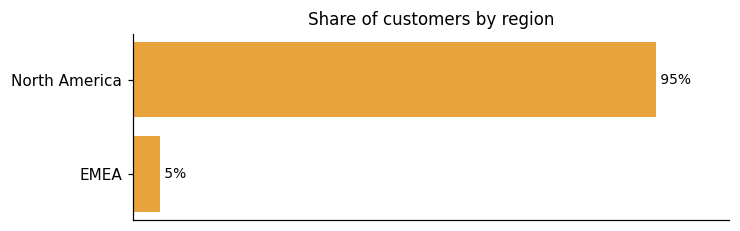
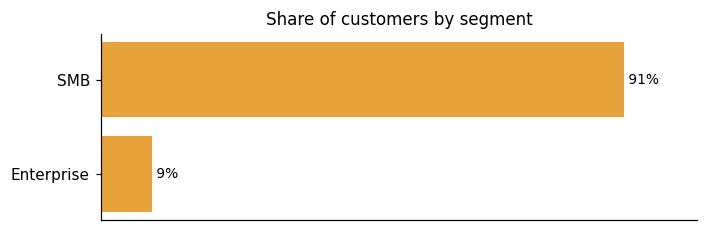
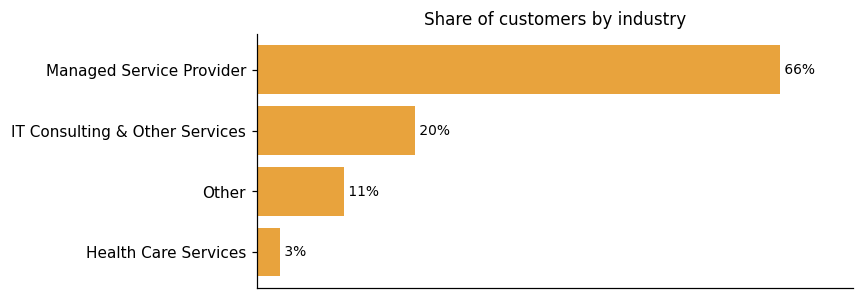
Representative customers: 4TS Computers, Absolute Technology Solutions, Alvarez Technology Group, BrownCow Tech, Business Information Solutions (BIS), Central Technology Solutions (CTS), Cinch I.T.
How x360 Platform uses AI in practice
The x360 Platform has no AI capabilities in its current documented scope. It is built as a BCDR and data protection platform for MSPs, bringing together multiple business use cases in one solution — covering backup, recovery, and secure file sync — without any AI-driven features in the available evidence.
x360 Platform pricing and value: what the evidence shows
x360 Platform's customer evidence points to lower costs, smooth migrations, and business continuity that held up under real pressure. On cost, one customer notes that Axcient™ does it for a lower cost, plus you get pooled flat-fee storage and long-term retention and the archive feature. On business continuity, one managed service provider spun up a client's server on the Axcient appliance after a disruption. That client operated normally for three weeks while the application was migrated to the cloud. As that customer puts it, Axcient saved the day! Migration friction is also low. Cygnus moved about 40 Datto units. In one customer's words, I didn't hear one customer complaint.
ROI evidence from 6 customers
Time-to-value: what implementations take
- We immediately spun up their server on the Axcient appliance so that their office could continue to work until the application was migrated to the cloud. They operated normally for 3 weeks.
- Within just 30 days, EDC had successfully deployed Axcient to all of their Veeam clients – about 90% of their total client population.
- Migrated 80-90% of clients to Direct-to-Cloud within the first 30 days.
- Cut employee onboarding time by four days at from 14 days down to 10.
- Cut employee onboarding time by four days – from 14 days down to 10.
Who it fits: value by company size
The x360 Platform, built by Axcient, covers small business needs — as one customer puts it, support a range of small businesses with one solution through x360 Recover. One friction point customers note is that the licensing portal is a bit non-intuitive.
No dedicated pricing page detected; pricing is undisclosed on the vendor site.
x360 Platform enterprise readiness: security, compliance, migration, and support
x360 Platform covers four enterprise-readiness dimensions: security, compliance, migration, and customer support. Axcient™ builds each of these into the platform.
Security controls and assurance
The x360 Platform is backed by SOC 2 Type II and SSAE 16 Type II attestations, giving procurement teams the independent audit evidence they typically need at the gate. Regular third-party penetration testing on key features reinforces that posture beyond certification alone. At the infrastructure level, SecurityScorecard consistently rates the Axcient ecosystem with the highest ratings across security risk factors spanning Network Security, DNS Health, Patching Cadence, Endpoint Security, IP Reputation, and several others. Redundant cloud storage underpins durability and availability targets across the platform. Ransomware resilience gets specific architectural treatment. AirGap technology separates backup requests from the actual backup mechanics to block malicious or accidental deletion, and third-party independent testing on AirGap validates its recovery performance. For its x360Cloud capability, encryption is layered across transit and rest: 128-bit SSL in transit and 256-bit AES at rest, alongside 99.999% durability and 99.999% availability targets. For its x360Recover capability, Geo+ automatically replicates cloud backup data to geographically separate Axcient data centers within the US, adding a physical separation layer against regional disasters or targeted attacks.
Compliance and data protection
The x360 Platform's compliance posture is built around two held attestations: SOC 2 Type II and SSAE 16 Type II, with data centers SSAE 16 Type II or SOC Certified. On the regulatory side, the platform is designed to help MSP partners comply with HIPAA and GDPR. Axcient complies with the EU-U.S. Data Privacy Framework, including the UK extension ("EU-U.S. DPF") and Swiss-U.S. DPF, as set forth by the U.S. Department of Commerce. Axcient has certified to the U.S. Department of Commerce that it adheres to the EU-U.S. Data Privacy Framework Principles. Where the Data Privacy Framework is unavailable, Axcient takes necessary measures to ensure an adequate level of protection, including standard contractual clauses as an example. For its x360Recover capability specifically, chain-free technology allows MSPs to easily meet the years-long compliance standards of highly regulated industries, such as healthcare, legal, financial services, and government. For its x360Cloud capability, compliance support includes secure encryption, immutable audit logs, multi-factor authentication, and Axcient's exclusive AirGap technology to prevent deletion. Axcient also continues to work with MSPs and their insurance carriers to gain coverage and avoid penalties as breach notification regulations evolve.
Migration from competing platforms
Migration onto the x360 Platform is built around minimal disruption. Silent installation, straightforward deployment, and the elimination of hardware swap requirements mean some MSPs reach their first backup within minutes — a posture the platform describes as avoiding overwhelming 'rip and replace' requirements. One customer put it plainly: "I even missed my initial onboarding call and was still able to get my organization integrated with Axcient in under 8 minutes." Real-world migrations at scale echo this. Cygnus migrated about 40 Datto units, and Scott describes the move as "pretty minimal from a bumpiness perspective," adding, "I didn't hear one customer complaint" For its x360Recover Direct-to-Cloud capability specifically, the approach goes further. Agents deploy through RMM tools silently, and the chain-free backup design means data protection starts without server reboots or deactivating existing backup products. For its x360Recover capability, incremental vault recovery can help you migrate in just 15 minutes without losing any data when moving from a third-party BDR appliance. Customers also note that x360 Recover is easy to deploy, easy to use, easy to implement. On the other side, one customer switching from a prior solution recalled that it was overcomplicated, overpriced, and took forever to set up — a documented point of friction that reflects the kind of migration experience x360 Platform is designed to avoid repeating.
Customer support experience
x360 Platform offers 24/7/365 service and product support for MSP partners. Onboarding brings new partners through configuration and optimization of their BCDR solutions, with access to dedicated support channels and the x360Portal. From there, partners can draw on one-on-one guidance through each deployment milestone from training specialists, alongside online and instructor-led training at no charge. For its BDR Appliances capability, an expert support team is available around the clock for deployment, troubleshooting, and best practices. For its x360Cloud capability, dedicated teams cover ongoing training, support, marketing, and account management at no cost. One customer notes, "It's very rare that we'll get an issue, and if there is, we call support, and they walk us through it." At the same time, users have flagged two friction points: "It would be nice for our skilled technicians skip tier1 support on some issues. Reporting, its getting better but would like to see more."
x360 Platform vs. Cohesity, Commvault, Druva and other platforms
Backup and data protection platforms capture point-in-time copies of enterprise data so organizations can recover from loss scenarios across hybrid, multicloud, and SaaS environments — delivered as software, appliances, or hosted backup as a service. x360 Platform addresses this category through three distinct capabilities. x360Recover delivers multi-layer DR orchestration with a 15-minute RPO and sub-1-hour RTO, supporting virtualization in the Axcient Cloud for both failover and recovery testing. x360Recover Direct-to-Cloud offers a fully hardware-free BaaS model for MSPs, covering endpoints, servers, and Azure data backed up directly to the Axcient Cloud. x360Cloud extends protection to SaaS data, covering Microsoft 365 and Google Workspace across Exchange, Calendar, Contacts, OneDrive, SharePoint, and Teams. One honest gap in the evidence: while Azure workloads are supported via Direct-to-Cloud, native protection for Azure PaaS databases or cloud-provider managed services is not described. Buyers with those workloads should probe that boundary directly. The comparison below shows where x360 Platform, Cohesity, Commvault, and Druva differ most — it is a differentiation view, not a complete feature-by-feature accounting, and should be read accordingly.
Backup and Data Protection Platforms
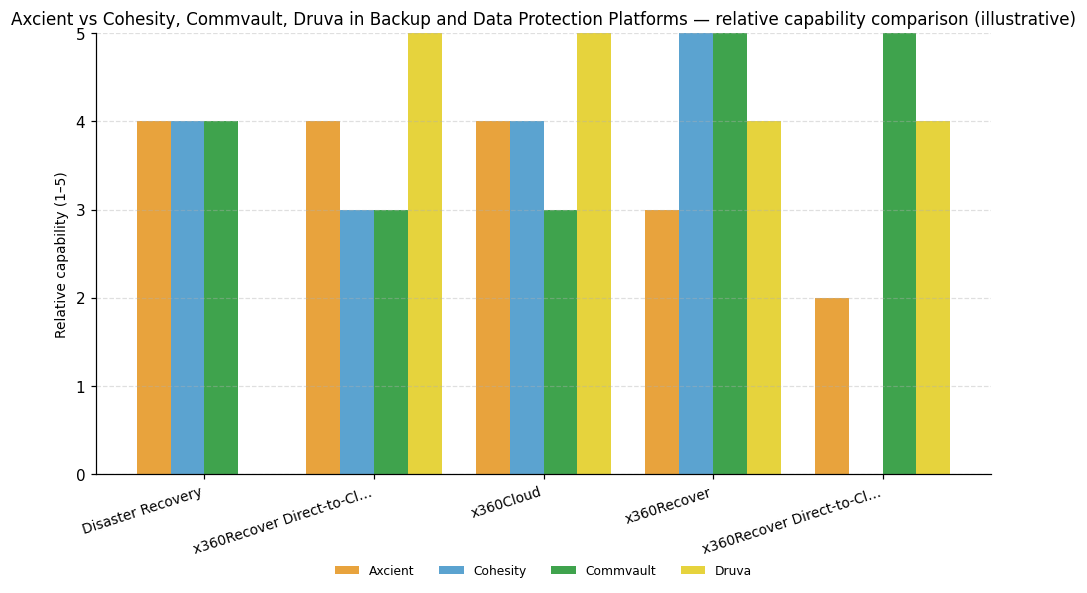
| Capability | Axcient | Cohesity | Commvault | Druva |
|---|---|---|---|---|
| Disaster Recovery | 4 | 4 | 4 | — |
| x360Recover Direct-to-Cloud | 4 | 3 | 3 | 5 |
| x360Cloud | 4 | 4 | 3 | 5 |
| x360Recover | 3 | 5 | 5 | 4 |
| x360Recover Direct-to-Cloud for Microsoft Azure | 2 | — | 5 | 4 |
Axcient™
Disaster Recovery: x360Recover provides multi-layer DR orchestration with 15-minute RPO and sub-1-hour RTO, supporting virtualization in the Axcient Cloud for failover and recovery testing.; x360Recover Direct-to-Cloud: x360Recover Direct-to-Cloud provides a fully hardware-free BaaS model for MSPs, backing up endpoints, servers, and Azure data directly to the Axcient Cloud.; x360Cloud: x360Cloud provides cloud-to-cloud backup for Microsoft 365 and Google Workspace covering Exchange, Calendar, Contacts, OneDrive, SharePoint, and Teams data.
Cohesity
Disaster Recovery: NetBackup recovery orchestration enhanced with scheduled rehearsals, automated recovery point recommendations, and cross-cloud/region recovery.; x360Cloud: Veritas acquisition adds broader SaaS workload coverage; DataProtect as a Service adds Microsoft Entra ID, Microsoft 365 Groups, and Teams recovery.; x360Recover: Addition of Veritas NetBackup and Alta Data Protection expands workload coverage across on-premises, multicloud, and SaaS environments.
Commvault
Disaster Recovery: Cleanroom Recovery cyberresilience operations improved and AWS storage support added to Air Gap Protect for isolated recovery orchestration.; x360Recover: Broad IaaS and PaaS coverage including native Oracle, Azure DevOps, and government cloud support for AWS, Azure, and GCP.; x360Recover Direct-to-Cloud for Microsoft Azure: Native support for Oracle, Azure DevOps, and government cloud PaaS environments across AWS, Azure, and GCP provides broad PaaS coverage.
Druva
x360Recover Direct-to-Cloud: Platform is fully SaaS-native on AWS, delivering BaaS as the primary and only deployment model with accelerated new capability delivery.; x360Cloud: Delivers Microsoft Entra ID, Dynamics 365, optimized Amazon S3 and RDS protection, and Azure storage tenant option on a fully SaaS-native platform.; x360Recover: SaaS platform delivers Azure Cloud storage tenant, AWS EC2 and Azure VM protection, and Microsoft Entra ID support, though GCP Compute Engine relies on agent-based methods.; x360Recover Direct-to-Cloud for Microsoft Azure: Optimized protection for Amazon S3 and Amazon RDS introduced natively on the SaaS platform, though GCP PaaS support lags other major cloud providers.



Connect x360 Platform with your stack: integrations and partner ecosystem
x360 Platform connects with 9 native integrations across 6 partner categories, including Cloud Infrastructure / IaaS, Productivity Suite / SaaS, and Hyperconverged Infrastructure / Cloud Platform.
The x360 Platform connects to external systems through REST APIs, PSA platforms, and RMM tools across its capabilities. REST APIs let MSPs, integrators, and other vendors communicate with BCDR services quickly and securely. The x360Recover Public APIs are openly available, so partners can start building integrations immediately. A Billing API sits alongside the x360Recover API in the growing public API catalog, pulling billable and actual usage data across the entire x360 suite to support invoices and summary reports. ConnectWise Asio is integrated with both x360Recover and x360Cloud. Axcient™ is expanding the Asio integration to cover AI, workflow, additional operating systems, and devices such as NAS and BDR appliances. For x360Recover, partners get PSA and RMM integration and can use co-managed backup with ConnectWise Asio. Through that connection, x360Recover users can view alerts, verify backups, check automated backup validation results, manage recoveries, and respond to tickets — all from a single login inside the Asio dashboard. For x360Sync, ConnectWise PSA integration covers service defaults, PSA ticketing, alert tracking, and billing within that capability's own workflow.
| Partner category | Integration partners | Native count | Flow direction |
|---|---|---|---|
| Cloud Infrastructure / IaaS | Google Cloud, Microsoft Azure, Amazon Web Services | 3 | Upstream |
| Productivity Suite / SaaS | Google Workspace, Microsoft 365 | 2 | Upstream |
| Hyperconverged Infrastructure / Cloud Platform | Nutanix | 1 | Upstream |
| Professional Services Automation (PSA) | Autotask | 1 | Downstream |
| Professional Services Automation (PSA) / MSP platform | ConnectWise | 1 | Bidirectional |
| Virtualization / Hypervisor | VMware | 1 | Upstream |
Axcient, Inc. News
Axcient??s Billing API simplifies invoicing
Axcient has launched a new billing API designed to automate and streamline invoicing for MSPs using x360Recover and x360Cloud. This API allows real-time access to usage data, reducing manual reconciliation and improving billing accuracy. It integrates with tools like ConnectWise PSA, enhancing efficiency and reducing revenue leakage by ensuring accurate billing for services provided.
Axcients Roadmap: 2024 Product Releases
Axcient's 2024 roadmap includes solutions for business continuity, disaster recovery, cloud protection, and remote workforce enablement. Products like x360Recover and x360Cloud offer backup and recovery options for MSPs and cloud services.
ConnectWise Acquires Axcient and SkyKick - FinSMEs
ConnectWise has acquired Axcient and SkyKick.
Axcient, Inc. Profile
Company Name
Axcient, Inc.
Company Website
https://axcient.com/HQ Location
707 17th St, Denver, Colorado 80202, US
Employees
101-250
Social


Financials
M&A