

Intelligent OCR Overview
Intelligent OCR helps mid-market teams automate accounts payable by capturing and processing invoices. Teams use it to automate the processing of invoices, capturing email invoices and matching them to purchase orders. They also manage approval workflows and exceptions, running invoice automation and reducing manual data entry. For example, a customer uses Intelligent OCR to scan and route invoices, eliminating manual data entry. An integration with MS Dynamics ERP helps the team manage operations.
Seen most for
Here's the scoop on Intelligent OCR! We've gathered over 93 insights from folks who use it, and know it inside out—from peer reviews to customer testimonials and expert opinions. We included citations from these sources so you can read the full content at the original source if you wish.
Do you need to check if Intelligent OCR is right for your needs? Our Cuspera AI engine can evaluate how Intelligent OCR fits your specific business needs, industry, and context. Get your personalized assessment report today.
Intelligent OCR supports business activities such as:
- Workflow Management
- Billing And Invoice Management
Intelligent OCR can help you with many business goals, such as Improve Internal Communications. It can help manage these activities if you use Offline and On Premises for these needs. As a solution, Intelligent OCR's capabilities include Capture Information.
Reviews
"...Easy-to-use and intuitive, browser-based interface Gets good reviews from users worldwide Drives invoice approval workflow Most affordable Intelligent OCR on the market today...." Peer review
Intelligent OCR Reviews
14 buyers and buying teams have used Cuspera to assess how well Intelligent OCR solved their business needs. Cuspera uses 93 insights from these buyers along with peer reviews, customer case studies, testimonials, expert blogs and vendor provided installation data to help you assess the fit for your specific business needs.
What teams use Intelligent OCR for
Explore Intelligent OCR use cases grouped by customer job. Click a use case to read the supporting evidence, or open a job to see detailed results.
Other use cases
Business Priorities
Improve Internal Communications is the most popular business priority peers achieved using Intelligent OCR.


Peer and Expert Opinion on Features
for Intelligent OCR
- Low
- Medium
- High
| FEATURES | RATINGS AND REVIEWS |
|---|---|
| Capture information | Read Reviews (11) |
| FEATURES | RATINGS AND REVIEWS |
|---|---|
| Capture information | Read Reviews (11) |
IT and Other Capabilities
for Intelligent OCR
- Low
- Medium
- High
| CAPABILITIES (DATA) | RATINGS AND REVIEWS |
|---|---|
| Data Import | Read Reviews (13) |
| Data Export | Read Reviews (6) |
| CAPABILITIES (DATA) | RATINGS AND REVIEWS |
|---|---|
| Data Import | Read Reviews (13) |
| Data Export | Read Reviews (6) |
| CAPABILITIES (SUPPORT) | RATINGS AND REVIEWS |
|---|---|
| 24/7 Support | Read Reviews (1) |
| CAPABILITIES (SUPPORT) | RATINGS AND REVIEWS |
|---|---|
| 24/7 Support | Read Reviews (1) |
| CAPABILITIES (OTHER) | RATINGS AND REVIEWS |
|---|---|
| AI Powered | Read Reviews (5) |
| Analytics | Read Reviews (25) |
| Custom Reports | Read Reviews (5) |
| CAPABILITIES (OTHER) | RATINGS AND REVIEWS |
|---|---|
| AI Powered | Read Reviews (5) |
| Analytics | Read Reviews (25) |
| Custom Reports | Read Reviews (5) |
Software Failure Risk Guidance
?for Intelligent OCR
Top Failure Risks for Intelligent OCR
Vendor Profile Details
Company Name
Echovera, Inc.
Company Website
https://echovera.ca/HQ Location
9 Davies Ave, Toronto, Ontario M4M, CA
Employees
1-10
Social


Financials
PRIVATE

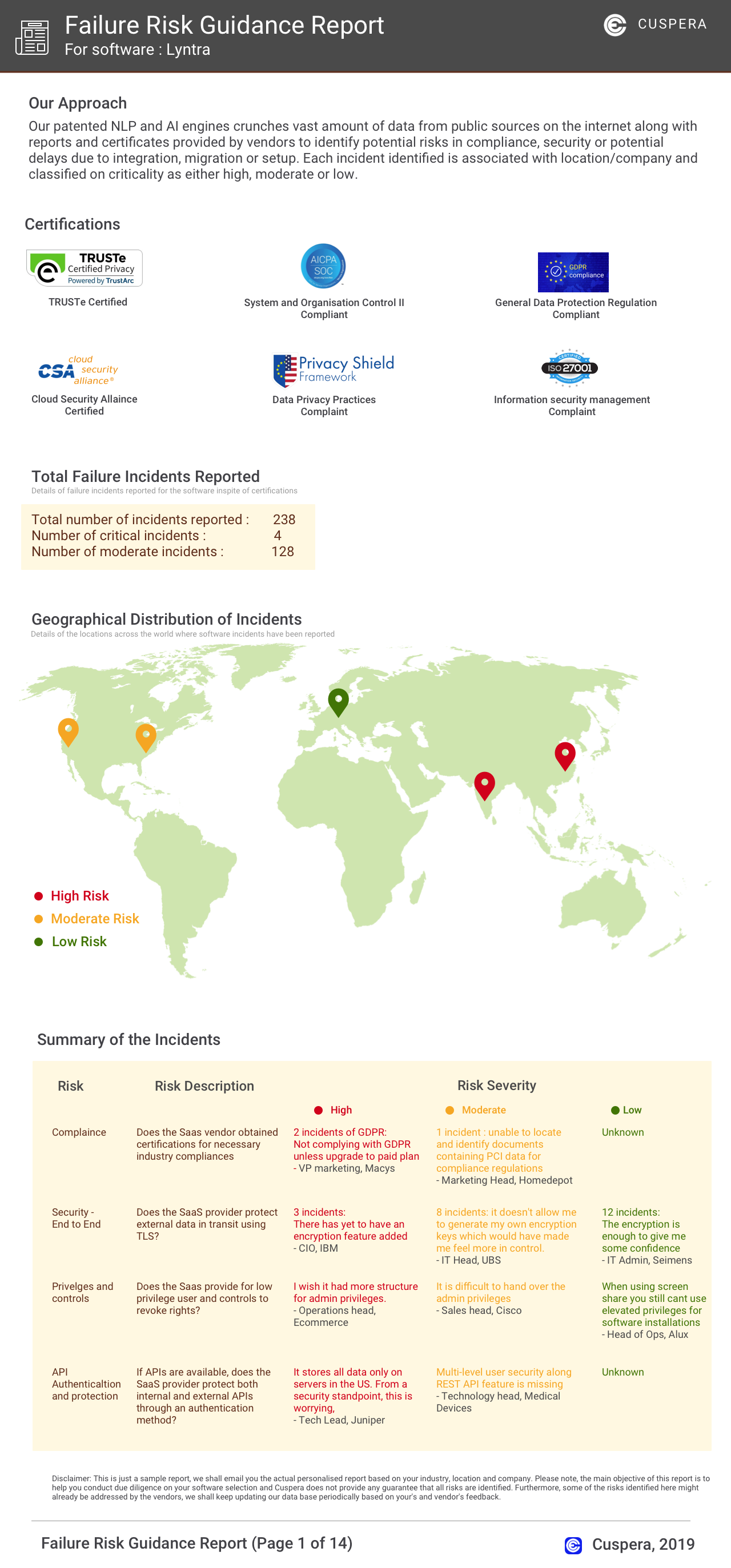
Get a personalised risk report for Intelligent OCR
See Sample Risk ReportTell us more about yourself so that we can personalise incidents for your location, industry etc.

Connect to vendor request
Intelligent OCR may get in touch with you regarding your request.
Request Custom Quote
Echovera, Inc. will get in touch with you regarding your request.